


Mocking is an essential part of unit testing, and the Mockito library makes it easy to write clean and intuitive unit tests for your Java code.
Get started with mocking and improve your application tests using our Mockito guide:
Handling concurrency in an application can be a tricky process with many potential pitfalls. A solid grasp of the fundamentals will go a long way to help minimize these issues.
Get started with understanding multi-threaded applications with our Java Concurrency guide:
Spring 5 added support for reactive programming with the Spring WebFlux module, which has been improved upon ever since. Get started with the Reactor project basics and reactive programming in Spring Boot:
Since its introduction in Java 8, the Stream API has become a staple of Java development. The basic operations like iterating, filtering, mapping sequences of elements are deceptively simple to use.
But these can also be overused and fall into some common pitfalls.
To get a better understanding on how Streams work and how to combine them with other language features, check out our guide to Java Streams:
Explore Spring Boot 3 and Spring 6 in-depth through building a full REST API with the framework:
Yes, Spring Security can be complex, from the more advanced functionality within the Core to the deep OAuth support in the framework.
I built the security material as two full courses - Core and OAuth, to get practical with these more complex scenarios. We explore when and how to use each feature and code through it on the backing project.
You can explore the course here:
All Access is finally out, with all of my Spring courses. Learn JUnit is out as well, and Learn Maven is coming fast. And, of course, quite a bit more affordable. Finally.
>> GET THE COURSE
Spring Data JPA is a great way to handle the complexity of JPA with the powerful simplicity of Spring Boot.
Get started with Spring Data JPA through the guided reference course:
Refactor Java code safely — and automatically — with OpenRewrite.
Refactoring big codebases by hand is slow, risky, and easy to put off. That’s where OpenRewrite comes in. The open-source framework for large-scale, automated code transformations helps teams modernize safely and consistently.
Each month, the creators and maintainers of OpenRewrite at Moderne run live, hands-on training sessions — one for newcomers and one for experienced users. You’ll see how recipes work, how to apply them across projects, and how to modernize code with confidence.
Join the next session, bring your questions, and learn how to automate the kind of work that usually eats your sprint time.
1. Overview
In this tutorial, we’ll explore Milvus, a highly scalable open-source vector database. It’s designed to store and index massive vector embeddings from deep neural networks and other machine-learning models. Milvus enables efficient similarity searches across diverse data types like text, images, voices, and videos. We’ll extensively explore the Milvus Java client SDK for integrating and managing Milvus DB through third-party applications. To explain, we’ll take the example of an application that stores the vectorized contents of books to enable similarity search.
2. Key Concepts
Before exploring the capabilities of Milvus’s Java SDK, let’s understand how Milvus logically organizes data:
- Collection: A logical container for storing vectors, similar to a table in traditional databases
- Field: Attributes of scalar and vector entities within a collection, defining the data types and other properties
- Schema: Defines the structure and attributes of data within a collection
- Index: Optimizes the search process by organizing vectors for efficient retrieval
- Partition: A logical subdivision within a collection to manage and organize data more effectively
3. Prerequisite
Before we explore the Java APIs, we’ll take care of a few prerequisites for running the sample codes.
3.1. Milvus Database Instance
First, we’ll need an instance of Milvus DB. The easiest and quickest way is to get a fully managed free Milvus DB instance provided by Zilliz Cloud:
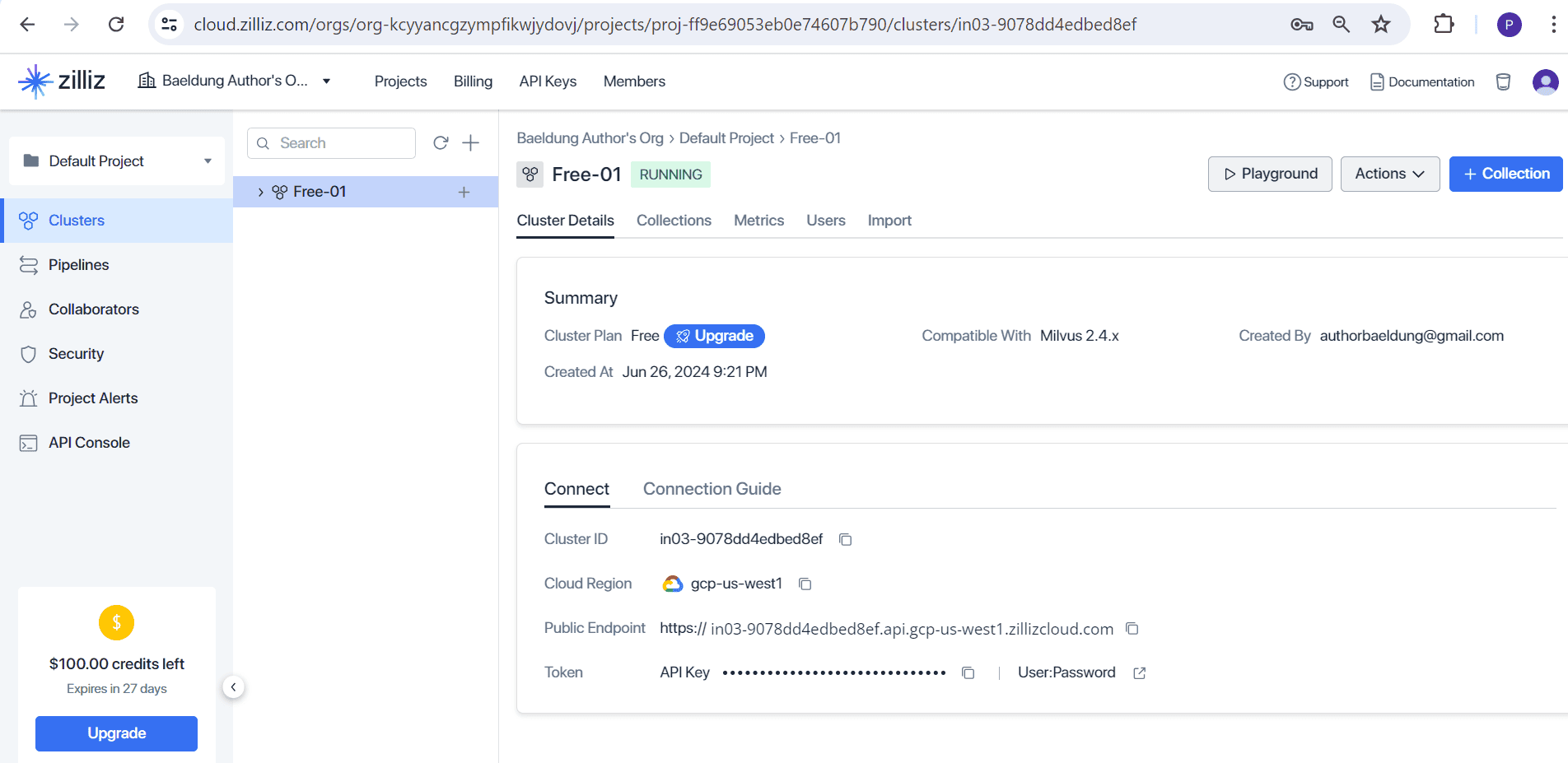
For this, we’ll need to register for a Zilliz cloud account and follow the documentation for creating a free DB cluster.
3.2. Maven Dependency
Before we start to explore the Milvus Java APIs we’ll need to import the necessary Maven dependency:
<dependency>
  <groupId>io.milvus</groupId>
  <artifactId>milvus-sdk-java</artifactId>
  <version>2.3.6</version>
</dependency>
4. Milvus Java Client SDK
The Milvus DB service endpoints are written using the gRPC framework. Hence, all their client SDKs in different programming languages such as Python, Go, and Java provide APIs on top of this gRPC framework. The Milvus Java Client SDK offers comprehensive support for CRUD (Create, Read, Update, and Delete) operations like any database. Additionally, it supports administrative operations such as creating collections, indexes, and partitions. To perform, the various DB operations, the API provides a corresponding request and request builder class. Developers can set the necessary parameters in the request object using the builder classes. Finally, this request object is sent to the back-end service with the help of a client class. This will become clearer once we go through the upcoming sections.
5. Create Milvus DB Client
The Java client SDK provides the MilvusClientV2 class for management and data operations in Milvus DB. The ConnectConfigBuilder class helps build the parent ConnectConfig class, which holds the connection information needed to create an instance of the MilvusClientV2 class:
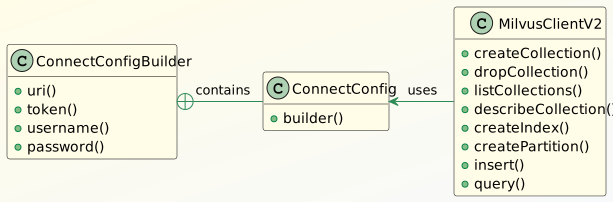
Let’s look at the method for creating an instance of MilvusClientV2 to understand more about the classes involved:
MilvusClientV2 createConnection() {
    ConnectConfig connectConfig = ConnectConfig.builder()
      .uri(CONNECTION_URI)
      .token(API_KEY)
      .build();
    milvusClientV2 = new MilvusClientV2(connectConfig);

    return milvusClientV2;
}
ConnectConfig class supports username and password authentication but we’ve used the recommended API token. The ConnectConfigBuilder class takes the URI and the API token to create the ConnectConfig object. That is later used for creating the MilvusClientV2 object.
6. Create Collection
Before storing data in the Milvus Vector DB, we must create a collection. It involves creating field schemas and a collection and then forming a create collection request object. Finally, the client sends the request object to the DB service endpoint to create the collection in the Milvus DB.
6.1. Create Field Schemas and Collection Schema
Let’s first explore the relevant key classes in the Milvus Java SDK: 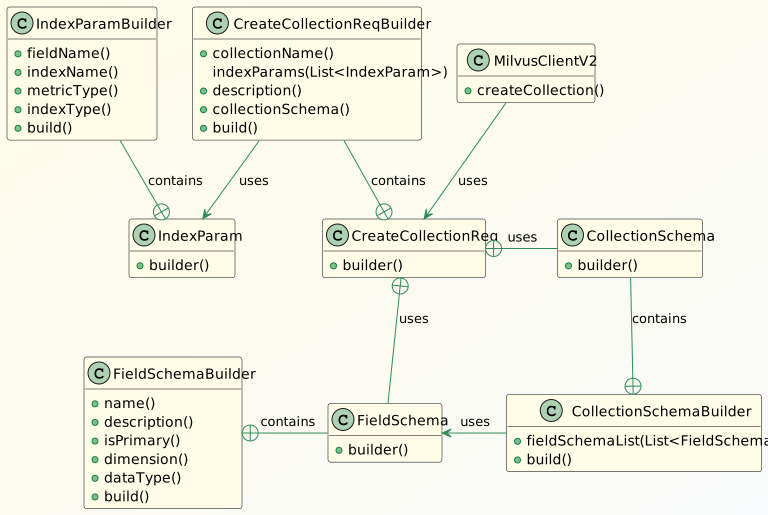
The FieldSchema class helps define the fields of a collection, while CollectionSchema uses the FieldSchema to define a collection. Additionally, the IndexParamBuilder class in IndexParam creates an index on the collection. We’ll explore the additional classes through the sample codes. First, let’s go through the steps for creating a FieldSchema object in the method createFieldSchema():
CreateCollectionReq.FieldSchema createFieldSchema(String name, String desc, DataType dataType,
    boolean isPrimary, Integer dimension) {
    CreateCollectionReq.FieldSchema fieldSchema = CreateCollectionReq.FieldSchema.builder()
      .name(name)
      .description(desc)
      .autoID(false)
      .isPrimaryKey(isPrimary)
      .dataType(dataType)
      .build();
    if (null != dimension) {
        fieldSchema.setDimension(dimension);
    }
    return fieldSchema;
}
The builder() method in the FieldSchema class returns an instance of its child FieldSchemaBuilder class. This class sets the important properties such as name, description, and data type for a collection field. The method isPrimaryKey() in the builder class helps mark a primary key field, while the setDimension() method in the FieldSchema class sets the mandatory dimension of a vector field. For example, let’s set the fields of a collection called Books in the method createFieldSchemas():
private static List<CreateCollectionReq.FieldSchema> createFieldSchemas() {
    List<CreateCollectionReq.FieldSchema> fieldSchemas = List.of(
      createFieldSchema("book_id", "Primary key", DataType.Int64, true, null),
      createFieldSchema("book_name", "Book Name", DataType.VarChar, false, null),
      createFieldSchema("book_vector", "vector field", DataType.FloatVector, false, 5)
    );
    return fieldSchemas;
}
The method returns a list of FieldSchema objects for the fields book_id, book_name, and book_vector for the Books collection. The book_vector field stores vectors with a dimension of 5, and book_id is the primary key. Precisely, we’ll store the vectorized texts of books in the book_vector field. Each FieldSchema object is created using the previously defined createFieldSchema() method. After creating the FieldSchema objects, we’ll use them in the createCollectionSchema() method for forming the Books CollectionSchema object:
private static CreateCollectionReq.CollectionSchema createCollectionSchema(
    List<CreateCollectionReq.FieldSchema> fieldSchemas) {
    return CreateCollectionReq.CollectionSchema.builder()
      .fieldSchemaList(fieldSchemas)
      .build();
}
The child CollectionSchemaBuilder sets the field schemas and finally builds the parent CollectionSchema object.
6.2. Create Collection Request and Collection
Let’s now look at the steps for creating the collection:
void whenCommandCreateCollectionInVectorDB_thenSuccess() {
    CreateCollectionReq createCollectionReq = CreateCollectionReq.builder()
      .collectionName("Books")
      .indexParams(List.of(createIndexParam("book_vector", "book_vector_indx")))
      .description("Collection for storing the details of books")
      .collectionSchema(createCollectionSchema(createFieldSchemas()))
      .build();
    milvusClientV2.createCollection(createCollectionReq);
    assertTrue(milvusClientV2.hasCollection(HasCollectionReq.builder()
      .collectionName("Books")
      .build()));
    }
}
We use the CreateCollectionReqBuilder class to build the CreateCollectionReq object by setting the CollectionSchema object and other parameters. Then, we pass this object to the createCollection() method of the MilvusClientV2 class to create the collection. Finally, we verify by calling the hasCollection(HasCollectionReq) method of MilvusClientV2. The CreateCollectionReqBuilder class also uses the indexParams() method to define indexes on the book_vector field. So, let’s look at the method createIndexParam() that helps create the IndexParam object:
IndexParam createIndexParam(String fieldName, String indexName) {
    return IndexParam.builder()
      .fieldName(fieldName)
      .indexName(indexName)
      .metricType(IndexParam.MetricType.COSINE)
      .indexType(IndexParam.IndexType.AUTOINDEX)
      .build();
}
The method uses the IndexParamBuilder class to set the various supported properties of an index in the Milvus DB. Moreover, the COSINE metric type property of the IndexPram object is important for calculating the similarity score between the vectors. Like relational DBs, indexes help boost query performance on frequently accessed fields in Milvus Vector DB. Let’s verify the details of the created Books collection in the Zilliz cloud console:

7. Create Partition
Once the Books collection is created, we can focus on the classes for creating partitions for organizing the data efficiently.
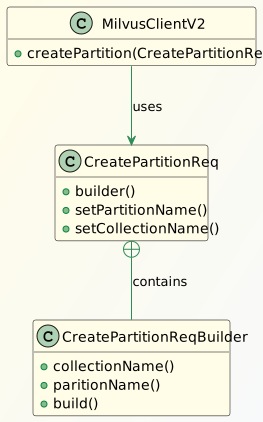
The child CreatePartitionReqBuilder class helps create the parent CreateParitionReq object by setting the partition and the target collection name. Then, the request object is passed into the MilvusClientV2‘s createPartition() method. Let’s create a partition Health in the Books collection using the classes defined earlier:
void whenCommandCreatePartitionInCollection_thenSuccess() {
    CreatePartitionReq createPartitionReq = CreatePartitionReq.builder()
        .collectionName("Books")
        .partitionName("Health")
        .build();
    milvusClientV2.createPartition(createPartitionReq);

    assertTrue(milvusClientV2.hasPartition(HasPartitionReq.builder()
        .collectionName("Books")
        .partitionName("Health")
        .build()));
}
In the method, the createPartitionReqBuilder class creates the CreatePartitionReq object for the collection Books. Later, the MilvusClientV2 object invokes its createPartition() method with the request object. This resulted in the creation of the partition Health in the Books collection. Finally, we verify the presence of the partition by invoking the hasPartition() method of the MilvusClientV2 class.
8. Insert Data Into a Collection
After creating the collection Books in the Milvus DB, we can insert data into it. As usual, first, let’s take a look at the key classes:
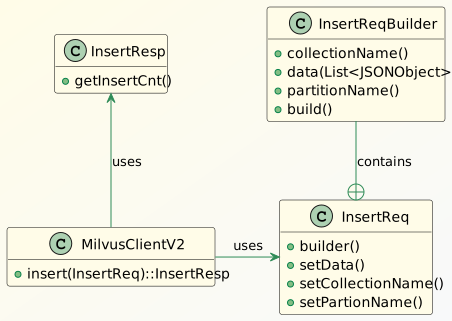
The child InsertReqBuilder class helps create its parent InsertReq object by setting the collectionName and the data. The method data() of the InsertReqBuilder class takes chunks of documents in List<JSONObject> to insert into the Milvus DB. Finally, we pass the InsertReq object to the insert() method of the MilvusClientV2 object to create entries into the collection. For inserting data into the partition Health of the collection Books, we’ll use a few dummy data from a JSON file book_vectors.json:
[
  {
    "book_id": 1,
    "book_vector": [
      0.6428583619771759,
      0.18717933359890893,
      0.045491267667689295,
      0.8578131397291819,
      0.6431108625406422
    ],
    "book_name": "Yoga"
  },
  More objects...
...
]
Real-world applications use embedding models such as BERT and Word2Vec to create the vector dimensions of texts, images, voice samples, and more. Let’s look at the classes defined earlier, in action:
void whenCommandInsertDataIntoVectorDB_thenSuccess() throws IOException {
    List<JSONObject> bookJsons = readJsonObjectsFromFile("book_vectors.json");

    InsertReq insertReq = InsertReq.builder()
      .collectionName("Books")
      .partitionName("Health")
      .data(bookJsons)
      .build();
    InsertResp insertResp = milvusClientV2.insert(insertReq);

    assertEquals(bookJsons.size(), insertResp.getInsertCnt());
}
The readJsonObjectsFromFile() method reads the data from the JSON file and stores it in the bookJsons object. As explained earlier, we created the InsertReq object with the data and then passed it to the insert() method of the MilvusClientV2 object. Finally, the getInsertCnt() method in the InsertResp object gives the total count of records inserted. We can also verify the inserted records in the Zilliz cloud console:

9. Perform Vector Similarity Search
Milvus supports vector similarity searches on collections with the help of some key classes:
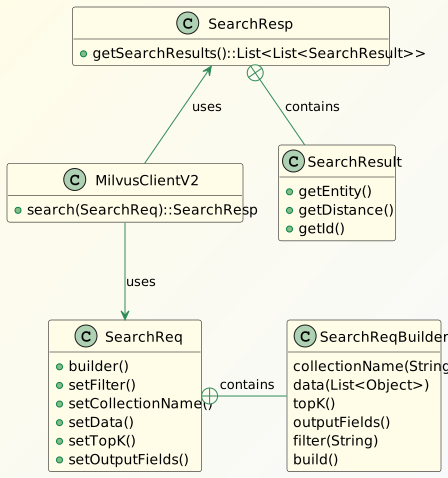
The SearchRequestBuilder sets the attributes such as topK nearest neighbors, query embeddings, and collection name of the parent SearchReq class. Additionally, we can set scalar expressions in the filter() method to get matching entities. Finally, the MilvusClientV2 class calls the search() method with the SearchReq object to fetch the records. As usual, let’s look at the sample code to understand more:
void givenSearchVector_whenCommandSearchDataFromCollection_thenSuccess() {
    List<Float> queryEmbedding = getQueryEmbedding("What are the benefits of Yoga?");
    SearchReq searchReq = SearchReq.builder()
      .collectionName("Books")
      .data(Collections.singletonList(queryEmbedding))
      .outputFields(List.of("book_id", "book_name"))
      .topK(2)
      .build();

    SearchResp searchResp = milvusClientV2.search(searchReq);
    List<List<SearchResp.SearchResult>> searchResults = searchResp.getSearchResults();
    searchResults.forEach(e -> e.forEach(el -> logger.info("book_id: {}, book_name: {}, distance: {}",
      el.getEntity().get("book_id"), el.getEntity().get("book_name"), el.getDistance()))
    );
}
First, the method getQueryEmbedding() converts the query into vector dimensions or embeddings. Then the SearchReqBuilder object creates the SearchReq object with all the search-related parameters. Interestingly, we can also control the field names in the result entity by setting it in the outputFields() method of the builder class. Finally, we call MilvusClientV2‘s search() method to get the query results:
book_id: 6, book_name: Yoga, distance: 0.8046049
book_id: 3, book_name: Tai Chi, distance: 0.5370003
The distance attribute in the search result signifies the similarity score. For our example, we considered the Cosine similarity (COSINE) to measure the similarity score. Hence, the larger the cosine, the smaller the angle between the two vectors, indicating that these two vectors are more similar to each other. Additionally, Milvus supports more metric types on floating type embeddings such as Euclidean distance (L2) and Inner product (IP).
10. Delete Data in the Collection
Let’s begin with the usual class diagram to learn about the key classes involved in deleting data from a collection:
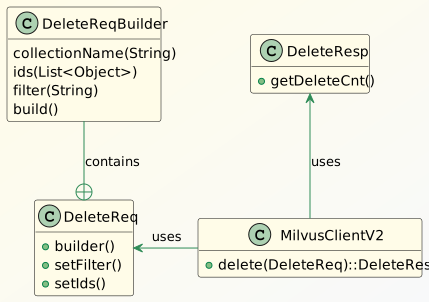
The delete() method in MilvusClientV2 deletes records in Milvus DB. It takes the DeleteReq object that allows specifying the records using the ids and filter fields. The child DeleteRequestBuilder class helps build the parent DeleteReq object. Let’s deep dive with the help of some sample code. Let’s look at the steps for deleting a record with book_id equal to 1 and 2 from the collection Books:
void givenListOfIds_whenCommandDeleteDataFromCollection_thenSuccess() {
    DeleteReq deleteReq = DeleteReq.builder()
      .collectionName("Books")
      .ids(List.of(1, 2))
      .build();

    DeleteResp deleteResp = milvusClientV2.delete(deleteReq);
    assertEquals(2, deleteResp.getDeleteCnt());
}
After calling the delete() method on the MilvusClientV2 object, we use the getDeleteCnt() method in the DeleteResp object to verify the number of records deleted. We can also use Scalar Expression Rules with the filter() method on the DeleteReqBuilder object to specify matching records for deletion:
void givenFilterCondition_whenCommandDeleteDataFromCollection_thenSuccess() {
    DeleteReq deleteReq = DeleteReq.builder()
      .collectionName("Books")
      .filter("book_id > 4")
      .build();

    DeleteResp deleteResp = milvusClientV2.delete(deleteReq);
    assertTrue(deleteResp.getDeleteCnt() >= 1 );
}
Based on the scalar condition defined in the filter() method, the records having book_id greater than 4 are deleted from the collection.
11. Conclusion
In this article, we explored the Milvus Java SDK. It covers almost all major operations related to managing the vector DB. The APIs are well-designed and intuitive to understand, hence, easier to adopt and build AI-driven applications. However, a basic understanding of vectors is equally important to use the APIs efficiently.














