Mocking is an essential part of unit testing, and the Mockito library makes it easy to write clean and intuitive unit tests for your Java code.
Get started with mocking and improve your application tests using our Mockito guide:
Handling concurrency in an application can be a tricky process with many potential pitfalls. A solid grasp of the fundamentals will go a long way to help minimize these issues.
Get started with understanding multi-threaded applications with our Java Concurrency guide:
Spring 5 added support for reactive programming with the Spring WebFlux module, which has been improved upon ever since. Get started with the Reactor project basics and reactive programming in Spring Boot:
Since its introduction in Java 8, the Stream API has become a staple of Java development. The basic operations like iterating, filtering, mapping sequences of elements are deceptively simple to use.
But these can also be overused and fall into some common pitfalls.
To get a better understanding on how Streams work and how to combine them with other language features, check out our guide to Java Streams:
Explore Spring Boot 3 and Spring 6 in-depth through building a full REST API with the framework:
Yes, Spring Security can be complex, from the more advanced functionality within the Core to the deep OAuth support in the framework.
I built the security material as two full courses - Core and OAuth, to get practical with these more complex scenarios. We explore when and how to use each feature and code through it on the backing project.
You can explore the course here:
All Access is finally out, with all of my Spring courses. Learn JUnit is out as well, and Learn Maven is coming fast. And, of course, quite a bit more affordable. Finally.
>> GET THE COURSE
Spring Data JPA is a great way to handle the complexity of JPA with the powerful simplicity of Spring Boot.
Get started with Spring Data JPA through the guided reference course:
Refactor Java code safely — and automatically — with OpenRewrite.
Refactoring big codebases by hand is slow, risky, and easy to put off. That’s where OpenRewrite comes in. The open-source framework for large-scale, automated code transformations helps teams modernize safely and consistently.
Each month, the creators and maintainers of OpenRewrite at Moderne run live, hands-on training sessions — one for newcomers and one for experienced users. You’ll see how recipes work, how to apply them across projects, and how to modernize code with confidence.
Join the next session, bring your questions, and learn how to automate the kind of work that usually eats your sprint time.
1. Overview
In this tutorial, we’ll learn how to use the Spring Cloud Function(SCF) framework to develop Java applications that can be deployed in Microsoft Azure Functions.
We’ll discuss its key concepts, develop a sample application, deploy it on Azure Functions service, and finally test it.
2. Key Concepts
The Azure Functions service provides a serverless environment where we can deploy our application without worrying about infrastructure management. We can write applications in different programming languages such as Java, Python, C#, etc. by following the framework defined for the corresponding SDK library. These applications can be invoked through the various events originating from Azure services such as Blob Storage, Table Storage, Cosmos DB database, Event bridge, etc. Eventually, the application can process the event data and send it to target systems.
The Java Azure Function library provides a robust annotation-based programming model. It helps register the methods to events, receive the data from source systems, and then update the target systems.
The SCF framework provides an abstraction on the underlying program written for Azure Functions and other serverless cloud-native services like AWS Lambda, Google Cloud Functions, and Apache OpenWhisk. All this is possible because of the SCF Azure Adapter:

Due to its uniform programming model, it helps the portability of the same code across different platforms. Moreover, we can easily adopt major features like dependency injection of Spring framework into the serverless applications.
Normally, we implement the core functional interfaces such as Function<I, O>, Consumer<I>, and Supplier<O>, and register them as Spring beans. Then this bean is autowired into the event handler class where the endpoint method is applied with the @FunctionName annotation.
Additionally, the SCF provides a FunctionCatlog bean that can be autowired into the event handler class. We can retrieve the implemented functional interface by using the FunctionCatlaog#lookup(“<<bean name>>”) method. The FunctionCatalog class wraps it in SimpleFunctionRegistry.FunctionInvocationWrapper class that provides additional features such as function composition and routing.
We’ll learn more in the next sections.
3. Prerequisites
First, we’ll need an active Azure subscription to deploy the Azure Function application.
The endpoints of the Java application would have to follow the Azure Function’s programming model, hence we’ll have to use the Maven dependency for it:
<dependency>
    <groupId>com.microsoft.azure.functions</groupId>
    <artifactId>azure-functions-java-library</artifactId>
    <version>3.1.0</version>
</dependency>
Once the application’s code is ready, we’ll need the Azure functions Maven plugin to deploy it in Azure:
<plugin>
    <groupId>com.microsoft.azure</groupId>
    <artifactId>azure-functions-maven-plugin</artifactId>
    <version>1.24.0</version>
</plugin>
The Maven tool helps package the application in a standard structure prescribed for deploying into the Azure Functions service. As usual, the plugin helps specify the Azure Function’s deployment configurations such appname, resourcegroup, appServicePlanName, etc.
Now, let’s define the SCF library Maven dependency:
<dependency>
    <groupId>org.springframework.cloud</groupId>
    <artifactId>spring-cloud-function-adapter-azure</artifactId>
    <version>4.1.3</version>
</dependency>
The library enables the SCF and Spring dependency injection feature in an Azure Function handler written in Java. The handler refers to the Java method where we apply the @FunctionName annotation and is also an entry point for processing any events from the Azure services like Blob Storage, Cosmos DB Event Bridge, etc., or custom applications.
The application jar’s Manifest file must point the entry point to the Spring Boot class annotated with @SpringBootApplication. We can set it explicitly with the help of the maven-jar-plugin:
<plugin>
    <groupId>org.apache.maven.plugins</groupId>
    <artifactId>maven-jar-plugin</artifactId>
    <version>3.4.2</version>
    <configuration>
        <archive>
            <manifest>
                <mainClass>com.baeldung.functions.AzureSpringCloudFunctionApplication</mainClass>
            </manifest>
        </archive>
    </configuration>
</plugin>
Another way is to set the start-class property value in the pom.xml file, but this works only if we define spring-boot-starter-parent as the parent:
<parent>
    <groupId>org.springframework.boot</groupId>
    <artifactId>spring-boot-starter-parent</artifactId>
    <version>2.7.11</version>
    <relativePath/>
</parent>
Finally, we set the start-class property:
<properties>
    <start-class>com.baeldung.functions.AzureSpringCloudFunctionApplication</start-class>
</properties>
This property ensures that the Spring Boot main class is invoked, initializing the Spring beans and allowing them to get autowired into the event handler classes.
Finally, Azure expects a specific type of packaging for the application and hence we’ll have to disable the default Spring Boot packaging and enable the spring boot thin layout:
<plugin>
    <groupId>org.springframework.boot</groupId>
    <artifactId>spring-boot-maven-plugin</artifactId>
    <dependencies>
        <dependency>
	    <groupId>org.springframework.boot.experimental</groupId>
	    <artifactId>spring-boot-thin-layout</artifactId>
	</dependency>
    </dependencies>
</plugin>
4. Java Implementation
Let’s consider a scenario where an Azure Function application calculates the allowance of an employee based on his city of residence. The application receives an employee JSON string over HTTP and sends it back by adding the allowance to the salary.
4.1. Implementation Using Plain Spring Beans
First, we’ll define the major classes for developing this Azure Function application:

Let’s start with defining the EmployeeSalaryFunction:
public class EmployeeSalaryFunction implements Function<Employee, Employee> {

    @Override
    public Employee apply(Employee employee) {
        int allowance;
        switch (employee.getCity()) {
            case "Chicago" -> allowance = 5000;
            case "California" -> allowance = 2000;
            case "New York" -> allowance = 2500;
            default -> allowance = 1000;
        }
        int finalSalary = employee.getSalary() + allowance;
        employee.setSalary(finalSalary);
        return employee;
    }
}
The EmployeeSalaryFunction class implements the interface java.util.function.Function. The EmployeeSalaryFunction#apply() method adds a city-based allowance to the employee’s base salary.
To load this class as a Spring bean, we’ll instantiate it in the ApplicationConfiguration class:
@Configuration
public class ApplicationConfiguration {
    @Bean
    public Function<Employee, Employee> employeeSalaryFunction() {
        return new EmployeeSalaryFunction();
    }
}
We’ve applied the @Configuration annotation to this class, letting the Spring framework know that this is a source of the bean definitions. The @Bean method employeeSalaryFunction() creates the spring bean employeeSalaryFunction of type EmployeeSalaryFunction.
Now, let’s inject this employeeSalaryFunction bean in the EmployeeSalaryHandler class using @Autowired annotation:
@Component
public class EmployeeSalaryHandler {
    @Autowired
    private Function<Employee, Employee> employeeSalaryFunction;

    @FunctionName("employeeSalaryFunction")
    public HttpResponseMessage calculateSalary(
      @HttpTrigger(
        name="http",
        methods = HttpMethod.POST,
        authLevel = AuthorizationLevel.ANONYMOUS)HttpRequestMessage<Optional<Employee>> employeeHttpRequestMessage,
      ExecutionContext executionContext
    ) {
        Employee employeeRequest = employeeHttpRequestMessage.getBody().get();
        Employee employee = employeeSalaryFunction.apply(employeeRequest);
        return employeeHttpRequestMessage.createResponseBuilder(HttpStatus.OK)
          .body(employee)
          .build();
    }
}
The Azure event handler function is primarily written following the Java Azure Function SDK programming model. However, it utilizes the Spring framework’s @Component annotation at the class level and the @Autowired annotation on the employeeSalaryFunction field. Conventionally, ensuring that the autowired bean’s name matches the name specified in the @FunctionName annotation is a good practice.
Similarly, we can extend the Spring framework support for other Azure Function triggers such as @BlobTrigger, @QueueTrigger, @TimerTrigger, etc.
4.2. Implementation Using SCF
In scenarios where we must dynamically retrieve a Function bean, explicitly autowiring all the Functions won’t be an optimal solution.
Assume we have multiple implementations to calculate the employee’s final salary based on the city:
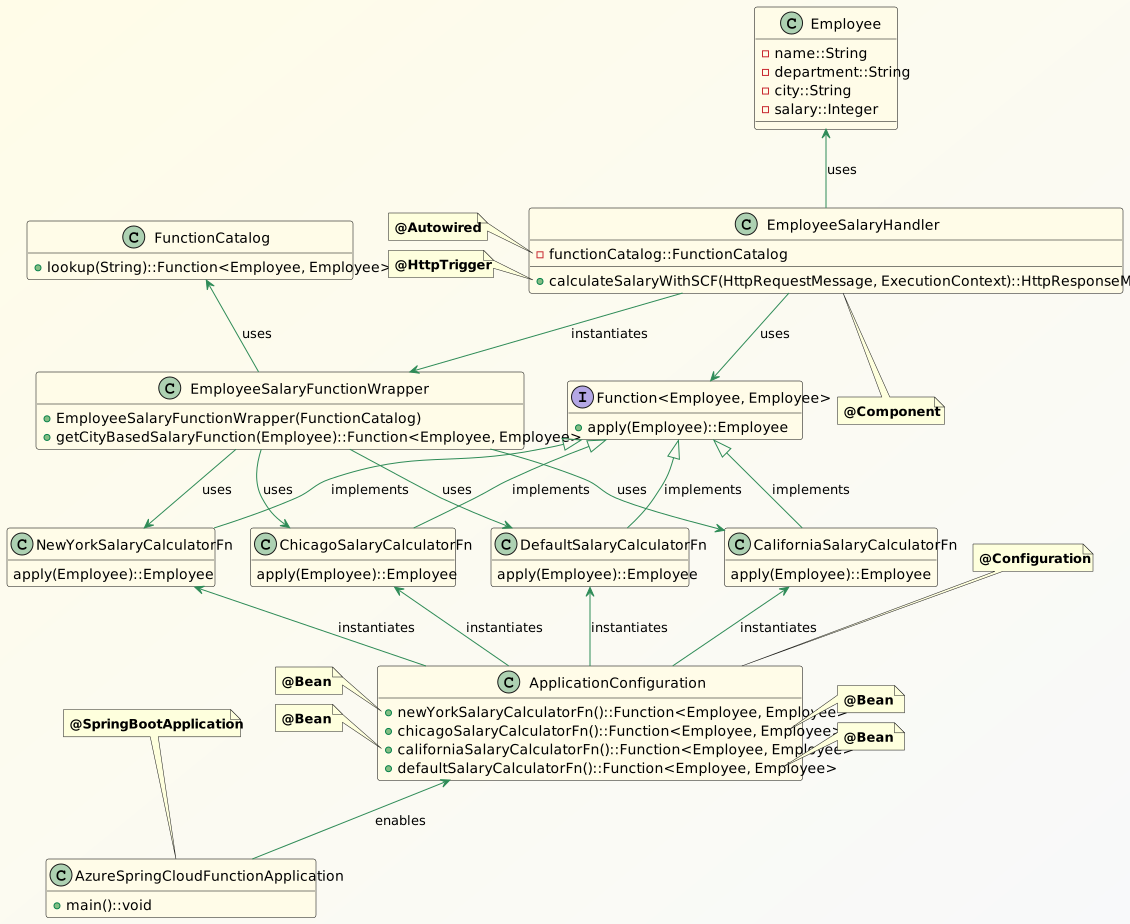
We’ve defined functions such as NewYorkSalaryCalculatorFn, ChicagoSalaryCalculatorFn, and CaliforniaSalaryCalculatorFn. These calculate the employees’ final salary based on their city of residence.
Let’s take a look at the CaliforniaSalaryCalculatorFn class:
public class CaliforniaSalaryCalculatorFn implements Function<Employee, Employee> {
    @Override
    public Employee apply(Employee employee) {
        Integer finalSalary = employee.getSalary() + 3000;
        employee.setSalary(finalSalary);
        return employee;
    }
}
The method adds an extra $3000 allowance to the employee’s base salary. The functions for calculating employees’s salaries, based out of other cities are more or less similar.
The entry method EmployeeSalaryHandler#calculateSalaryWithSCF() uses the EmployeeSalaryFunctionWrapper#getCityBasedSalaryFunction() to retrieve the appropriate city-specific function to calculate the employee’s salary:
public class EmployeeSalaryFunctionWrapper {
    private FunctionCatalog functionCatalog;

    public EmployeeSalaryFunctionWrapper(FunctionCatalog functionCatalog) {
        this.functionCatalog = functionCatalog;
    }

    public Function<Employee, Employee> getCityBasedSalaryFunction(Employee employee) {
        Function<Employee, Employee> salaryCalculatorFunction;
        switch (employee.getCity()) {
            case "Chicago" -> salaryCalculatorFunction = functionCatalog.lookup("chicagoSalaryCalculatorFn");
            case "California" -> salaryCalculatorFunction = functionCatalog.lookup("californiaSalaryCalculatorFn|defaultSalaryCalculatorFn");
            case "New York" -> salaryCalculatorFunction = functionCatalog.lookup("newYorkSalaryCalculatorFn");
            default -> salaryCalculatorFunction = functionCatalog.lookup("defaultSalaryCalculatorFn");
        }
        return salaryCalculatorFunction;
    }
}
We can instantiate EmployeeSalaryFunctionWrapper by passing FunctionCatalog object to the constructor. Then we retrieve the correct salary calculator function bean by calling EmployeeSalaryFunctionWrapper#getCityBasedSalaryFunction(). The FunctionCatalog#lookup(<<bean name>>) method helps retrieve the salary calculator function bean.
Moreover, the function bean is an instance of SimpleFunctionRegistry$FunctionInvocationWrapper that supports function composition and routing. For example, functionCatalog.lookup(“californiaSalaryCalculatorFn|defaultSalaryCalculatorFn”) would return a composed function. The apply() method on this function is equivalent to:
californiaSalaryCalculatorFn.andThen(defaultSalaryCalculatorFn).apply(employee)This means that employees from California get both the state and an additional default allowance.
Finally, let’s see the event handler function:
@Component
public class EmployeeSalaryHandler {
    @Autowired
    private FunctionCatalog functionCatalog;

    @FunctionName("calculateSalaryWithSCF")
    public HttpResponseMessage calculateSalaryWithSCF(
      @HttpTrigger(
        name="http",
        methods = HttpMethod.POST,
        authLevel = AuthorizationLevel.ANONYMOUS)HttpRequestMessage<Optional<Employee>> employeeHttpRequestMessage,
      ExecutionContext executionContext
    ) {
        Employee employeeRequest = employeeHttpRequestMessage.getBody().get();
        executionContext.getLogger().info("Salary of " + employeeRequest.getName() + " is:" + employeeRequest.getSalary());
        EmployeeSalaryFunctionWrapper employeeSalaryFunctionWrapper = new EmployeeSalaryFunctionWrapper(functionCatalog);
        Function<Employee, Employee> cityBasedSalaryFunction = employeeSalaryFunctionWrapper.getCityBasedSalaryFunction(employeeRequest);
        Employee employee = cityBasedSalaryFunction.apply(employeeRequest);

        executionContext.getLogger().info("Final salary of " + employee.getName() + " is:" + employee.getSalary());
        return employeeHttpRequestMessage.createResponseBuilder(HttpStatus.OK)
          .body(employee)
          .build();
    }
}
Unlike the calcuateSalary() method discussed in the previous section, calculateSalaryWithSCF() uses the FunctionCatalog object autowired to the class.
5. Deploy and Run the Application
We’ll use Maven to compile, package, and deploy the application on Azure Functions. Let’s run the Maven goals from IntelliJ:

Upon successful deployment, the functions appear on the Azure portal:

Finally, after getting their endpoints from the Azure portal, we can invoke them and check the results:

Furthermore, the function invocations can be confirmed on the Azure portal:

6. Conclusion
In this article, we learned how to develop Java Azure Function applications using the Spring Cloud Function framework. The framework enables the use of the basic Spring dependency injection feature. Additionally, the FunctionCatalog class provides features concerning functions like composition and routing.
While the framework may add some overhead compared to the low-level Java Azure Function library, it offers significant design advantages. Therefore, it should be adopted only after carefully evaluating the application’s performance needs.