1. Introduction
In this tutorial, we’ll learn how to use Spring Cloud Function.
We’ll build and run a simple Spring Cloud Function locally and then deploy it to AWS.
2. Spring Cloud Function Setup
To start with, let’s implement from scratch and test a simple project with two functions using different approaches:
- A String reverser, using a plain method
- And a greeter using a dedicated class
2.1. Maven Dependencies
The first thing we need to do is include the spring-cloud-starter-function-web dependency. This will act as our local adapter and brings in the necessary dependencies to run our function locally:
<dependency>
    <groupId>org.springframework.cloud</groupId>
    <artifactId>spring-cloud-starter-function-web</artifactId>
    <version>1.0.1.RELEASE</version>
</dependency>
Stay tuned as we’ll modify this a bit when we are deploying to AWS.
2.2. Writing the Spring Cloud Function
With Spring Cloud Function, we can expose @Beans of type Function, Consumer or Supplier as individual methods:
@SpringBootApplication
public class CloudFunctionApplication {

    public static void main(String[] args) {
        SpringApplication.run(CloudFunctionApplication.class, args);
    }

    @Bean
    public Function<String, String> reverseString() {
        return value -> new StringBuilder(value).reverse().toString();
    }
}
Like in this code, we can expose a reverse string feature as a Function, which our target functional platform can invoke.
2.3. Testing the Reverse String Function Locally
The spring-cloud-starter-function-web exposes the function as an HTTP endpoint. After we run the CloudFunctionApplication, we can curl our target to test it locally:
curl localhost:8080/reverseString -H "Content-Type: text/plain" -d "Baeldung User"
Note that the endpoint is the name of the bean.
And as expected, we get the reversed string as output:
resU gnudleaB
2.4. Scanning Spring Cloud Function in Packages
Apart from exposing our method as a @Bean, we could also write our software as classes that implement the functional interface Function<T, R>:
public class Greeter implements Function<String, String> {

    @Override
    public String apply(String s) {
        return "Hello " + s + ", and welcome to Spring Cloud Function!!!";
    }
}
We can then specify the packages to scan for relevant beans in application.properties:
spring.cloud.function.scan.packages=com.baeldung.spring.cloudfunction.functions
2.5. Testing the Greeter Function Locally
Again, we can start the app and use curl to test the Greeter function:
curl localhost:8080/greeter -H "Content-Type: text/plain" -d "World"
Note that the endpoint is the name of the class that implements the Functional interface.
And, no surprise, we get the expected greeting back:
Hello World, and welcome to Spring Cloud function!!!
3. Spring Cloud Function on AWS
What makes Spring Cloud Function so powerful is that we can build Spring enabled functions that are cloud agnostic. The function itself doesn’t need to know about how it was called or the environment it is deployed into. For example, we can easily deploy this greeter to AWS, Azure or Google Cloud platform without changing any of the business logic.
Since AWS Lambda is one of the popular serverless solutions, let’s focus on how to deploy our app into it.
So, let’s not wait any longer and deploy our function to the cloud!
3.1. Maven Dependencies
Remember the spring-cloud-starter-function-web dependency, which we added originally. Now it’s time to change that.
See, depending on where we are going to run the Spring Cloud Function, we need to add the appropriate dependency.
For AWS, we’ll use spring-cloud-function-adapter-aws:
<dependency>
    <groupId>org.springframework.cloud</groupId>
    <artifactId>spring-cloud-function-adapter-aws</artifactId>
</dependency>
Next, let’s add the required AWS dependencies to handle Lambda events:
<dependency>
    <groupId>com.amazonaws</groupId>
    <artifactId>aws-lambda-java-events</artifactId>
    <version>2.0.2</version>
    <scope>provided</scope>
</dependency>
<dependency>
    <groupId>com.amazonaws</groupId>
    <artifactId>aws-lambda-java-core</artifactId>
    <version>1.1.0</version>
    <scope>provided</scope>
</dependency>
Finally, because we are going to upload the artifact generated by the maven build to AWS Lambda, we need to build an artifact that is shaded, meaning, it has all the dependencies exploded out as individual class files instead of jars.
The spring-boot-thin-layout dependency helps us to reduce the size of the artifact by excluding some dependencies that are not needed:
<build>
    <plugins>
        <plugin>
            <groupId>org.apache.maven.plugins</groupId>
            <artifactId>maven-deploy-plugin</artifactId>
            <configuration>
                <skip>true</skip>
            </configuration>
        </plugin>
        <plugin>
            <groupId>org.springframework.boot</groupId>
            <artifactId>spring-boot-maven-plugin</artifactId>
            <dependencies>
                <dependency>
                    <groupId>org.springframework.boot.experimental</groupId>
                    <artifactId>spring-boot-thin-layout</artifactId>
                    <version>1.0.10.RELEASE</version>
                </dependency>
            </dependencies>
        </plugin>
        <plugin>
            <groupId>org.apache.maven.plugins</groupId>
            <artifactId>maven-shade-plugin</artifactId>
            <configuration>
                <createDependencyReducedPom>false</createDependencyReducedPom>
                <shadedArtifactAttached>true</shadedArtifactAttached>
                <shadedClassifierName>aws</shadedClassifierName>
            </configuration>
        </plugin>
    </plugins>
</build>
3.2. AWS Handlers
If we want to expose our string reverser again via an HTTP request, then Spring Cloud Function AWS ships with SpringBootRequestHandler. It implements AWS’s RequestHandler and is in charge of dispatching the AWS request to our function.
public class MyStringHandlers extends SpringBootRequestHandler<String, String> {

}
Spring Cloud Function AWS also ships with SpringBootStreamHandler and FunctionInvokingS3EventHandler as other examples
Now, it may seem a bit odd that the MyStringHandlers is just an empty class but it plays an important role in both acting as the entry point of the Lambda function and also defining its input and output types.
As we’ll see in the screenshot below, we’ll provide the fully qualified name of this class in the Handler input field of the AWS Lambda configuration page.
3.3. How Does AWS Know Which Cloud Function to Invoke?
As it turns out, even if we have more than one Spring Cloud Function in our application, AWS can invoke only one of them.
In the next section, we’ll specify the cloud function name in an environment variable called FUNCTION_NAME on the AWS console.
4. Upload the Function to AWS and Test
Finally, let’s build our jar with maven, and then upload it via the AWS Console UI.
On the AWS Lambda console page, in the Function code section, we can select a Java 8 runtime and simply click Upload.
After that, we need to indicate in the Handler field the fully-qualified name of the class that implements SpringBootRequestHandler, or com.baeldung.spring.cloudfunction.MyStringHandlers in our case:

And then in Environment variables, we indicate which Spring function bean to invoke via the FUNCTION_NAME environment variable:

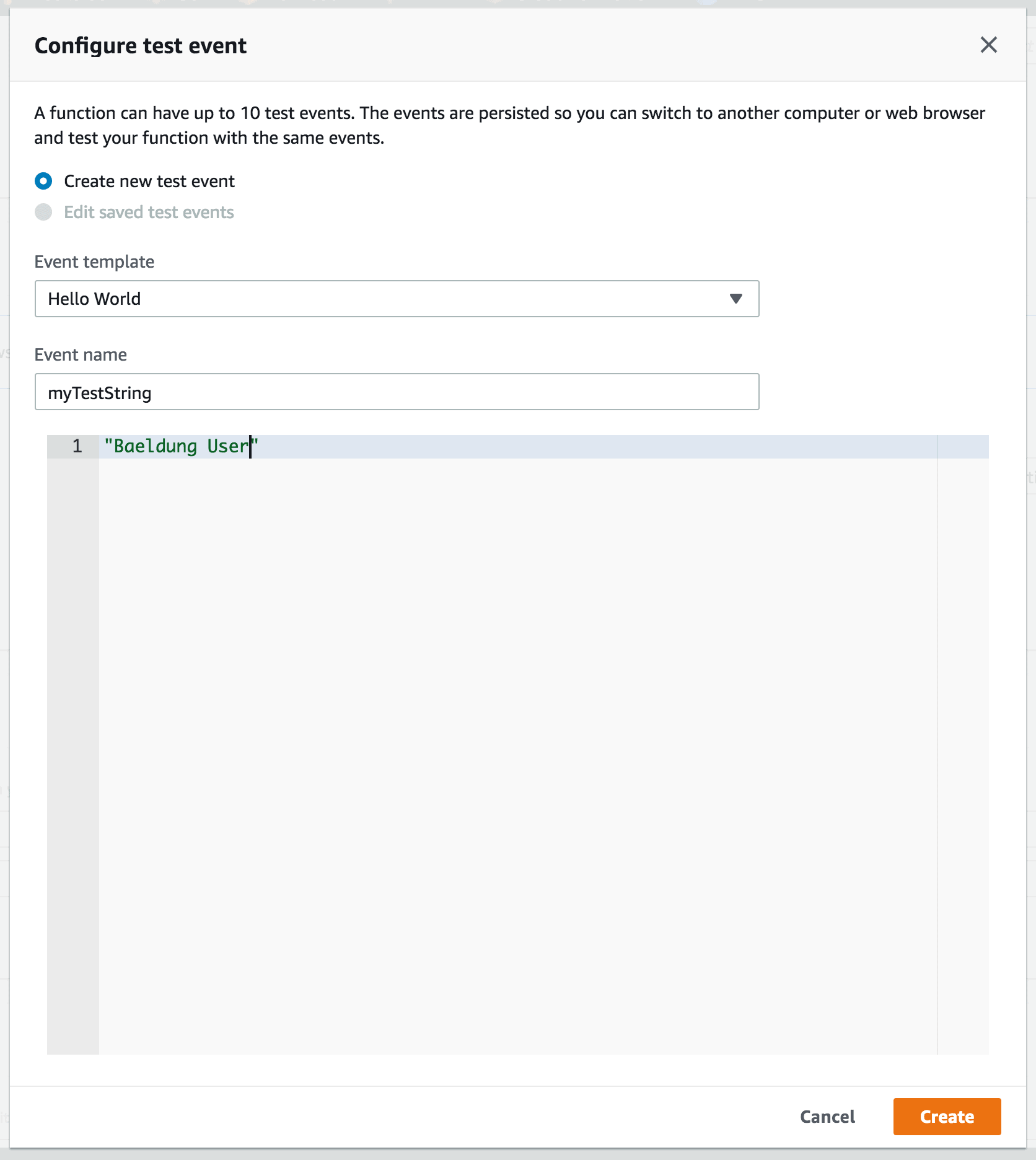
And having done that, it’s time for us to test the Lambda function by creating a test event and supplying a sample string:
4.2. Testing the Function on AWS
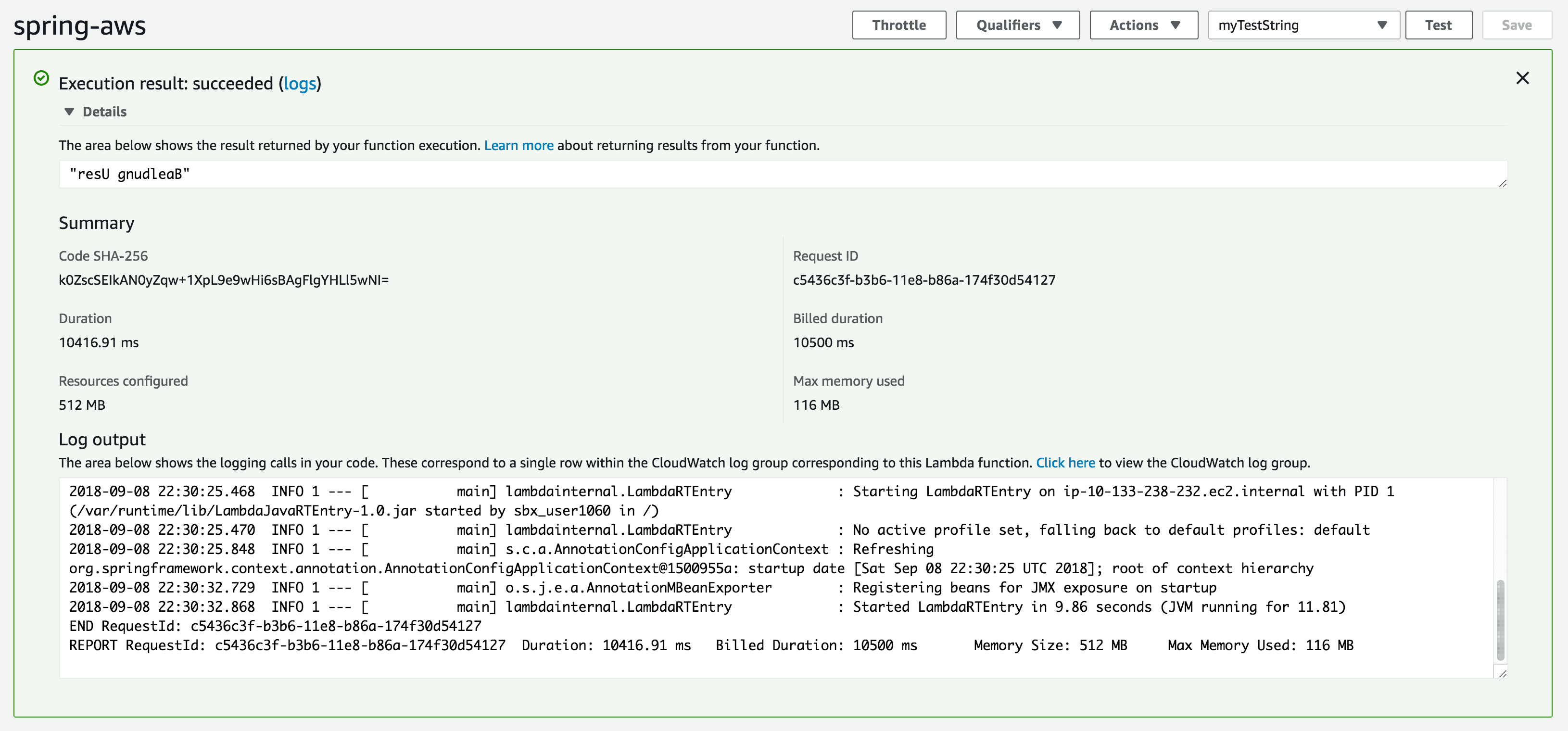
Now, we Save our test, then click the Test button.
And, as expected, we get the same output as what we got when we tested the function locally:
4.3. Testing Another Function
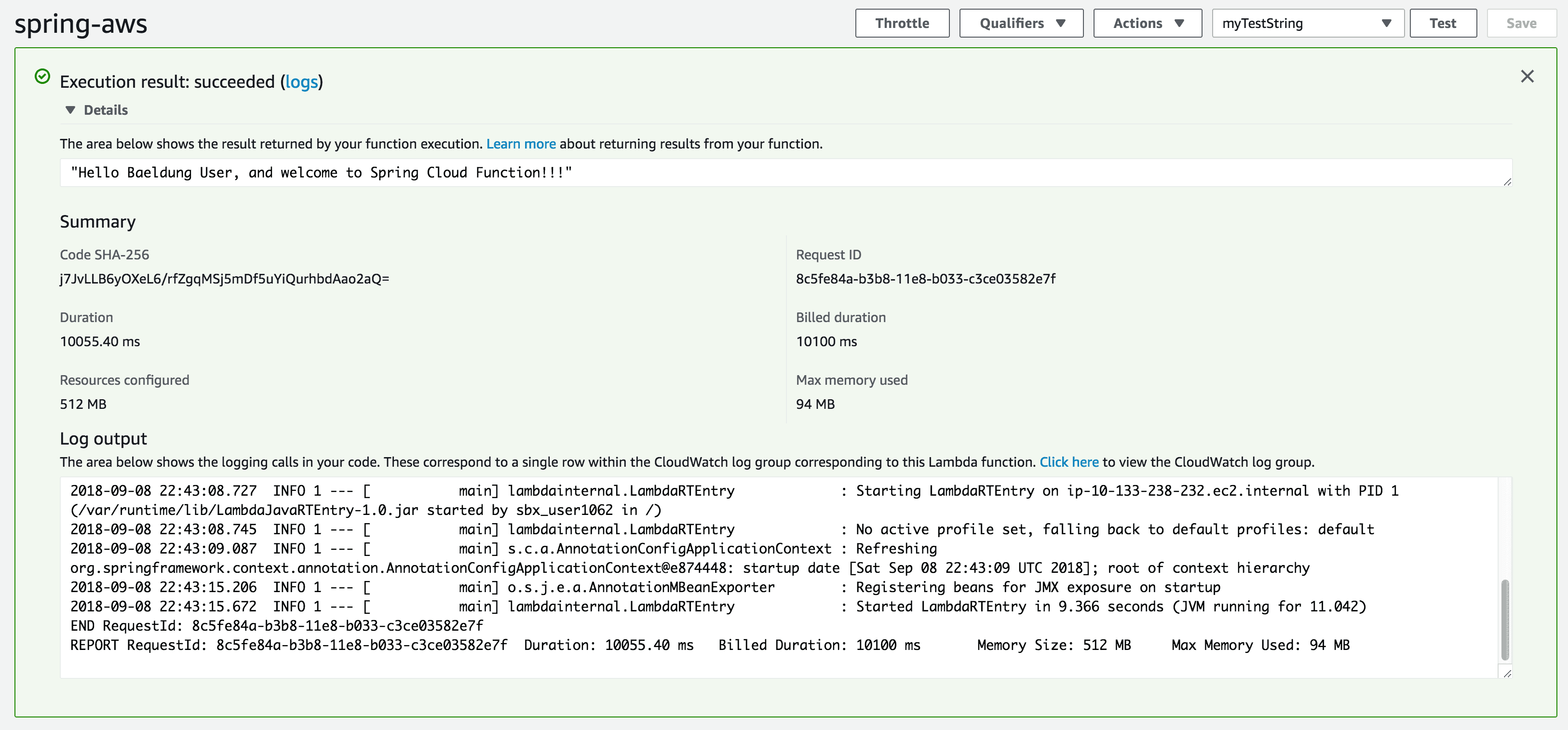
Remember, we have one more function in our application: greeter. Let’s make sure that works too.
We’ll change the FUNCTION_NAME environment variable to greeter:

Click the Save button and finally, the Test button again:
5. Conclusion
In summary, though in its early stages, Spring Cloud Function is a powerful tool for decoupling the business logic from any specific runtime target.
With it, the same code can run as a web endpoint, on a cloud platform, or as a part of a stream. It abstracts away all of the transport details and infrastructure, allowing the developer to keep all the familiar tools and processes, and focus firmly on business logic.
The code backing this article is available on GitHub. Once you're
logged in as a Baeldung Pro Member, start learning and coding on the project.


