


Mocking is an essential part of unit testing, and the Mockito library makes it easy to write clean and intuitive unit tests for your Java code.
Get started with mocking and improve your application tests using our Mockito guide:
Handling concurrency in an application can be a tricky process with many potential pitfalls. A solid grasp of the fundamentals will go a long way to help minimize these issues.
Get started with understanding multi-threaded applications with our Java Concurrency guide:
Spring 5 added support for reactive programming with the Spring WebFlux module, which has been improved upon ever since. Get started with the Reactor project basics and reactive programming in Spring Boot:
Since its introduction in Java 8, the Stream API has become a staple of Java development. The basic operations like iterating, filtering, mapping sequences of elements are deceptively simple to use.
But these can also be overused and fall into some common pitfalls.
To get a better understanding on how Streams work and how to combine them with other language features, check out our guide to Java Streams:
Explore Spring Boot 3 and Spring 6 in-depth through building a full REST API with the framework:
Yes, Spring Security can be complex, from the more advanced functionality within the Core to the deep OAuth support in the framework.
I built the security material as two full courses - Core and OAuth, to get practical with these more complex scenarios. We explore when and how to use each feature and code through it on the backing project.
You can explore the course here:
All Access is finally out, with all of my Spring courses. Learn JUnit is out as well, and Learn Maven is coming fast. And, of course, quite a bit more affordable. Finally.
>> GET THE COURSE
Spring Data JPA is a great way to handle the complexity of JPA with the powerful simplicity of Spring Boot.
Get started with Spring Data JPA through the guided reference course:
Refactor Java code safely — and automatically — with OpenRewrite.
Refactoring big codebases by hand is slow, risky, and easy to put off. That’s where OpenRewrite comes in. The open-source framework for large-scale, automated code transformations helps teams modernize safely and consistently.
Each month, the creators and maintainers of OpenRewrite at Moderne run live, hands-on training sessions — one for newcomers and one for experienced users. You’ll see how recipes work, how to apply them across projects, and how to modernize code with confidence.
Join the next session, bring your questions, and learn how to automate the kind of work that usually eats your sprint time.
1. Overview
Spring Web Flow builds on Spring MVC and allows implementing flows within a web application. It’s used for creating sequences of steps that guide users through a process or some business logic.
In this quick tutorial, we’ll go through a simple example of a user activation flow. The user is presented with a page and clicks on the Activate button to proceed or on the Cancel button to cancel activation.
Not that the assumption here is that we have an already set-up Spring MVC web application.
2. Setup
Let’s start by adding the Spring Web Flow dependency into the pom.xml:
<dependency>
    <groupId>org.springframework.webflow</groupId>
    <artifactId>spring-webflow</artifactId>
    <version>3.0.0</version>
</dependency>
The latest version of Spring Web Flow can be found in the Central Maven Repository.
3. Creating a Flow
Let’s now create a simple flow. As stated earlier, flow is a sequence of steps that guides a user through a process. Currently, this can only be done using XML-based config.
Each step in the flow is called a state.
For this simple example, we’ll be using a view-state. A view-state is a step in the flow that renders a matching view. The view-state refers to a page in the app (WEB-INF/view), with the id of the view-state being the name of the page to which it refers.
We will also be using a transition element. A transition element is used for handling events that occur within a particular state.
For this example flow, we’ll set up three view-states – the activation, success, and failure.
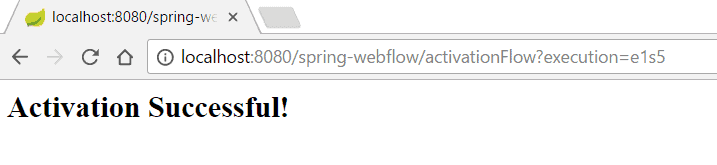
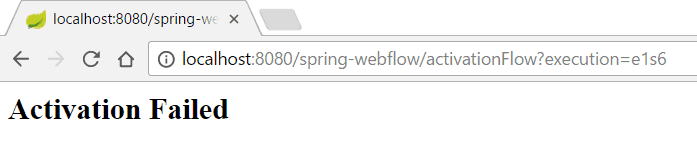
The process for this flow is pretty straightforward. The starting point is the activation view. If an activate event is triggered, it should transition to the success view. If the cancel event is triggered, it should transition to the failure view. The transition element handles the button click event that happens in the view-state:
<view-state id="activation">
    <transition on="activate" to="success"/>
    <transition on="cancel" to="failure"/>
</view-state>

<view-state id="success" />

<view-state id="failure" />
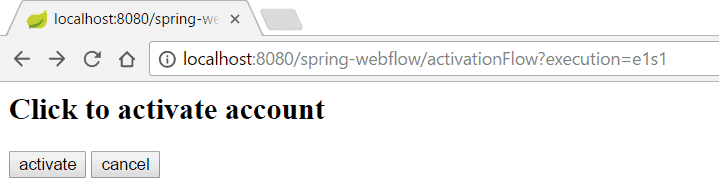
The initial activation page, which is referred to by the id activation and located in WEB-INF/view/activation.jsp, is a simple page that has two buttons, activate and cancel. Clicking the buttons with trigger our transitions to either send the user to the success view-state (WEB-INF/view/success.jsp) or the failure view-state (WEB-INF/view/failure.jsp):
<body>
    <h2>Click to activate account</h2>

    <form method="post" action="${flowExecutionUrl}">
        <input type="submit" name="_eventId_activate" value="activate" />
        <input type="submit" name="_eventId_cancel" value="cancel" />
    </form>
</body>
We’re using the flowExecutionUrl to access the context-relative URI for the current flow execution view-state.
4. Configuring the Flow
Next, we will configure Spring Web Flow into our web environment. We will do this by setting up a Flow Registry and Flow Builder Service.
The Flow Registry allows us to specify the location of our flows and also specify a Flow Builder Service if one is being used.
The Flow Builder Service helps us customize services and settings used to build flows.
One of the services we can customize is the view-factory-creator. The view-factory-creator allows us to customize the ViewFactoryCreator used by Spring Web Flow. Since we are using Spring MVC, we can configure Spring Web Flow to use the view resolver in our Spring MVC configurations.
Here is how we’ll configure Spring Web Flow for our example:
@Configuration
public class WebFlowConfig extends AbstractFlowConfiguration {

    @Autowired
    private WebMvcConfig webMvcConfig;

    @Bean
    public FlowDefinitionRegistry flowRegistry() {
        return getFlowDefinitionRegistryBuilder(flowBuilderServices())
          .addFlowLocation("/WEB-INF/flows/activation-flow.xml", "activationFlow")
          .build();
    }

    @Bean
    public FlowExecutor flowExecutor() {
        return getFlowExecutorBuilder(flowRegistry()).build();
    }

    @Bean
    public FlowBuilderServices flowBuilderServices() {
        return getFlowBuilderServicesBuilder()
          .setViewFactoryCreator(mvcViewFactoryCreator())
          .setDevelopmentMode(true).build();
    }

    @Bean
    public MvcViewFactoryCreator mvcViewFactoryCreator() {
        MvcViewFactoryCreator factoryCreator = new MvcViewFactoryCreator();
        factoryCreator.setViewResolvers(
          Collections.singletonList(this.webMvcConfig.viewResolver()));
        factoryCreator.setUseSpringBeanBinding(true);
        return factoryCreator;
    }
}
We can also use XML for that configuration:
<bean class="org.springframework.webflow.mvc.servlet.FlowHandlerMapping">
    <property name="flowRegistry" ref="activationFlowRegistry"/>
</bean>

<flow:flow-builder-services id="flowBuilderServices"
  view-factory-creator="mvcViewFactoryCreator"/>

<bean id="mvcViewFactoryCreator"
  class="org.springframework.webflow.mvc.builder.MvcViewFactoryCreator">
    <property name="viewResolvers" ref="jspViewResolver"/>
</bean>

<flow:flow-registry id="activationFlowRegistry"
  flow-builder-services="flowBuilderServices">
    <flow:flow-location id="activationFlow" path="/WEB-INF/flows/activation-flow.xml"/>
</flow:flow-registry>

<bean class="org.springframework.webflow.mvc.servlet.FlowHandlerAdapter">
    <property name="flowExecutor" ref="activationFlowExecutor"/>
</bean>
<flow:flow-executor id="activationFlowExecutor"
  flow-registry="activationFlowRegistry"/>
5. Navigating the Flows
To navigate through the flows, start up the web app and go to http://localhost:8080/{context-path}/activationFlow. To start up the app, deploy it on an application server, such as Tomcat or Jetty.
This sends us to the initial page of the flow, which is the activation page specified in our flow configuration:
You can click on the activate button to go the success page:
 Or the cancel button to go to the failure page:
6. Conclusion
In this article, we used a simple example as a guide on how to use Spring Web Flow.














