Handling UnexpectedRollbackException in Spring
Last updated: February 14, 2026


Mocking is an essential part of unit testing, and the Mockito library makes it easy to write clean and intuitive unit tests for your Java code.
Get started with mocking and improve your application tests using our Mockito guide:
Handling concurrency in an application can be a tricky process with many potential pitfalls. A solid grasp of the fundamentals will go a long way to help minimize these issues.
Get started with understanding multi-threaded applications with our Java Concurrency guide:
Spring 5 added support for reactive programming with the Spring WebFlux module, which has been improved upon ever since. Get started with the Reactor project basics and reactive programming in Spring Boot:
Since its introduction in Java 8, the Stream API has become a staple of Java development. The basic operations like iterating, filtering, mapping sequences of elements are deceptively simple to use.
But these can also be overused and fall into some common pitfalls.
To get a better understanding on how Streams work and how to combine them with other language features, check out our guide to Java Streams:
Explore Spring Boot 3 and Spring 6 in-depth through building a full REST API with the framework:
Yes, Spring Security can be complex, from the more advanced functionality within the Core to the deep OAuth support in the framework.
I built the security material as two full courses - Core and OAuth, to get practical with these more complex scenarios. We explore when and how to use each feature and code through it on the backing project.
You can explore the course here:
All Access is finally out, with all of my Spring courses. Learn JUnit is out as well, and Learn Maven is coming fast. And, of course, quite a bit more affordable. Finally.
>> GET THE COURSE
Spring Data JPA is a great way to handle the complexity of JPA with the powerful simplicity of Spring Boot.
Get started with Spring Data JPA through the guided reference course:
Refactor Java code safely — and automatically — with OpenRewrite.
Refactoring big codebases by hand is slow, risky, and easy to put off. That’s where OpenRewrite comes in. The open-source framework for large-scale, automated code transformations helps teams modernize safely and consistently.
Each month, the creators and maintainers of OpenRewrite at Moderne run live, hands-on training sessions — one for newcomers and one for experienced users. You’ll see how recipes work, how to apply them across projects, and how to modernize code with confidence.
Join the next session, bring your questions, and learn how to automate the kind of work that usually eats your sprint time.
1. Overview
When dealing with nested transactions, there are specific issues that may arise, linked with the nesting itself. In particular, a common problem often results in an UnexpectedRollbackException. This happens when one operation in a transaction fails, and we try to perform another database operation within the same transaction. In such cases, we usually see a fairly confusing error message: Transaction rolled back because it has been marked as rollback-only.
In this tutorial, we’ll understand why UnexpectedRollbackException happens even when exceptions are caught. Further, we’ll explore how to fix or work around it by creating separate transactional boundaries. In particular, we can do this either by using different propagation levels or by managing transactions programmatically with TransactionTemplate.
2. Understanding the Problem
For the examples here, we imagine we want to build the backend of a blogging website similar to Baeldung.
The focus is on a use case where we try to publish an article by saving it to the database. Regardless of whether the save operation succeeds or fails, we also want to record a corresponding entry in an audit table.
2.1. Reproducing the Issue
Let’s start from the Blog class that saves an Article instance into the database and writes an Audit record about the result:
@Component
class Blog {

    private final ArticleRepo articleRepo;
    private final AuditRepo auditRepo;

    // constructor

    @Transactional
    public Optional<Long> publishArticle(Article article) {
        try {
            article = articleRepo.save(article);
            auditRepo.save(
              new Audit("SAVE_ARTICLE", "SUCCESS", "saved: " + article.getTitle()));
            return Optional.of(article.getId());

        } catch (Exception e) {
            String errMsg = "failed to save: %s, err: %s".formatted(article.getTitle(), e.getMessage());
            auditRepo.save(
              new Audit("SAVE_ARTICLE", "FAILURE", errMsg));
            return Optional.empty();
        }
    }

}
At first glance, this appears to be fine — if saving the article fails, we catch the exception and insert an audit entry to indicate the failure. However, trying to publish an invalid Article throws an UnexpectedRollbackException with the error message Transaction rolled back because it has been marked as rollback-only.
2.2. Testing
Let’s write an integration test to confirm this behaviour. For example, we can attempt to publish an article with a null author:
@SpringBootTest
class ArticleServiceIntegrationTest {

    @Autowired
    private Blog articleService;

    @Autowired
    private ArticleRepo articleRepo;

    @Autowired
    private AuditRepo auditRepo;

    @BeforeEach
    void afterEach() {
        articleRepo.deleteAll();
        auditRepo.deleteAll();
    }

    @Test
    void whenPublishingAnInvalidArticle_thenThrowsUnexpectedRollbackException() {
        assertThatThrownBy(
             () -> articleService.publishArticle(new Article("Test Article", null)))
          .isInstanceOf(UnexpectedRollbackException.class)
          .hasMessageContaining("marked as rollback-only");

        assertThat(auditRepo.findAll())
          .isEmpty();
    }

}
As we can see, since the Article is invalid due to the missing author, an exception is thrown and the transaction is rolled back. Consequently, not only does the INSERT into the article table fail, but the audit record isn’t saved either.
2.3. Rollback-Only Transactions
The reason lies in how Spring manages transactions. When we use @Transactional, Spring starts a transaction for that method. If articleRepo.save() throws an exception, Spring marks the current transaction as rollback-only.
When we then try to persist the Audit entry inside the try-catch block, it still runs within the same transaction. At the end of the method, Spring attempts to commit, detects that the transaction was already marked for rollback, and throws an UnexpectedRollbackException instead.
3. Use Nested Transactions via AOP
To solve the issue at hand, we may need to perform the Audit insert in a separate transaction. One way to do this is by using the Spring @Transactional annotation with a different propagation setting.
3.1. Propagation Types
Specifically, we want the Audit operation to run in its own transaction. Since Spring uses AOP proxies for @Transactional, this solution requires a separate proxy. The simplest way to achieve the desired result is to extract a new class dedicated to interacting with the Audit data:
@Service
class AuditService {

    private final AuditRepo auditRepo;

    // constructor

    @Transactional(propagation = Propagation.REQUIRES_NEW)
    public void saveAudit(String action, String status, String message) {
        auditRepo.save(new Audit(action, status, message));
    }

}
As we can see, saveAudit() is also @Transactional. By default, if it’s called from within another transactional method, it would participate in the existing transaction. However, we override the default behavior using Propagation.REQUIRES_NEW, so Spring always creates a new transaction for saving the Audit entity.
Now, we can update the main service to call this method. Let’s create a new method, publishArticle_v2(), so we can easily compare the two approaches:
@Transactional
public Optional<Long> publishArticle_v2(Article article) {
    try {
        article = articleRepo.save(article);
        auditService.saveAudit("SAVE_ARTICLE", "SUCCESS", "saved: " + article.getTitle());
        return Optional.of(article.getId());

    } catch (Exception e) {
        auditService.saveAudit("SAVE_ARTICLE", "FAILURE", "failed to save: " + article.getTitle());
        return Optional.empty();
    }
}
So, we can use AOP and the @Transactional annotation to define transactional scopes, but it requires adding extra layers of abstraction so that Spring can create the necessary AOP proxies. In this example, we had to introduce an AuditService, the sole purpose of which is to delegate to the AuditRepo and override the transactional propagation level to start a new transaction.
3.2. Nested Transactions
What we’ve done here is essentially create a new nested transaction while keeping the initial one intact. This means the Audit operation runs in its own independent transaction, so it can commit successfully even if the main transaction eventually fails:
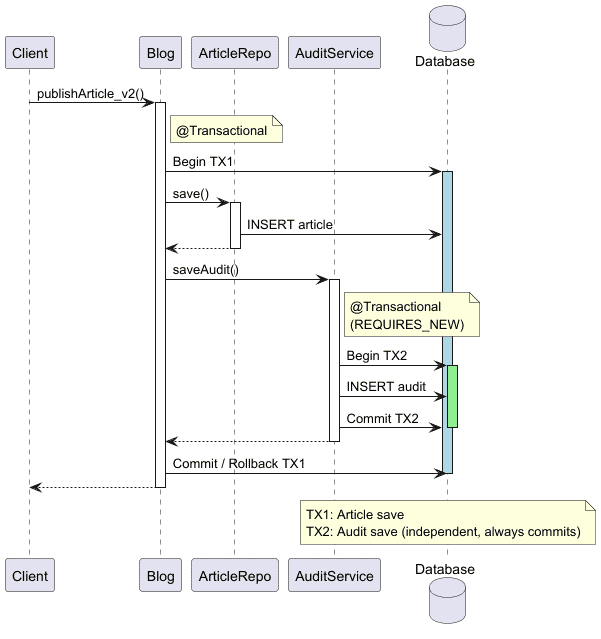
Let’s write a simple test to verify that this new approach still throws an exception due to the invalid Article, but successfully inserts a record for the failed operation into the audit table:
@Test
void whenPublishingAnInvalidArticle_thenSavesFailureToAudit() {
    assertThatThrownBy(
         () -> articleService.publishArticle_v2(new Article("Test Article", null)))
      .isInstanceOf(Exception.class);

    assertThat(auditRepo.findAll())
      .extracting("description")
      .containsExactly("failed to save: Test Article");
}
As expected, the main transaction is free to rollback and throw a Java exception, while the failure is still recorded in the audit table.
4. Use Sequential Transactions via TransactionTemplate
Instead of using nested transactions, we can alternatively ensure that we either commit or roll back the first transaction before starting the second one:
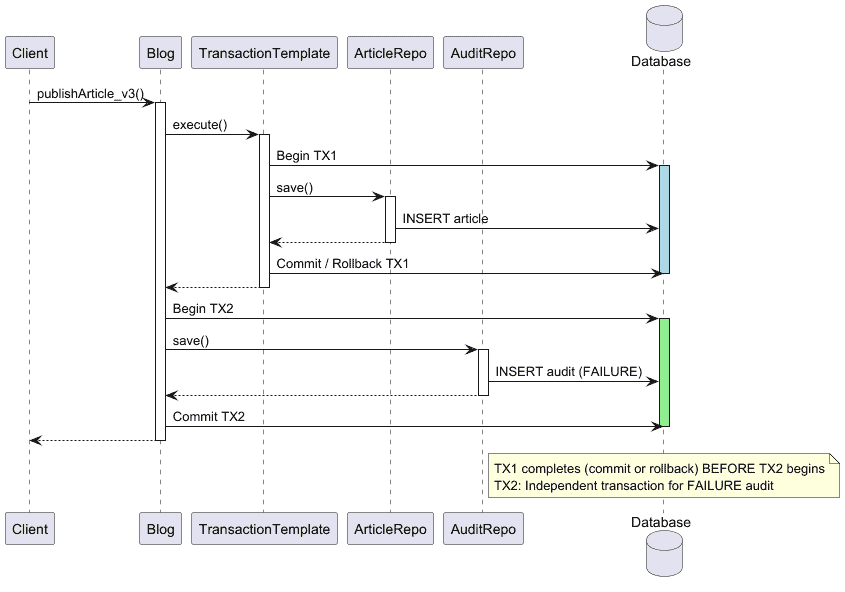
Since defining exact transaction scopes can be tricky with Spring AOP, we use the TransactionTemplate bean this time.
TransactionTemplate enables us to define transactional boundaries programmatically, providing finer control over the start and end times of transactions. For example, we can use it to start one transaction for saving the Article and, in case of a failure, ensure we close it before recording it in the audit table. This way, JPA can start a new transaction for the audit operation:
@Component
class Blog {

    private final ArticleRepo articleRepo;
    private final AuditRepo auditRepo;
    private final TransactionTemplate transactionTemplate;

    // constructor

    public Optional publishArticle_v3(final Article article) {
        try {
            Article savedArticle = transactionTemplate.execute(txStatus -> {
                Article saved = articleRepo.save(article);
                auditRepo.save(
                  new Audit("SAVE_ARTICLE", "SUCCESS", "saved: " + article.getTitle()));
                return saved;
            }); // <-- transaction ends here

            return Optional.of(savedArticle.getId());

        } catch (Exception e) {
            auditRepo.save(
              new Audit("SAVE_ARTICLE", "FAILURE", "failed to save: " + article.getTitle()));
            return Optional.empty();
        }
    }
}
If we test this solution, we might expect it to handle the error gracefully and return an empty Optional. Needless to say, it should also record the failure in the audit table:
@Test
void whenPublishingAnInvalidArticle_thenRecoverFromError_andSavesFailureToAudit() {
    Optional<Long> id = articleService.publishArticle_v3(new Article("Test Article", null));

    assertThat(id).isEmpty();

    assertThat(auditRepo.findAll())
      .extracting("description")
      .containsExactly("failed to save: Test Article");
}
At this point, we ensure safe handling of the transaction.
5. Conclusion
In this article, we explored a common pitfall with nested transactions in Spring that can lead to UnexpectedRollbackException. Specifically, we examined why simply catching exceptions inside a transactional method isn’t enough and how Spring marks the transaction as rollback-only.
After that, we walked through two practical solutions:
- using a separate transactional boundary with different propagation
- managing transactions programmatically with TransactionTemplate
Both approaches save critical Audit records, even if the main operation fails.














