


Mocking is an essential part of unit testing, and the Mockito library makes it easy to write clean and intuitive unit tests for your Java code.
Get started with mocking and improve your application tests using our Mockito guide:
Handling concurrency in an application can be a tricky process with many potential pitfalls. A solid grasp of the fundamentals will go a long way to help minimize these issues.
Get started with understanding multi-threaded applications with our Java Concurrency guide:
Spring 5 added support for reactive programming with the Spring WebFlux module, which has been improved upon ever since. Get started with the Reactor project basics and reactive programming in Spring Boot:
Since its introduction in Java 8, the Stream API has become a staple of Java development. The basic operations like iterating, filtering, mapping sequences of elements are deceptively simple to use.
But these can also be overused and fall into some common pitfalls.
To get a better understanding on how Streams work and how to combine them with other language features, check out our guide to Java Streams:
Explore Spring Boot 3 and Spring 6 in-depth through building a full REST API with the framework:
Yes, Spring Security can be complex, from the more advanced functionality within the Core to the deep OAuth support in the framework.
I built the security material as two full courses - Core and OAuth, to get practical with these more complex scenarios. We explore when and how to use each feature and code through it on the backing project.
You can explore the course here:
All Access is finally out, with all of my Spring courses. Learn JUnit is out as well, and Learn Maven is coming fast. And, of course, quite a bit more affordable. Finally.
>> GET THE COURSE
Spring Data JPA is a great way to handle the complexity of JPA with the powerful simplicity of Spring Boot.
Get started with Spring Data JPA through the guided reference course:
Refactor Java code safely — and automatically — with OpenRewrite.
Refactoring big codebases by hand is slow, risky, and easy to put off. That’s where OpenRewrite comes in. The open-source framework for large-scale, automated code transformations helps teams modernize safely and consistently.
Each month, the creators and maintainers of OpenRewrite at Moderne run live, hands-on training sessions — one for newcomers and one for experienced users. You’ll see how recipes work, how to apply them across projects, and how to modernize code with confidence.
Join the next session, bring your questions, and learn how to automate the kind of work that usually eats your sprint time.
1. Overview
In a standard REST response, the server waits until it has the entire payload before sending it back to the client. However, large language models (LLMs) generate outputs in a token-by-token manner, usually taking a significant amount of time to produce a full response.
This leads to latency waiting for a full response, especially when the output involves a large number of tokens. Streaming responses address this problem by sending data incrementally in small pieces.
In this tutorial, we’ll explore how to use Spring AI ChatClient to return a streaming chat response rather than sending the entire response at once.
2. Maven Dependencies
Let’s start by adding the Spring AI OpenAI dependency to our pom.xml:
<dependency>
    <groupId>org.springframework.ai</groupId>
    <artifactId>spring-ai-starter-model-openai</artifactId>
    <version>1.0.2</version>
</dependency>
We’ll need a web container to illustrate the chat response streaming. We could choose either spring-boot-starter-web or spring-boot-starter-webflux dependency:
<dependency>
    <groupId>org.springframework.boot</groupId>
    <artifactId>spring-boot-starter-webflux</artifactId>
</dependency>
3. Common Components
Before we explore different streaming approaches. Let’s create a common component for the subsequent sections. The ChatRequest class contains the payload of our API call:
public class ChatRequest {
    @NotNull
    private String prompt;

    // constructor, getter and setter
}
For the following sections, we’ll send the following chat request to our endpoints. This is intentionally to let the chat model produce a long response so that we could demonstrate the streaming:
{
    "prompt": "Tell me a story about a girl loves a boy, around 250 words"
}
Now, we’re all set and ready to move on to different streaming approaches.
4. Streaming as Words
To provide a more realistic experience, we don’t want to wait for the entire response before returning it to the client. We could stream the response to the client instead. Spring AI streams the chat response word by word by default.
Let’s create a ChatService to enable streaming chat response from the ChatClient. The major bit here is we are calling stream() and returning the response as a Flux<String>:
@Component
public class ChatService {
    private final ChatClient chatClient;

    public ChatService(ChatModel chatModel) {
        this.chatClient = ChatClient.builder(chatModel)
          .build();
    }

    public Flux<String> chat(String prompt) {
        return chatClient.prompt()
          .user(userMessage -> userMessage.text(prompt))
          .stream()
          .content();
    }
}
There are 2 conditions for enabling the chat response streaming. First, the REST controller must return a Flux<String>. Second, the response content type must be set to text/event-stream:
@RestController
@Validated
public class ChatController {
    private final ChatService chatService;

    public ChatController(ChatService chatService) {
        this.chatService = chatService;
    }

    @PostMapping(value = "/chat", produces = MediaType.TEXT_EVENT_STREAM_VALUE)
    public Flux<String> chat(@RequestBody @Valid ChatRequest request) {
        return chatService.chat(request.getPrompt());
    }
}
Now, everything is set. We could start our Spring Boot application and use Postman to send our chat request to the REST endpoint:
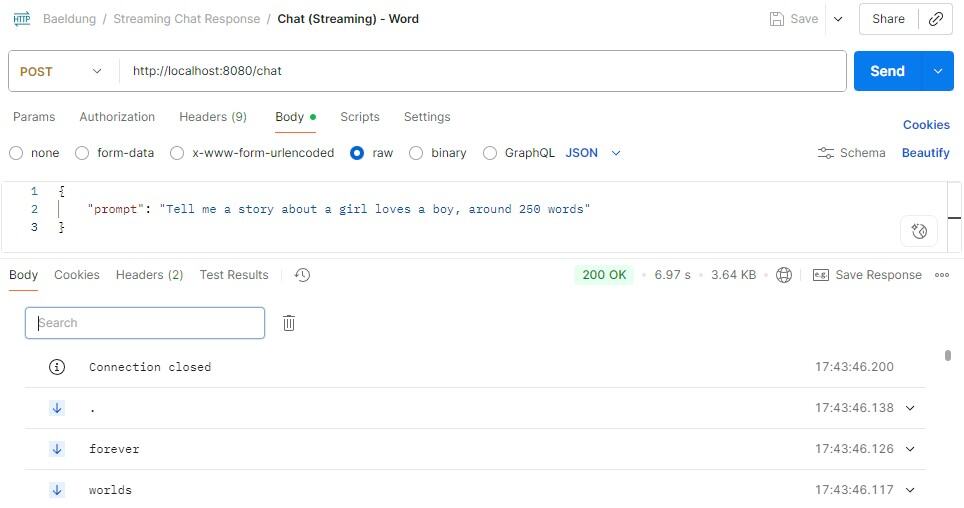
Upon execution, we could see the response body displayed in Postman is row by row, where each row is a server-sent event.
From the response, we could see that Spring AI streams the response word by word. This allows the client to start consuming results immediately without waiting for the response. In this way, it offers very low latency, making users feel like it’s live typing.
5. Streaming as Chunks
Even though streaming as words is very responsive, it could increase the overhead significantly.
We could reduce the overhead by collecting the words together to form a larger chunk and return it instead of a single word. This makes the stream more efficient and retains the progressive streaming experience.
We could modify our chat() method and call the transform on Flux<String> to collect the content until the chunk size reaches 100:
@Component
public class ChatService {
    private final ChatClient chatClient;

    public ChatService(ChatModel chatModel) {
        this.chatClient = ChatClient.builder(chatModel)
          .build();
    }

    public Flux<String> chat(String prompt) {
        return chatClient.prompt()
          .user(userMessage -> userMessage.text(prompt))
          .stream()
          .content()
          .transform(flux -> toChunk(flux, 100));
    }

    private Flux<String> toChunk(Flux<String> tokenFlux, int chunkSize) {
        return Flux.create(sink -> {
            StringBuilder buffer = new StringBuilder();
            tokenFlux.subscribe(
              token -> {
                  buffer.append(token);
                  if (buffer.length() >= chunkSize) {
                      sink.next(buffer.toString());
                      buffer.setLength(0);
                  }
              },
              sink::error,
              () -> {
                  if (buffer.length() > 0) {
                      sink.next(buffer.toString());
                  }
                  sink.complete();
              }
            );
        });
    }
}
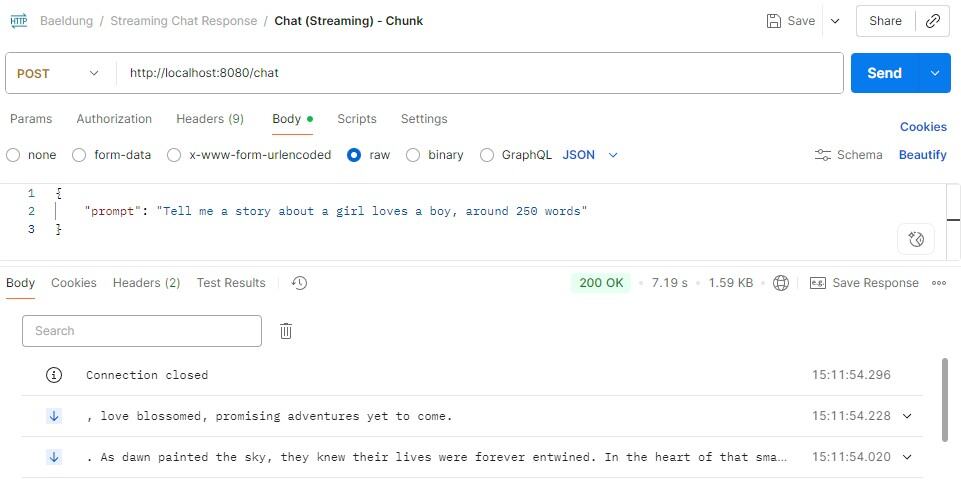
Basically, we collect each word returned from Flux<String> and append it to the StringBuilder. Once the buffer size reaches the minimum of 100 characters, we flush the buffer as a chunk to the client. At the end of the stream, we flush the remaining buffer as the final chunk.
Now, if we issue the chat request to the modified ChatService, we could see that the content in the server-sent event will be at least 100 characters long except for the last chunk:
6. Streaming as JSON
If we want to stream the chat response in a structured format, we could use newline-delimited JSON (NDJSON). NDJSON is a streaming format where each line contains a JSON object, and objects are separated by a newline character.
To achieve it, we could instruct the chat model to return NDJSON by adding a system prompt, along with a sample JSON to ensure the chat model fully understands the required format and avoids confusion:
@Component
public class ChatService {
    private final ChatClient chatClient;

    public ChatService(ChatModel chatModel) {
        this.chatClient = ChatClient.builder(chatModel)
          .build();
    }

    public Flux<String> chat(String prompt) {
        return chatClient.prompt()
          .system(systemMessage -> systemMessage.text(
            """
              Respond in NDJSON format.
              Each JSON object should contains around 100 characters.
              Sample json object format: {"part":0,"text":"Once in a small town..."}
            """))
          .user(userMessage -> userMessage.text(prompt))
          .stream()
          .content()
          .transform(this::toJsonChunk);
    }

    private Flux<String> toJsonChunk(Flux<String> tokenFlux) {
        return Flux.create(sink -> {
            StringBuilder buffer = new StringBuilder();
            tokenFlux.subscribe(
              token -> {
                  buffer.append(token);
                  int idx;
                  if ((idx = buffer.indexOf("\n")) >= 0) {
                      String line = buffer.substring(0, idx);
                      sink.next(line);
                      buffer.delete(0, idx + 1);
                  }
              },
              sink::error,
              () -> {
                  if (buffer.length() > 0) {
                      sink.next(buffer.toString());
                  }
                  sink.complete();
              }
            );
        });
    }
}
The method toJsonChunk() is similar to the toChunk() in the previous section. The key difference is the flushing strategy. Instead of flushing data when the buffer reaches the minimum size, it flushes the buffer content to the client once the newline character is found in the token.
Let’s make a chat request again to see the results:
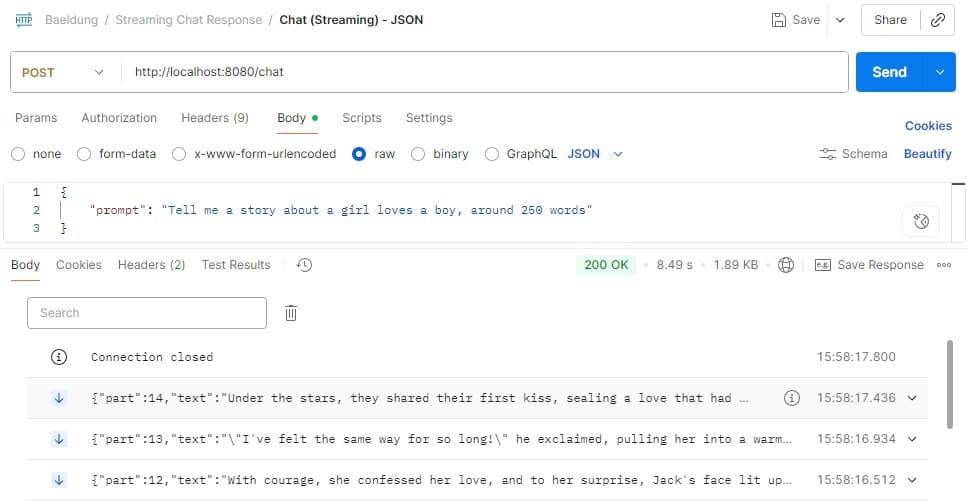
We could see that each line is a JSON object where its format follows the system prompt. JSON is widely supported by different programming languages, making it easy for clients to parse and consume when the event arrives.
7. Non-Streaming
We’ve already explored different approaches to streaming responses. Now, let’s take a look at the traditional non-streaming approach.
When we return a synchronous chat response with the spring-boot-starter-web Maven dependency, we simply invoke the ChatClient call() method:
ChatClient chatClient = ...;
chatClient.prompt()
  .user(userMessage -> userMessage.text(prompt))
  .call()
  .content()
However, we’ll get the following exception if we do the same with the spring-boot-starter-webflux dependency:
org.springframework.web.client.ResourceAccessException: I/O error on POST request for "https://api.openai.com/v1/chat/completions": block()/blockFirst()/blockLast() are blocking, which is not supported in thread reactor-http-nio-3This happens because WebFlux is non-blocking and does not allow blocking operations such as call().
To achieve the same non-streaming response in WebFlux, we’ll need to call stream() in the ChatClient and combine the collected flux into a single response:
@Component
public class ChatService {
    private final ChatClient chatClient;

    public ChatService(ChatModel chatMode) {
        this.chatClient = ChatClient.builder(chatModel)
          .build();
    }

    public Flux<String> chat(String prompt) {
        return chatClient.prompt()
          .user(userMessage -> userMessage.text(prompt))
          .stream()
          .content();
    }
}
In the controller, we have to convert Flux<String> into Mono<String> by collecting the words and joining them:
@RestController
@Validated
public class ChatController {
    private final ChatService chatService;

    public ChatController(ChatService chatService) {
        this.chatService = chatService;
    }

    @PostMapping(value = "/chat")
    public Mono<String> chat(@RequestBody @Valid ChatRequest request) {
        return chatService.chat(request.getPrompt())
          .collectList()
          .map(list -> String.join("", list));
    }
}
With this approach, we could use the WebFlux non-blocking model to return a non-streaming response.
8. Conclusion
In this article, we explored different approaches to streaming chat responses using the Spring AI ChatClient.
This included streaming as words, streaming as chunks, and streaming as JSON. With these techniques, we could significantly reduce the latency of returning a chat response to the client and enhance the user experience.














