Maven Multi-Module Project Coverage With Jacoco
Last updated: January 8, 2024


Mocking is an essential part of unit testing, and the Mockito library makes it easy to write clean and intuitive unit tests for your Java code.
Get started with mocking and improve your application tests using our Mockito guide:
Handling concurrency in an application can be a tricky process with many potential pitfalls. A solid grasp of the fundamentals will go a long way to help minimize these issues.
Get started with understanding multi-threaded applications with our Java Concurrency guide:
Spring 5 added support for reactive programming with the Spring WebFlux module, which has been improved upon ever since. Get started with the Reactor project basics and reactive programming in Spring Boot:
Since its introduction in Java 8, the Stream API has become a staple of Java development. The basic operations like iterating, filtering, mapping sequences of elements are deceptively simple to use.
But these can also be overused and fall into some common pitfalls.
To get a better understanding on how Streams work and how to combine them with other language features, check out our guide to Java Streams:
Explore Spring Boot 3 and Spring 6 in-depth through building a full REST API with the framework:
Yes, Spring Security can be complex, from the more advanced functionality within the Core to the deep OAuth support in the framework.
I built the security material as two full courses - Core and OAuth, to get practical with these more complex scenarios. We explore when and how to use each feature and code through it on the backing project.
You can explore the course here:
All Access is finally out, with all of my Spring courses. Learn JUnit is out as well, and Learn Maven is coming fast. And, of course, quite a bit more affordable. Finally.
>> GET THE COURSE
Spring Data JPA is a great way to handle the complexity of JPA with the powerful simplicity of Spring Boot.
Get started with Spring Data JPA through the guided reference course:
Refactor Java code safely — and automatically — with OpenRewrite.
Refactoring big codebases by hand is slow, risky, and easy to put off. That’s where OpenRewrite comes in. The open-source framework for large-scale, automated code transformations helps teams modernize safely and consistently.
Each month, the creators and maintainers of OpenRewrite at Moderne run live, hands-on training sessions — one for newcomers and one for experienced users. You’ll see how recipes work, how to apply them across projects, and how to modernize code with confidence.
Join the next session, bring your questions, and learn how to automate the kind of work that usually eats your sprint time.
Get up to speed with the core of Maven quickly, and then go beyond the foundations into the more powerful functionality of the build tool, such as profiles, scopes, multi-module projects and quite a bit more:
1. Overview
In this tutorial, we’ll build a Maven multi-module project. In this project, the services and controllers will be in different modules. Then, we’ll write some tests and use Jacoco to calculate the code coverage.
2. Service Layer
First, let’s create the service layer of our multi-module application.
2.1. Service Class
We’ll create our service and add a couple of methods:
@Service
class MyService {

    String unitTestedOnly() {
        return "unit tested only";
    }

    String coveredByUnitAndIntegrationTests() {
        return "covered by unit and integration tests";
    }

    String coveredByIntegrationTest() {
        return "covered by integration test";
    }

    String notTested() {
        return "not tested";
    }

}
As their names indicate:
- a unit test located in the same layer will test the method unitTestedOnly()
- a unit test will test coveredByUnitAndIntegrationTests(). An integration test in the controller module will also cover this method’s code
- an integration test will cover coveredByIntegrationTest(). However, no unit test will test this method
- No test will cover the method notTested()
2.2. Unit Tests
Let’s now write the corresponding unit tests:
class MyServiceUnitTest {

    MyService myService = new MyService();

    @Test
    void whenUnitTestedOnly_thenCorrectText() {
        assertEquals("unit tested only", myService.unitTestedOnly());
    }

    @Test
    void whenTestedMethod_thenCorrectText() {
        assertEquals("covered by unit and integration tests", myService.coveredByUnitAndIntegrationTests());
    }

}
The tests are simply checking that the method’s output is as expected.
2.3. Surefire Plugin Configuration
We’ll use the Maven Surefire plugin to run the unit tests. Let’s configure it inside the service’s module pom.xml:
<plugins>
    <plugin>
    <groupId>org.apache.maven.plugins</groupId>
    <artifactId>maven-surefire-plugin</artifactId>
    <version>3.2.5</version>
    <configuration>
    <includes>
        <include>**/*Test.java</include>
    </includes>
    </configuration>
    </plugin>
</plugins>
3. Controller Layer
We’ll now add a controller layer in our multi-module application.
3.1. Controller Class
Let’s add the controller class:
@RestController
class MyController {

    private final MyService myService;

    public MyController(MyService myService) {
        this.myService = myService;
    }

    @GetMapping("/tested")
    String fullyTested() {
        return myService.coveredByUnitAndIntegrationTests();
    }

    @GetMapping("/indirecttest")
    String indirectlyTestingServiceMethod() {
        return myService.coveredByIntegrationTest();
    }

    @GetMapping("/nottested")
    String notTested() {
        return myService.notTested();
    }

}
The fullyTested() and indirectlyTestingServiceMethod() methods will be tested by integration tests. As a result, those tests will cover the two service methods coveredByUnitAndIntegrationTests() and coveredByIntegrationTest(). On the other hand, we’ll write no test for notTested().
3.2. Integration Tests
We can now test our RestController:
@SpringBootTest(classes = MyApplication.class)
@AutoConfigureMockMvc
class MyControllerIntegrationTest {

    @Autowired
    private MockMvc mockMvc;

    @Test
    void whenFullyTested_ThenCorrectText() throws Exception {
        mockMvc.perform(MockMvcRequestBuilders.get("/tested"))
          .andExpect(MockMvcResultMatchers.status()
            .isOk())
          .andExpect(MockMvcResultMatchers.content()
            .string("covered by unit and integration tests"));
    }

    @Test
    void whenIndirectlyTestingServiceMethod_ThenCorrectText() throws Exception {
        mockMvc.perform(MockMvcRequestBuilders.get("/indirecttest"))
          .andExpect(MockMvcResultMatchers.status()
            .isOk())
          .andExpect(MockMvcResultMatchers.content()
            .string("covered by integration test"));
    }

}
In these tests, we start an application server and send it requests. Then, we check that the output is correct.
3.3. Failsafe Plugin Configuration
We’ll use the Maven Failsafe plugin to run the integration tests. The last step is to configure it inside the controller’s module pom.xml:
<plugin>
    <groupId>org.apache.maven.plugins</groupId>
    <artifactId>maven-failsafe-plugin</artifactId>
    <version>3.1.2</version>
    <executions>
        <execution>
            <goals>
                <goal>integration-test</goal>
                <goal>verify</goal>
            </goals>
	</execution>
        </executions>
    <configuration>
        <includes>
            <include>**/*IntegrationTest.java</include>
        </includes>
    </configuration>
</plugin>
4. Aggregating Coverage via Jacoco
Jacoco (Java Code Coverage) is a tool used in Java applications to measure code coverage during testing. Let’s now compute our coverage report.
4.1. Preparing Jacoco Agent
The prepare-agent phase sets up the necessary hooks and configuration so that Jacoco can track the executed code while running tests. This configuration is required before we run any tests. Thus, we’ll add the preparation step directly to the parent pom.xml:
<plugin>
    <groupId>org.jacoco</groupId>
    <artifactId>jacoco-maven-plugin</artifactId>
    <version>0.8.11</version>
    <executions>
        <execution>
            <goals>
                <goal>prepare-agent</goal>
            </goals>
        </execution>
    </executions>
</plugin>
4.2. Gathering Tests Results
To gather the test coverage, we’ll create a new module aggregate-report. It contains only a pom.xml and has dependencies on the two previous modules.
Thanks to the preparation phase, we can aggregate the reports from every module. It’s the job of the report-aggregate goal:
<plugin>
    <groupId>org.jacoco</groupId>
    <artifactId>jacoco-maven-plugin</artifactId>
    <version>0.8.8</version>
    <executions>
        <execution>
            <phase>verify</phase>
            <goals>
                <goal>report-aggregate</goal>
            </goals>
            <configuration>
                <dataFileIncludes>
                    <dataFileInclude>**/jacoco.exec</dataFileInclude>
                </dataFileIncludes>
                <outputDirectory>${project.reporting.outputDirectory}/jacoco-aggregate</outputDirectory>
            </configuration>
        </execution>
    </executions>
</plugin>
We can now run the verify goal from the parent module:
$ mvn clean verifyAt the end of the build, we can see that Jacoco generates the report in the target/site/jacoco-aggregate folder of the aggregate-report submodule.
Let’s open the index.html file to have a look at the results.
To begin, we can navigate to the report for the controller class:

As expected, the constructor and the fullyTested() and indirectlyTestingServiceMethod() methods are covered by the tests, whereas notTested() isn’t covered.
Let’s now have a look at the report for the service class:
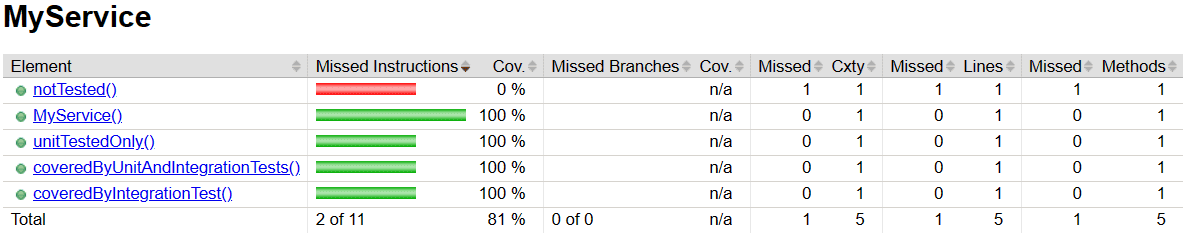
This time, let’s focus on the coveredByIntegrationTest() method. As we know, no test in the service module tests this method. The only test that passes through this method’s code is inside the controller module. However, Jacoco recognized that there is a test for this method. In this case, the word aggregation takes its whole meaning!
5. Conclusion
In this article, we created a multi-module project and gathered the test coverage thanks to Jacoco.
Let’s recall that we need to run the preparation phase before the tests, while the aggregation takes place after them. To go further, we can use a tool like SonarQube to get an excellent overview of the coverage result.














