Write Extracted Data to a File Using JMeter
Last updated: January 8, 2024


Mocking is an essential part of unit testing, and the Mockito library makes it easy to write clean and intuitive unit tests for your Java code.
Get started with mocking and improve your application tests using our Mockito guide:
Handling concurrency in an application can be a tricky process with many potential pitfalls. A solid grasp of the fundamentals will go a long way to help minimize these issues.
Get started with understanding multi-threaded applications with our Java Concurrency guide:
Spring 5 added support for reactive programming with the Spring WebFlux module, which has been improved upon ever since. Get started with the Reactor project basics and reactive programming in Spring Boot:
Since its introduction in Java 8, the Stream API has become a staple of Java development. The basic operations like iterating, filtering, mapping sequences of elements are deceptively simple to use.
But these can also be overused and fall into some common pitfalls.
To get a better understanding on how Streams work and how to combine them with other language features, check out our guide to Java Streams:
Explore Spring Boot 3 and Spring 6 in-depth through building a full REST API with the framework:
Yes, Spring Security can be complex, from the more advanced functionality within the Core to the deep OAuth support in the framework.
I built the security material as two full courses - Core and OAuth, to get practical with these more complex scenarios. We explore when and how to use each feature and code through it on the backing project.
You can explore the course here:
All Access is finally out, with all of my Spring courses. Learn JUnit is out as well, and Learn Maven is coming fast. And, of course, quite a bit more affordable. Finally.
>> GET THE COURSE
Spring Data JPA is a great way to handle the complexity of JPA with the powerful simplicity of Spring Boot.
Get started with Spring Data JPA through the guided reference course:
Refactor Java code safely — and automatically — with OpenRewrite.
Refactoring big codebases by hand is slow, risky, and easy to put off. That’s where OpenRewrite comes in. The open-source framework for large-scale, automated code transformations helps teams modernize safely and consistently.
Each month, the creators and maintainers of OpenRewrite at Moderne run live, hands-on training sessions — one for newcomers and one for experienced users. You’ll see how recipes work, how to apply them across projects, and how to modernize code with confidence.
Join the next session, bring your questions, and learn how to automate the kind of work that usually eats your sprint time.
1. Overview
In this tutorial, let’s explore two methods to extract data from Apache JMeter and write it into an external file.
2. Setting up a Basic JMeter Script
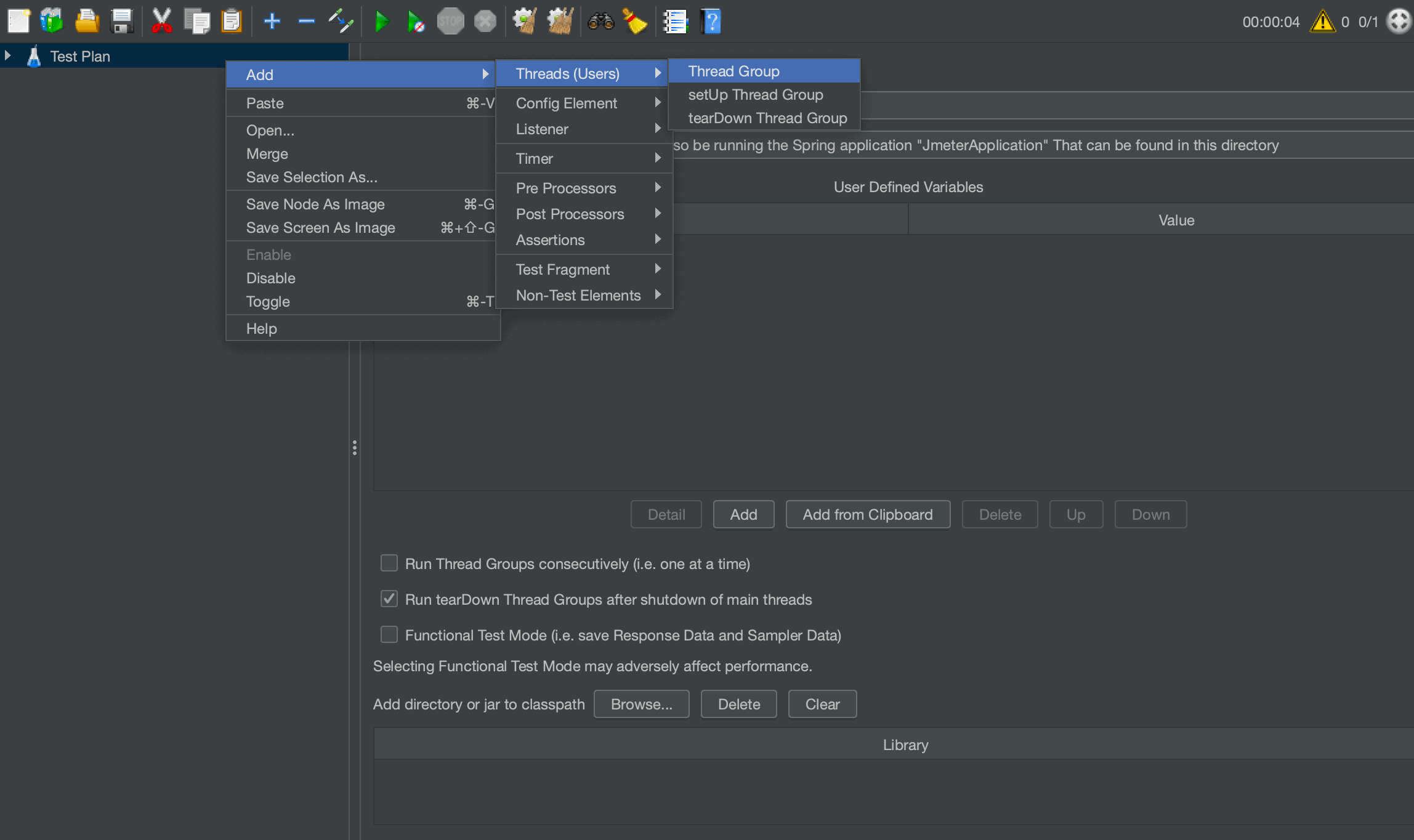
Let’s now start by creating a basic JMeter script. Let’s create a Thread Group with a single thread (this is the default when creating a Thread Group):
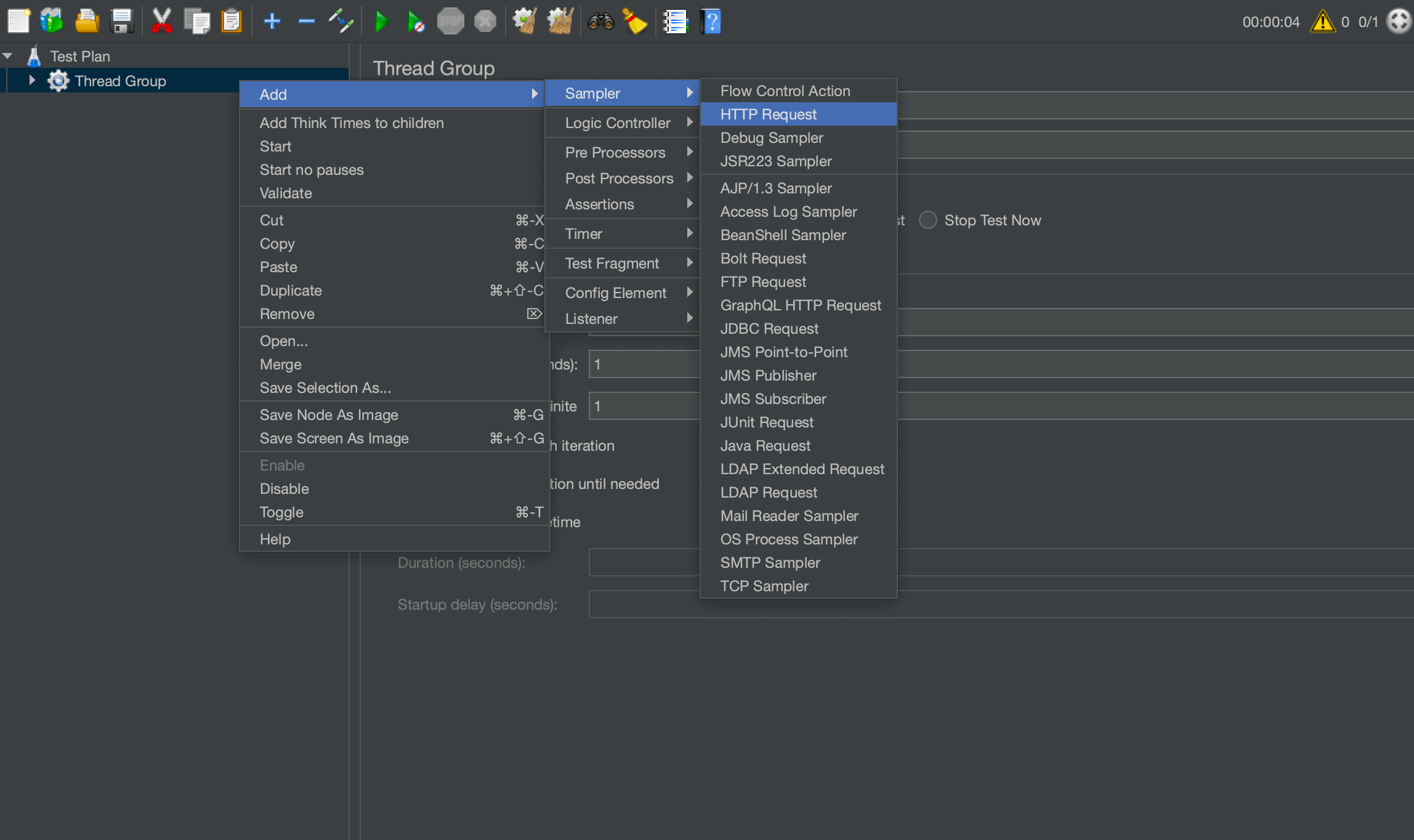
Within this Thread Group, let’s now create an HTTP Sampler:
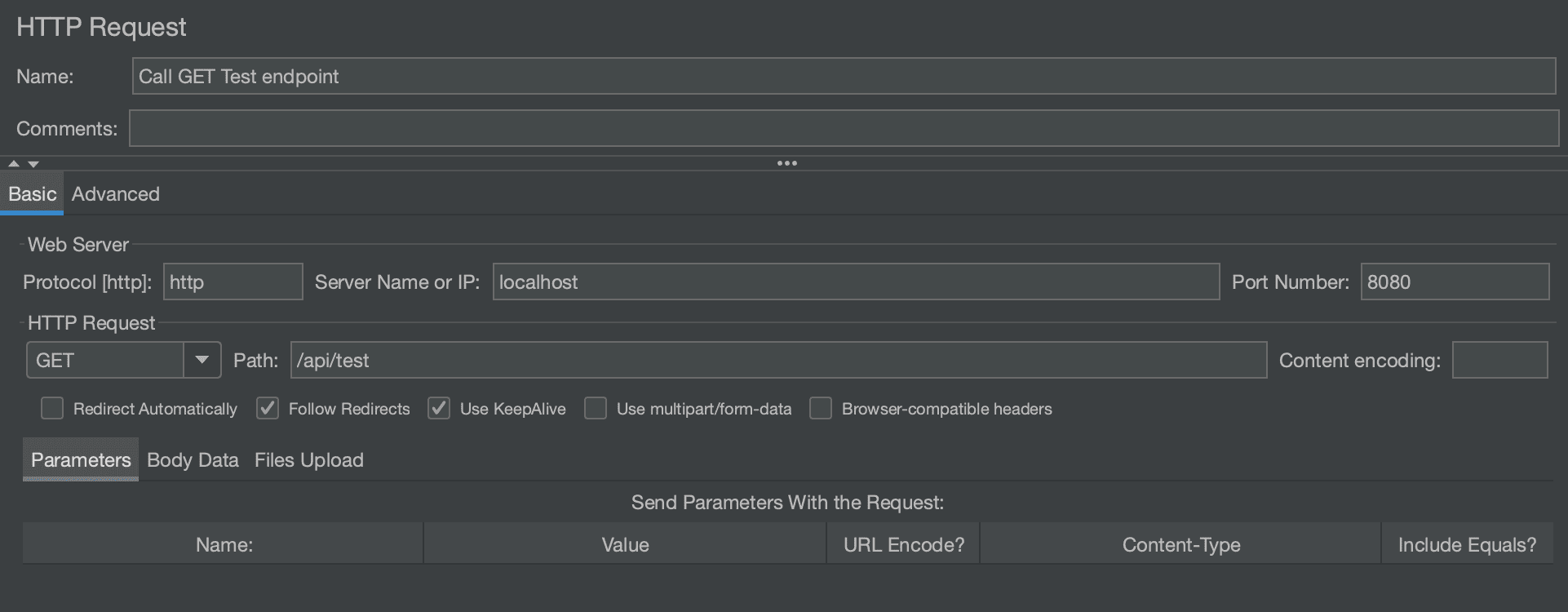
Let’s set up our HTTP Sampler to call an API running on localhost. We can start by defining the API with a simple REST controller:
@RestController
public class RetrieveUuidController {

    @GetMapping("/api/uuid")
    public Response uuid() {
        return new Response(format("Test message... %s.", UUID.randomUUID()));
    }
}
In addition, let’s also define the Response instance that is returned by our controller as referenced above:
public class Response {
    private Instant timestamp;
    private UUID uuid;
    private String message;

    // getters, setters, and constructor omitted
}
Let’s now use this to test our JMeter script. By default, this will run on port 8080. If we’re unable to use port 8080, then we’ll need to update the Port Number field in the HTTP Sampler accordingly.
The HTTP Sampler request should look like this:
3. Writing the Extracted Output Using a Listener
Next, let’s use a listener of type Save Responses to a file to extract the data we want to a file:
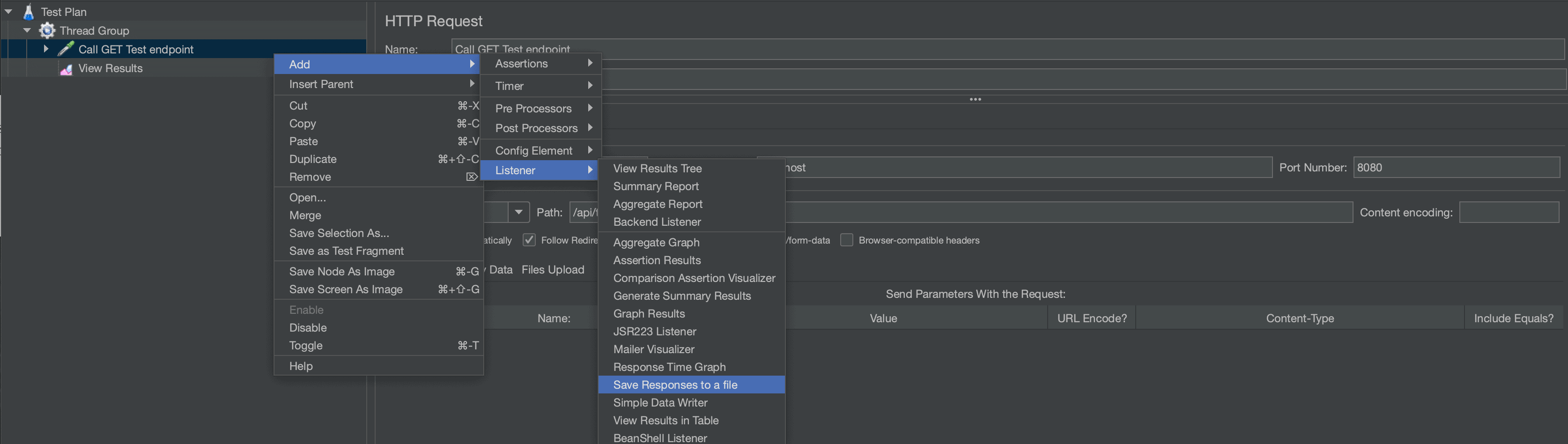
Using this listener is convenient but doesn’t allow much flexibility in what we can extract to a file. For our case, this will produce a JSON file that is saved to the location where JMeter is currently running (though the path can be configured in the Filename Prefix field).
4. Writing the Extracted Output Using PostProcessor
Another way we can extract data to a file is by creating a BeanShell PostProcessor. BeanShell is a very flexible scripting processor that allows us to write our script using Java code as well as make use of some built-in variables provided by JMeter.
BeanShell can be used for a variety of different use cases. In this case, let’s create a BeanShell post-processor and add a script to help us extract some data to a file:
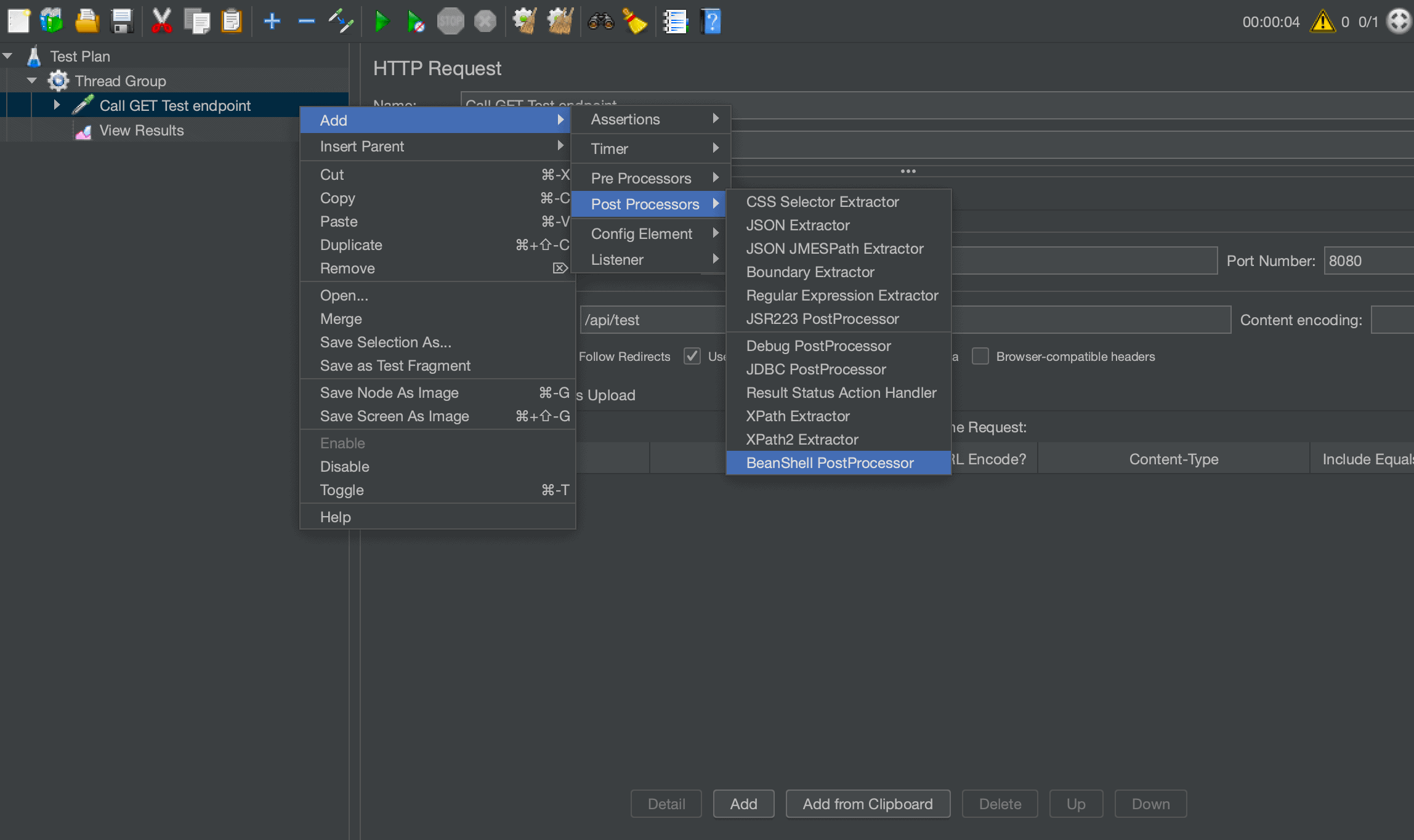
Let’s now add the following script to the Script section:
FileWriter fWriter = new FileWriter("/<path>/result.txt", true);
BufferedWriter buff = new BufferedWriter(fWriter);

buff.write("data");

buff.close();
fWriter.close();
We now have a simple script that will output the string data to a file called result. One important point to note here is the 2nd parameter of the FileWriter constructor. This must be set to true so that our BeanShell will append to the file instead of overwriting it. This is very important when using multiple threads in JMeter.
Next, we want to extract something more meaningful to our use case. Let’s make use of the ctx variable that is provided by JMeter. This will allow us to access the context held by our single thread that is running the HTTP request.
From ctx, let’s get the response code, response headers, and response body and extract these to our file:
buff.write("Response Code : " + ctx.getPreviousResult().getResponseCode());
buff.write(System.getProperty("line.separator"));
buff.write("Response Headers : " + ctx.getPreviousResult().getResponseHeaders());
buff.write(System.getProperty("line.separator"));
buff.write("Response Body : " + new String(ctx.getPreviousResult().getResponseData()));
If we want to gather specific field data and write it to our file, we can make use of the vars variable. It is a map we can use in PostProcessors to store and retrieve string data.
For this more complex example, let’s create another PostProcessor before our file extractor. This will do a search through the JSON response from the HTTP request:
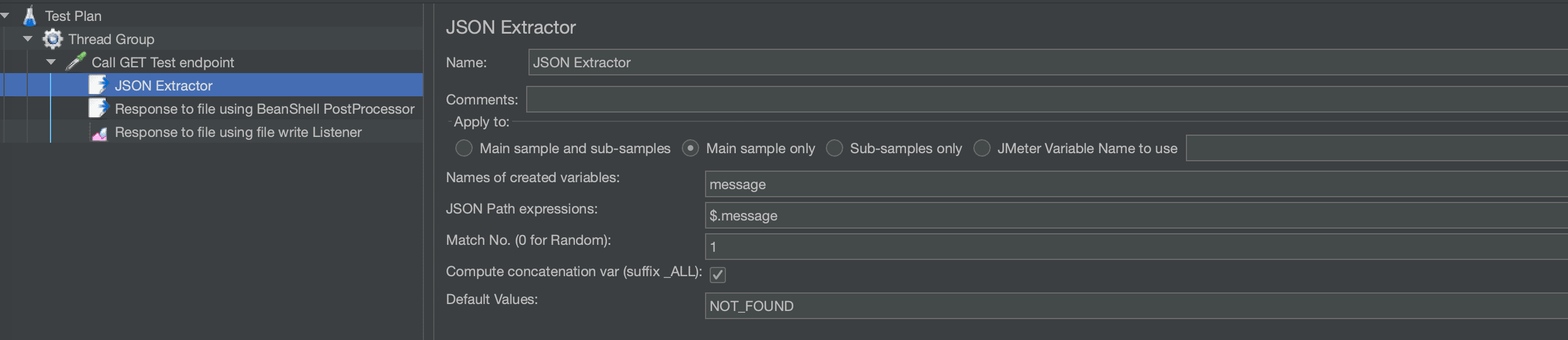
This extractor will create a variable called message. All that is left to do is to reference this variable in our file extractor to output it to our file:
buff.write("More complex extraction : " + vars.get("message"));Note: We can use this approach in conjunction with other post-processors such as “Regular Expression Extractor” to gather information in a more bespoke manner.
5. Conclusion
In this tutorial, we covered how to extract data from JMeter to an external file using a BeanShell post-processor and a write listener.














