


Mocking is an essential part of unit testing, and the Mockito library makes it easy to write clean and intuitive unit tests for your Java code.
Get started with mocking and improve your application tests using our Mockito guide:
Handling concurrency in an application can be a tricky process with many potential pitfalls. A solid grasp of the fundamentals will go a long way to help minimize these issues.
Get started with understanding multi-threaded applications with our Java Concurrency guide:
Spring 5 added support for reactive programming with the Spring WebFlux module, which has been improved upon ever since. Get started with the Reactor project basics and reactive programming in Spring Boot:
Since its introduction in Java 8, the Stream API has become a staple of Java development. The basic operations like iterating, filtering, mapping sequences of elements are deceptively simple to use.
But these can also be overused and fall into some common pitfalls.
To get a better understanding on how Streams work and how to combine them with other language features, check out our guide to Java Streams:
Explore Spring Boot 3 and Spring 6 in-depth through building a full REST API with the framework:
Yes, Spring Security can be complex, from the more advanced functionality within the Core to the deep OAuth support in the framework.
I built the security material as two full courses - Core and OAuth, to get practical with these more complex scenarios. We explore when and how to use each feature and code through it on the backing project.
You can explore the course here:
All Access is finally out, with all of my Spring courses. Learn JUnit is out as well, and Learn Maven is coming fast. And, of course, quite a bit more affordable. Finally.
>> GET THE COURSE
Spring Data JPA is a great way to handle the complexity of JPA with the powerful simplicity of Spring Boot.
Get started with Spring Data JPA through the guided reference course:
Refactor Java code safely — and automatically — with OpenRewrite.
Refactoring big codebases by hand is slow, risky, and easy to put off. That’s where OpenRewrite comes in. The open-source framework for large-scale, automated code transformations helps teams modernize safely and consistently.
Each month, the creators and maintainers of OpenRewrite at Moderne run live, hands-on training sessions — one for newcomers and one for experienced users. You’ll see how recipes work, how to apply them across projects, and how to modernize code with confidence.
Join the next session, bring your questions, and learn how to automate the kind of work that usually eats your sprint time.
Get up to speed with the core of Maven quickly, and then go beyond the foundations into the more powerful functionality of the build tool, such as profiles, scopes, multi-module projects and quite a bit more:
1. Introduction
In this tutorial, we’ll take a quick look at the fundamental concepts of the Maven Reactor and its place in the Maven ecosystem.
We’ll start with the introduction to the Maven Reactor. Next, we’ll set up a simple example of a multi-module Maven project with inter-module dependencies and see the Reactor in action to sort out the build dependencies. We’ll touch upon some available flags that can fine-tune Maven Reactor’s behavior. We’ll conclude by summarizing some of the benefits of using Reactor.
2. Basics of Maven Reactor
Maven Reactor is a built-in part of Maven and manages project dependencies and builds. It is responsible for the execution of Maven builds and ensures that projects are built in the correct order to satisfy the dependencies. The real benefit of the Maven Reactor can be appreciated in complex multi-module projects with many inter-module dependencies.
The Reactor uses a directed acyclic graph (DAG) to determine the build order of the project.
It performs the following functions as part of the Maven core:
- Gathers all the modules available for building
- Organizes the projects into the appropriate build sequence
- Sequentially executes the selected projects
4. Example Use Case
Let’s consider a project that involves developing a web-based application for managing patient information. The project consists of three modules:
- The patient-web module – this module serves as the user interface for the application
- The patient-data module – this module handles all database CRUD operations
- The patient-domain module – this module contains the domain entities that are utilized by the application
In this project, the patient-web module relies on the other two modules since it retrieves and displays data from the persistent storage. On the other hand, the patient-data module depends on the patient-domain module as it needs to access the domain entities to carry out CRUD operations. It’s important to note that the patient-data module is independent of the other two modules.
4.1. Maven Setup
To implement our simple example, let’s set up a multi-module project called sample-reactor-project, comprising three modules. Each of these modules will serve the purposes previously mentioned:
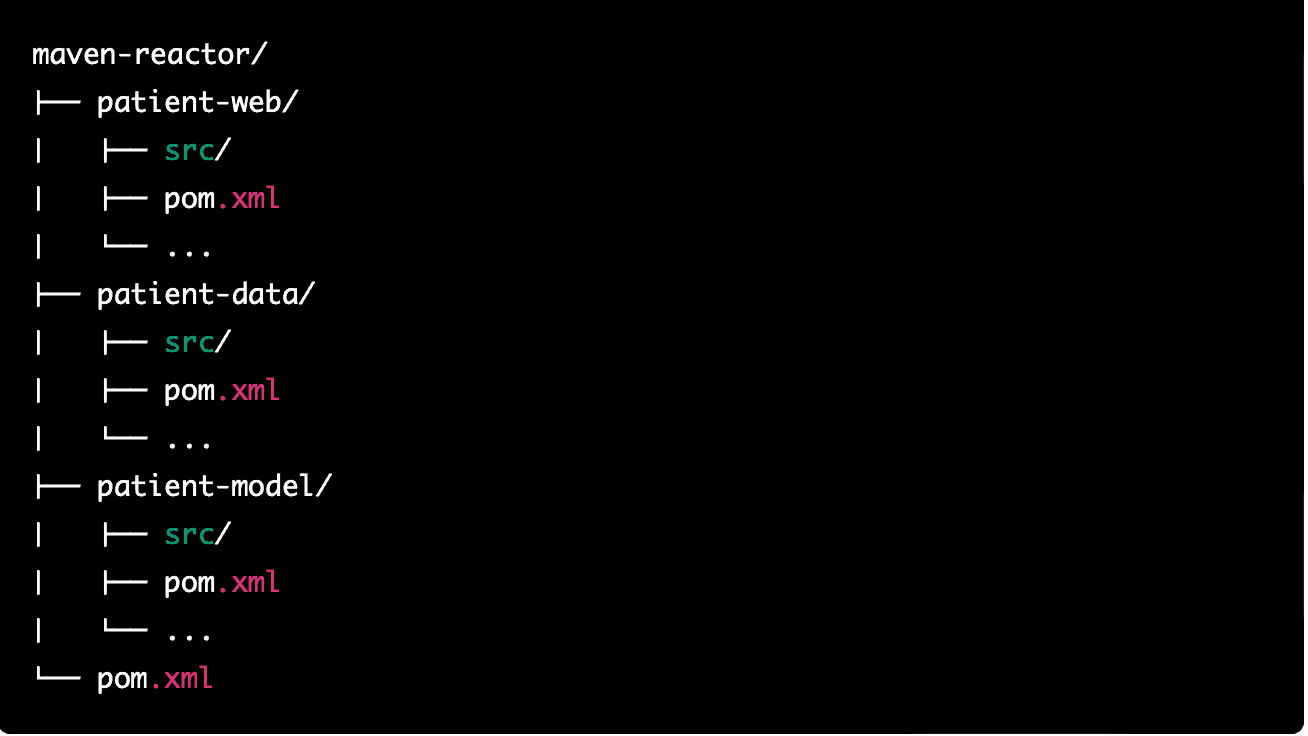
At this point, let’s peek into Project POM:
<artifactId>maven-reactor</artifactId>
<version>1.0-SNAPSHOT</version>
<name>maven-reactor</name>
<packaging>pom</packaging>
<modules>
    <module>patient-web</module>
    <module>patient-data</module>
    <module>patient-domain</module>
</modules>
Essentially, here we have defined a multi-module project with all three modules declared within <module> ..</module> tags in the project pom.
Now, let’s look at the POM for the patient-data module:
<artifactId>patient-data</artifactId>
<name>patient-data</name>
<parent>
    <groupId>com.baeldung</groupId>
    <artifactId>maven-reactor</artifactId>
    <version>1.0-SNAPSHOT</version>
</parent>
<dependencies>
    <dependency>
        <groupId>com.baeldung</groupId>
        <artifactId>patient-domain</artifactId>
        <version>1.0-SNAPSHOT</version>
    </dependency>
</dependencies>
Here, we can see that the patient data depends on the patient-domain.
For our use case, we’ll assume the patient-domain module is independent of the rest of the modules and can be built independently. Its POM looks like this:
<artifactId>patient-domain</artifactId>
<name>patient-domain</name>
    <parent>
        <groupId>com.baeldung</groupId>
        <artifactId>maven-reactor</artifactId>
        <version>1.0-SNAPSHOT</version>
    </parent>
</project>
Finally, the patient-web should have dependencies from both patient-data and patient-domain:
<artifactId>patient-web</artifactId>
<version>1.0-SNAPSHOT</version>
<name>patient-web</name>
    <parent>
        <groupId>com.baeldung</groupId>
        <artifactId>maven-reactor</artifactId>
        <version>1.0-SNAPSHOT</version>
    </parent>
    <dependencies>
        <dependency>
            <groupId>com.baeldung</groupId>
            <artifactId>patient-data</artifactId>
            <version>1.0-SNAPSHOT</version>
        </dependency>
    <dependency>
        <groupId>com.baeldung</groupId>
        <artifactId>patient-domain</artifactId>
        <version>1.0-SNAPSHOT</version>
    </dependency>
</dependencies>
4.2. Maven Reactor in Action
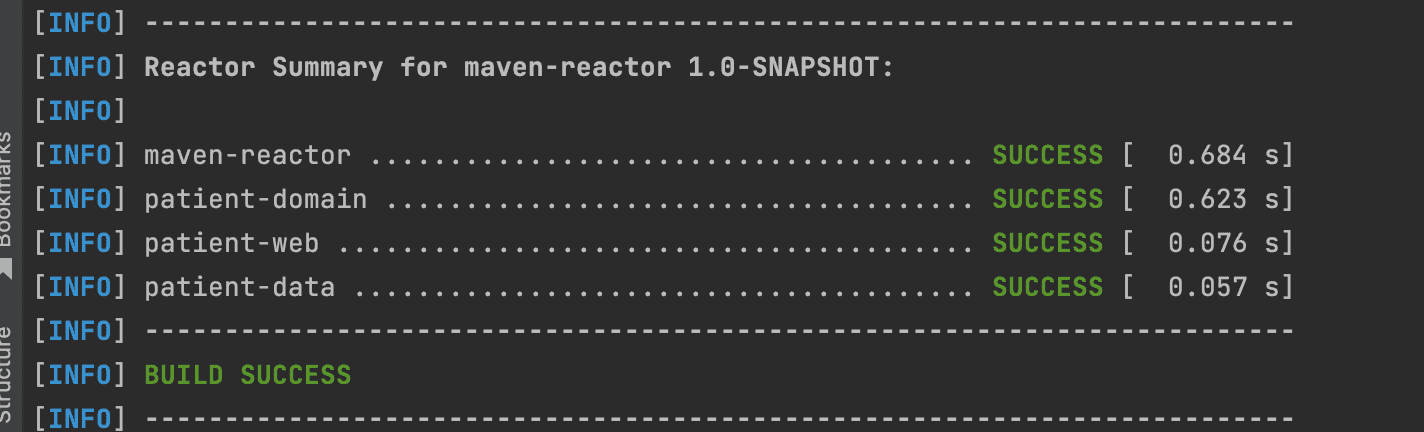
To see the Reactor in action, let’s go to the project’s parent directory (maven-reactor) and execute the mvn clean install.
At this point, Maven will use the Reactor to perform the following tasks:
- Collect all available modules in the project (in this case, patient-web, patient-data, and patient-domain)
- Determine the correct order to build the modules based on their dependencies (in this case, the patient-domain must be built before patient-data, which must be built before the patient-web)
- Build each module in the correct order, ensuring that dependencies are correctly resolved
Here’s the Reactor build order with the successful build:
5. Configuring Reactor
Although Reactor is a part of Maven by default, we can still modify its behavior by utilizing several command line switches. These switches are considered essential as they allow us to govern how the Reactor builds our project. Some of the essential switches to consider are:
- –resume-from: allows us to resume a reactor from a specific project in case it fails in the middle of the build
- –also-make: builds the specified projects and any of their dependencies in the reactor
- –also-make-dependents: builds the specified projects and any projects that depend on them
- –fail-fast: stops the overall build immediately whenever a module build fails (default)
- –fail-at-end: this option continues the reactor build even if a particular module build fails and reports all failed modules at the end instead
- –non-recursive: using this option, we can disable Reactor build and build only the project in the current directory, even if the project’s pom declares other modules
By using these options, we can fine-tune the behavior of the reactor and build our project exactly how we need it.
6. Conclusion
In this article, we had a quick look at the benefits of using Maven Reactor as part of the Apache Maven ecosystem to build multi-module complex projects taking away the responsibility of resolving the dependencies and order of build from the developer as well as reducing the time to build














