


Mocking is an essential part of unit testing, and the Mockito library makes it easy to write clean and intuitive unit tests for your Java code.
Get started with mocking and improve your application tests using our Mockito guide:
Handling concurrency in an application can be a tricky process with many potential pitfalls. A solid grasp of the fundamentals will go a long way to help minimize these issues.
Get started with understanding multi-threaded applications with our Java Concurrency guide:
Spring 5 added support for reactive programming with the Spring WebFlux module, which has been improved upon ever since. Get started with the Reactor project basics and reactive programming in Spring Boot:
Since its introduction in Java 8, the Stream API has become a staple of Java development. The basic operations like iterating, filtering, mapping sequences of elements are deceptively simple to use.
But these can also be overused and fall into some common pitfalls.
To get a better understanding on how Streams work and how to combine them with other language features, check out our guide to Java Streams:
Explore Spring Boot 3 and Spring 6 in-depth through building a full REST API with the framework:
Yes, Spring Security can be complex, from the more advanced functionality within the Core to the deep OAuth support in the framework.
I built the security material as two full courses - Core and OAuth, to get practical with these more complex scenarios. We explore when and how to use each feature and code through it on the backing project.
You can explore the course here:
All Access is finally out, with all of my Spring courses. Learn JUnit is out as well, and Learn Maven is coming fast. And, of course, quite a bit more affordable. Finally.
>> GET THE COURSE
Spring Data JPA is a great way to handle the complexity of JPA with the powerful simplicity of Spring Boot.
Get started with Spring Data JPA through the guided reference course:
Refactor Java code safely — and automatically — with OpenRewrite.
Refactoring big codebases by hand is slow, risky, and easy to put off. That’s where OpenRewrite comes in. The open-source framework for large-scale, automated code transformations helps teams modernize safely and consistently.
Each month, the creators and maintainers of OpenRewrite at Moderne run live, hands-on training sessions — one for newcomers and one for experienced users. You’ll see how recipes work, how to apply them across projects, and how to modernize code with confidence.
Join the next session, bring your questions, and learn how to automate the kind of work that usually eats your sprint time.
1. Introduction
Apache Kafka is the most popular open-source distributed and fault-tolerant stream processing system. Kafka Consumer provides the basic functionalities to handle messages. Kafka Streams also provides real-time stream processing on top of the Kafka Consumer client.
In this tutorial, we’ll explain the features of Kafka Streams to make the stream processing experience simple and easy.
2. Difference Between Streams and Consumer APIs
2.1. Kafka Consumer API
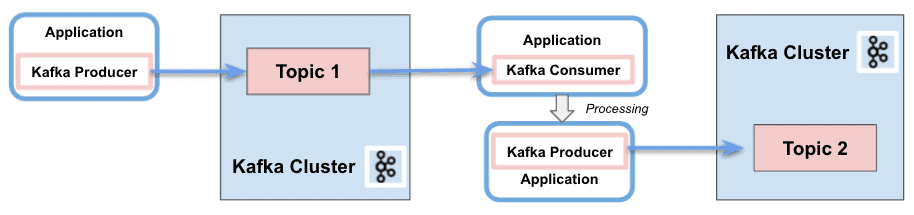
In a nutshell, Kafka Consumer API allows applications to process messages from topics. It provides the basic components to interact with them, including the following capabilities:
- Separation of responsibility between consumers and producers
- Single processing
- Batch processing support
- Only stateless support. The client does not keep the previous state and evaluates each record in the stream individually
- Write an application requires a lot of code
- No use of threading or parallelism
- It is possible to write in several Kafka clusters
2.2. Kafka Streams API
Kafka Streams greatly simplifies the stream processing from topics. Built on top of Kafka client libraries, it provides data parallelism, distributed coordination, fault tolerance, and scalability. It deals with messages as an unbounded, continuous, and real-time flow of records, with the following characteristics:
- Single Kafka Stream to consume and produce
- Perform complex processing
- Do not support batch processing
- Support stateless and stateful operations
- Write an application requires few lines of code
- Threading and parallelism
- Interact only with a single Kafka Cluster
- Stream partitions and tasks as logical units for storing and transporting messages
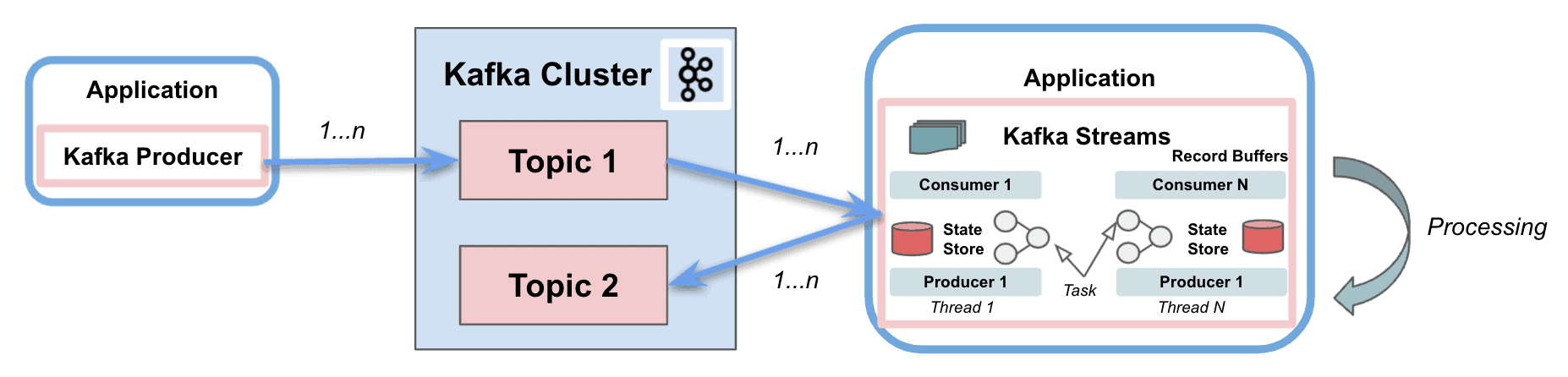
Kafka Streams uses the concepts of partitions and tasks as logical units strongly linked to the topic partitions. Besides, it uses threads to parallelize processing within an application instance. Another important capability supported is the state stores, used by Kafka Streams to store and query data coming from the topics. Finally, Kafka Streams API interacts with the cluster, but it does not run directly on top of it.
In the coming sections, we’ll focus on four aspects that make the difference with respect to the basic Kafka clients: Stream-table duality, Kafka Streams Domain Specific Language (DSL), Exactly-Once processing Semantics (EOS), and Interactive queries.
2.3. Dependencies
To implement the examples, we’ll simply add the Kafka Consumer API and Kafka Streams API dependencies to our pom.xml:
<dependency>
    <groupId>org.apache.kafka</groupId>
    <artifactId>kafka-clients</artifactId>
    <version>3.4.0</version>
</dependency>

<dependency>
    <groupId>org.apache.kafka</groupId>
    <artifactId>kafka-streams</artifactId>
    <version>3.4.0</version>
 </dependency>
3. Stream-Table Duality
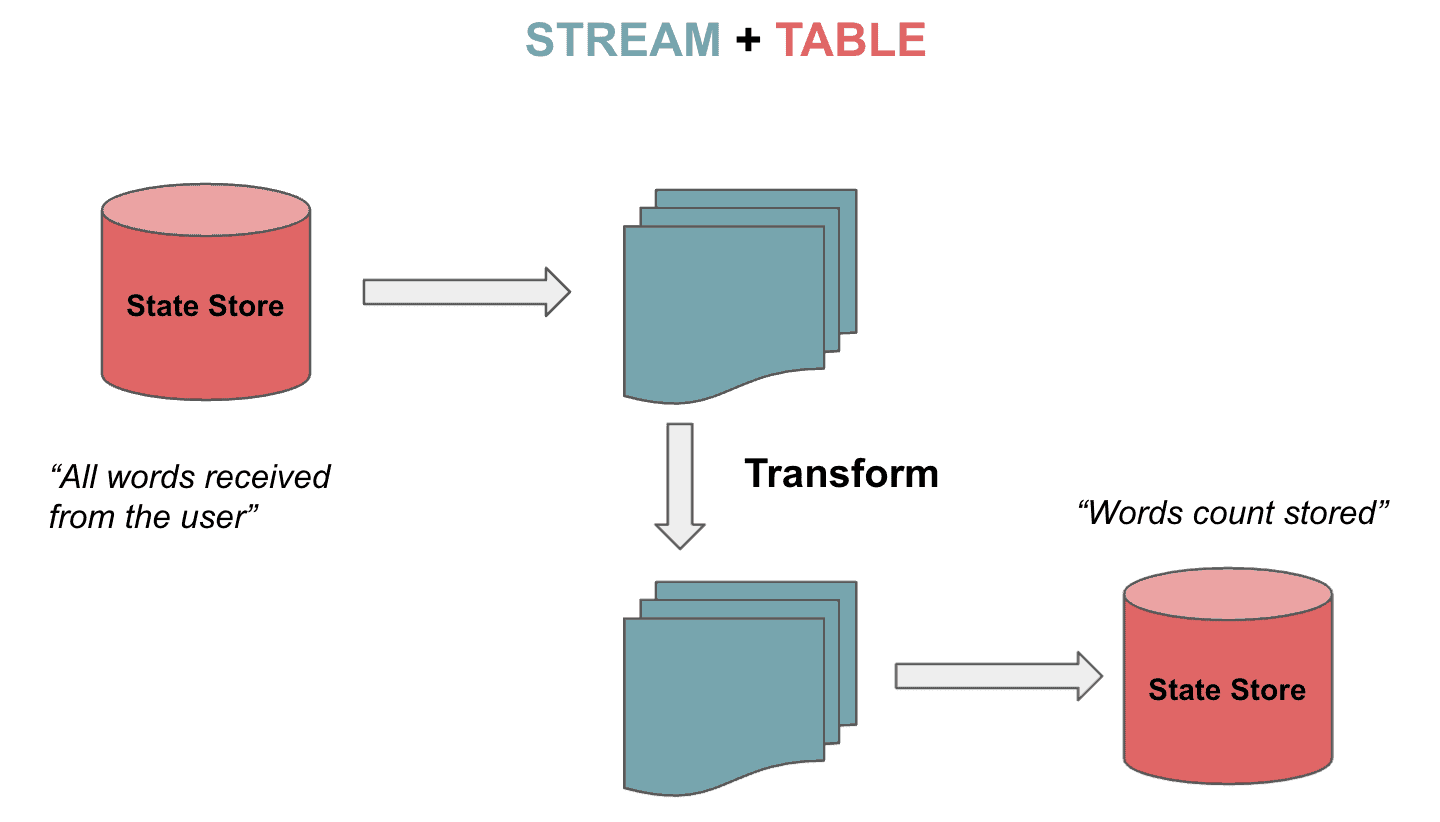
Kafka Streams support streams but also tables that can be bidirectionally transformed. It is the so-called stream-table duality. Tables are a set of evolving facts. Each new event overwrites the old one, whereas streams are a collection of immutable facts.
Streams handle the complete flow of data from the topic. Tables store the state by aggregating information from the streams. Let’s imagine playing a chess game as described in Kafka Data Modelling. The stream of continuous moves are aggregated to a table, and we can transition from one state to another:
3.1. KStream, KTable and GlobalKTable
Kafka Streams provides two abstractions for Streams and Tables. KStream handles the stream of records. On the other hand, KTable manages the changelog stream with the latest state of a given key. Each data record represents an update.
There is another abstraction for not partitioned tables. We can use GlobalKTables to broadcast information to all tasks or to do joins without re-partitioned the input data.
We can read and deserialize a topic as a stream:
StreamsBuilder builder = new StreamsBuilder();
KStream<String, String> textLines =
  builder.stream(inputTopic, Consumed.with(Serdes.String(), Serdes.String()));
It is also possible to read a topic to track the latest words received as a table:
KTable<String, String> textLinesTable =
  builder.table(inputTopic, Consumed.with(Serdes.String(), Serdes.String()));
Finally, we are able to read a topic using a global table:
GlobalKTable<String, String> textLinesGlobalTable =
  builder.globalTable(inputTopic, Consumed.with(Serdes.String(), Serdes.String()));
4. Kafka Streams DSL
Kafka Streams DSL is a declarative and functional programming style. It is built on top of the Streams Processor API. The language provides the built-in abstractions for streams and tables mentioned in the previous section.
Furthermore, it also supports stateless (map, filter, etc.) and stateful transformations (aggregations, joins, and windowing). Thus, it is possible to implement stream processing operations with just a few lines of code.
4.1. Stateless Transformations
Stateless transformations don’t require a state for processing. In the same way, a state store is not needed in the stream processor. Example operations include are filter, map, flatMap, or groupBy.
Let’s now see how to map the values as UpperCase, filter them from the topic and store them as a stream:
KStream<String, String> textLinesUpperCase =
  textLines
    .map((key, value) -> KeyValue.pair(value, value.toUpperCase()))
    .filter((key, value) -> value.contains("FILTER"));
4.2. Stateful Transformations
Stateful transformations depend on the state to fulfil the processing operations. The processing of a message depends on the processing of other messages (state store). In other words, any table or state store can be restored using the changelog topic.
An example of stateful transformation is the word count algorithm:
KTable<String, Long> wordCounts = textLines
  .flatMapValues(value -> Arrays.asList(value
    .toLowerCase(Locale.getDefault()).split("\\W+")))
  .groupBy((key, word) -> word)
    .count(Materialized.<String, Long, KeyValueStore<Bytes, byte[]>> as("counts-store"));
We’ll send those two strings to the topic:
String TEXT_EXAMPLE_1 = "test test and test";
String TEXT_EXAMPLE_2 = "test filter filter this sentence";
The result is:
Word: and -> 1
Word: test -> 4
Word: filter -> 2
Word: this -> 1
Word: sentence -> 1
DSL covers several transformation features. We can join, or merge two input streams/tables with the same key to produce a new stream/table. We are also able to aggregate, or combe multiple records from streams/tables into one single record in a new table. Finally, it is possible to apply windowing, to group records with the same key in join or aggregation functions.
An example of joining with 5s windowing will merge records grouped by key from two streams into one stream:
KStream<String, String> leftRightSource = leftSource.outerJoin(rightSource,
  (leftValue, rightValue) -> "left=" + leftValue + ", right=" + rightValue,
    JoinWindows.of(Duration.ofSeconds(5))).groupByKey()
      .reduce(((key, lastValue) -> lastValue))
  .toStream();
So we’ll put in the left stream value=left with key=1 and the right stream value=right and key=2. The result is the following:
(key= 1) -> (left=left, right=null)
(key= 2) -> (left=null, right=right)
For the aggregation example, we’ll compute the word count algorithm but using as key the first two letters of each word:
KTable<String, Long> aggregated = input
  .groupBy((key, value) -> (value != null && value.length() > 0)
    ? value.substring(0, 2).toLowerCase() : "",
    Grouped.with(Serdes.String(), Serdes.String()))
  .aggregate(() -> 0L, (aggKey, newValue, aggValue) -> aggValue + newValue.length(),
    Materialized.with(Serdes.String(), Serdes.Long()));
With the following entries:
"one", "two", "three", "four", "five"
The output is:
Word: on -> 3
Word: tw -> 3
Word: th -> 5
Word: fo -> 4
Word: fi -> 4
5. Exactly-Once Processing Semantics (EOS)
There are occasions in which we need to ensure that the consumer reads the message just exactly once. Kafka introduced the capability of including the messages into transactions to implement EOS with the Transactional API. The same feature is covered by Kafka Streams from version 0.11.0.
To configure EOS in Kafka Streams, we’ll include the following property:
streamsConfiguration.put(StreamsConfig.PROCESSING_GUARANTEE_CONFIG,
  StreamsConfig.EXACTLY_ONCE);
6. Interactive Queries
Interactive queries allow consulting the state of the application in distributed environments. This means the capability of extract information from the local stores, but also from the remote stores on multiple instances. Basically, we’ll gather all the stores and group them together to get the complete state of the application.
Let’s see an example using interactive queries. Firstly, we’ll define the processing topology, in our case, the word count algorithm:
KStream<String, String> textLines =
  builder.stream(TEXT_LINES_TOPIC, Consumed.with(Serdes.String(), Serdes.String()));

final KGroupedStream<String, String> groupedByWord = textLines
  .flatMapValues(value -> Arrays.asList(value.toLowerCase().split("\\W+")))
  .groupBy((key, word) -> word, Grouped.with(stringSerde, stringSerde));
Next, we’ll create a state store (key-value) for all the computed word counts:
groupedByWord
  .count(Materialized.<String, Long, KeyValueStore<Bytes, byte[]>>as("WordCountsStore")
  .withValueSerde(Serdes.Long()));
Then, we can query the key-value store:
ReadOnlyKeyValueStore<String, Long> keyValueStore =
  streams.store(StoreQueryParameters.fromNameAndType(
    "WordCountsStore", QueryableStoreTypes.keyValueStore()));

KeyValueIterator<String, Long> range = keyValueStore.all();
while (range.hasNext()) {
    KeyValue<String, Long> next = range.next();
    System.out.println("count for " + next.key + ": " + next.value);
}
The output of the example is the following:
Count for and: 1
Count for filter: 2
Count for sentence: 1
Count for test: 4
Count for this: 1
7. Conclusion
In this tutorial, we showed how Kafka Streams simplify the processing operations when retrieving messages from Kafka topics. It strongly eases the implementation when dealing with streams in Kafka. Not only for stateless processing but also for stateful transformations.
Of course, it is possible to perfectly build a consumer application without using Kafka Streams. But we would need to manually implement the bunch of extra features given for free.














