


Mocking is an essential part of unit testing, and the Mockito library makes it easy to write clean and intuitive unit tests for your Java code.
Get started with mocking and improve your application tests using our Mockito guide:
Handling concurrency in an application can be a tricky process with many potential pitfalls. A solid grasp of the fundamentals will go a long way to help minimize these issues.
Get started with understanding multi-threaded applications with our Java Concurrency guide:
Spring 5 added support for reactive programming with the Spring WebFlux module, which has been improved upon ever since. Get started with the Reactor project basics and reactive programming in Spring Boot:
Since its introduction in Java 8, the Stream API has become a staple of Java development. The basic operations like iterating, filtering, mapping sequences of elements are deceptively simple to use.
But these can also be overused and fall into some common pitfalls.
To get a better understanding on how Streams work and how to combine them with other language features, check out our guide to Java Streams:
Explore Spring Boot 3 and Spring 6 in-depth through building a full REST API with the framework:
Yes, Spring Security can be complex, from the more advanced functionality within the Core to the deep OAuth support in the framework.
I built the security material as two full courses - Core and OAuth, to get practical with these more complex scenarios. We explore when and how to use each feature and code through it on the backing project.
You can explore the course here:
All Access is finally out, with all of my Spring courses. Learn JUnit is out as well, and Learn Maven is coming fast. And, of course, quite a bit more affordable. Finally.
>> GET THE COURSE
Spring Data JPA is a great way to handle the complexity of JPA with the powerful simplicity of Spring Boot.
Get started with Spring Data JPA through the guided reference course:
Refactor Java code safely — and automatically — with OpenRewrite.
Refactoring big codebases by hand is slow, risky, and easy to put off. That’s where OpenRewrite comes in. The open-source framework for large-scale, automated code transformations helps teams modernize safely and consistently.
Each month, the creators and maintainers of OpenRewrite at Moderne run live, hands-on training sessions — one for newcomers and one for experienced users. You’ll see how recipes work, how to apply them across projects, and how to modernize code with confidence.
Join the next session, bring your questions, and learn how to automate the kind of work that usually eats your sprint time.
1. Overview
In this tutorial, we’ll learn about Deep Java Library (DJL), an engine-agnostic machine learning framework developed by AWS.
Python libraries such as PyTorch, TensorFlow, MXNet, and ONNX are leaders in developing and executing deep learning neural networks. As a result, Java developers struggle to work with applications that use artificial intelligence.
DJL provides an abstraction over the various ML engines by offering a single interface for interacting with them. In this article, we’ll use DJL to build a simple program that recognizes handwritten digits from images. Although DJL supports both model training and inference, we’ll focus on inference and load a pre-trained image classification model from DJL’s public Model Zoo repository.
2. Key Concepts
The DJL APIs offer a standard framework for working with the machine learning engines:
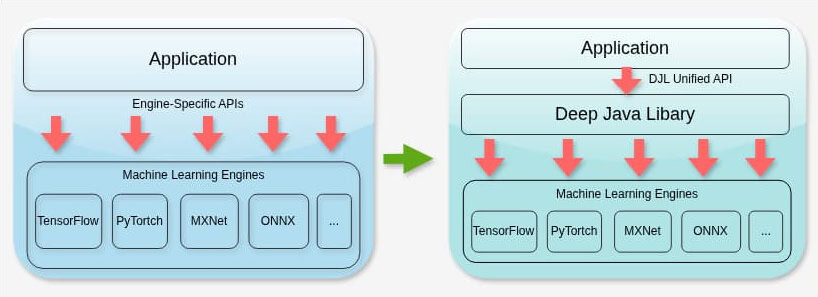
Applications that use ML Python libraries must rely on engine-specific APIs. This creates tight coupling, increasing complexity and maintenance overhead. By contrast, DJL is a lightweight library with minimal dependencies that enables applications to interact with the underlying ML engines transparently. Essentially, DJL does not replace ML engines, but it provides a unified Java API that delegates execution to the selected engine at runtime. As a result, switching between the libraries is seamless with minimal effort.
Furthermore, DJL has access to a centralized registry of pre-trained models, known as Model Zoo. These models are for common use cases such as image recognition, natural language processing, and word-to-vector transformations.
The library can load these models and then invoke them with datasets to generate a desired output:
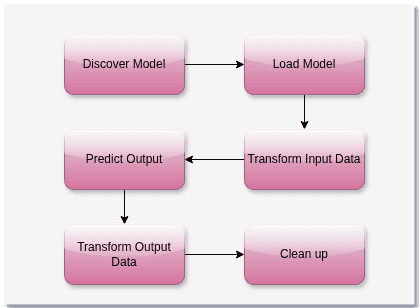
The library discovers a model, tailored to an ML engine and a specific purpose, from the Model Zoo. Then it pre-processes the dataset into a format the underlying engine understands. The library invokes the underlying ML engine with the transformed dataset and fetches the output. Again, it transforms the output to a format that the Java program understands. Finally, all the resources are released and cleaned up.
In the next sections, we’ll learn about prerequisite dependencies, important library components, and a use case that we’ll implement.
3. Key Java Components
Let’s explore the key Java components of DJL:
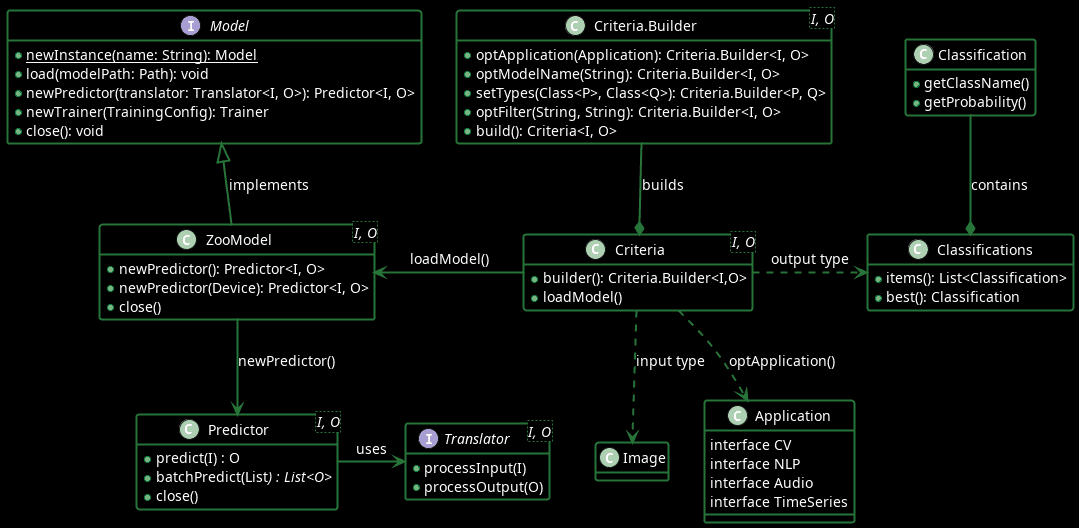
The Criteria.Builder class helps define ML model search criteria, such as the model name, model input and output arguments, and the model application, and then creates a Criteria object. The Criteria#loadModel() method then loads the ML model directly from the Model Zoo.
The Model#load() interface method allows applications to load ML Models from the local cache. Based on the use case, such as training a model or using a model to predict, the applications can use the methods newTrainer() or newPredictor() to create the Trainer or the Predictor object. The Predictor#predict() method predicts outputs based on given input, such as images, audio transcripts, or texts. Additionally, Predictor#batchPredict() provides the flexibility to process multiple inputs and generate a corresponding list of outputs.
The Predictor depends on the Translator to convert input objects into a format that the underlying ML engine understands. Furthermore, the Translator translates the ML engine output into a format that the application understands. For example, it converts image or audio file objects into an n-dimensional representation that the ML engine can process. The DJL library provides several built-in implementations of the Translator interface, such as ImageClassificationTranslator, SpeechRecognitionTranslator, and ObjectDetectionTranslator. In more specialized scenarios, developers can also implement the Translator interface to handle custom pre-processing and post-processing logic.
These concepts would be clearer in the next sections, where we’ll implement an image-recognition use case to identify a single handwritten digit in an image.
4. Prerequisite
First, we import the DJL Bill of Materials (BOM) from Maven to ensure consistent versions across all DJL dependencies:
<dependencyManagement>
    <dependencies>
        <dependency>
            <groupId>ai.djl</groupId>
            <artifactId>bom</artifactId>
            <version>0.36.0</version>
            <type>pom</type>
            <scope>import</scope>
        </dependency>
    </dependencies>
</dependencyManagement>
Next, we add the DJL Model Zoo module, which provides access to pre-trained models hosted in public repositories:
<dependency>
    <groupId>ai.djl</groupId>
    <artifactId>model-zoo</artifactId>
    <version>0.36.0</version>
</dependency>
Finally, DJL requires a runtime engine-specific dependency to execute the model:
<dependency>
    <groupId>ai.djl.pytorch</groupId>
    <artifactId>pytorch-engine</artifactId>
</dependency>
We include pytorch-engine library to use PyTorch as the underlying ML engine.
Finally, for the image recognition use case, we’ll use a pre-trained PyTorch model on the classic MNIST dataset of 28×28 handwritten digits (0-9).
5. Image Recognition Use Case Implementation
Now, we can implement the image-recognition use case to identify a single handwritten digit in an image.
First, let’s define a DigitIdentifier class:
public class DigitIdentifier {

    public String identifyDigit(String imagePath)
            throws ModelNotFoundException, MalformedModelException, IOException, TranslateException {
        Criteria<Image, Classifications> criteria = Criteria.builder()
          .optApplication(Application.CV.IMAGE_CLASSIFICATION)
          .setTypes(Image.class, Classifications.class)
          .optFilter("dataset", "mnist")
          .build();

        ZooModel<Image, Classifications> model = criteria.loadModel();
        Classifications classifications = null;
        try (Predictor<Image, Classifications> predictor = model.newPredictor()) {
            classifications = predictor.predict(this.loadImage(imagePath));
        }

        return classifications.best().getClassName();
    }
}
In the class, the identifyDigit() method first loads the Computer Vision model trained on the MNIST dataset using the Criteria object. Then we invoke the model#newPredictor() to get the Predictor object. Next, we pass the path of an image of a digit to the Predictor#predict() method to fetch the Classifications object. The Classifications object consists of multiple Classification objects, which basically represent the predictions with an accuracy score. Moreover, instead of iterating through all Classification objects, we choose the best by calling Classifications#best() method.
Now, let’s look at a list of handwritten images of the digit 3, taken from the MNIST test dataset:
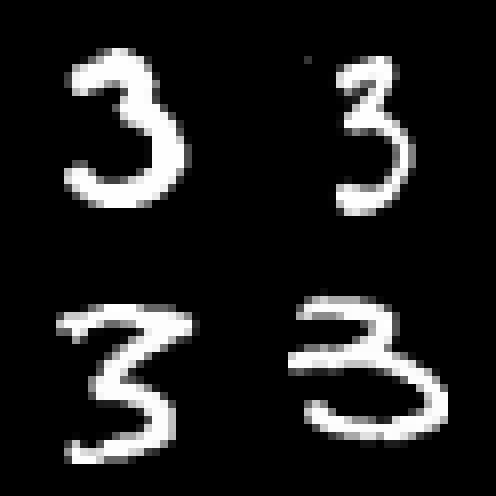
We’ll run the identifyDigit() method and see if it can predict the digit 3 in the test image dataset:
@ParameterizedTest
@ValueSource(strings = {
  "data/3_991.png", "data/3_1028.png",
  "data/3_9882.png", "data/3_9996.png"
})
void whenRunModel_thenIdentifyDigitCorrectly(String imagePath) throws Exception {
    DigitIdentifier digitIdentifier = new DigitIdentifier();
    String identifiedDigit = digitIdentifier.identifyDigit(imagePath);
    assertEquals("3", identifiedDigit);
}
The parameterized JUnit test method invokes the DigitIdentifier#identifyDigit() method with the path of the test images. We find that the ML model correctly predicts the digit in the image files.
Machine learning models make probabilistic predictions, so they do not always produce correct results, even for similar images. The quality and representativeness of the training dataset largely determine prediction accuracy.
6. Conclusion
In this article, we learned the key components of the DJL APIs and implemented an image-recognition use case. This can be a stepping stone for exploring more features and use cases on our own.
DJL’s ability to abstract the underlying ML engine can truly help Java developers contribute to applications that require ML. However, as a prerequisite, understanding Machine learning concepts is equally important and can help in the right adoption.














