


Mocking is an essential part of unit testing, and the Mockito library makes it easy to write clean and intuitive unit tests for your Java code.
Get started with mocking and improve your application tests using our Mockito guide:
Handling concurrency in an application can be a tricky process with many potential pitfalls. A solid grasp of the fundamentals will go a long way to help minimize these issues.
Get started with understanding multi-threaded applications with our Java Concurrency guide:
Spring 5 added support for reactive programming with the Spring WebFlux module, which has been improved upon ever since. Get started with the Reactor project basics and reactive programming in Spring Boot:
Since its introduction in Java 8, the Stream API has become a staple of Java development. The basic operations like iterating, filtering, mapping sequences of elements are deceptively simple to use.
But these can also be overused and fall into some common pitfalls.
To get a better understanding on how Streams work and how to combine them with other language features, check out our guide to Java Streams:
Explore Spring Boot 3 and Spring 6 in-depth through building a full REST API with the framework:
Yes, Spring Security can be complex, from the more advanced functionality within the Core to the deep OAuth support in the framework.
I built the security material as two full courses - Core and OAuth, to get practical with these more complex scenarios. We explore when and how to use each feature and code through it on the backing project.
You can explore the course here:
All Access is finally out, with all of my Spring courses. Learn JUnit is out as well, and Learn Maven is coming fast. And, of course, quite a bit more affordable. Finally.
>> GET THE COURSE
Spring Data JPA is a great way to handle the complexity of JPA with the powerful simplicity of Spring Boot.
Get started with Spring Data JPA through the guided reference course:
Refactor Java code safely — and automatically — with OpenRewrite.
Refactoring big codebases by hand is slow, risky, and easy to put off. That’s where OpenRewrite comes in. The open-source framework for large-scale, automated code transformations helps teams modernize safely and consistently.
Each month, the creators and maintainers of OpenRewrite at Moderne run live, hands-on training sessions — one for newcomers and one for experienced users. You’ll see how recipes work, how to apply them across projects, and how to modernize code with confidence.
Join the next session, bring your questions, and learn how to automate the kind of work that usually eats your sprint time.
1. Overview
Hilla is a full-stack web framework for Java. Hilla lets us build a full-stack application by adding React views to a Spring Boot application and calling backend Java services from TypeScript through type-safe RPC.
It uses the Vaadin UI component set and is compatible with Vaadin Flow. Both are part of the Vaadin platform. In this tutorial, we’ll discuss the basics of Hilla development.
2. Creating a Hilla Project
We can create a Hilla project by adding the Vaadin dependency on Spring Initializr or downloading a customized starter on Vaadin Start.
Alternatively, we can add Hilla to an existing Spring Boot project, by adding the following bill of materials (BOM) in the project’s Maven pom.xml. We initialize the vaadin.version property with the latest version of vaadin-bom:
<properties>
    <vaadin.version>24.4.10</vaadin.version>
</properties>

<dependencyManagement>
    <dependencies>
        <dependency>
            <groupId>com.vaadin</groupId>
            <artifactId>vaadin-bom</artifactId>
            <version>${vaadin.version}</version>
            <type>pom</type>
            <scope>import</scope>
        </dependency>
    </dependencies>
</dependencyManagement>
Then, we add the following dependency for the Vaadin platform, which includes Hilla:
<dependency>
    <groupId>com.vaadin</groupId>
    <artifactId>vaadin-spring-boot-starter</artifactId>
</dependency>
To complete the setup, let’s create a theme. The theme configuration file ensures a consistent look and feel for all views and includes CSS utility classes. We add a src/main/frontend/themes/hilla/theme.json file with the following content:
{
    "lumoImports" : [ "typography", "color", "sizing", "spacing", "utility" ]
}
We then load the theme by updating our Spring Boot application to extend AppShellConfigurator and adding a @Theme(“hilla”) annotation:
@Theme("hilla") // needs to match theme folder name
@SpringBootApplication
public class DemoApplication implements AppShellConfigurator {
    // application code omitted
}
3. Starting the Application
Hilla includes React views and backend Java sources in the same project as one unified full-stack project. We can define views by creating React components in the src/main/frontend/views folder.
Let’s start by adding a view by creating a new file, src/main/frontend/views/@index.tsx (creating folders as needed) with the following content:
export default function Index() {

    return (
        <h1>Hello world</h1>
    );
}
Now, let’s start the application by running mvn spring-boot:run or running the Spring Boot application class in our IDE.
The first startup takes some time as Hilla downloads both Maven and npm dependencies and starts a Vite dev server. Subsequent starts are quicker.
With the build running, we can open up our browser to localhost:8080 to see the ‘Hello world‘ greeting:

4. Calling Server Methods With @BrowserCallable
A unique aspect of Hilla applications is how we call the server from the client. Unlike traditional Spring Boot apps with React frontends, we don’t create two separate applications that communicate over a generic REST API. Instead, we have one full-stack application that uses RPC to call methods on service classes written in Java. It follows a backend-for-frontend (BFF) architecture.
Let’s look at how we can access a backend service from the browser. We’ll use the Contact class throughout our example:
@Entity
public class Contact {

    @Id
    @GeneratedValue
    private Long id;
    @Size(min = 2)
    private String name;
    @Email
    private String email;
    private String phone;

    // Constructor, getters, setters
}
We’ll also use a Spring Data JPA repository for accessing and persisting data:
public interface ContactRepository extends
    JpaRepository<Contact, Long>,
    JpaSpecificationExecutor<Contact> {
}
We can make a Java service callable from a TypeScript view by annotating it with @BrowserCallable. Hilla services are protected by Spring Security. By default, access is denied to all services. We can add an @AnonymousAllowed annotation to allow any user to call the service:
@BrowserCallable
@AnonymousAllowed
public class ContactService {

    private final ContactRepository contactRepository;

    public ContactService(ContactRepository contactRepository) {
        this.contactRepository = contactRepository;
    }

    public List<Contact> findAll() {
        return contactRepository.findAll();
    }

    public Contact findById(Long id) {
        return contactRepository.findById(id).orElseThrow();
    }

    public Contact save(Contact contact) {
        return contactRepository.save(contact);
    }
}
Java and TypeScript handle nullability differently. In Java, all non-primitive types can be null, whereas TypeScript requires us to explicitly define variables or fields as nullable. Hilla’s TypeScript generator is in a strict mode by default, ensuring Java and TypeScript types match exactly.
The downside of this strictness is that the TypeScript code can become clumsy as we need to introduce null checks in several places. If we follow good API design practices, avoiding null return values for collections, we can add a package-info.java file with a @NonnullApi annotation in our service package to simplify the TypeScript types:
@NonNullApi
package com.example.application;

import org.springframework.lang.NonNullApi;
We can now call the service with the same signature from React. Let’s update @index.tsx to find all contacts and display them in a Grid:
export default function Contacts() {
    const contacts = useSignal<Contact[]>([]);

    async function fetchContacts() {
        contacts.value = await ContactService.findAll();
    }

    useEffect(() => {
        fetchContacts();
    }, []);

    return (
        <div className="p-m flex flex-col gap-m">
            <h2>Contacts</h2>
            <Grid items={contacts.value}>
                <GridSortColumn path="name">
                    {({item}) => <NavLink to={`contacts/${item.id}/edit`}>{item.name}</NavLink>}
                </GridSortColumn>
                <GridSortColumn path="email"/>
                <GridSortColumn path="phone"/>
            </Grid>
        </div>
    );
}
Let’s define an async function, fetchContacts(), that awaits ContactService.findAll() and then sets the contacts signal value to the received contacts. We import the Contact type and ContactService from the Frontend/generated folder, which is where Hilla generates client-side code. Hilla uses signals that are based on Preact signals:

5. Configuring Views and Layouts
Hilla uses file-based routing, which means that views are mapped to routes based on their filename and folder structure. The root folder for all views is src/main/frontend/views. In the following sections, we’ll walk through how to configure views and layouts.
5.1. View Naming Conventions
Views are mapped to paths by their name and the following conventions:
- @index.tsx — the index for a directory
- @layout.tsx — the layout for a directory
- view-name.tsx — mapped to view-name
- {parameter} — folder that captures a parameter
- {parameter}.tsx — view that captures a parameter
- {{parameter}}.tsx — view that captures an optional parameter
- {…wildcard}.tsx — matches any character
5.2. View Configuration
We can configure a view by exporting a constant named config of type ViewConfig. Here, we can define things like the view’s title, icon, and access control:
export const config: ViewConfig = {
    title: "Contact List",
    menu: {
        order: 1,
    }
}

export default function Index() {
    // Code omitted
}
5.3. Defining Layouts
We can define parent layouts for any directory. A @layout.tsx in the root of the views folder wraps all content in the application, whereas a @layout.tsx in a contacts folder only wraps any views in that directory or its subdirectories.
Let’s create a new @layout.tsx file in the src/main/frontend/views directory:
export default function MainLayout() {

    return (
        <div className="p-m h-full flex flex-col box-border">
            <header className="flex gap-m pb-m">
                <h1 className="text-l m-0">
                    My Hilla App
                </h1>
                {createMenuItems().map(({to, title}) => (
                    <NavLink to={to} key={to}>
                        {title}
                    </NavLink>
                ))}
            </header>
            <Suspense>
                <Outlet/>
            </Suspense>
        </div>
    );
}
The createMenuItems() helper returns an array of the discovered routes and creates links for each.
Let’s open the browser again and verify that we can see the new menu above our view:

6. Building Forms and Validating Input
Next, let’s implement the edit view to edit Contacts. We’ll use the Hilla useForm() hook to bind input fields to fields on the Contact object and validate that all validation constraints defined on it pass.
First, we create a new file views/contacts/{id}/edit.tsx with the following content:
export default function ContactEditor() {
    const {id} = useParams();
    const navigate = useNavigate();

    const {field, model, submit, read} = useForm(ContactModel, {
        onSubmit: async contact => {
            await ContactService.save(contact);
            navigate('/');
        }
    })

    async function loadUser(id: number) {
        read(await ContactService.findById(id))
    }

    useEffect(() => {
        if (id) {
            loadUser(parseInt(id))
        }
    }, [id]);

    return (
        <div className="flex flex-col items-start gap-m">
            <TextField label="Name" {...field(model.name)}/>
            <TextField label="Email" {...field(model.email)}/>
            <TextField label="Phone" {...field(model.phone)}/>
            <div className="flex gap-s">
                <Button onClick={submit} theme="primary">Save</Button>
                <Button onClick={() => navigate('/')} theme="tertiary">Cancel</Button>
            </div>
        </div>
    );
}
Then, let’s use the useParams() hook to access the id parameter from the URL.
Next, we pass ContactModel to useForm() and configure it to submit to our Java service. Let’s also destructure the field, model, submit, and read properties from the return value into variables. Finally, we read the currently selected Contact into the form with a useEffect that fetches the Contact by id from our backend.
We create input fields for each property on Contact and use the field method to bind them to the appropriate fields on the Contact object. This synchronizes the value and validation rules defined on the Java object with the UI.
The Save button calls the form’s submit() method:

7. Automatic CRUD Operations With AutoCrud
Because Hilla is a full-stack framework, it can help us automate some common tasks like creating listings and editing entities. Let’s update our service to take advantage of these features:
@BrowserCallable
@AnonymousAllowed
public class ContactService extends CrudRepositoryService<Contact, Long, ContactRepository> {

    public List<Contact> findAll() {
        return getRepository().findAll();
    }

    public Contact findById(Long id) {
        return getRepository().findById(id).orElseThrow();
    }
}
Extending CrudRepositoryService creates a service that provides all the basic CRUD operations Hilla needs to generate data grids, forms, or CRUD views based on a given entity. In this case, we also added the same findAll() and findById() methods we had in our service earlier to avoid breaking the existing views.
We can now create a new view that displays a CRUD editor based on the new service. Let’s define a new file named frontend/views/auto-crud.tsx with the following content:
export default function AutoCrudView() {
    return <AutoCrud service={ContactService} model={ContactModel} className="h-full"/>
}
We only need to return a single component, AutoCrud, and pass in the service and model to get the view for listing, editing, and deleting contacts:
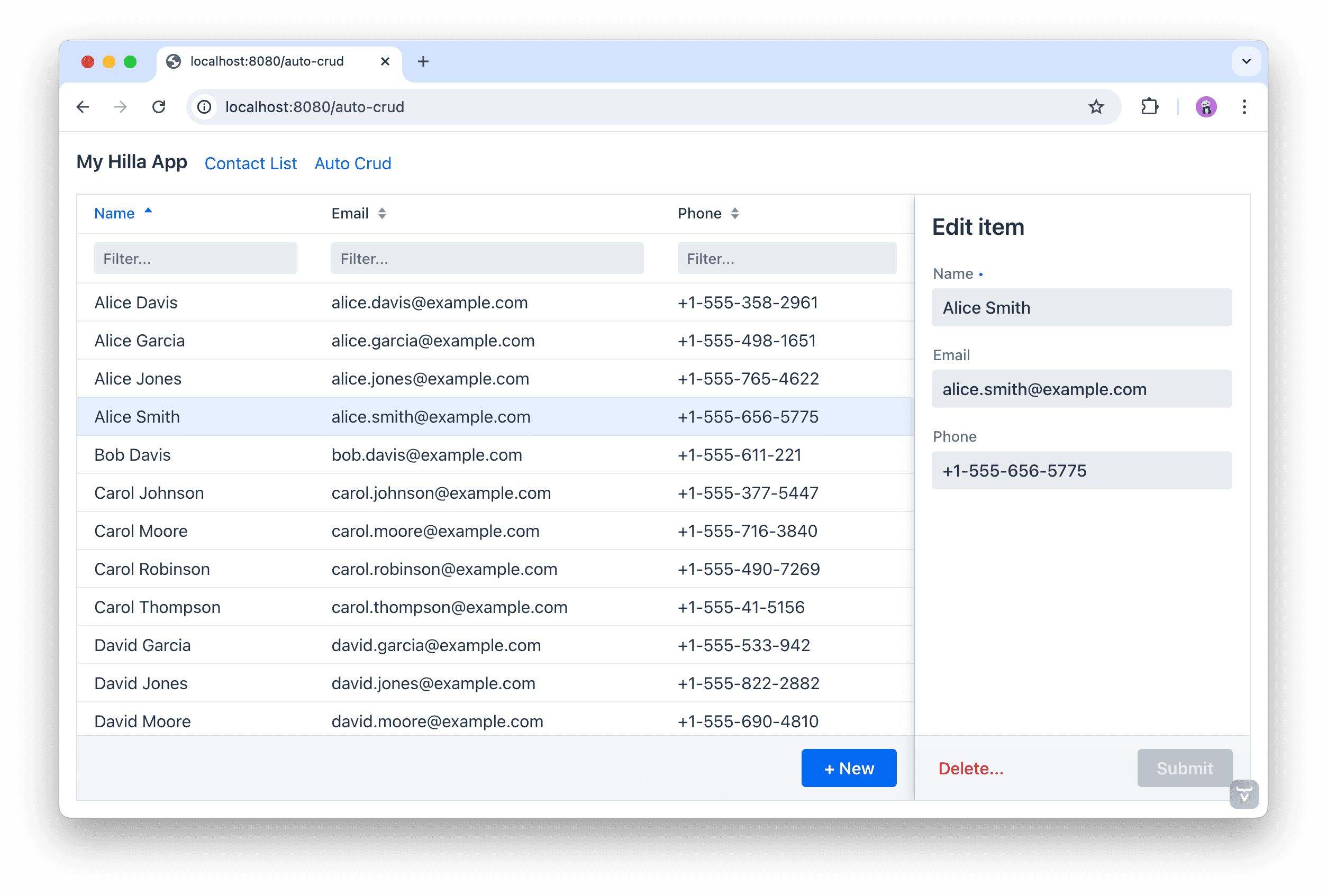 If we only need to list items without editing them, we can use the AutoGrid component instead. Likewise, if we need to edit an item but don’t want to display a list, we can use the AutoForm component. Both work in the same way as AutoCrud above.
8. Building for Production
To build Hilla for production, we use the production Maven profile. The production build creates an optimized frontend JavaScript bundle and turns off development-time debugging. The profile is included automatically in projects created on Spring Initializr and Vaadin Start. We can also add it manually if we have a custom project:
<profile>
    <!-- Production mode is activated using -Pproduction -->
    <id>production</id>
    <dependencies>
        <!-- Exclude development dependencies from production -->
        <dependency>
            <groupId>com.vaadin</groupId>
            <artifactId>vaadin-core</artifactId>
            <exclusions>
                <exclusion>
                    <groupId>com.vaadin</groupId>
                    <artifactId>vaadin-dev</artifactId>
                </exclusion>
            </exclusions>
        </dependency>
    </dependencies>
    <build>
        <plugins>
            <plugin>
                <groupId>com.vaadin</groupId>
                <artifactId>vaadin-maven-plugin</artifactId>
                <version>${vaadin.version}</version>
                <executions>
                    <execution>
                        <goals>
                            <goal>build-frontend</goal>
                        </goals>
                        <phase>compile</phase>
                    </execution>
                </executions>
            </plugin>
        </plugins>
    </build>
</profile>
We can build the project using the production profile:
./mvnw package -Pproduction9. Conclusion
In this article, we learned the basics of Hilla development for building full-stack web applications that combine a Spring Boot backend with a React frontend with type-safe communication.
Hilla let’s us add React views to a Spring Boot project. The views are mapped to routes based on name and folder structure. We can call Spring Service classes from TypeScript, retaining full type information by annotating the Service class with @BrowserCallable. Hilla uses Java Bean Validation annotations for input validation on the client, and again to verify the correctness of data received in the Java service method.














