


Mocking is an essential part of unit testing, and the Mockito library makes it easy to write clean and intuitive unit tests for your Java code.
Get started with mocking and improve your application tests using our Mockito guide:
Handling concurrency in an application can be a tricky process with many potential pitfalls. A solid grasp of the fundamentals will go a long way to help minimize these issues.
Get started with understanding multi-threaded applications with our Java Concurrency guide:
Spring 5 added support for reactive programming with the Spring WebFlux module, which has been improved upon ever since. Get started with the Reactor project basics and reactive programming in Spring Boot:
Since its introduction in Java 8, the Stream API has become a staple of Java development. The basic operations like iterating, filtering, mapping sequences of elements are deceptively simple to use.
But these can also be overused and fall into some common pitfalls.
To get a better understanding on how Streams work and how to combine them with other language features, check out our guide to Java Streams:
Explore Spring Boot 3 and Spring 6 in-depth through building a full REST API with the framework:
Yes, Spring Security can be complex, from the more advanced functionality within the Core to the deep OAuth support in the framework.
I built the security material as two full courses - Core and OAuth, to get practical with these more complex scenarios. We explore when and how to use each feature and code through it on the backing project.
You can explore the course here:
All Access is finally out, with all of my Spring courses. Learn JUnit is out as well, and Learn Maven is coming fast. And, of course, quite a bit more affordable. Finally.
>> GET THE COURSE
Spring Data JPA is a great way to handle the complexity of JPA with the powerful simplicity of Spring Boot.
Get started with Spring Data JPA through the guided reference course:
Refactor Java code safely — and automatically — with OpenRewrite.
Refactoring big codebases by hand is slow, risky, and easy to put off. That’s where OpenRewrite comes in. The open-source framework for large-scale, automated code transformations helps teams modernize safely and consistently.
Each month, the creators and maintainers of OpenRewrite at Moderne run live, hands-on training sessions — one for newcomers and one for experienced users. You’ll see how recipes work, how to apply them across projects, and how to modernize code with confidence.
Join the next session, bring your questions, and learn how to automate the kind of work that usually eats your sprint time.
1. Overview
Vaadin Flow is a full-stack web framework for Java. Vaadin Flow is designed to let Java developers build web applications in Java, without needing JavaScript or HTML. Vaadin Flow can be used for any kind of web applications, but it is especially well-suited for data-rich business applications.
Vaadin Flow builds on the extensive set of Vaadin UI components, with an intuitive Java API for building user interfaces. In this tutorial, we’re going to cover the core concepts and features of Vaadin Flow.
2. Creating a Vaadin Flow Project
We can create a Vaadin Flow project by adding the Vaadin dependency in Spring Initalizr, or downloading a customized starter on Vaadin Start.
Alternatively, we can add Vaadin Flow to an existing Spring Boot project, by adding the following bill of materials (BOM) in pom.xml. We initialize the vaadin.version property with the latest version of vaadin-bom.
<properties>
    <vaadin.version>24.3.6</vaadin.version>
</properties>

<dependencyManagement>
    <dependencies>
        <dependency>
            <groupId>com.vaadin</groupId>
            <artifactId>vaadin-bom</artifactId>
            <version>${vaadin.version}</version>
            <type>pom</type>
            <scope>import</scope>
        </dependency>
    </dependencies>
</dependencyManagement>
To complete the setup, we add the following dependency:
<dependency>
    <groupId>com.vaadin</groupId>
    <artifactId>vaadin-spring-boot-starter</artifactId>
</dependency>
You can find starter projects for other stacks like Quarkus, JakartaEE, or plain servlet on the Vaadin website.
3. Building User Interfaces out of Components
Vaadin Flow is a component-based framework. Each component is represented by a Java object:
var textField = new TextField("Name");
var button = new Button("Click me");
4. Structuring the UI With Layouts
We can build views out of components by using Layouts. Layouts control the positioning, alignment, and spacing of components. The basic layouts are HorizontalLayout and VerticalLayout. We can build more complex layouts by combining the two.
var verticalLayout = new VerticalLayout(
  new Button("Top"),
  new Button("Middle"),
  new Button("Bottom")
);
var horizontalLayout = new HorizontalLayout(
new Button("Left"),
new Button("Center"),
new Button("Right")
);
In addition to HorizontalLayout and VerticalLayout, Vaadin Flow includes layouts for more specific use cases:
- FormLayout: for forms where input labels should be placed next to the field.
- SplitLayout: for separating two content areas with a resizable splitter.
- Div: for controlling content placement through CSS (advanced).
Here’s how we put it all together to build a more complex layout with a resizable SplitLayout as the parent layout, a Grid component as the first component, and a VerticalLayout nesting a HorizontalLayout as the second component.
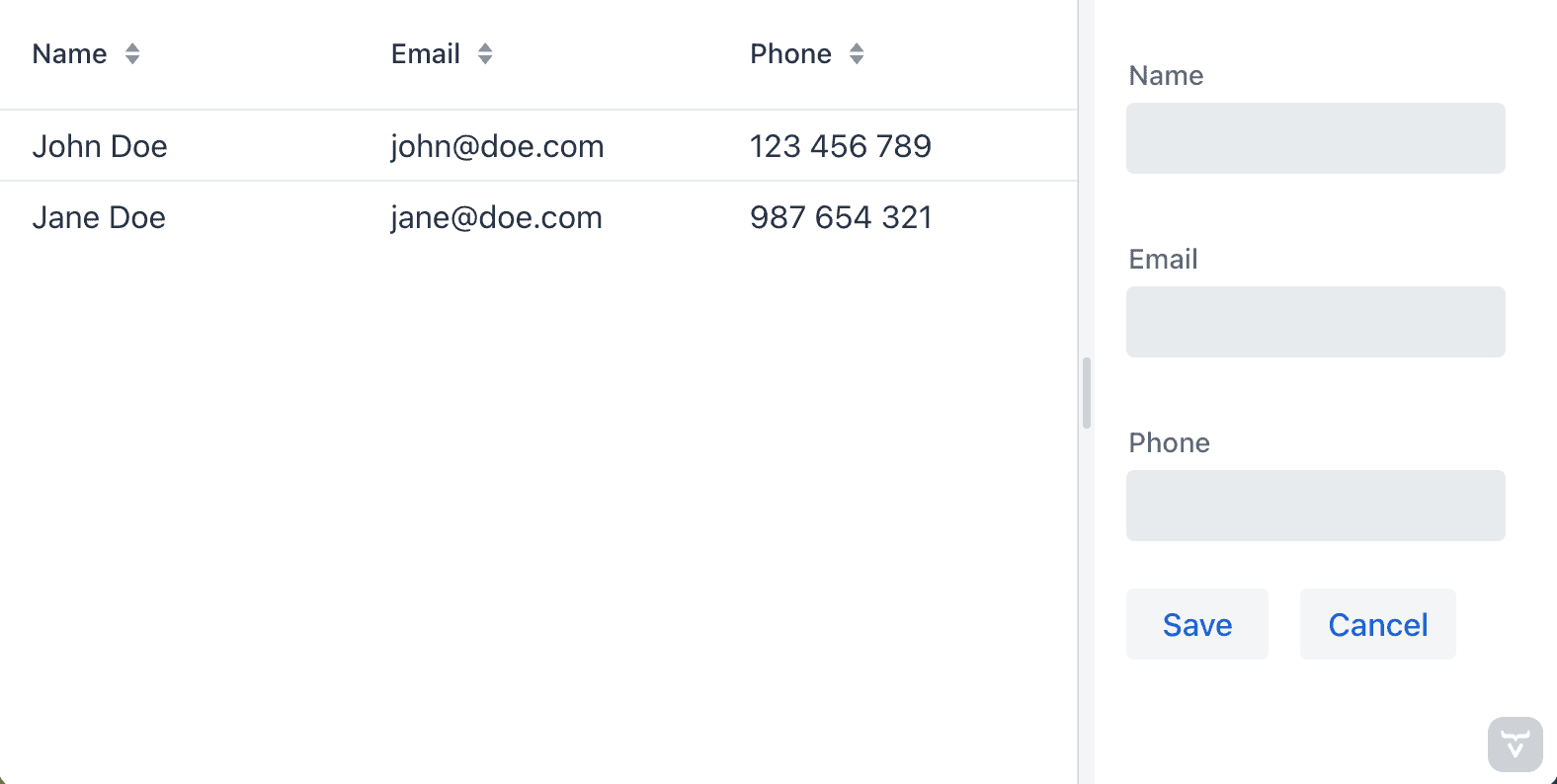
public class ExampleLayout extends SplitLayout {
    public ExampleLayout() {
        var grid = new Grid<>(Contact.class);
        grid.setColumns("name", "email", "phone");
        grid.setItems(List.of(
          new Contact("John Doe", "[email protected]", "123 456 789"),
          new Contact("Jane Doe", "[email protected]", "987 654 321")
        ));

        var form = new VerticalLayout();

        var nameField = new TextField("Name");
        var emailField = new TextField("Email");
        var phoneField = new TextField("Phone");
        var saveButton = new Button("Save");
        var cancelButton = new Button("Cancel");

        form.add(
          nameField,
          emailField,
          phoneField,
          new HorizontalLayout(saveButton, cancelButton)
        );

        setSizeFull();
        setSplitterPosition(70);
        addToPrimary(grid);
        addToSecondary(form);
    }
}
5. Turning a Component Into a View With @Route
We can turn any component, most often a layout, into a view by annotating it with @Route:
@Route("hello-world") // available on /hello-world
public class HelloWorldView extends VerticalLayout {
    public HelloWorldView() {
        add(new H1("Hello, World!"));
    }
}
We can navigate to views using a RouterLink:
var link = new RouterLink("Hello world view", HelloWorldView.class);6. Using Events for Interaction
Vaadin Flow is an event-driven framework. You can listen for user events on components to update the UI on user interaction.
var nameField = new TextField("Your name");
var helloButton = new Button("Add");

helloButton.addClickListener(e -> {
    Notification.show("Hello, " + nameField.getValue());
});
7. Displaying Java Objects in a Data Grid
Vaadin Flow runs on the server JVM, which means we have convenient access to services. Instead of calling remote services from the frontend, we call services as Java methods. Let’s look at how we can hook up a data grid to a Spring Data repository.
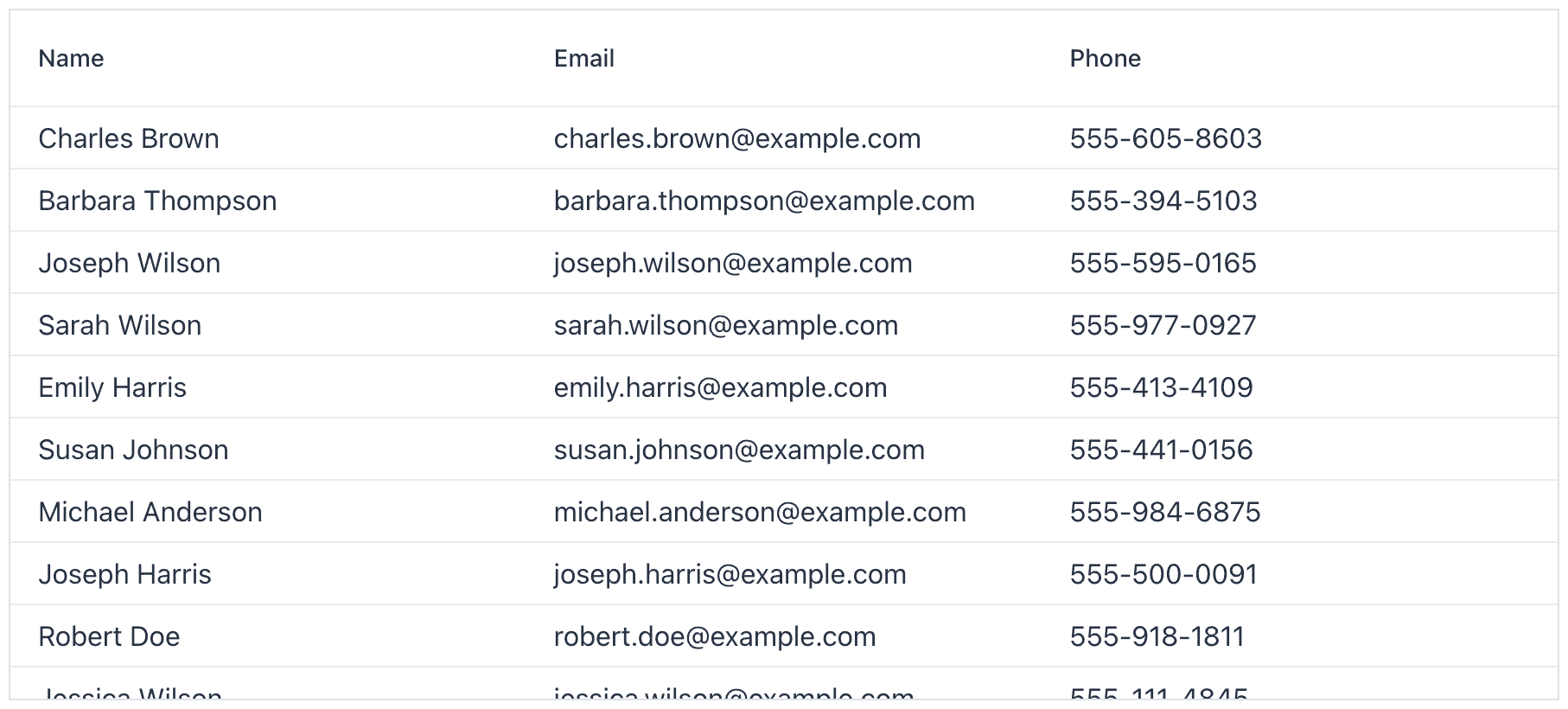
The Grid is backed by a collection of Java objects. In this example, we use a Contact JPA entity defined as follows:
@Entity
public class Contact {
    @Id
    @GeneratedValue
    private Long id;
    private String name;
    private String email;
    private String phone;

    // constructors, getters, setters
}
We can then create the Grid and configure its columns as follows:
var grid = new Grid<Contact>();

grid.addColumn(Contact::getName).setHeader("Name");
grid.addColumn(Contact::getEmail).setHeader("Email");
grid.addColumn(Contact::getPhone).setHeader("Phone");
The Grid component supports two ways of adding data. The simple case is passing an in-memory list of items:
var contacts = contactRepository.findAll();
grid.setItems(contacts);
For larger data sets, we can give the Grid a callback that it can use to lazily load data from the backend:
grid.setItems(query -> {
    // Create a PageRequest based on page, offset, filter, sort in the query
    var pageRequest = VaadinSpringDataHelpers.toSpringPageRequest(query);
    return contactRepository.findAll(pageRequest).stream();
});
8. Building Forms and Validating Data
Vaadin Flow uses Binder for binding input fields to a data model and performing data validation.
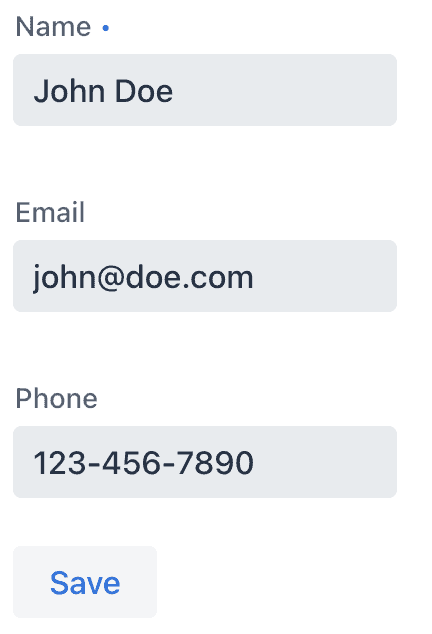
Let’s build a form a Contact class defined as below:
public class Contact {
    @NotBlank
    private String name;
    @Email
    private String email;
    @Pattern(regexp = "\\d{3}-\\d{3}-\\d{4}")
    private String phone;

    // constructors, getters, setters
}
We create input fields for each field we want to edit, along with a button for submitting:
var nameField = new TextField("Name");
var emailField = new TextField("Email");
var phoneField = new TextField("Phone");
var saveButton = new Button("Save");
We bind the fields to the getter and setter methods of the fields on the data object. We define validation rules with asRequired() and withValidator():
binder.forField(nameField)
  .asRequired()
  .bind(Contact::getName, Contact::setName);
binder.forField(emailField)
  .withValidator(email -> email.contains("@"), "Not a valid email address")
  .bind(Contact::getEmail, Contact::setEmail);
binder.forField(phoneField)
  .withValidator(phone -> phone.matches("\\d{3}-\\d{3}-\\d{4}"), "Not a valid phone number")
  .bind(Contact::getPhone, Contact::setPhone);
Alternatively, Binder supports Java Bean Validation annotations through the BeanValidationBinder subclass. This allows us to have consistent validation in our UI and backend:
var binder = new BeanValidationBinder<>(Contact.class);

binder.forField(nameField).bind(Contact::getName, Contact::setName);
binder.forField(emailField).bind(Contact::getEmail, Contact::setEmail);
binder.forField(phoneField).bind(Contact::getPhone, Contact::setPhone);
We connect the Binder to the model by calling setBean():
var contact = new Contact("John Doe", "[email protected]", "123-456-7890");
binder.setBean(contact);
When saving, we verify that the bound values are valid before using the saved object:
saveButton.addClickListener(e -> {
    if (binder.validate().isOk()) {
        Notification.show("Saved " + contact);
    }
});
9. Using Server Push for Live Data Updates
Vaadin Flow supports WebSockets for pushing UI updates to the browser. Enable WebSocket communication by adding a @Push annotation on a class extending AppShellConfigurator, typically the Spring Boot Application class:
@Push
@SpringBootApplication
public class Application implements AppShellConfigurator {
}
When updating the UI from a background thread, like from a Flux in the example below, we need to use ui.access() to ensure Flow is notified of the change and can push it to the browser:
var output = new Span();

// Publish server time once a second
var serverTime = Flux.interval(Duration.ofSeconds(1))
  .map(o -> "Server time: " + Instant.now());

serverTime.subscribe(time ->
  getUI().ifPresent(ui ->
    ui.access(() -> {
        output.setText(time);
    })
  )
);

add(output);
10. Building for Production
Building a Vaadin Flow application for production requires using the production Maven profile. The production build creates an optimized frontend JavaScript bundle and turns off development-time debugging. The profile is included automatically in projects created on Spring Initializr and Vaadin Start. We can also add it manually if we have a custom project:
<profile>
    <!-- Production mode is activated using -Pproduction -->
    <id>production</id>
    <dependencies>
        <!-- Exclude development dependencies from production -->
        <dependency>
            <groupId>com.vaadin</groupId>
            <artifactId>vaadin-core</artifactId>
            <exclusions>
                <exclusion>
                    <groupId>com.vaadin</groupId>
                    <artifactId>vaadin-dev</artifactId>
                </exclusion>
            </exclusions>
        </dependency>
    </dependencies>
    <build>
        <plugins>
            <plugin>
                <groupId>com.vaadin</groupId>
                <artifactId>vaadin-maven-plugin</artifactId>
                <version>${vaadin.version}</version>
                <executions>
                    <execution>
                        <goals>
                            <goal>build-frontend</goal>
                        </goals>
                        <phase>compile</phase>
                    </execution>
                </executions>
            </plugin>
        </plugins>
    </build>
</profile>
We build the project using the the production profile by running:
./mvnw package -Pproduction11. Summary
In this tutorial, we learned the basics of Vaadin Flow, a framework for building full-stack web applications in Java. It includes an extensive set of UI components and powerful features for displaying and editing data. Because it runs on the JVM, we can directly access backend services without the need for separate REST endpoints.














