Gatling vs JMeter vs The Grinder: Comparing Load Test Tools
Last updated: August 22, 2025



Mocking is an essential part of unit testing, and the Mockito library makes it easy to write clean and intuitive unit tests for your Java code.
Get started with mocking and improve your application tests using our Mockito guide:
Handling concurrency in an application can be a tricky process with many potential pitfalls. A solid grasp of the fundamentals will go a long way to help minimize these issues.
Get started with understanding multi-threaded applications with our Java Concurrency guide:
Spring 5 added support for reactive programming with the Spring WebFlux module, which has been improved upon ever since. Get started with the Reactor project basics and reactive programming in Spring Boot:
Since its introduction in Java 8, the Stream API has become a staple of Java development. The basic operations like iterating, filtering, mapping sequences of elements are deceptively simple to use.
But these can also be overused and fall into some common pitfalls.
To get a better understanding on how Streams work and how to combine them with other language features, check out our guide to Java Streams:
Explore Spring Boot 3 and Spring 6 in-depth through building a full REST API with the framework:
Yes, Spring Security can be complex, from the more advanced functionality within the Core to the deep OAuth support in the framework.
I built the security material as two full courses - Core and OAuth, to get practical with these more complex scenarios. We explore when and how to use each feature and code through it on the backing project.
You can explore the course here:
All Access is finally out, with all of my Spring courses. Learn JUnit is out as well, and Learn Maven is coming fast. And, of course, quite a bit more affordable. Finally.
>> GET THE COURSE
Spring Data JPA is a great way to handle the complexity of JPA with the powerful simplicity of Spring Boot.
Get started with Spring Data JPA through the guided reference course:
Refactor Java code safely — and automatically — with OpenRewrite.
Refactoring big codebases by hand is slow, risky, and easy to put off. That’s where OpenRewrite comes in. The open-source framework for large-scale, automated code transformations helps teams modernize safely and consistently.
Each month, the creators and maintainers of OpenRewrite at Moderne run live, hands-on training sessions — one for newcomers and one for experienced users. You’ll see how recipes work, how to apply them across projects, and how to modernize code with confidence.
Join the next session, bring your questions, and learn how to automate the kind of work that usually eats your sprint time.
1. Introduction
Choosing the right tool for the job can be daunting. In this tutorial, we’ll simplify this by comparing three web application load testing tools – Apache JMeter, Gatling, and The Grinder–against a simple REST API.
2. Load Testing Tools
First, let’s quickly review some background on each.
2.1. Gatling
Gatling is a load testing tool that creates test scripts in Scala. Gatling’s recorder generates the Scala test scripts, a key feature for Gatling. Check out our Intro to Gatling tutorial for more information.
2.2. JMeter
JMeter is a load testing tool by Apache. It provides a nice GUI that we use can for configuration. A unique feature called logic controllers gives great flexibility to set up tests in the GUI.
Visit our Intro to JMeter tutorial for screenshots and more explanation.
2.3. The Grinder
And our final tool, The Grinder, provides a more programming-based scripting engine than the other two and uses Jython. However, The Grinder 3 does have functionality for recording scripts.
The Grinder also differs from the other two tools by allowing for console and agent processes. This functionality provides the ability for an agent process so that the load tests can scale up across multiple servers. It’s specifically advertised as a load test tool built for developers to find deadlocks and slowdowns.
3. Test Case Setup
Next, for our test, we need an API. Our API functionality includes:
- add/update a rewards record
- view one/all rewards record
- link a transaction to a customer rewards record
- view transactions for a customer rewards record
Our Scenario:
A store is having a nationwide sale with new and returning customers who need customer rewards accounts to get savings. The rewards API checks for customer rewards account by the customer id. If no rewards account exists, add it, then link to the transaction.
After this, we query the transactions.
3.1. Our REST API
Let’s get a quick highlight of the API by viewing some of the method stubs:
@PostMapping(path="/rewards/add")
public @ResponseBody RewardsAccount addRewardsAcount(@RequestBody RewardsAccount body)

@GetMapping(path="/rewards/find/{customerId}")
public @ResponseBody Optional<RewardsAccount> findCustomer(@PathVariable Integer customerId)

@PostMapping(path="/transactions/add")
public @ResponseBody Transaction addTransaction(@RequestBody Transaction transaction)

@GetMapping(path="/transactions/findAll/{rewardId}")
public @ResponseBody Iterable<Transaction> findTransactions(@PathVariable Integer rewardId)
Note some of the relationships such as querying for transactions by the reward id and getting the rewards account by customer id. These relationships force some logic and some response parsing for our test scenario creation.
The application under test also uses an H2 in-memory database for persistence.
Luckily, our tools all handle it fairly well, some better than others.
3.2. Our Testing Plan
Next, we need test scripts.
To get a fair comparison, we’ll perform the same automation steps for each tool:
- Generate random customer account ids
- Post a transaction
- Parse the response for the random customer id and transaction id
- Query for a customer rewards account id with the customer id
- Parse the response for the rewards account id
- If no rewards account id exists then add one with a post
- Post the same initial transaction with updated rewards id using the transaction id
- Query for all transactions by rewards account id
Let’s take a closer look at Step 4 for each tool. And, make sure to check out the sample for all three completed scripts (in the GitHub source code).
3.3. Gatling
For Gatling, familiarity with Scala adds a boon for developers since the Gatling API is robust and contains a lot of features.
Gatling’s API takes a builder DSL approach, as we can see in its step 4:
.exec(http("get_reward")
  .get("/rewards/find/${custId}")
  .check(jsonPath("$.id").saveAs("rwdId")))
Of particular note is Gatling’s support for JSON Path when we need to read and verify an HTTP response. Here, we’ll pick up the reward id and save it to Gatling’s internal state.
Also, Gatling’s expression language makes for easier dynamic request body Strings:
.body(StringBody(
  """{
    "customerRewardsId":"${rwdId}",
    "customerId":"${custId}",
    "transactionDate":"${txtDate}"
  }""")).asJson)
Lastly our configuration for this comparison. The 1000 runs set as a repeat of the entire scenario, atOnceUsers method sets the threads/users:
val scn = scenario("RewardsScenario")
  .repeat(1000) {
  ...
  }
  setUp(
    scn.inject(atOnceUsers(100))
  ).protocols(httpProtocol)
The entire Scala script is viewable at our Github repo.
3.4. JMeter
JMeter generates an XML file after the GUI configuration. The file contains JMeter specific objects with set properties and their values, for example:
<HTTPSamplerProxy guiclass="HttpTestSampleGui" testclass="HTTPSamplerProxy" testname="Add Transaction" enabled="true"><JSONPostProcessor guiclass="JSONPostProcessorGui" testclass="JSONPostProcessor" testname="Transaction Id Extractor" enabled="true">Check out the testname attributes, they can be labeled as we recognize them matching the logical steps above. The ability to add children, variables and dependency steps gives JMeter flexibility as scripting provides. Furthermore, we even set the scope for our variables!
Our configuration for runs and users in JMeter uses ThreadGroups:
<stringProp name="ThreadGroup.num_threads">100</stringProp>While possible, writing tests in XML as .jmx files do not make sense with a full-featured GUI.
3.5. The Grinder
Without the functional programming of Scala and GUI, our Jython script for The Grinder looks pretty basic. Add some system Java classes, and we have a lot fewer lines of code.
customerId = str(random.nextInt());
result = request1.POST("http://localhost:8080/transactions/add",
  "{"'"customerRewardsId"'":null,"'"customerId"'":"+ customerId + ","'"transactionDate"'":null}")
txnId = parseJsonString(result.getText(), "id")
However, fewer lines of test setup code are balanced by the need for more string maintenance code such as parsing JSON strings. Also, the HTTPRequest API is slim on functionality.
With The Grinder, we define threads, processes, and runs values in an external properties file:
grinder.threads = 100
grinder.processes = 1
grinder.runs = 1000
Our full Jython script for The Grinder is available in the GitHub project.
4. Test Runs
4.1. Test Execution
All three tools recommend using the command line for large load tests.
To run the tests, we’ll use Gatling open-source version 3.4.0 as a standalone tool, JMeter 5.3 and The Grinder version 3.
Gatling requires only that we have JAVA_HOME and GATLING_HOME set. To execute Gatling we use:
./gatling.shin the GATLING_HOME/bin directory.
JMeter needs a parameter to disable the GUI for the test as prompted when starting the GUI for configuration:
./jmeter.sh -n -t TestPlan.jmx -l log.jtlLike Gatling, The Grinder requires that we set JAVA_HOME and GRINDERPATH. However, it needs a couple more properties, too:
export CLASSPATH=/home/lore/Documents/grinder-3/lib/grinder.jar:$CLASSPATH
export GRINDERPROPERTIES=/home/lore/Documents/grinder-3/examples/grinder.properties
As mentioned above, we provide a grinder.properties file for additional configuration such as threads, runs, processes, and console hosts.
Finally, we bootstrap the console and agents with:
java -classpath $CLASSPATH net.grinder.Consolejava -classpath $CLASSPATH net.grinder.Grinder $GRINDERPROPERTIES4.2. Test Results
Each of the tests ran 1000 runs with 100 users/threads. Let’s unpack some of the highlights:
| Successful Requests | Errors | Total Test Time (s) | Average Response Time (ms) | Mean Throughput | |
|---|---|---|---|---|---|
| Gatling | 500000 Requests | 0 | 218s | 42 | 2283 req/s |
| JMeter | 499997 Requests | 0 | 237s | 46 | 2101 req/s |
| The Grinder | 499997 Requests | 0 | 221s | 43 | 2280 req/s |
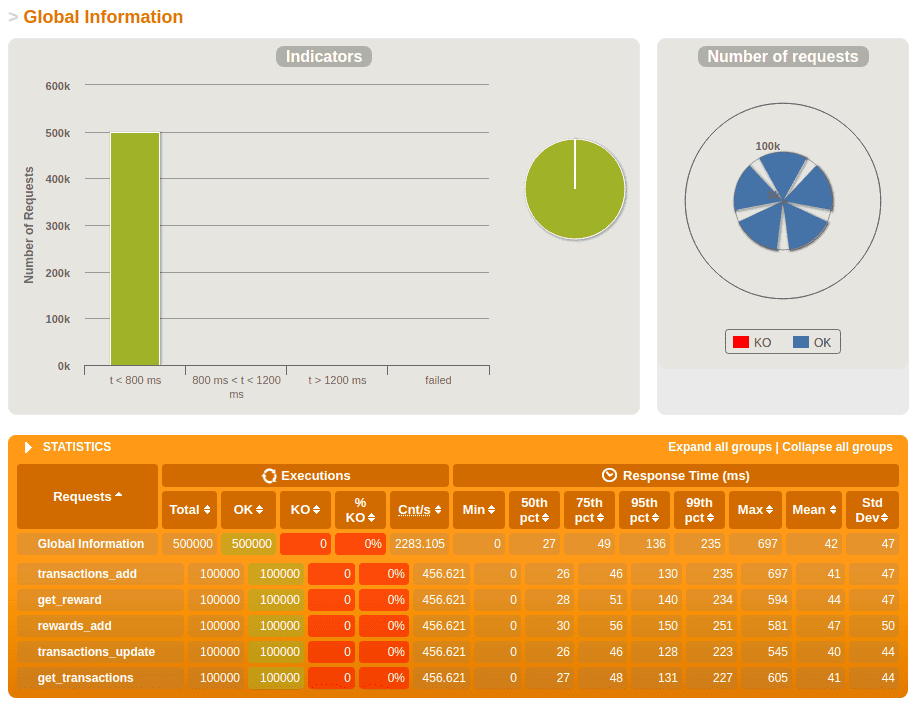
The results show the 3 tools have similar speed, with Gatling slightly edging out the other 2, based on the mean throughput.
Each tool also provides additional information in a friendlier user interface.
Gatling will generate an HTML report at the end of the run, which contains multiple graphs and statistics, for the total run as well as for each request. Here’s a snippet of the test result report:
When using JMeter, we can open the GUI after the test run and generate an HTML report based on the log file where we saved the results:
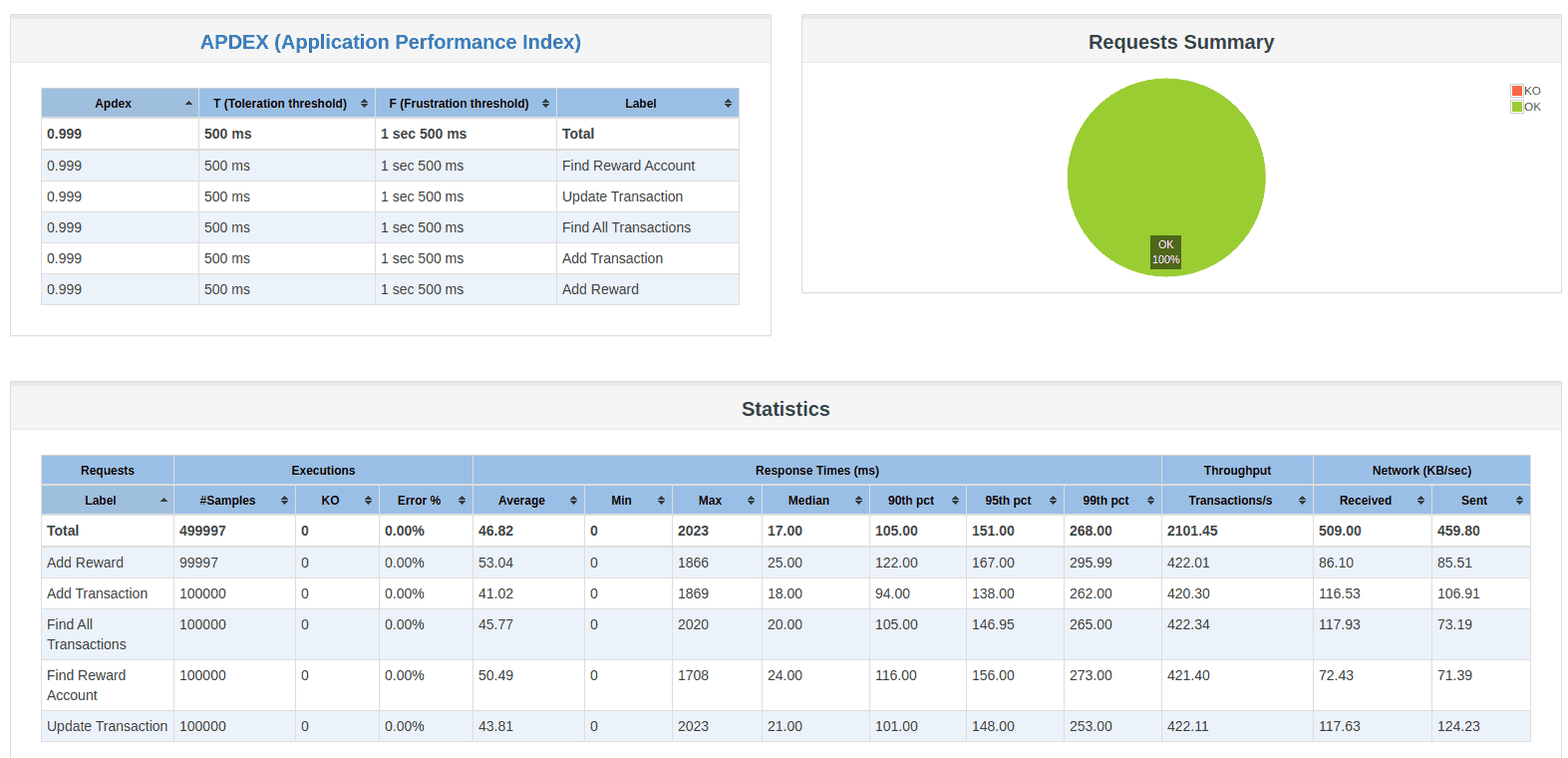
The JMeter HTML report also contains a breakdown of the statistics per request.
Finally, The Grinder Console records statistics for each agent and run:

While The Grinder is high-speed, it comes at the cost of additional development time and less diversity of output data.
5. Summary
Now it’s time to take an overall look at each of the load testing tools.
| Gatling | JMeter | The Grinder | |
|---|---|---|---|
| Project and Community | 9 | 9 | 6 |
| Performance | 9 | 8 | 9 |
| Scriptability/API | 7 | 9 | 8 |
| UI | 9 | 8 | 6 |
| Reports | 9 | 7 | 6 |
| Integration | 7 | 9 | 7 |
| Summary | 8.3 | 8.3 | 7 |
Gatling:
- Solid, polished load testing tool that outputs beautiful reports with Scala scripting
- Open Source and Enterprise support levels for the product
JMeter:
- Robust API (through GUI) for test script development with no coding required
- Apache Foundation Support and great integration with Maven
The Grinder:
- Fast performance load testing tool for developers using Jython
- Cross-server scalability provides even more potential for large tests
Simply put, if speed and scalability is a need, then use The Grinder.
If great looking interactive graphs help show a performance gain to argue for a change, then use Gatling.
JMeter is the tool for complicated business logic or an integration layer with many message types. As part of the Apache Software Foundation, JMeter provides a mature product and a large community.
6. Conclusion
In conclusion, we see that the tools have comparable functionalities in some areas while shining in others. The right tool for the right job is colloquial wisdom that works in software development.














