Difference Between GroupId and ConsumerId in Apache Kafka
Last updated: July 6, 2024


Mocking is an essential part of unit testing, and the Mockito library makes it easy to write clean and intuitive unit tests for your Java code.
Get started with mocking and improve your application tests using our Mockito guide:
Handling concurrency in an application can be a tricky process with many potential pitfalls. A solid grasp of the fundamentals will go a long way to help minimize these issues.
Get started with understanding multi-threaded applications with our Java Concurrency guide:
Spring 5 added support for reactive programming with the Spring WebFlux module, which has been improved upon ever since. Get started with the Reactor project basics and reactive programming in Spring Boot:
Since its introduction in Java 8, the Stream API has become a staple of Java development. The basic operations like iterating, filtering, mapping sequences of elements are deceptively simple to use.
But these can also be overused and fall into some common pitfalls.
To get a better understanding on how Streams work and how to combine them with other language features, check out our guide to Java Streams:
Explore Spring Boot 3 and Spring 6 in-depth through building a full REST API with the framework:
Yes, Spring Security can be complex, from the more advanced functionality within the Core to the deep OAuth support in the framework.
I built the security material as two full courses - Core and OAuth, to get practical with these more complex scenarios. We explore when and how to use each feature and code through it on the backing project.
You can explore the course here:
All Access is finally out, with all of my Spring courses. Learn JUnit is out as well, and Learn Maven is coming fast. And, of course, quite a bit more affordable. Finally.
>> GET THE COURSE
Spring Data JPA is a great way to handle the complexity of JPA with the powerful simplicity of Spring Boot.
Get started with Spring Data JPA through the guided reference course:
Refactor Java code safely — and automatically — with OpenRewrite.
Refactoring big codebases by hand is slow, risky, and easy to put off. That’s where OpenRewrite comes in. The open-source framework for large-scale, automated code transformations helps teams modernize safely and consistently.
Each month, the creators and maintainers of OpenRewrite at Moderne run live, hands-on training sessions — one for newcomers and one for experienced users. You’ll see how recipes work, how to apply them across projects, and how to modernize code with confidence.
Join the next session, bring your questions, and learn how to automate the kind of work that usually eats your sprint time.
1. Introduction
In this tutorial, we’ll clarify the difference between GroupId and ConsumerId in Apache Kafka, which is important in understanding how to set up consumers correctly. In addition, we’ll touch on the difference between ClientId and ConsumerId and see how they are related to each other.
2. Consumer Groups
Before exploring the differences between identifier types in Apache Kafka, let’s understand Consumer Groups.
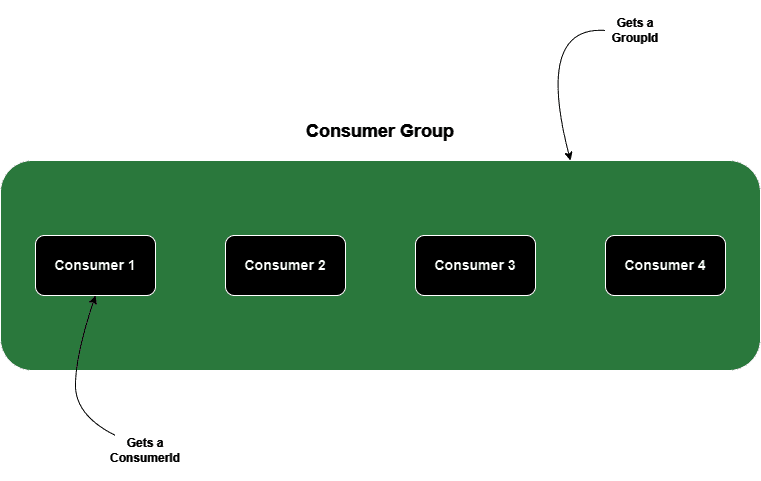
Consumer Groups consist of multiple consumers who work together to consume messages from one or more topics, accomplishing parallel message processing. They enable scalability, fault tolerance, and efficient parallel processing of messages in a distributed Kafka environment.
Crucially, each consumer within the group is responsible for processing only a subset of its topic, known as a partition.
3. Understanding Identifiers
Next, let’s define at a high level all of the identifiers we’re considering in this tutorial:
- GroupId uniquely identifies a Consumer Group.
- ClientId uniquely identifies a request that is passed to the server.
- ConsumerId is assigned to individual consumers within a Consumer Group and is a combination of the client.id consumer property and the consumer’s unique identifier.
4. Purpose of Identifiers
Next, let’s understand the purpose of each identifier.
GroupId is central to the load-balancing mechanism, enabling the distribution of partitions among consumers. Consumer Groups manage the coordination, load balancing, and partition assignment among consumers within the same group. Kafka ensures that only one consumer has access to each partition at any given time. If a consumer within the group fails, Kafka seamlessly reassigns the partition to other consumers to maintain continuity of message processing.
Kafka uses ConsumerIds to ensure that each consumer within the group is uniquely identifiable when interacting with the Kafka broker. This identifier, fully managed by Kafka, is used for managing consumer offsets and tracking the progress in processing messages from partitions.
Lastly, ClientId tracks the source of requests, beyond just IP/port, by allowing the developer to configure a logical application name that will be included in server-side request logging. Because we have control over this value, we could create two separate clients with the same ClientId. However, in this case, the ConsumerId generated by Kafka will be different.
5. Configuring GroupId and ConsumerId
5.1. Using Spring Kafka
Let’s define GroupId and ConsumerId for our consumers in Spring Kafka. We’ll achieve this by leveraging the @KafkaListener annotation:
@KafkaListener(topics = "${kafka.topic.name:test-topic}", clientIdPrefix = "neo", groupId = "${kafka.consumer.groupId:test-consumer-group}", concurrency = "4")
public void receive(@Payload String payload, Consumer<String, String> consumer) {
    LOGGER.info("Consumer='{}' received payload='{}'", consumer.groupMetadata()
      .memberId(), payload);
    this.payload = payload;

    latch.countDown();
}
Notice how we specified the groupId property to an arbitrary value of our choice.
Additionally, we’ve set the clientIdPrefix property to contain a custom prefix. Let’s inspect application logs to verify that the ConsumerId contains this prefix:
c.b.s.kafka.groupId.MyKafkaConsumer : Consumer='neo-1-bae916e4-eacb-485a-9c58-bc22a0eb6187' received payload='Test 123...'
The value of consumerId, also known as memberId, follows a specific pattern. It starts with the clientIdPrefix, followed by a counter based on the number of consumers in the group, and finally, a UUID.
5.2. Using Kafka CLI
We can also configure the GroupId and ConsumerId via CLI. We’ll work with the kafka-console-consumer.sh script. Let’s start a console consumer with group.id set to test-consumer-group and client.id property set to neo-<sequence_number>:
$ kafka-console-consumer.sh --bootstrap-server localhost:9092 --topic Test --group test-consumer-group --consumer-property "client.id=neo-1"In this case, we must ensure that each client is assigned a unique client.id. This behavior is different from Spring Kafka, where we set the clientIdPrefix and the framework adds a sequence number to it. If we describe the consumer group, we’ll see the ConsumerId generated by Kafka for each consumer:
kafka-consumer-groups.sh --bootstrap-server localhost:9092 --group test-consumer-group --describeGROUP TOPIC PARTITION CURRENT-OFFSET LOG-END-OFFSET LAG CONSUMER-ID HOST CLIENT-ID
test-consumer-group Test 0 0 0 0 neo-1-975feb3f-9e5a-424b-9da3-c2ec3bc475d6 /127.0.0.1 neo-1
test-consumer-group Test 1 0 0 0 neo-1-975feb3f-9e5a-424b-9da3-c2ec3bc475d6 /127.0.0.1 neo-1
test-consumer-group Test 2 0 0 0 neo-1-975feb3f-9e5a-424b-9da3-c2ec3bc475d6 /127.0.0.1 neo-1
test-consumer-group Test 3 0 0 0 neo-1-975feb3f-9e5a-424b-9da3-c2ec3bc475d6 /127.0.0.1 neo-1
test-consumer-group Test 7 0 0 0 neo-3-09b8d4ee-5f03-4386-94b1-e068320b5e6a /127.0.0.1 neo-3
test-consumer-group Test 8 0 0 0 neo-3-09b8d4ee-5f03-4386-94b1-e068320b5e6a /127.0.0.1 neo-3
test-consumer-group Test 9 0 0 0 neo-3-09b8d4ee-5f03-4386-94b1-e068320b5e6a /127.0.0.1 neo-3
test-consumer-group Test 4 0 0 0 neo-2-6a39714e-4bdd-4ab8-bc8c-5463d78032ec /127.0.0.1 neo-2
test-consumer-group Test 5 0 0 0 neo-2-6a39714e-4bdd-4ab8-bc8c-5463d78032ec /127.0.0.1 neo-2
test-consumer-group Test 6 0 0 0 neo-2-6a39714e-4bdd-4ab8-bc8c-5463d78032ec /127.0.0.1 neo-26. Summary
Let’s summarize the key differences between the three identifiers we’ve discussed:
Dimension |
GroupId |
ConsumerId |
ClientId |
What does it identify? |
Consumer Group |
Individual Consumer within a Consumer Group |
Individual Consumer within a Consumer Group |
Where does its value come from? |
Developers set the GroupId |
Kafka generates the ConsumerId based on the client.id consumer property |
Developers set the client.id consumer property |
Is it unique? |
If two consumer groups have the same GroupId, they are effectively one |
Kafka ensures each consumer has a unique value |
It doesn’t have to be unique. Two consumers can be given the same value for the client.id consumer property as per the use case |
7. Conclusion
In this article, we’ve looked at some of the key identifiers associated with Kafka consumers: GroupId, ClientId, and ConsumerId. We now understand their purpose and how to configure them.














