Uploading Files with Servlets and JSP
Last updated: August 20, 2023


Mocking is an essential part of unit testing, and the Mockito library makes it easy to write clean and intuitive unit tests for your Java code.
Get started with mocking and improve your application tests using our Mockito guide:
Handling concurrency in an application can be a tricky process with many potential pitfalls. A solid grasp of the fundamentals will go a long way to help minimize these issues.
Get started with understanding multi-threaded applications with our Java Concurrency guide:
Spring 5 added support for reactive programming with the Spring WebFlux module, which has been improved upon ever since. Get started with the Reactor project basics and reactive programming in Spring Boot:
Since its introduction in Java 8, the Stream API has become a staple of Java development. The basic operations like iterating, filtering, mapping sequences of elements are deceptively simple to use.
But these can also be overused and fall into some common pitfalls.
To get a better understanding on how Streams work and how to combine them with other language features, check out our guide to Java Streams:
Explore Spring Boot 3 and Spring 6 in-depth through building a full REST API with the framework:
Yes, Spring Security can be complex, from the more advanced functionality within the Core to the deep OAuth support in the framework.
I built the security material as two full courses - Core and OAuth, to get practical with these more complex scenarios. We explore when and how to use each feature and code through it on the backing project.
You can explore the course here:
All Access is finally out, with all of my Spring courses. Learn JUnit is out as well, and Learn Maven is coming fast. And, of course, quite a bit more affordable. Finally.
>> GET THE COURSE
Spring Data JPA is a great way to handle the complexity of JPA with the powerful simplicity of Spring Boot.
Get started with Spring Data JPA through the guided reference course:
Refactor Java code safely — and automatically — with OpenRewrite.
Refactoring big codebases by hand is slow, risky, and easy to put off. That’s where OpenRewrite comes in. The open-source framework for large-scale, automated code transformations helps teams modernize safely and consistently.
Each month, the creators and maintainers of OpenRewrite at Moderne run live, hands-on training sessions — one for newcomers and one for experienced users. You’ll see how recipes work, how to apply them across projects, and how to modernize code with confidence.
Join the next session, bring your questions, and learn how to automate the kind of work that usually eats your sprint time.
1. Introduction
In this quick tutorial, we’ll see how to upload a file from a servlet.
To achieve this, we’ll first see the vanilla Jakarta EE solution with file upload capabilities provided by native @MultipartConfig annotation.
Then, we’ll go over the Apache Commons FileUpload library, for earlier versions of the Servlet API.
2. Using Jakarta EE @MultipartConfig
Jakarta EE has the ability to support multi-part uploads out of the box.
As such, it’s probably a default go-to when enriching a Jakarta EE app with file upload support.
First, let’s add a form to our HTML file:
<form method="post" action="multiPartServlet" enctype="multipart/form-data">
    Choose a file: <input type="file" name="multiPartServlet" />
    <input type="submit" value="Upload" />
</form>
The form should be defined using the enctype=”multipart/form-data” attribute to signal a multipart upload.
Next, we’ll want to annotate our HttpServlet with the correct information using the @MultipartConfig annotation:
@MultipartConfig(fileSizeThreshold = 1024 * 1024,
  maxFileSize = 1024 * 1024 * 5,
  maxRequestSize = 1024 * 1024 * 5 * 5)
public class MultipartServlet extends HttpServlet {
    //...
}
Then, let’s make sure that our default server upload folder is set:
String uploadPath = getServletContext().getRealPath("") + File.separator + UPLOAD_DIRECTORY;
File uploadDir = new File(uploadPath);
if (!uploadDir.exists()) uploadDir.mkdir();
Finally, we can easily retrieve our inbound File from the request using the getParts() method, and save it to the disk:
for (Part part : request.getParts()) {
    fileName = getFileName(part);
    part.write(uploadPath + File.separator + fileName);
}
Note that, in this example, we’re using a helper method getFileName():
private String getFileName(Part part) {
    for (String content : part.getHeader("content-disposition").split(";")) {
        if (content.trim().startsWith("filename"))
            return content.substring(content.indexOf("=") + 2, content.length() - 1);
        }
    return Constants.DEFAULT_FILENAME;
}
For Servlet 3.1. projects, we could alternatively use the Part.getSubmittedFileName() method:
fileName = part.getSubmittedFileName();3. Using Apache Commons FileUpload
If we’re not on a Servlet 3.0 project, we can use the Apache Commons FileUpload library directly.
3.1. Setup
We’ll want to use the following pom.xml dependencies to get our example running:
<dependency>
    <groupId>org.apache.commons</groupId>
    <artifactId>commons-fileupload2-jakarta-servlet6</artifactId>
    <version>2.0.0-M2</version>
</dependency>
The most recent versions can be found with a quick search on Maven’s Central Repository: commons-fileupload2-jakarta-servlet6.
3.2. Upload Servlet
The three main parts to incorporating Apache’s FileUpload library go as follows:
- An upload form in a .jsp page.
- Configuring your DiskFileItemFactory and ServletFileUpload object.
- Processing the actual contents of a multipart file upload.
The upload form is the same as the one in the previous section.
Let’s move on to creating our Jakarta EE servlet.
In our request processing method, we can wrap the incoming HttpRequest with a check to see if it’s a multi-part upload.
We’ll also specify what resources to allocate to the file upload temporarily (while being processed) on our DiskFileItemFactory.
Lastly, we’ll create a ServletFileUpload object which will represent the actual file itself. It will expose the contents of the multi-part upload for final persistence server side:
if (ServletFileUpload.isMultipartContent(request)) {

    DiskFileItemFactory factory = new DiskFileItemFactory();
    factory.setSizeThreshold(MEMORY_THRESHOLD);
    factory.setRepository(new File(System.getProperty("java.io.tmpdir")));

    ServletFileUpload upload = new ServletFileUpload(factory);
    upload.setFileSizeMax(MAX_FILE_SIZE);
    upload.setSizeMax(MAX_REQUEST_SIZE);
    String uploadPath = getServletContext().getRealPath("")
      + File.separator + UPLOAD_DIRECTORY;
    File uploadDir = new File(uploadPath);
    if (!uploadDir.exists()) {
        uploadDir.mkdir();
    }
    //...
}
And, then we can extract those contents and write them to disk:
if (ServletFileUpload.isMultipartContent(request)) {
    //...
    List<FileItem> formItems = upload.parseRequest(request);
    if (formItems != null && formItems.size() > 0) {
        for (FileItem item : formItems) {
	    if (!item.isFormField()) {
	        String fileName = new File(item.getName()).getName();
	        String filePath = uploadPath + File.separator + fileName;
                File storeFile = new File(filePath);
                item.write(storeFile);
                request.setAttribute("message", "File "
                  + fileName + " has uploaded successfully!");
	    }
        }
    }
}
4. Running the Example
After we’ve compiled our project into a .war, we can drop it into our local Tomcat instance and start it up.
From there, we can bring up the main upload view where we’re presented with a form:

After successfully uploading our file, we should see the message:

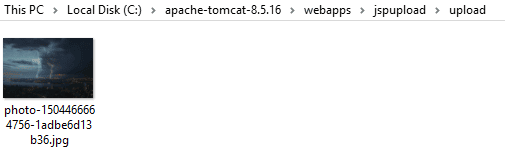
Lastly, we can check the location specified in our servlet:
5. Conclusion
That’s it! We’ve learned how to provide multi-part file uploads using Jakarta EE, as well as Apache’s Common FileUpload library!














