1. Introduction
Traefik is a modern reverse proxy and load balancer designed to streamline and optimize the deployment and management of microservices. In this tutorial, we’ll explore what Traefik is, its key features, and how it can be integrated into an application infrastructure.
2. What Is Traefik
Traefik is an open-source, dynamic reverse proxy and load balancer developed by Containous. It’s specifically designed to integrate seamlessly with modern container orchestration platforms such as Kubernetes, Docker Swarm, and Mesos.
Traefik’s primary goal is to simplify the configuration and management of reverse proxying and load-balancing tasks, making it an ideal choice for microservice architectures.
3. Key Features
- Auto-discovery: Traefik automatically discovers services and routes by integrating with service registries, container orchestrators, and cloud providers.
- Dynamic Configuration: It dynamically adapts its configuration as the environment changes, without requiring a restart.
- Middleware: Supports various middleware to manipulate requests and responses, such as authentication, rate limiting, and retries.
- Load Balancing: Provides sophisticated load-balancing algorithms to distribute traffic across services.
- SSL Termination: Traefik can automatically manage SSL certificates, making it easier to secure our applications with HTTPS.
- Dashboard: Offers a built-in web UI to monitor and visualize the state of our services and routers.
4. How Traefik Works
Traefik operates by listening to the APIs of our orchestration platform or service discovery tool. It then uses this information to route traffic to the appropriate service automatically. For example, in a Kubernetes environment, we can configure Traefik as an ingress controller to manage incoming HTTP and HTTPS traffic to services within the cluster.
Let’s understand a simple flow of how Traefik works:
- Service Discovery: Traefik continuously monitors the environment for new or updated services.
- Routing: Traefik dynamically creates or updates routes based on the discovered services.
- Load Balancing: Traefik distributes incoming requests across the available service instances.
- TLS Termination: If configured, Traefik handles HTTPS traffic, managing SSL certificates automatically.
- Middleware: We can modify requests and responses before they reach the service or the client.

The above image is part of the official documentation for Traefik.
5. Working With Traefik
Traefik offers multiple installation methods. For this guide, we’ll focus on installing it using Docker. We’ll use the below docker-compose.yml to run Traefik as a container. We can find the latest image for Traefik in the Docker repository:
version: '3'

services:
  reverse-proxy:
    # The official v3 Traefik docker image
    image: traefik:v3.1
    # Enables the web UI and tells Traefik to listen to docker
    command: --api.insecure=true --providers.docker
    ports:
      # The HTTP port
      - "80:80"
      # The Web UI (enabled by --api.insecure=true)
      - "8080:8080"
    volumes:
      # So that Traefik can listen to the Docker events
      - /var/run/docker.sock:/var/run/docker.sock
The below command will run a Traefik container in the background. In this example, Traefik is configured to listen to Docker events, automatically updating its routing configuration based on the running services:
docker-compose up -d reverse-proxy
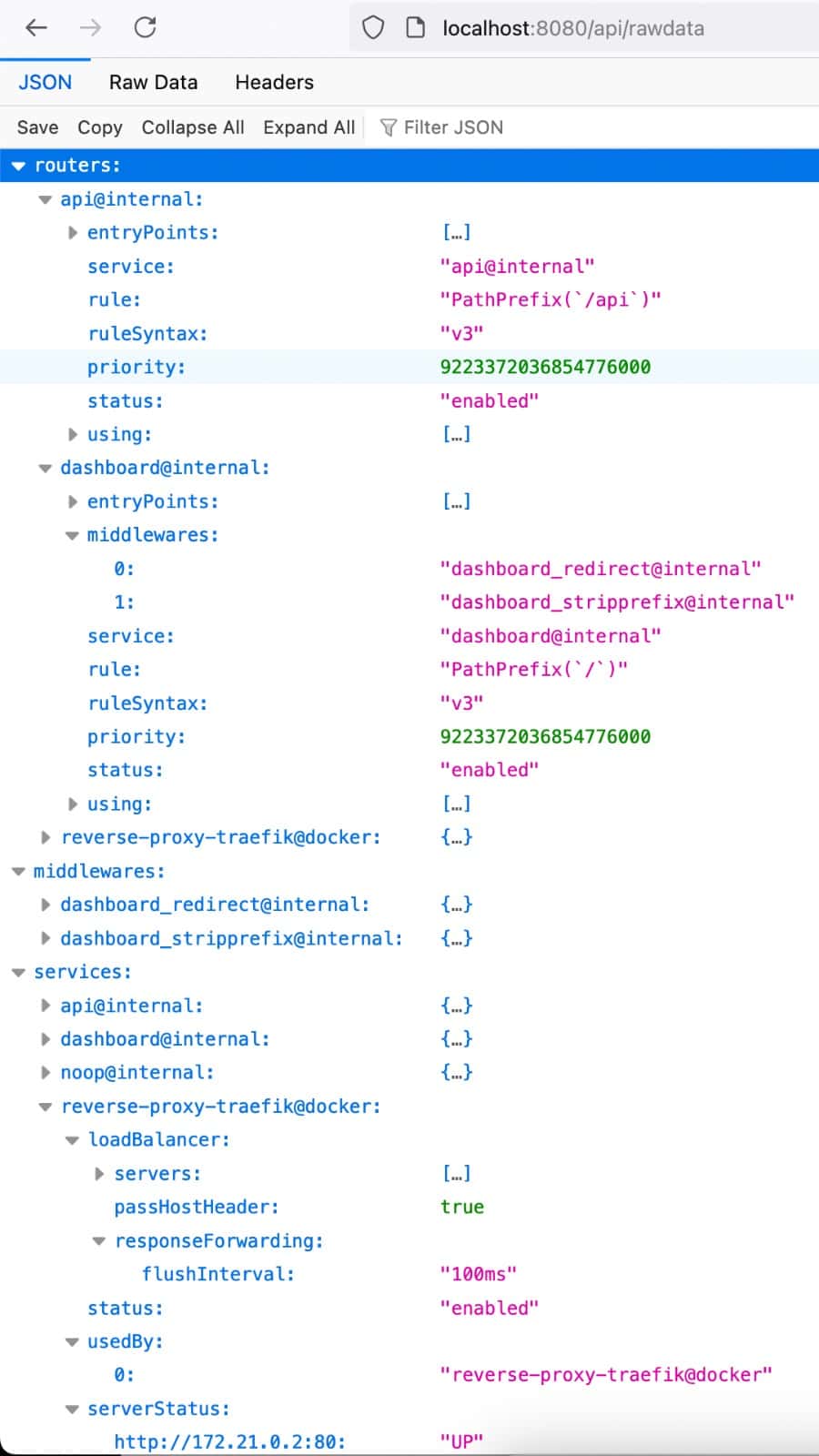
Let’s open the browser and navigate to http://localhost:8080/api/rawdata to view Traefik’s API raw data:

We can now deploy new services. Let’s add a new service called whoami in the docker-compose.yml. This service will output the information about the machine on which the service is deployed:
version: '3'

services:

  whoami:
    image: traefik/whoami
    labels:
      - "traefik.http.routers.whoami.rule=Host(`whoami.docker.localhost`)"
Let’s now run the command to start the service:
docker-compose up -d whoami
Traefik automatically detects the new service and updates the configuration:

When Traefik detects new services, it creates the corresponding routes, allowing us to access them. Let’s give it a try using curl:
curl -H Host:whoami.docker.localhost http://127.0.0.1
Running the above command will result in output containing details like the client’s IP address, the service’s internal IP and hostname, and headers, including the original host and protocol:
Hostname: 008455958d71
IP: 127.0.0.1
IP: 172.21.0.3
RemoteAddr: 172.21.0.2:43852
GET / HTTP/1.1
Host: whoami.docker.localhost
User-Agent: curl/8.7.1
Accept: /
Accept-Encoding: gzip
X-Forwarded-For: 172.21.0.1
X-Forwarded-Host: whoami.docker.localhost
X-Forwarded-Port: 80
X-Forwarded-Proto: http
X-Forwarded-Server: 0c1bf06a7c23
X-Real-Ip: 172.21.0.1
6. Conclusion
In this article, we explored what Traefik is, what its core features are, and how to get it up and running using Docker. Traefik is a powerful and flexible tool for managing traffic in modern web architectures. Its auto-discovery, dynamic configuration and extensive middleware support make it ideal for microservices and containerized environments.