


Mocking is an essential part of unit testing, and the Mockito library makes it easy to write clean and intuitive unit tests for your Java code.
Get started with mocking and improve your application tests using our Mockito guide:
Handling concurrency in an application can be a tricky process with many potential pitfalls. A solid grasp of the fundamentals will go a long way to help minimize these issues.
Get started with understanding multi-threaded applications with our Java Concurrency guide:
Spring 5 added support for reactive programming with the Spring WebFlux module, which has been improved upon ever since. Get started with the Reactor project basics and reactive programming in Spring Boot:
Since its introduction in Java 8, the Stream API has become a staple of Java development. The basic operations like iterating, filtering, mapping sequences of elements are deceptively simple to use.
But these can also be overused and fall into some common pitfalls.
To get a better understanding on how Streams work and how to combine them with other language features, check out our guide to Java Streams:
Explore Spring Boot 3 and Spring 6 in-depth through building a full REST API with the framework:
Yes, Spring Security can be complex, from the more advanced functionality within the Core to the deep OAuth support in the framework.
I built the security material as two full courses - Core and OAuth, to get practical with these more complex scenarios. We explore when and how to use each feature and code through it on the backing project.
You can explore the course here:
All Access is finally out, with all of my Spring courses. Learn JUnit is out as well, and Learn Maven is coming fast. And, of course, quite a bit more affordable. Finally.
>> GET THE COURSE
Spring Data JPA is a great way to handle the complexity of JPA with the powerful simplicity of Spring Boot.
Get started with Spring Data JPA through the guided reference course:
Refactor Java code safely — and automatically — with OpenRewrite.
Refactoring big codebases by hand is slow, risky, and easy to put off. That’s where OpenRewrite comes in. The open-source framework for large-scale, automated code transformations helps teams modernize safely and consistently.
Each month, the creators and maintainers of OpenRewrite at Moderne run live, hands-on training sessions — one for newcomers and one for experienced users. You’ll see how recipes work, how to apply them across projects, and how to modernize code with confidence.
Join the next session, bring your questions, and learn how to automate the kind of work that usually eats your sprint time.
1. Overview
Apache Tomcat is an open-source Java servlet container and web server. It creates dynamic web content by executing Java web applications on the server side.
In this tutorial, we’ll discuss how to find the version of a Tomcat server. The version of the Tomcat server we’ll be using in the examples is 10.1.52. We run the server on the Debian 12 distro.
2. The Web Interface
We can access the server from the node where the server is running by opening the URL http://localhost:8080 in a web browser: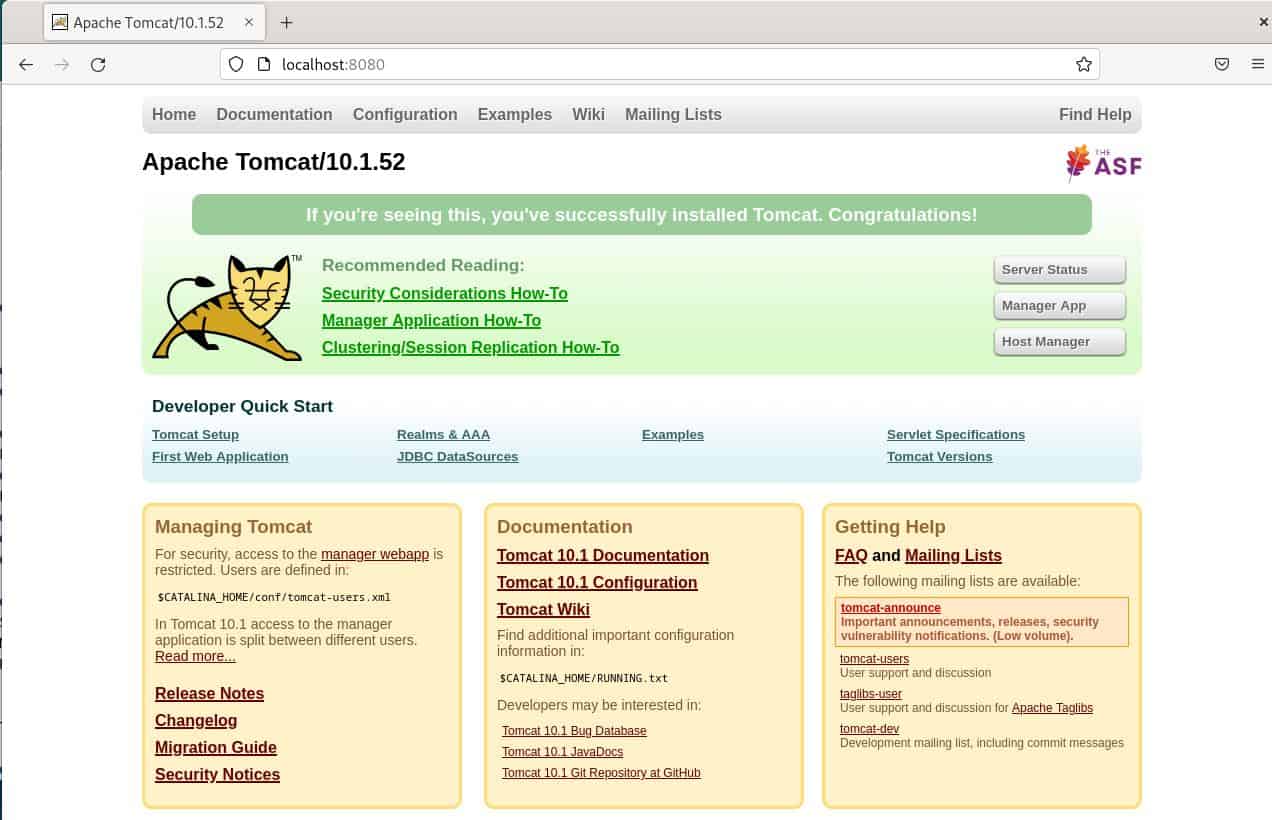
The Apache Tomcat server runs on port 8080 by default. Evidently, the server’s version is 10.1.52. If we attempt to check it from a remote host, we need to replace localhost in the URL with the server’s IP address.
The title of the web page is Apache Tomcat/10.1.52. Therefore, we can also get the version from the title using curl:
$ curl -s http://localhost:8080 | grep title
        <title>Apache Tomcat/10.1.52</title
The -s option runs curl in silent mode by skipping the progress meter in the output. We use grep to filter the response’s content and print only the HTML <title> tag that defines the title of a Web page.
3. The version.sh Script
We can use the version.sh script in the bin directory of the Tomcat Server to display its version:
$ cd /opt/tomcat
$ ./bin/version.sh
Using CATALINA_BASE:   /opt/tomcat
Using CATALINA_HOME:   /opt/tomcat
Using CATALINA_TMPDIR: /opt/tomcat/temp
Using JRE_HOME:        /usr
Using CLASSPATH:       /opt/tomcat/bin/bootstrap.jar:/opt/tomcat/bin/tomcat-juli.jar
Using CATALINA_OPTS:
Server version: Apache Tomcat/10.1.52
Server built:   Jan 23 2026 19:29:07 UTC
Server number:  10.1.52.0
OS Name:        Linux
OS Version:     6.1.0-10-amd64
Architecture:   amd64
JVM Version:    17.0.18+8-Debian-1deb12u1
JVM Vendor:     Debian
The server resides in the /opt/tomcat directory in our setup. The script is located in the /opt/tomcat/bin directory. As evident from the output, the server’s version is 10.1.52. We can print only the server’s version by filtering the output using grep:
$ ./bin/version.sh | grep "Server version"
Server version: Apache Tomcat/10.1.52
We can run this script and obtain the version even if the server isn’t running.
4. The catalina.sh Script
Another option is to use the catalina.sh script in the bin directory:
$ ./bin/catalina.sh version
Using CATALINA_BASE:   /opt/tomcat
Using CATALINA_HOME:   /opt/tomcat
Using CATALINA_TMPDIR: /opt/tomcat/temp
Using JRE_HOME:        /usr
Using CLASSPATH:       /opt/tomcat/bin/bootstrap.jar:/opt/tomcat/bin/tomcat-juli.jar
Using CATALINA_OPTS:
Server version: Apache Tomcat/10.1.52
Server built:   Jan 23 2026 19:29:07 UTC
Server number:  10.1.52.0
OS Name:        Linux
OS Version:     6.1.0-10-amd64
Architecture:   amd64
JVM Version:    17.0.18+8-Debian-1deb12u1
JVM Vendor:     Debian
Server built:   Jan 23 2026 19:29:07 UTC
Server number:  10.1.52.0
This script is useful for various purposes. For example, we can use it to start and stop the server. So, it takes several commands. We pass the version command to display the information about the server.
The output of the script is identical to that of version.sh. Indeed, version.sh calls catalina.sh behind the scenes. Just like version.sh, we can run this script and obtain the version even if the server isn’t running.
We ran version.sh and catalina.sh on Linux, but since Apache Tomcat is a cross-platform server, the scripts also exist on other operating systems. For example, we can use version.bat and catalina.bat on Windows.
5. The catalina.jar File
Another alternative is to run the jar file, catalina.jar, in the lib directory using the java command. The org.apache.catalina.util.ServerInfo class, which contains the server’s version, resides in this jar file:
$ java -cp /opt/tomcat/lib/catalina.jar org.apache.catalina.util.ServerInfo
Server version: Apache Tomcat/10.1.52
Server built:   Jan 23 2026 19:29:07 UTC
Server number:  10.1.52.0
OS Name:        Linux
OS Version:     6.1.0-10-amd64
Architecture:   amd64
JVM Version:    17.0.18+8-Debian-1deb12u1
JVM Vendor:     Debian
The output is similar to the outputs in the previous sections. We can run this jar file and obtain the version even if the server isn’t running.
6. Log Files
The version is printed at the beginning of the log file each time the server is started. Therefore, we can get the version from the log files:
$ grep "Starting Servlet engine" ./logs/catalina.out | tail -1
17-Feb-2026 05:19:34.090 INFO [main] org.apache.catalina.core.StandardEngine.startInternal Starting Servlet engine: [Apache Tomcat/10.1.52]
The server’s log file, catalina.out, resides in the logs directory. We searched for the “Starting Servlet engine” expression in the log file using grep. Furthermore, we printed only the last instance using the tail command, i.e., tail -1, since there may be multiple instances of it in the log file.
This method is applicable if the server has been started at least once.
7. Release Notes
The RELEASE-NOTES file in the server’s home directory contains the version. Therefore, we can print the version using grep:
$ grep "Apache Tomcat Version" ./RELEASE-NOTES
                     Apache Tomcat Version 10.1.52
As it’s apparent from the output, the version is 10.1.52.
8. Programmatically from a Java Application
It’s also possible to check the server’s version from a running Java application. We’ve already seen how to use the org.apache.catalina.util.ServerInfo class from the command line using the java command. We can call the static getServerInfo() method of this class to get the version:
String serverInfo = ServerInfo.getServerInfo();Alternatively, if we’re using a servlet, we can get the name and version of the server on which the servlet is running using the getServerInfo() method in the ServletContext interface:
String serverInfo = getServletContext().getServerInfo();This method can be used not only for the Tomcat server but also for other servlet containers.
9. Conclusion
In this article, we discussed how to find the version of a Tomcat server.
Firstly, we saw how to get the server’s version through its web interface. We also learned that we can automate this method by using the curl command from the command line.
Then, we discussed methods using several scripts and files. These methods include the usage of the version.sh and catalina.sh scripts, the catalina.jar file, server log files, and release notes. Using these files may require root privileges depending on the permissions of the directory where the server is installed.
Finally, we learned how to get the server’s version from a Java application and a servlet.














