


Mocking is an essential part of unit testing, and the Mockito library makes it easy to write clean and intuitive unit tests for your Java code.
Get started with mocking and improve your application tests using our Mockito guide:
Handling concurrency in an application can be a tricky process with many potential pitfalls. A solid grasp of the fundamentals will go a long way to help minimize these issues.
Get started with understanding multi-threaded applications with our Java Concurrency guide:
Spring 5 added support for reactive programming with the Spring WebFlux module, which has been improved upon ever since. Get started with the Reactor project basics and reactive programming in Spring Boot:
Since its introduction in Java 8, the Stream API has become a staple of Java development. The basic operations like iterating, filtering, mapping sequences of elements are deceptively simple to use.
But these can also be overused and fall into some common pitfalls.
To get a better understanding on how Streams work and how to combine them with other language features, check out our guide to Java Streams:
Explore Spring Boot 3 and Spring 6 in-depth through building a full REST API with the framework:
Yes, Spring Security can be complex, from the more advanced functionality within the Core to the deep OAuth support in the framework.
I built the security material as two full courses - Core and OAuth, to get practical with these more complex scenarios. We explore when and how to use each feature and code through it on the backing project.
You can explore the course here:
All Access is finally out, with all of my Spring courses. Learn JUnit is out as well, and Learn Maven is coming fast. And, of course, quite a bit more affordable. Finally.
>> GET THE COURSE
Spring Data JPA is a great way to handle the complexity of JPA with the powerful simplicity of Spring Boot.
Get started with Spring Data JPA through the guided reference course:
Refactor Java code safely — and automatically — with OpenRewrite.
Refactoring big codebases by hand is slow, risky, and easy to put off. That’s where OpenRewrite comes in. The open-source framework for large-scale, automated code transformations helps teams modernize safely and consistently.
Each month, the creators and maintainers of OpenRewrite at Moderne run live, hands-on training sessions — one for newcomers and one for experienced users. You’ll see how recipes work, how to apply them across projects, and how to modernize code with confidence.
Join the next session, bring your questions, and learn how to automate the kind of work that usually eats your sprint time.
1. Introduction
In this quick tutorial, we’re going to learn how to work with enums in Thymeleaf.
We’ll start by listing enum values in a dropdown. After that, we’ll look at using our enum for flow control within our templates.
2. Setup
Let’s start by adding the Spring Boot starter for Thymeleaf to our pom.xml file:
<dependency>
    <groupId>org.springframework.boot</groupId>
    <artifactId>spring-boot-starter-thymeleaf</artifactId>
    <versionId>3.1.5</versionId>
</dependency>
We’re going to be working with widgets that have a few choices of color, so let’s define our Color enum:
public enum Color {
    BLACK, BLUE, RED, YELLOW, GREEN, ORANGE, PURPLE, WHITE
}
Now, let’s create our Widget class:
public class Widget {
    private String name;
    private Color color;

    // Standard getters/setters
}
3. Displaying Enums in a Dropdown Menu
Let’s use select and option to create a dropdown that uses our Color enum:
<select name="color">
    <option th:each="colorOpt : ${T(com.baeldung.thymeleaf.model.Color).values()}"
        th:value="${colorOpt}" th:text="${colorOpt}"></option>
</select>
The T operator is part of the Spring Expression Language for specifying an instance of a class or accessing static methods.
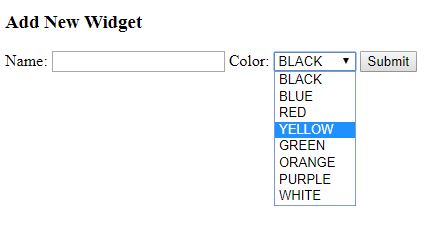
If we run our application and navigate to our widget entry page, we’ll see all our colors in the Color dropdown:
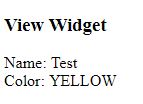
When we submit our form, our Widget object will be populated with the selected color:
4. Using a Display Name
Since all capital letters can be a bit jarring, let’s expand on our example to provide more user-friendly dropdown labels.
We’ll start by modifying our Color enum to provide a display name:
public enum Color {
    BLACK("Black"),
    BLUE("Blue"),
    RED("Red"),
    YELLOW("Yellow"),
    GREEN("Green"),
    ORANGE("Orange"),
    PURPLE("Purple"),
    WHITE("White");

    private final String displayValue;

    private Color(String displayValue) {
        this.displayValue = displayValue;
    }

    public String getDisplayValue() {
        return displayValue;
    }
}
Next, let’s head over to our Thymeleaf template and update our dropdown to use the new displayValue:
<select name="color">
    <option th:each="colorOpt : ${T(com.baeldung.thymeleaf.model.Color).values()}"
        th:value="${colorOpt}" th:text="${colorOpt.displayValue}"></option>
</select>
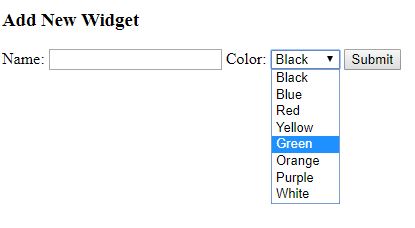
Our dropdown now displays with the more readable color names:
5. If Statements
Sometimes we might want to vary what we’re displaying based on the values of an enum. We can use our Color enum with Thymeleaf conditional statements.
Let’s imagine that we have opinions on some of the possible widget colors.
We can use a Thymeleaf if statement with our Color enum to conditionally display text:
<div th:if="${widget.color == T(com.baeldung.thymeleaf.model.Color).RED}">
    This color screams danger.
</div>
Another option is to use a String comparison:
<div th:if="${widget.color.name() == 'GREEN'}">
    Green is for go.
</div>
6. Switch-Case Statements
In addition to if statements, Thymeleaf supports a switch-case statement.
Let’s use a switch-case statement with our Color enum:
<div th:switch="${widget.color}">
    <span th:case="${T(com.baeldung.thymeleaf.model.Color).RED}"
      style="color: red;">Alert</span>
    <span th:case="${T(com.baeldung.thymeleaf.model.Color).ORANGE}"
      style="color: orange;">Warning</span>
    <span th:case="${T(com.baeldung.thymeleaf.model.Color).YELLOW}"
      style="color: yellow;">Caution</span>
    <span th:case="${T(com.baeldung.thymeleaf.model.Color).GREEN}"
      style="color: green;">All Good</span>
</div>
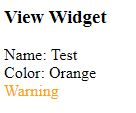
If we enter an orange widget, we should see our warning statement:
7. Conclusion
In this tutorial, we started by using Thymeleaf to create a dropdown using the Color enum we defined in our application. From there, we learned how to make the drop down display values more readable.
After going over the input side with the dropdown, we moved on to the output side and learned how to work with enums in control structures. We used both if and switch-case statements to condition some elements based on our Color enum.














