Swagger: Specify Two Responses with the Same Response Code
Last updated: January 28, 2024


Mocking is an essential part of unit testing, and the Mockito library makes it easy to write clean and intuitive unit tests for your Java code.
Get started with mocking and improve your application tests using our Mockito guide:
Handling concurrency in an application can be a tricky process with many potential pitfalls. A solid grasp of the fundamentals will go a long way to help minimize these issues.
Get started with understanding multi-threaded applications with our Java Concurrency guide:
Spring 5 added support for reactive programming with the Spring WebFlux module, which has been improved upon ever since. Get started with the Reactor project basics and reactive programming in Spring Boot:
Since its introduction in Java 8, the Stream API has become a staple of Java development. The basic operations like iterating, filtering, mapping sequences of elements are deceptively simple to use.
But these can also be overused and fall into some common pitfalls.
To get a better understanding on how Streams work and how to combine them with other language features, check out our guide to Java Streams:
Explore Spring Boot 3 and Spring 6 in-depth through building a full REST API with the framework:
Yes, Spring Security can be complex, from the more advanced functionality within the Core to the deep OAuth support in the framework.
I built the security material as two full courses - Core and OAuth, to get practical with these more complex scenarios. We explore when and how to use each feature and code through it on the backing project.
You can explore the course here:
All Access is finally out, with all of my Spring courses. Learn JUnit is out as well, and Learn Maven is coming fast. And, of course, quite a bit more affordable. Finally.
>> GET THE COURSE
Spring Data JPA is a great way to handle the complexity of JPA with the powerful simplicity of Spring Boot.
Get started with Spring Data JPA through the guided reference course:
Refactor Java code safely — and automatically — with OpenRewrite.
Refactoring big codebases by hand is slow, risky, and easy to put off. That’s where OpenRewrite comes in. The open-source framework for large-scale, automated code transformations helps teams modernize safely and consistently.
Each month, the creators and maintainers of OpenRewrite at Moderne run live, hands-on training sessions — one for newcomers and one for experienced users. You’ll see how recipes work, how to apply them across projects, and how to modernize code with confidence.
Join the next session, bring your questions, and learn how to automate the kind of work that usually eats your sprint time.
1. Overview
In this article, we’ll write an API specification that allows returning two different objects for the same response code. We’ll demonstrate how we can use that specification to generate Java code and the Swagger documentation.
2. Presentation of the Problem
Let’s define two objects. A Car has an owner and a plate as attributes, both being Strings. On the other hand, a Bike has an owner and speed. The speed is an Integer.
Using OpenAPI, these definitions correspond to the following description:
Car:
  type: object
  properties:
    owner:
      type: string
    plate:
      type: string
Bike:
  type: object
  properties:
    owner:
      type: string
    speed:
      type: integer
We want to describe an endpoint /vehicle which will accept GET requests and will be able to return either a Car or a Bike. That is to say, we want to complete the following descriptor:
paths:
  /vehicle:
    get:
      responses:
        '200':
          # return Car or Bike
We’ll discuss this topic for both OpenAPI 2 and 3 specifications.
3. Having Two Different Responses With OpenAPI 3
OpenAPI version 3 introduced oneOf, which is exactly what we need.
3.1. Building the Descriptor File
In OpenAPI 3 specification, oneOf expects an array of objects and indicates that the provided value should exactly match one of the given objects:
schema:
  oneOf:
    - $ref: '#/components/schemas/Car'
    - $ref: '#/components/schemas/Bike'
Besides, OpenAPI 3 introduced the possibility to showcase various examples of responses. For clarity, we definitely want to provide at least an example response with a Car and another one with a Bike:
examples:
  car:
    summary: an example of car
    value:
      owner: baeldung
      plate: AEX305
  bike:
    summary: an example of bike
    value:
      owner: john doe
      speed: 25
Finally, let’s have a look at our whole descriptor file:
openapi: 3.0.0
info:
  title: Demo api
  description: Demo api for the article 'specify two responses with same code based on optional parameter'
  version: 0.1.0
paths:
  /vehicle:
    get:
      responses:
        '200':
          description: Get a vehicle
          content:
            application/json:
              schema:
                oneOf:
                  - $ref: '#/components/schemas/Car'
                  - $ref: '#/components/schemas/Bike'
              examples:
                car:
                  summary: an example of car
                  value:
                    owner: baeldung
                    plate: AEX305
                bike:
                  summary: an example of bike
                  value:
                    owner: john doe
                    speed: 25
components:
  schemas:
    Car:
      type: object
      properties:
        owner:
          type: string
        plate:
          type: string
    Bike:
      type: object
      properties:
        owner:
          type: string
        speed:
          type: integer
3.2. Generate Java Classes
Now, we’ll use our YAML file to generate our API interfaces. Two maven plugins, swagger-codegen, and openapi-generator, can be used to generate Java code from the api.yaml file. As of version 6.0.1, openapi-generator doesn’t handle oneOf, so we’ll stick to swagger-codegen in this article.
We’ll use the following configuration for the swagger-codegen plugin:
<plugin>
    <groupId>io.swagger.codegen.v3</groupId>
    <artifactId>swagger-codegen-maven-plugin</artifactId>
    <version>3.0.52</version>
    <executions>
        <execution>
            <goals>
                <goal>generate</goal>
            </goals>
            <configuration>
                <inputSpec>${project.basedir}/src/main/resources/static/api.yaml</inputSpec>
                <language>spring</language>
                <configOptions>
                    <java8>true</java8>
                    <interfaceOnly>true</interfaceOnly>
                </configOptions>
            </configuration>
        </execution>
    </executions>
</plugin>
Let’s note that we decided to toggle the option to generate only the interfaces in order to spare the generation of a lot of files that are not very interesting to us.
Let’s now execute the plugin:
mvn clean compileWe can now have a look at the generated files:
- the Car and Bike objects are generated
- the OneOfinlineResponse200 interface is generated to represent the object that can be either a Car or a Bike, thanks to the use of the @JsonSubTypes annotation
- InlineResponse200 is the base implementation of OneOfinlineResponse200
- VehicleApi defines the endpoint: a get request to this endpoint returns an InlineResponse200
3.3. Generate the Swagger UI Documentation
To generate the Swagger UI documentation from our YAML descriptor file, we’ll use springdoc-openapi. Let’s add the dependency to springdoc-openapi-ui to our pom.xml:
<dependency>
    <groupId>org.springdoc</groupId>
    <artifactId>springdoc-openapi-ui</artifactId>
    <version>1.6.10</version>
</dependency
Version 1.6.10 of springdoc-openapi-ui depends on swagger-ui version 4.13.2, which handles correctly oneOf and various response examples.
To generate the Swagger UI documentation from the YAML file, we need to declare a SpringBootApplication and add the three following beans:
@Bean
SpringDocConfiguration springDocConfiguration() {
    return new SpringDocConfiguration();
}

@Bean
SpringDocConfigProperties springDocConfigProperties() {
    return new SpringDocConfigProperties();
}

@Bean
ObjectMapperProvider objectMapperProvider(SpringDocConfigProperties springDocConfigProperties) {
    return new ObjectMapperProvider(springDocConfigProperties);
}
Last but not least, we’ll need to make sure our YAML descriptor is inside the resources/static directory and update the application.properties to specify that we don’t want to generate the Swagger UI from the Controllers but from the YAML file:
springdoc.api-docs.enabled=false
springdoc.swagger-ui.url=/api.yaml
We can now start our application:
mvn spring-boot:runThe Swagger UI is accessible through http://localhost:8080/swagger-ui/index.html.
We can see that there is a dropdown to navigate between the Car and Bike examples:

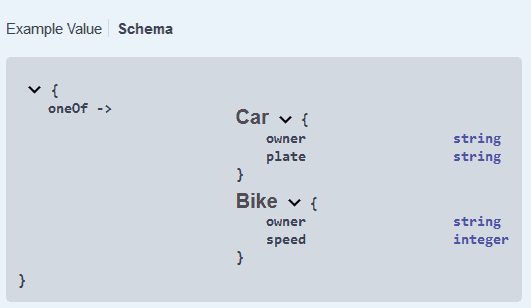
The response Schema is also correctly rendered:
4. Having Two Different Responses With OpenAPI 2
In OpenAPI 2, oneOf didn’t exist. So let’s find an alternative.
4.1. Build the Descriptor File
The best we can do is to define a wrapping object which will have all properties of Car and Bike. The common properties will be required, and the properties that belong to only one of them will remain optional:
CarOrBike:
  description: a car will have an owner and a plate, whereas a bike has an owner and a speed
  type: object
  required:
    - owner
  properties:
    owner:
      type: string
    plate:
      type: string
    speed:
      type: integer
Our API response will be a CarOrBike object. We’ll add more insight in the description. Unfortunately, we can’t add various examples, so we decide to give only an example of a Car.
Let’s have a look at the resulting api.yaml:
swagger: 2.0.0
info:
  title: Demo api
  description: Demo api for the article 'specify two responses with same code based on optional parameter'
  version: 0.1.0
paths:
  /vehicle:
    get:
      responses:
        '200':
          description: Get a vehicle. Can contain either a Car or a Bike
          schema:
            $ref: '#/definitions/CarOrBike'
          examples:
            application/json:
              owner: baeldung
              plate: AEX305
              speed:
definitions:
  Car:
    type: object
    properties:
      owner:
        type: string
      plate:
        type: string
  Bike:
    type: object
    properties:
      owner:
        type: string
      speed:
        type: integer
  CarOrBike:
    description: a car will have an owner and a plate, whereas a bike has an owner and a speed
    type: object
    required:
      - owner
    properties:
      owner:
        type: string
      plate:
        type: string
      speed:
        type: integer
4.2. Generate Java Classes
Let’s adapt our swagger-codegen plugin configuration to parse the OpenAPI 2 file. For this, we need to use version 2.x of the plugin. It was also located in another package:
<plugin>
    <groupId>io.swagger</groupId>
    <artifactId>swagger-codegen-maven-plugin</artifactId>
    <version>2.4.27</version>
    <executions>
        <execution>
            <goals>
                <goal>generate</goal>
            </goals>
            <configuration>
                <inputSpec>${project.basedir}/src/main/resources/static/api.yaml</inputSpec>
                <language>spring</language>
                <configOptions>
                    <java8>true</java8>
                    <interfaceOnly>true</interfaceOnly>
                </configOptions>
            </configuration>
        </execution>
    </executions>
</plugin>
Let’s now have a look at the generated files:
- the CarOrBike object contains the expected fields, with an @NotNull owner
- VehicleApi defines the endpoint: a get request to this endpoint returns a CarOrBike
4.3. Generate the Swagger UI Documentation
We can generate the documentation in the same way as we did in 3.3.
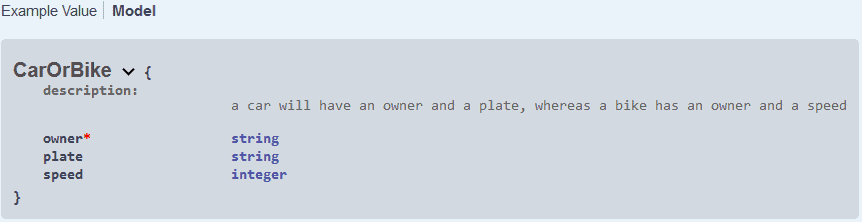
We can see that our description is shown:

And our CarOrBike model is described as expected:
5. Conclusion
In this tutorial, we understood how to write an OpenAPI specification for an endpoint that can return one object or another. We used the YAML descriptor to generate Java code thanks to swagger-codegen and to generate the Swagger UI documentation with springdoc-openapi-ui.














