


Mocking is an essential part of unit testing, and the Mockito library makes it easy to write clean and intuitive unit tests for your Java code.
Get started with mocking and improve your application tests using our Mockito guide:
Handling concurrency in an application can be a tricky process with many potential pitfalls. A solid grasp of the fundamentals will go a long way to help minimize these issues.
Get started with understanding multi-threaded applications with our Java Concurrency guide:
Spring 5 added support for reactive programming with the Spring WebFlux module, which has been improved upon ever since. Get started with the Reactor project basics and reactive programming in Spring Boot:
Since its introduction in Java 8, the Stream API has become a staple of Java development. The basic operations like iterating, filtering, mapping sequences of elements are deceptively simple to use.
But these can also be overused and fall into some common pitfalls.
To get a better understanding on how Streams work and how to combine them with other language features, check out our guide to Java Streams:
Explore Spring Boot 3 and Spring 6 in-depth through building a full REST API with the framework:
Yes, Spring Security can be complex, from the more advanced functionality within the Core to the deep OAuth support in the framework.
I built the security material as two full courses - Core and OAuth, to get practical with these more complex scenarios. We explore when and how to use each feature and code through it on the backing project.
You can explore the course here:
All Access is finally out, with all of my Spring courses. Learn JUnit is out as well, and Learn Maven is coming fast. And, of course, quite a bit more affordable. Finally.
>> GET THE COURSE
Spring Data JPA is a great way to handle the complexity of JPA with the powerful simplicity of Spring Boot.
Get started with Spring Data JPA through the guided reference course:
Refactor Java code safely — and automatically — with OpenRewrite.
Refactoring big codebases by hand is slow, risky, and easy to put off. That’s where OpenRewrite comes in. The open-source framework for large-scale, automated code transformations helps teams modernize safely and consistently.
Each month, the creators and maintainers of OpenRewrite at Moderne run live, hands-on training sessions — one for newcomers and one for experienced users. You’ll see how recipes work, how to apply them across projects, and how to modernize code with confidence.
Join the next session, bring your questions, and learn how to automate the kind of work that usually eats your sprint time.
1. Overview
While we’re creating configuration properties for our Spring projects, we may choose to split them across multiple files. It’s common to have different properties by Spring profile.
Over time, with a lot of properties, these files can start to contain a lot of duplication and may get hard to read. Cleaning them up would be a lot of manual work.
In this short tutorial, we’ll look at a Maven plugin called Spring Properties Cleaner, which can help tidy up and bring things under control.
2. Example
2.1. Some Properties Files
Let’s imagine we have two profiles – dev and prod. In this example, we haven’t created a plain application.properties file yet. Our application-dev.properties file has one set of settings:
spring.datasource.url=jdbc:postgresql://${db_server}/mydatabase
spring.datasource.username=${USERNAME}
spring.datasource.password = ${PASSWORD}

redis_host=localhost

spring.redis.host=http://${redis_host}
spring.redis.port=6379

redis_host=localhost

spring.jpa.show-sql=true


upstream.host = myapp.dev.myorg.com

# upstream services
upstream.service.users.url=http://${upstream.host}/api/users
upstream.service.products.url=http://${upstream.host}/api/products

spring.redis.timeout=10000
Then, our application-prod.properties file has a different set:
spring.datasource.url=jdbc:postgresql://${db_server}/mydatabase
spring.datasource.username=${USERNAME}
spring.datasource.password = ${PASSWORD}

# upstream services
upstream.service.users.url=https://${upstream.host}/api/users
upstream.service.products.url=https://${upstream.host}/api/products

redis_host=azure.redis6a5d54.microsoft.com

spring.redis.host=https://${redis_host}
spring.redis.port=6379

upstream.host = myapp.prod.myorg.com

spring.redis.timeout=2000
In the rest of this tutorial, we’ll tidy these files up.
2.2. What’s Wrong With the Properties Files?
Let’s review the issues in the above files:
- The key redis_host appears twice in the dev profile
- Sometimes, our keys are formatted name=value, and sometimes, there’s extra spacing – name = value
- The properties are not sorted in any logical order, with multiple spring.redis keys in different parts of the file
- The list of URLs for the “upstream services” is essentially the same for both configurations, though they can’t be shared because it’s http on dev and https on prod
- The spring.datasource properties seem to be the same between the files and might be a candidate for a common application.properties
Even with these short files, there’s a lot of detail to consider to try and improve things.
Let’s automate it with the Spring Properties Cleaner. Then, let’s use the plugin as a linter to ensure it doesn’t get into this state again.
3. Adding Spring Properties Cleaner to Our Build
Spring Properties Cleaner is available as a Maven plugin. If it detects any problems in the properties files, it will fail our build.
We start by adding the latest version to our pom.xml:
<plugin>
    <groupId>uk.org.webcompere</groupId>
    <artifactId>spring-properties-cleaner-plugin</artifactId>
    <version>1.0.6</version>
    <executions>
        <execution>
            <goals>
                <goal>scan</goal>
            </goals>
        </execution>
    </executions>
</plugin>
Now, if we run a Maven compile, the plugin will complain about errors:
$ mvn compile

...
[INFO] --- spring-properties-cleaner:1.0.3:scan (default) @ spring-properties-cleaner ---
[INFO] Executing scan on /Users/ashleyfrieze/dev/tutorials/maven-modules/maven-plugins/spring-properties-cleaner/src/main/resources
[ERROR] application-dev.properties: redis_host has duplicate values L5:'localhost',L10:'localhost'
[ERROR] File 'application-dev.properties' does not meet standard - have you run fix?
[ERROR] File 'application-prod.properties' does not meet standard - have you run fix?
[INFO] ------------------------------------------------------------------------
[INFO] BUILD FAILURE
With the default configuration, the plugin detects minor formatting errors and duplicate keys.
4. Fixing Duplicates and Formatting
Let’s now run the fix operation to fix these minor errors:
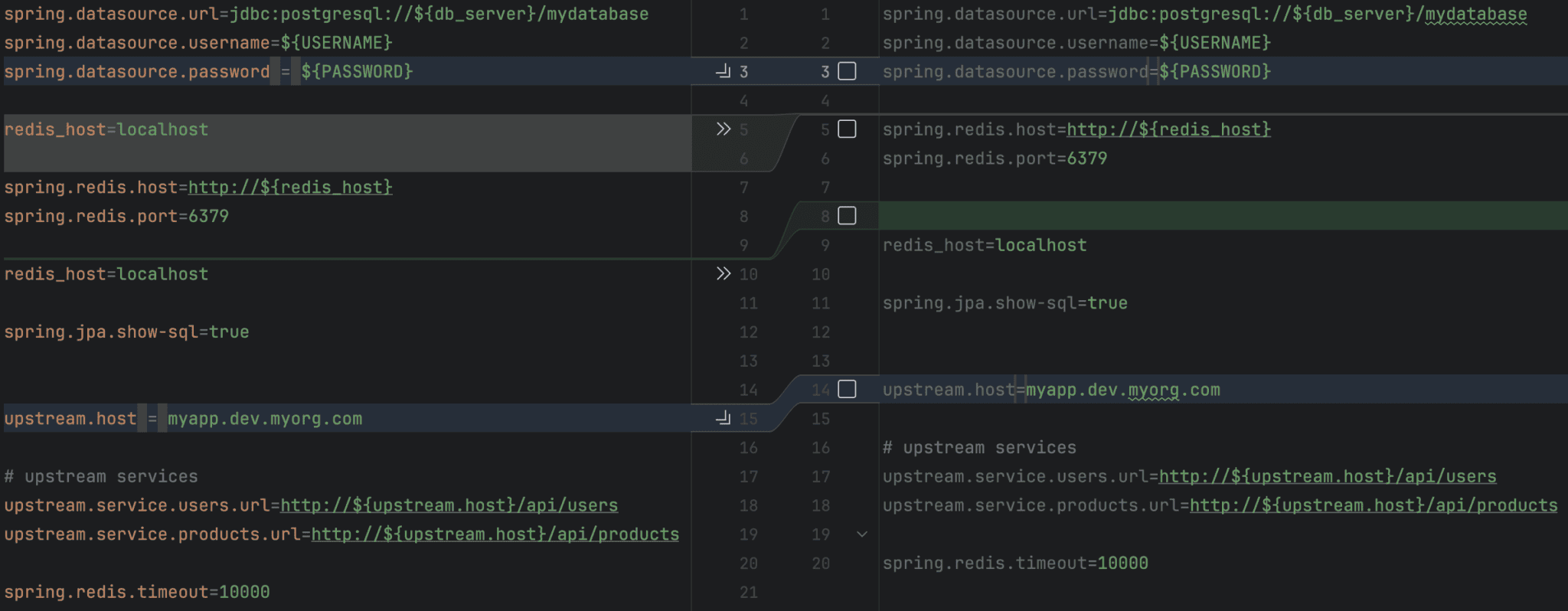
$ mvn spring-properties-cleaner:fixThen, let’s review the diffs for application-dev.properties using our version control software:
It’s a really good idea to work on the fixes for these files incrementally, checking the changes into our version control system as we go.
With this default configuration, we can see how some spacing has been removed at the start of the file and again lower down. Also, we can see that the duplicate property has been removed.
Now that the plugin has tidied the files, our Maven builds will succeed again unless we accidentally make a change to these files that introduces further issues.
However, we can configure the plugin to control more aspects of our files.
5. Sorting Our Properties
Let’s add a sort configuration to the plugin:
<plugin>
    ...
    <artifactId>spring-properties-cleaner-plugin</artifactId>
    ...
    <configuration>
        <sort>clustered</sort>
    </configuration>
</plugin>
Here, we’ve added a sort of clustered. We could’ve chosen sorted, which would arrange the keys in alphabetical order (treating numbers as numeric sequences). However, clustered observes the original order of the keys in the file, just moving those that are separate from keys of the same prefix.
Let’s see what it changes in application-prod.properties when we re-run the fix command:
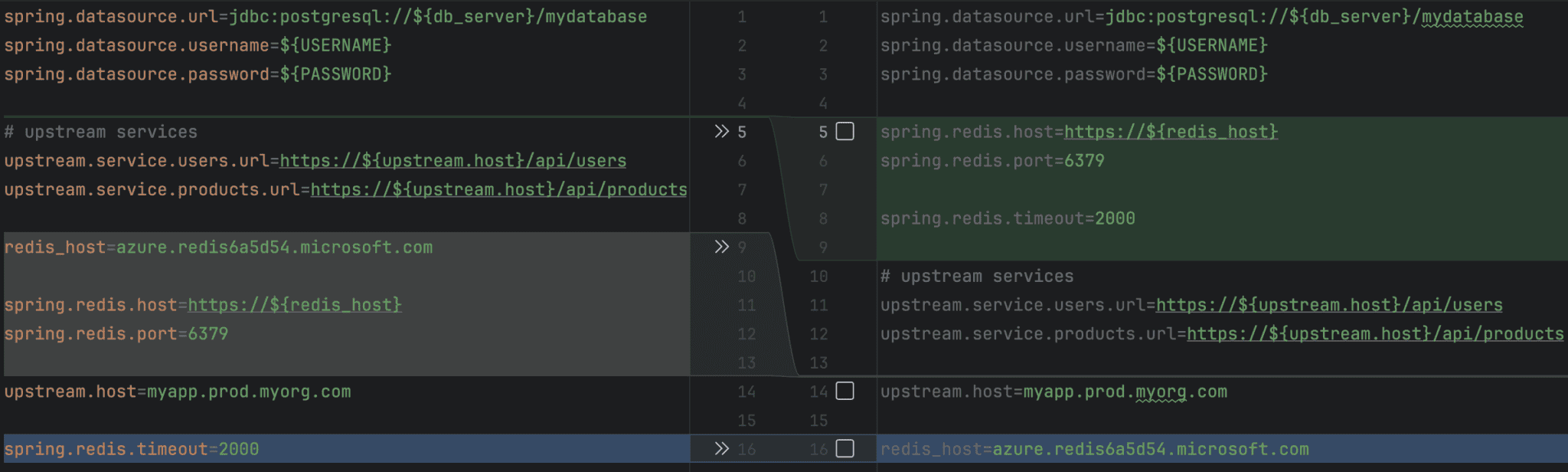
The sort has brought the spring keys together and has lifted the upstream.host key above redis_host, too, leaving that at the bottom of the file.
After reviewing the diffs for all our files, we can check them into our source control and look at another improvement.
6. Inlining Prefixes
If our goal is to refactor the files so that common things are in application.properties, then we may need to deal with a situation where two files have essentially the same values, but where an incomplete placeholder makes it hard to find a common pattern.
Let’s look again at how our example files represent URLs:
- In dev: upstream.service.users.url=http://${upstream.host}/api/users
- In prod: upstream.service.users.url=https://${upstream.host}/api/users
If the upstream.host placeholder could also contain the scheme, then both of these values would be the same.
This is where the inlinePrefix configuration comes along. It takes a regular expression and modifies a placeholder to inline a repeated prefix:
<configuration>
    <inlinePrefix>https?://</inlinePrefix>
</configuration>
This regular expression recognizes https and http schemes. We could customize it further if we have other keys with this sort of problem.
Let’s see how it affects our applicaton-prod.properties:
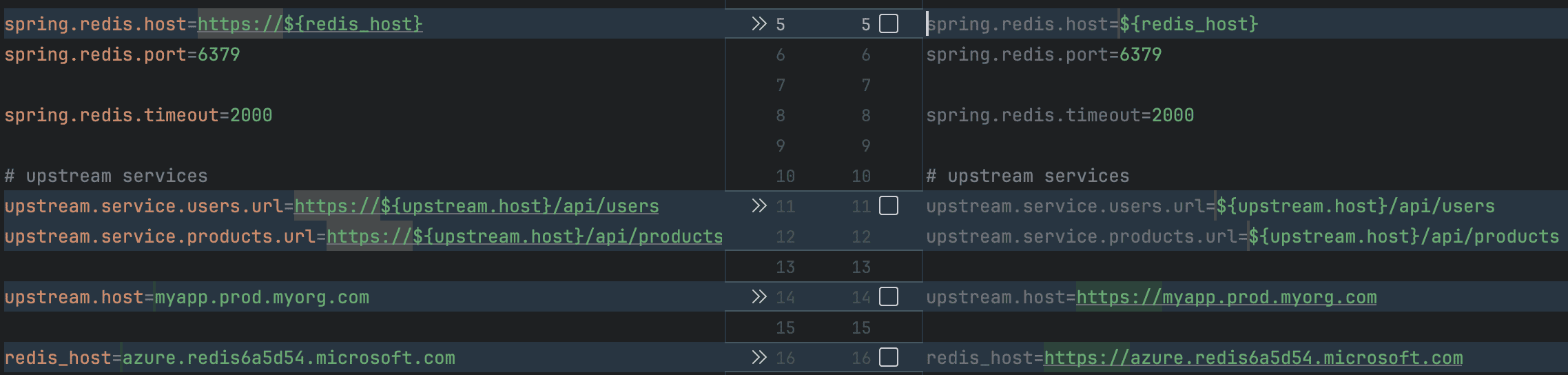
We can see that the http scheme is now part of the upstream.host and redis_host keys. This will allow us to extract more commonality into our application.properties.
Let’s check this file in and continue.
7. Extracting to the Common Properties
To set up the plugin to extract properties, we add the common configuration:
<configuration>
    ...
    <common>full</common>
</configuration>
7.1. Extracting a Common File With full
There are three possible modes for the common extraction: full, consistent, and multiple. In full mode, a property must be identical across all properties files to be promoted to the application.properties file.
The other modes, consistent and multiple, allow for properties that appear in some places to be added to the common file. This can have side effects and, thus, needs more checking.
Let’s see what full has done to our files.
It has created a new application.properties file:
spring.datasource.url=jdbc:postgresql://${db_server}/mydatabase
spring.datasource.username=${USERNAME}
spring.datasource.password=${PASSWORD}

spring.redis.host=${redis_host}
spring.redis.port=6379

# upstream services
upstream.service.users.url=${upstream.host}/api/users
upstream.service.products.url=${upstream.host}/api/products
This contains most of what was in the other files, in a common format.
Our application-dev.properties is now much smaller:
spring.redis.timeout=10000

spring.jpa.show-sql=true


redis_host=http://localhost


upstream.host=http://myapp.dev.myorg.com
And our application-prod.properties is similarly simplified.
The only thing left to make things cleaner would be removing the extra line breaks between the keys.
7.2. Other Common File Modes
In our example, we’ve used full, which is the safest option, as it will only extract a property into the common application.properties file if that property is identical in all the profile-specific files.
With consistent mode, we can extract a property which is identical in all files in which it is found, but which does not exist in all of the files. This has the side-effect of promoting keys into the common file that we might specifically wish to exclude from certain profiles.
In multiple mode, a property will be extracted into the common file if it appears in multiple properties files and has the most common value. Let’s say that we had spring.redis.timeout as 10000 in two properties files and 20000 in a third. With this mode, the 10000 value would be in the common application.properties file, and the file with the outlier value would keep its custom value.
When we start moving inconsistent properties between files, there’s a risk that something becomes a common property that we need to start overriding in a profile-specific file. These changes need more careful checking and testing.
8. Cleaning Vertical Whitespace
We can remove all vertical whitespace with remove, but let’s use the section setting to put whitespace between blocks in the file with a different prefix:
<configuration>
    ...
    <whitespace>section</whitespace>
</configuration>
When we run the fix command this last time, the whitespace is tidied up:
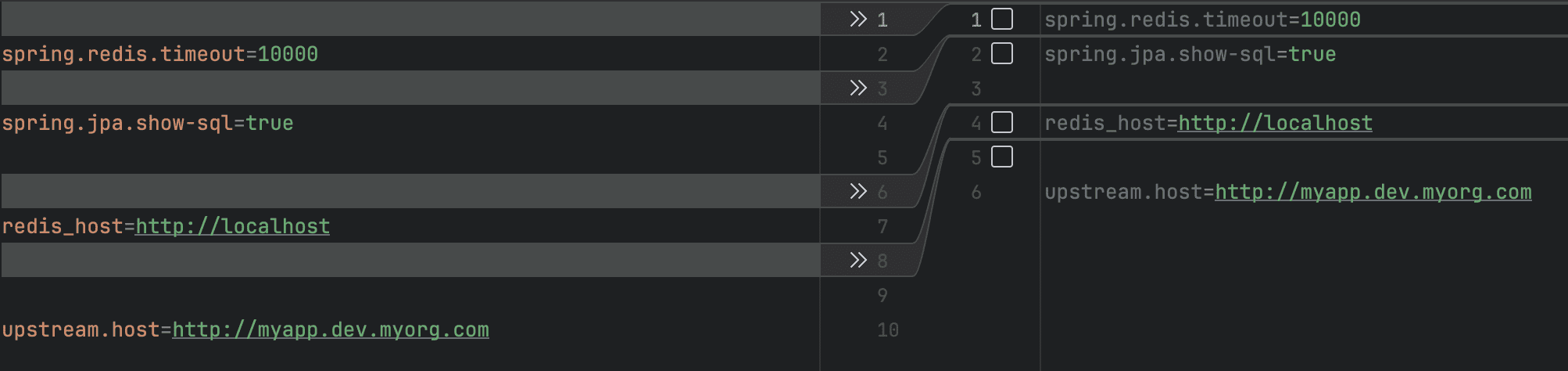
Now, our properties files are clean and tidy.
9. Conclusion
In this tutorial, we’ve looked at some of the ways things can get messy as our properties files get larger.
We installed the Spring Properties Cleaner Maven plugin and used it to monitor for problems in our build. Then, we increased the strength of its configuration, choosing options for sorting and simplifying our file and, finally, extracting the properties into a central application.properties file.
By using this plugin as a linter, we can both tidy up our properties files and prevent problems from re-occurring.















