


Mocking is an essential part of unit testing, and the Mockito library makes it easy to write clean and intuitive unit tests for your Java code.
Get started with mocking and improve your application tests using our Mockito guide:
Handling concurrency in an application can be a tricky process with many potential pitfalls. A solid grasp of the fundamentals will go a long way to help minimize these issues.
Get started with understanding multi-threaded applications with our Java Concurrency guide:
Spring 5 added support for reactive programming with the Spring WebFlux module, which has been improved upon ever since. Get started with the Reactor project basics and reactive programming in Spring Boot:
Since its introduction in Java 8, the Stream API has become a staple of Java development. The basic operations like iterating, filtering, mapping sequences of elements are deceptively simple to use.
But these can also be overused and fall into some common pitfalls.
To get a better understanding on how Streams work and how to combine them with other language features, check out our guide to Java Streams:
Explore Spring Boot 3 and Spring 6 in-depth through building a full REST API with the framework:
Yes, Spring Security can be complex, from the more advanced functionality within the Core to the deep OAuth support in the framework.
I built the security material as two full courses - Core and OAuth, to get practical with these more complex scenarios. We explore when and how to use each feature and code through it on the backing project.
You can explore the course here:
All Access is finally out, with all of my Spring courses. Learn JUnit is out as well, and Learn Maven is coming fast. And, of course, quite a bit more affordable. Finally.
>> GET THE COURSE
Spring Data JPA is a great way to handle the complexity of JPA with the powerful simplicity of Spring Boot.
Get started with Spring Data JPA through the guided reference course:
Refactor Java code safely — and automatically — with OpenRewrite.
Refactoring big codebases by hand is slow, risky, and easy to put off. That’s where OpenRewrite comes in. The open-source framework for large-scale, automated code transformations helps teams modernize safely and consistently.
Each month, the creators and maintainers of OpenRewrite at Moderne run live, hands-on training sessions — one for newcomers and one for experienced users. You’ll see how recipes work, how to apply them across projects, and how to modernize code with confidence.
Join the next session, bring your questions, and learn how to automate the kind of work that usually eats your sprint time.
If you're working on a Spring Security (and especially an OAuth) implementation, definitely have a look at the Learn Spring Security course:
>> LEARN SPRING SECURITY1. Overview
Keycloak is an open-source identity and access management (IAM) system that integrates well with the Spring Boot application. In this tutorial, we’ll describe how to get Keycloak user ID in a Spring Boot application.
2. Problem Statement
Keycloak provides features such as securing a REST API, user federation, fine-grained authorization, social login, two-factor authentication (2FA), etc. Moreover, we can use it for implementing single sign-on (SSO) using OpenID Connect (OIDC). Let’s assume that we have a Spring Boot application secured by OIDC using Keycloak, and we want to get a user ID in the Spring Boot application. In this situation, we’ll need to get an access token or security context in the Spring Boot application.
2.1. Keycloak Server as Authorization Server
To keep things simple, we’ll be using Keycloak embedded in a Spring Boot application. Let’s assume that we’re using the authorization server project available on GitHub. First, we’ll define the customerClient client in realm baeldung in our embedded Keycloak server: 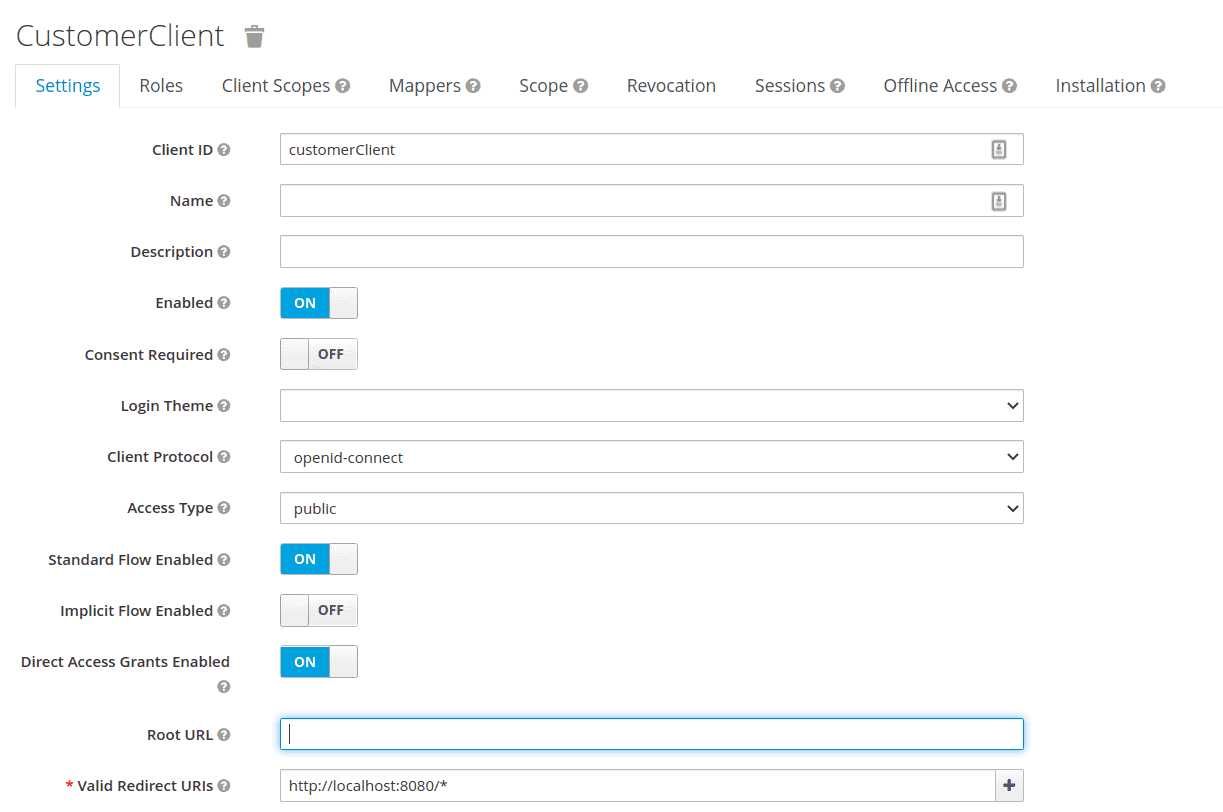 Then, we export the realm details as customer-realm.json and set the realm file in our application-customer.yml:
keycloak:
  server:
    contextPath: /auth
    adminUser:
      username: bael-admin
      password: pass
    realmImportFile: customer-realm.json
Finally, we can run the application using the –spring-boot.run.profiles=customer option. Now, the authorization server is ready. After running the server, we can access the authorization server’s welcome page at http://localhost:8083/auth/.
2.2. Resource Server
Now that we’ve configured the authorization server, let’s set up the resource server. For that, we’ll use the resource server project available on GitHub. First, let’s add the application-embedded.properties file as a resource:
keycloak.auth-server-url=http://localhost:8083/auth
keycloak.realm=baeldung
keycloak.resource=customerClient
keycloak.public-client=true
keycloak.principal-attribute=preferred_username
Now, the resource server is secure using the OAuth2 authorization server, and we must log in to the SSO server to access the resources. We can run the application using the –spring-boot.run.profiles=embedded option.
3. Get Keycloak User ID
Getting the user ID from Keycloak can be accomplished in by using client mapper.
3.1. Client Mapper
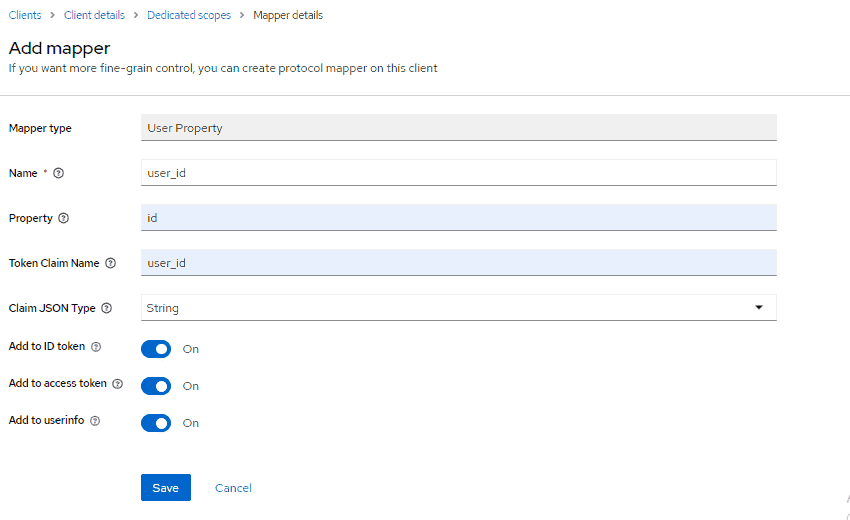
We can add a user ID in the client mapper and get it in the Spring Boot application. First, we define a client mapper in the customerClient client:
Then, we get the user ID in the CustomUserAttrController class:
@Controller
public class CustomUserAttrController {

    @GetMapping(path = "/users")
    public String getUserInfo(Model model) {

        final DefaultOidcUser user = (DefaultOidcUser) SecurityContextHolder.getContext()
            .getAuthentication()
            .getPrincipal();

        String userId = "";

        OidcIdToken token = user.getIdToken();

        Map<String, Object> customClaims = token.getClaims();

        if (customClaims.containsKey("user_id")) {
            userId = String.valueOf(customClaims.get("user_id"));
        }

        model.addAttribute("username", user.getName());
        model.addAttribute("userID", userId);
         return "userInfo";
    }

}
We use the getClaims() method from IDToken for getting the mapper. Then, we add the user ID to the model attribute.
3.2. Thymeleaf
We’ll modify the userInfo.html template to display the user ID information:
<div id="container">
    <h1>
	User ID : <span th:text="${userID}">--userID--</span>.
    </h1>
</div>
3.3. Test
After running the application, we can navigate to http://localhost:8081/users. Entering baeldung:baeldung for the credentials, will return the following:

4. Conclusion
In this article, we looked at getting the user ID from Keycloak in a Spring Boot application. We first set up the required environment for invoking a secure application. Then, we described getting Keycloak user ID in the Spring Boot application using IDToken and client mapper.














