Optimizing Spring Integration Tests at Scale
Last updated: November 5, 2025



Mocking is an essential part of unit testing, and the Mockito library makes it easy to write clean and intuitive unit tests for your Java code.
Get started with mocking and improve your application tests using our Mockito guide:
Handling concurrency in an application can be a tricky process with many potential pitfalls. A solid grasp of the fundamentals will go a long way to help minimize these issues.
Get started with understanding multi-threaded applications with our Java Concurrency guide:
Spring 5 added support for reactive programming with the Spring WebFlux module, which has been improved upon ever since. Get started with the Reactor project basics and reactive programming in Spring Boot:
Since its introduction in Java 8, the Stream API has become a staple of Java development. The basic operations like iterating, filtering, mapping sequences of elements are deceptively simple to use.
But these can also be overused and fall into some common pitfalls.
To get a better understanding on how Streams work and how to combine them with other language features, check out our guide to Java Streams:
Explore Spring Boot 3 and Spring 6 in-depth through building a full REST API with the framework:
Yes, Spring Security can be complex, from the more advanced functionality within the Core to the deep OAuth support in the framework.
I built the security material as two full courses - Core and OAuth, to get practical with these more complex scenarios. We explore when and how to use each feature and code through it on the backing project.
You can explore the course here:
All Access is finally out, with all of my Spring courses. Learn JUnit is out as well, and Learn Maven is coming fast. And, of course, quite a bit more affordable. Finally.
>> GET THE COURSE
Spring Data JPA is a great way to handle the complexity of JPA with the powerful simplicity of Spring Boot.
Get started with Spring Data JPA through the guided reference course:
Refactor Java code safely — and automatically — with OpenRewrite.
Refactoring big codebases by hand is slow, risky, and easy to put off. That’s where OpenRewrite comes in. The open-source framework for large-scale, automated code transformations helps teams modernize safely and consistently.
Each month, the creators and maintainers of OpenRewrite at Moderne run live, hands-on training sessions — one for newcomers and one for experienced users. You’ll see how recipes work, how to apply them across projects, and how to modernize code with confidence.
Join the next session, bring your questions, and learn how to automate the kind of work that usually eats your sprint time.
1. Introduction
Spring Boot is a popular Java framework that provides a rich platform for integration testing. It’s pretty convenient and flexible; however, at a large scale, when the project has hundreds or even thousands of integration tests using lots of heavy components (like TestContainers-managed beans), there can be performance and other issues.
In this article, we’ll look at how the framework works under the hood, why it can be slow and consume a lot of resources, and how to boost the performance. With knowledge of these details, you’ll be able to efficiently scale your test suites.
2. Spring Context Cache Explained
2.1. Definition of MergedContextConfiguration
Let’s take a look at a simple Spring Boot Integration test. It declares the configuration and can have a parent super-class, injected fields, and @Test methods.
The Spring Test framework reads test class signatures and decides whether to create a new Spring context or reuse an existing one from the cache. Let’s look at a few annotations that declare configurations, profiles, or properties:
@ContextConfiguration(classes = {
    FeatureServiceIntTest.Configuration.class
})
@ActiveProfiles("test")
@TestPropertySource(properties = {
    "parameter = value"
})
public class FeatureServiceIntTest extends AbstractIntTest {
    @MockBean
    private FeatureRepository featureRepository;

    // ...
}
In total, Spring gathers around a dozen of such parameters from the test class and its super-classes and aggregates them to an object of org.springframework.test.context.MergedContextConfiguration class:
- locations, classes, contextInitializerClasses, contextLoader (from @ContextConfiguration)
- activeProfiles (from @ActiveProfiles)
- propertySourceDescriptors, propertySourceLocations, propertySourceProperties (from @TestPropertySource)
- contextCustomizers (from @ContextCustomizerFactory) – e.g. @DynamicPropertySource, @MockBean/@MockitoBean and @SpyBean/@MockitoSpyBean
- parent (for contexts with an inheritance hierarchy)
MergedContextConfiguration is a key for the Spring context cache. It means that if all these fields are equal, the existing Spring context can be used. Otherwise, Spring creates a new context, puts it into a cache with this key, and uses it for the integration test.
2.2. Example of Test Suite Execution
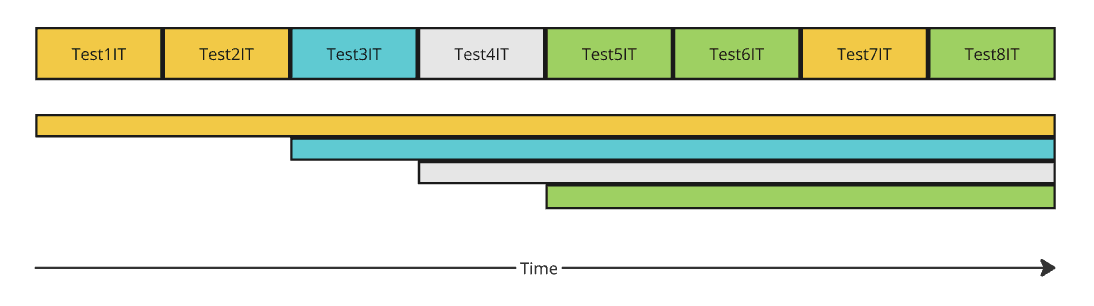
Consider a test suite of eight test classes that have four different configurations (according to their MergedContextConfiguration). If we run these tests, eventually there will be four separate active Spring contexts, and each context is created on demand (Test1IT, Test3IT, Test4IT, and Test5IT create new context; Test2IT, Test6IT, and Test8IT reuse existing). The same color means the test class has an equal configuration:
Spring will close all these contexts on the JVM shutdown hook, but it can be too late, meaning that at this moment, a few things may already have happened:
- tests conflicting with each other on resources like fixed ports
- too many active contexts share too many heavy-weight Spring beans (like managed by TestContainers), leading to OOM or an overloaded Docker host
Also, each context initialization can be quite long. For a rich context that bootstraps a web application with databases and lots of components, the initialization time is usually way more than the test execution.
So far, we can have several intermediate conclusions:
- somehow limit the number of currently active Spring contexts
- to optimize tests, we need to reduce the number of unique context configurations
- increase the shared state to reduce the overhead of each subsequent context initialization
- after all, can we revisit the standard behavior to have the maximum benefit of it?
Let’s go through each of these points.
3. Classic Optimizations
3.1. @DirtiesContext Annotation
The @DirtiesContext annotation closes the Spring context before/after the test method or test class. The purpose of this annotation is to avoid reusing a shared Spring context that was modified in a way that may be incompatible with other tests.
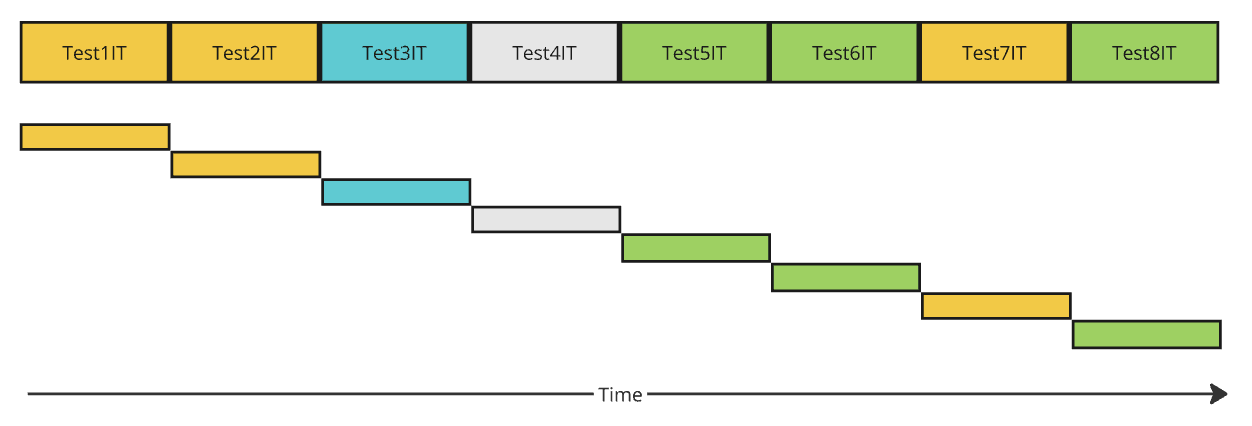
In the most radical scenario, when this annotation is added to a parent integration test class, we’ll have lots of reinitialization. While this may solve some test conflict problems, it brings huge overhead in time. The time diagram demonstrates how each subsequent test creates and closes the new context:
3.2. Context Cache Size
The next point is the adjustment of the context cache size. By default, it’s 32 (which may be too high in case of heavy-weight beans) and can be adjusted to a smaller number. It’s possible to specify it via the property in the spring.properties file on the classpath:
spring.test.context.cache.maxSize=4Or, this can be specified in the settings of the Maven or Gradle build:
<plugin>
    <groupId>org.apache.maven.plugins</groupId>
    <artifactId>maven-failsafe-plugin</artifactId>
    <version>${maven-surefire.version}</version>
    <configuration>
        <argLine>-Dspring.test.context.cache.maxSize=1 ...</argLine>
    </configuration>
</plugin>
With a cache of size 1 (one), the new time diagram will look like:
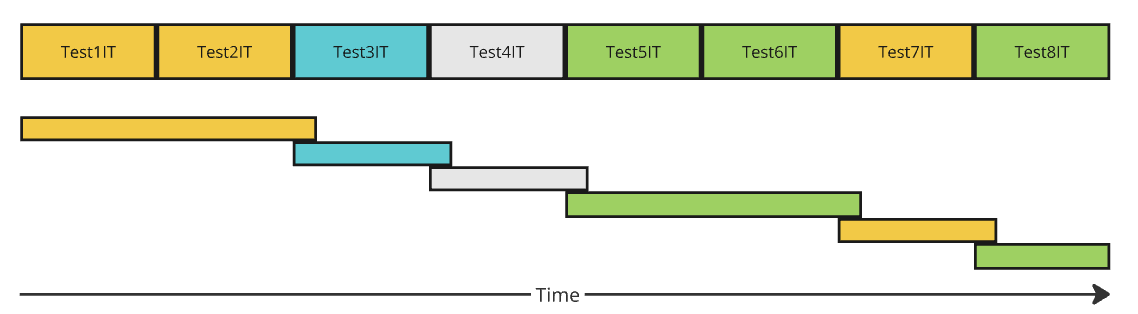
You can notice that when tests with the same context configuration are executed subsequently, one after another, the context is kept alive. This is already better than using the globally configured @DirtiesContext annotation.
Also, pay attention that there is a small overlay of active contexts (old context is closed only after the new one is created), which may be crucial if fixed server ports are used for tests, as we’ll further explain below.
3.3. Introduce Common Test Parent
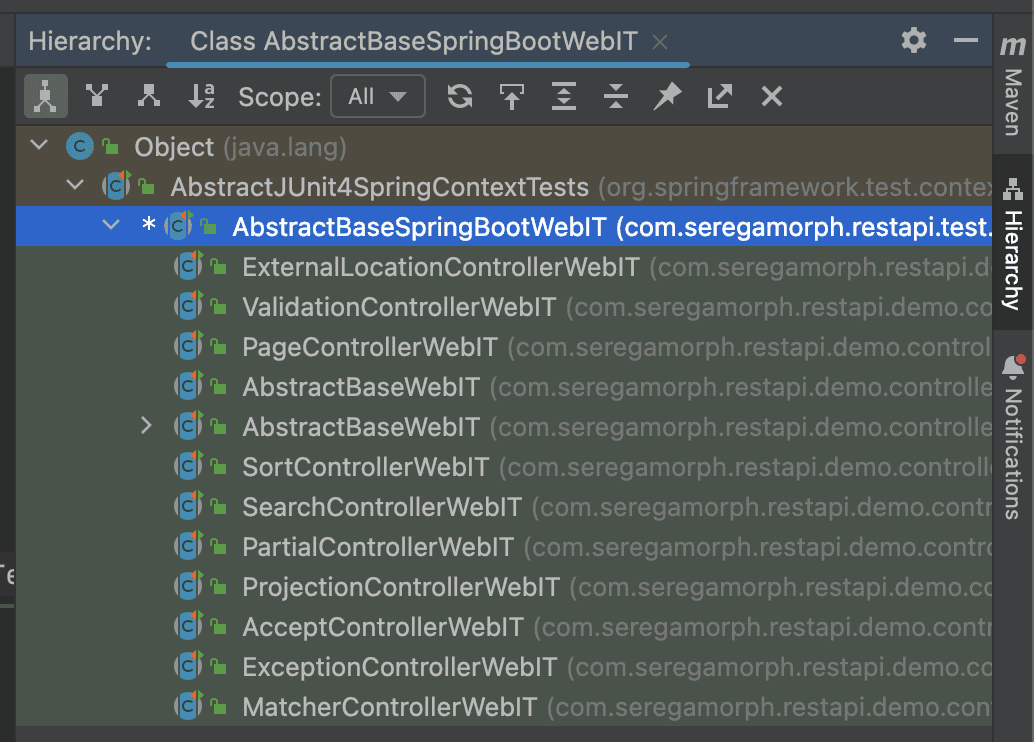
One of the easiest ways to reduce the number of unique context configurations is to introduce a common integration test parent super-class. Add all needed configurations there.
Whenever possible, the subclasses should not declare additional configurations (including @MockBean and @SpyBean annotations), as these are also context configuration customizations, which lead to the creation of a separate Spring context:
3.4. Properly Define @MockBean
Using @MockBean (replaced with @MockitoBean in the latest Spring releases) and @SpyBean (replaced with @MockitoSpyBean) is a pretty convenient and flexible approach to override behavior or define a missing bean in the context.
However, as already mentioned, it’s one of the so-called customizers (see definition of MergedContextConfiguration above). Whenever possible, try to locate @MockBean/@SpyBean declarations in the parent integration test classes or shared @TestConfiguration class.
3.5. Reusable Static Docker Container Bean
Instead of creating TestContainer-managed Docker containers as beans for each Spring context, use a specialized static bean declaration:
@TestConfiguration
public class LocalStackS3TestConfiguration {
    private static LocalStackContainer localStackS3;

    // override destroy method to empty to avoid closing docker container
    // bean on closing Spring context
    @Bean(destroyMethod = "")
    public LocalStackContainer localStackS3Container() {
        synchronized (LocalStackS3TestConfiguration.class) {
            if (localStackS3 == null) {
                localStackS3 = new LocalStackContainer(DockerImageName.parse("localstack/localstack:4.6.0"))
                        .withServices(LocalStackContainer.Service.S3);
                localStackS3.start();
            }
            return localStackS3;
        }
    }
}
Note that the destroyMethod annotation parameter should be overridden to avoid closing it on context close.
3.6. Lazy Initialization of Database Containers
If an application has a single database, it’s not that critical. But if there are several DataSources accessing different schemas, it makes sense to start database containers only on demand (lazily). As in many tests, these initializations will be simply redundant (rare integration tests are using all possible DataSources). Technically, it can be implemented this way:
- don’t start the TestContainers Container object immediately
- create a wrapping DataSource object that will start the underlying container on the very first getConnection() call
We can base our implementation on Spring DelegatingDataSource (it should also be Closeable to delegate bean shutdown):
public class LateInitDataSource extends DelegatingDataSource implements Closeable {
    private final Supplier<DataSource> dataSourceSupplier;

    public LateInitDataSource(Supplier<DataSource> dataSourceSupplier) {
        // SingletonSupplier: call dataSourceSupplier.get() not more than once
        this.dataSourceSupplier = SingletonSupplier.of(() -> {
            DataSource dataSource = dataSourceSupplier.get();
            setTargetDataSource(dataSource);
            return dataSource;
        });
    }

    @Override
    public void afterPropertiesSet() {
        // no op to skip getTargetDataSource setup
    }

    @Override
    protected DataSource obtainTargetDataSource() {
        return dataSourceSupplier.get();
    }

    @Override
    public void close() throws IOException {
        DataSource targetDataSource = getTargetDataSource();
        if (targetDataSource instanceof AutoCloseable) {
            try {
                ((AutoCloseable) targetDataSource).close();
            } catch (IOException e) {
                throw e;
            } catch (Exception e) {
                throw new IOException("Error while closing targetDataSource", e);
            }
        }
    }

    @Override
    public String toString() {
        return "LateInitDataSource{" + ", delegate=" + getTargetDataSource() + '}';
    }
}
Then, we also need to declare the DataSource beans:
@Bean
public DataSource dataSource(PostgreSQLContainer<?> container) {
    // lazy late initialization
    return new LateInitDataSource(() -> {
        LOGGER.info("Late initialization data source docker container {}", container);
        // start only on demand
        container.start();
        return createHikariDataSourceForContainer(container);
    });
}
3.7. Bad Practice: Fixed Ports
Using fixed port numbers (as we usually configure in production) is convenient for integration testing; however, it limits possible parallelization of test execution. For example, it prevents multiple test classes in the same module or in multiple modules from being executed simultaneously. We can observe test server initialization issues like:
Caused by: java.io.IOException: Failed to bind to address 0.0.0.0/0.0.0.0:8080 (address already in use)Instead of configuring fixed ports for HTTP, GRPC, and TestContainer ports:
@SpringBootTest(webEnvironment = WebEnvironment.DEFINED_PORT)Prefer using WebEnvironment.RANDOM_PORT:
@SpringBootTest(webEnvironment = WebEnvironment.RANDOM_PORT)
// will inject actual dynamic port
@LocalServerPort
private int port;
For the case of manual Server Socket initialization, use server socket port 0 (zero); it will auto-assign a random available server port. Configure the test clients accordingly.
3.8. Bad Practice: Container Is Not a @Bean
The Docker container managed by TestContainers should have lifecycle management by Spring. Avoid declarations like:
@TestConfiguration
public class DockerDataSourceTestConfiguration {
    @Bean
    public DataSource dataSource() {
        // not a manageable bean!
        var container = new PostgreSQLContainer("postgres:9.6");
        container.start();
        return createDataSource(container);
    }

    private static DataSource createDataSource(JdbcDatabaseContainer container) {
        var hikariDataSource = new HikariDataSource();
        hikariDataSouce.setJdbcUrl(container.getJdbcUrl());
        ...
        return hikariDataSource;
    }
}
Instead, declare the Container as a bean and inject it as a DataSource creation parameter:
@TestConfiguration
public class DockerDataSourceTestConfiguration {
    // will be terminated with Spring context
    @Bean(initMethod = "start")
    public PostgreSQLContainer postgreSQLContainer() {
        return new PostgreSQLContainer("postgres:9.6");
    }

    @Bean
    public DataSource dataSource(PostgreSQLContainer postgreSQLContainer) {
        return createDataSource(postgreSQLContainer);
    }

    // ...
}
3.9. Bad Practice: ExecutorService Is Not Properly Shut Down
There is a similar situation with ExecutorService created during class initialization. It should be properly managed; otherwise, eventually, the runtime can have lots of active threads that complicate test failure analysis, increase the resource consumption, and may lead to confusing failure messages in test execution logs for failing scheduled tasks in such executors that are still active. To address the problem, add missing @PreDestroy methods:
@Service
public class DefaultScheduler {
    private final ScheduledExecutorService scheduler = Executors.newScheduledThreadPool(16);

    public void scheduleNow(Runnable command, long periodSeconds) {
        scheduler.scheduleAtFixedRate(command, 0L, periodSeconds, TimeUnit.SECONDS);
    }

    // to avoid thread leakage in test execution
    @PreDestroy
    public void shutdown() {
        scheduler.shutdown();
    }
}
This simple approach will also have a positive effect on a proper application shutdown.
4. Let’s Revisit Standard Test Execution Behavior
It’s possible to maximize the optimization of resource consumption during test execution. When the test engine starts the suite, we already know the list of test classes. This way, we can predict the exact moment when the Spring context stops being used and eagerly close it:
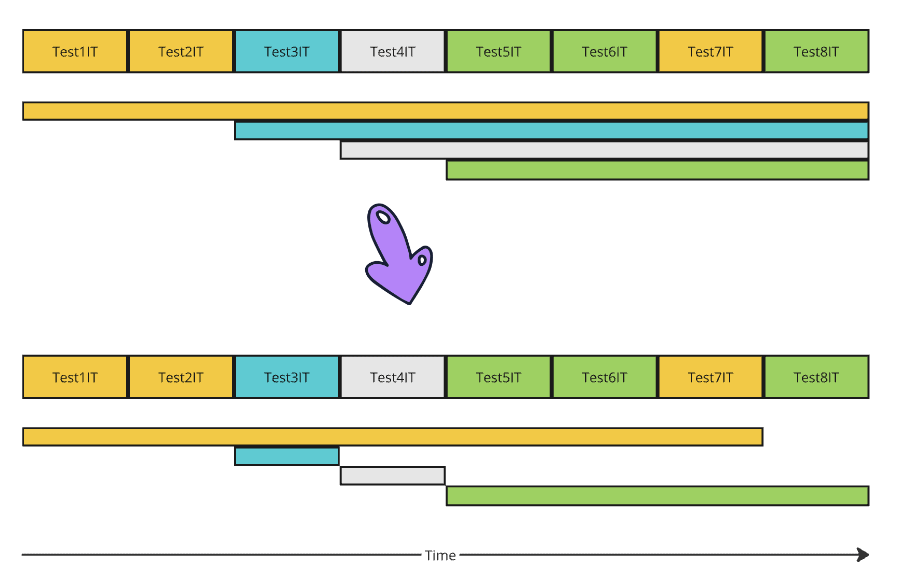
On the time diagram, we can see that the same context is used for Test1IT, Test2IT, and Test7IT. It means that after Test7IT, we can terminate the context, releasing all resources. The same goes for Test3IT, Test4IT and Test8IT.
Let’s mix it with the second optimization — reorder test execution to sequentially execute tests that share the same context:
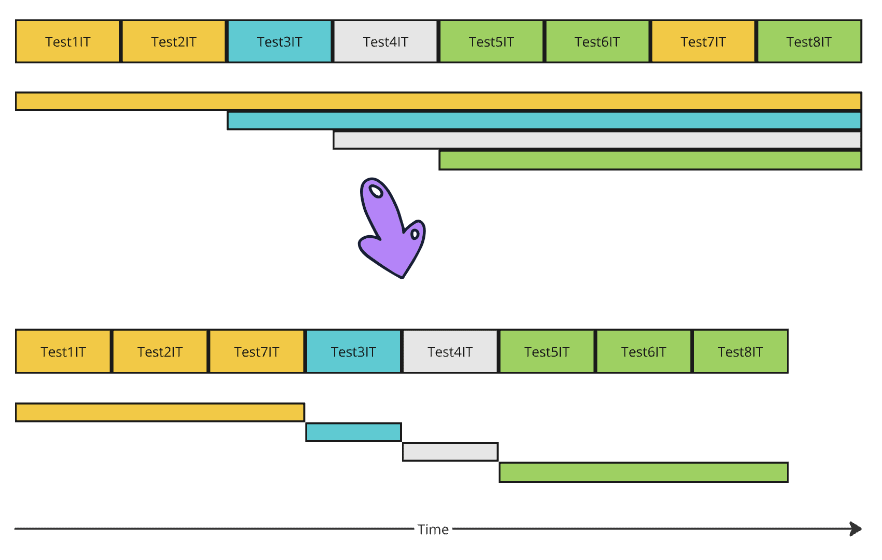
Now, at any moment in time, we have no more than one active Spring context. This way, the test suite needs the minimal possible amount of resources (like CPU and memory). This will also reduce the load on the Docker environment that manages TestContainer Spring beans.
To support this behavior, we have to implement:
- suite test classes reordering
- auto-closing of the Spring context
Spring Framework cannot control the test class order; it’s a responsibility of the test engine (like TestNG or JUnit). JUnit 5 supports test reordering via a specialized listener org.junit.jupiter.api.ClassOrderer. The implementation of such a reordering listener is a part of the spring-test-smart-context project.
The class implementing the ClassOrderer should be in the classpath of the module with tests so that it will be auto-discovered via junit-platform.properties. The ordering logic is based on the calculated MergedContextConfiguration object of the test class.
To auto-close the Spring context, use SmartDirtiesContextTestExecutionListener or base your implementation on it.
4.1. Easy-to-Use Solution
Such logic can be implemented in the project, but it’s easier to use a simple plug-in library that will be auto-discovered via the classpath. There are three simple steps.
First, we need to add a library to the test classpath:
<dependency>
    <groupId>com.github.seregamorph</groupId>
    <artifactId>spring-test-smart-context</artifactId>
    <version>0.14</version>
    <scope>test</scope>
</dependency>
Or for Gradle, we add:
testImplementation("com.github.seregamorph:spring-test-smart-context:0.14")Then, remove from tests (especially parent test classes) the @DirtiesContext annotations if it was used, or replace al uses of it with declarations:
@TestExecutionListeners(listeners = {
    SmartDirtiesContextTestExecutionListener.class,
})
Optionally, enable INFO logging for com.github.seregamorph.testsmartcontext logger to see more details.
Sample log output during test execution can look like:
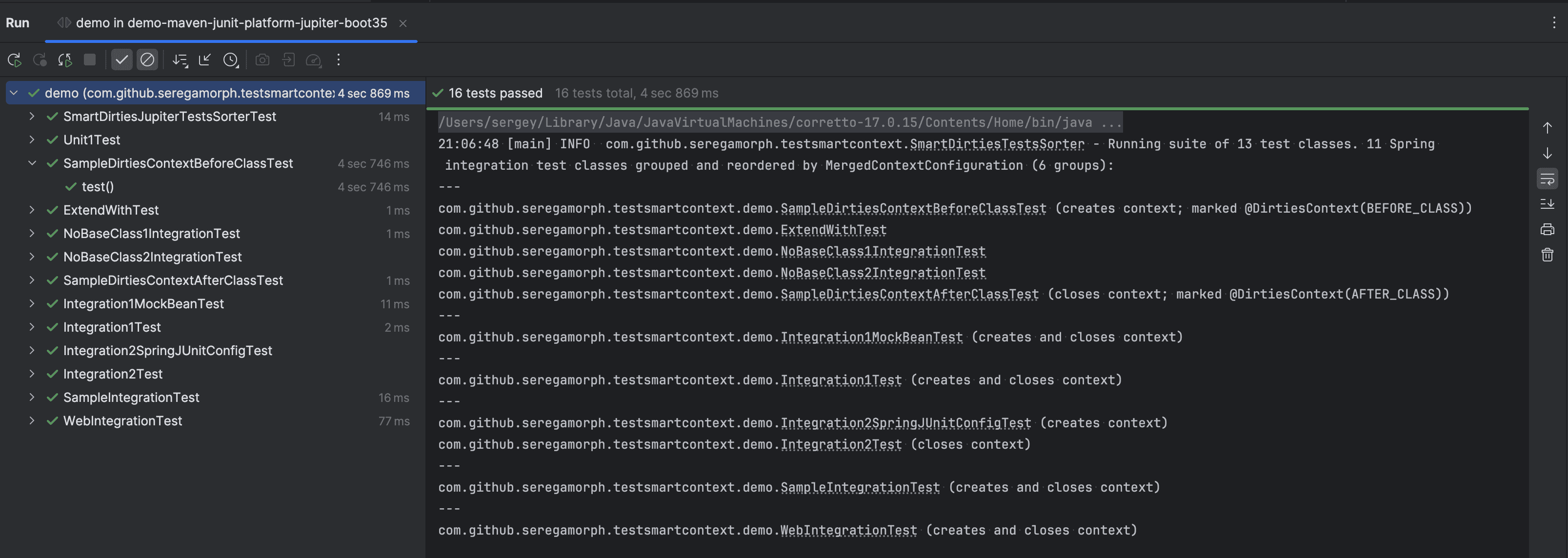
There, we can see the estimated number of tests to execute and how many unique configurations they use, and we can understand how Spring reuses existing context between different tests.
4.2. Implicit Benefits
Besides all the described advantages of using smart test ordering and context closing, there are a few more. When the test engine executes all tests in a single thread, closing all allocated resources on context close, it’s way easier to inspect JVM monitoring to analyze heap and thread leakages:
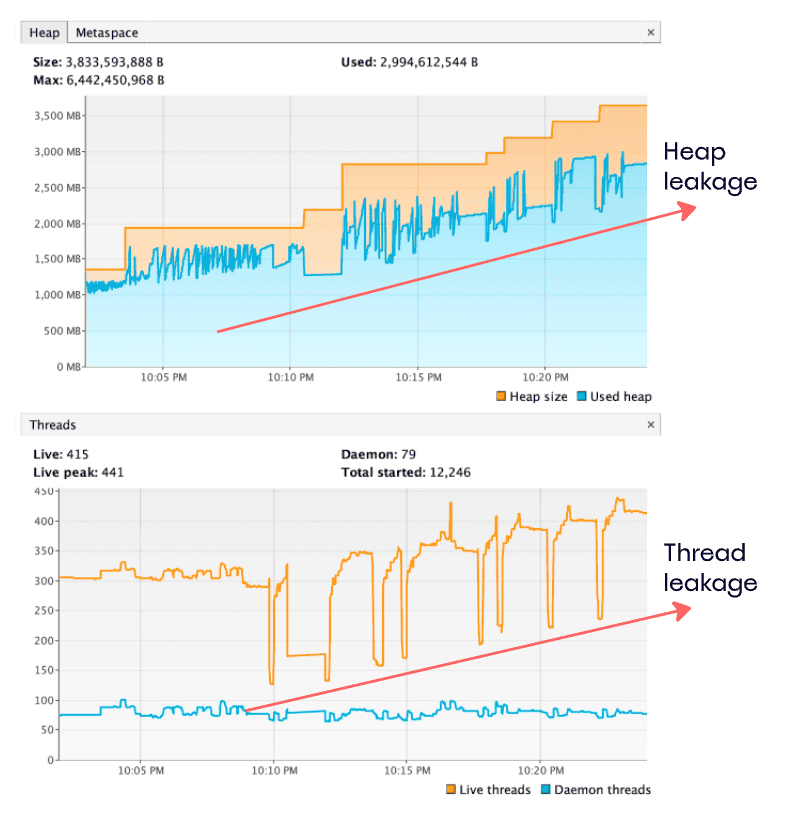
As we can see here, the chart of active thread numbers has drops – these are Spring context closings. But there is an obvious ascending trend in the number of threads, which signals the thread leakages. A similar heap dump chart may also highlight if we’ve missed closing allocated resources properly.
5. Conclusion
Inspecting and optimizing Spring integration tests can significantly reduce the amount of required resources, such as CPU and memory, and it may stabilize test execution. Also, with fewer resources allocated, the test execution will always be faster. There’s a simple explanation for this: The system will not lose resources on redundant Docker container management, thread pools, and so on.
Addressing such problems with integration tests can also enhance the proper graceful shutdown cycle of the application, making deployments more seamless.
In rare cases, it can even help to find leakages affecting production code!















