How to Get the RequestBody and ResponseBody in HandlerInterceptor
Last updated: September 7, 2026


Mocking is an essential part of unit testing, and the Mockito library makes it easy to write clean and intuitive unit tests for your Java code.
Get started with mocking and improve your application tests using our Mockito guide:
Handling concurrency in an application can be a tricky process with many potential pitfalls. A solid grasp of the fundamentals will go a long way to help minimize these issues.
Get started with understanding multi-threaded applications with our Java Concurrency guide:
Spring 5 added support for reactive programming with the Spring WebFlux module, which has been improved upon ever since. Get started with the Reactor project basics and reactive programming in Spring Boot:
Since its introduction in Java 8, the Stream API has become a staple of Java development. The basic operations like iterating, filtering, mapping sequences of elements are deceptively simple to use.
But these can also be overused and fall into some common pitfalls.
To get a better understanding on how Streams work and how to combine them with other language features, check out our guide to Java Streams:
Explore Spring Boot 3 and Spring 6 in-depth through building a full REST API with the framework:
Yes, Spring Security can be complex, from the more advanced functionality within the Core to the deep OAuth support in the framework.
I built the security material as two full courses - Core and OAuth, to get practical with these more complex scenarios. We explore when and how to use each feature and code through it on the backing project.
You can explore the course here:
All Access is finally out, with all of my Spring courses. Learn JUnit is out as well, and Learn Maven is coming fast. And, of course, quite a bit more affordable. Finally.
>> GET THE COURSE
Spring Data JPA is a great way to handle the complexity of JPA with the powerful simplicity of Spring Boot.
Get started with Spring Data JPA through the guided reference course:
Refactor Java code safely — and automatically — with OpenRewrite.
Refactoring big codebases by hand is slow, risky, and easy to put off. That’s where OpenRewrite comes in. The open-source framework for large-scale, automated code transformations helps teams modernize safely and consistently.
Each month, the creators and maintainers of OpenRewrite at Moderne run live, hands-on training sessions — one for newcomers and one for experienced users. You’ll see how recipes work, how to apply them across projects, and how to modernize code with confidence.
Join the next session, bring your questions, and learn how to automate the kind of work that usually eats your sprint time.
1. Overview
In this tutorial, we’ll look at several ways to log HTTP request and response bodies using a Spring MVC HandlerInterceptor without disrupting normal request handling.
In short, we’ll use a servlet filter, in particular the ContentCaching wrapper, to log details of a simple REST API.
2. Spring MVC Execution Chain
First, we need to learn about the stages of a request within the Spring MVC execution chain.
The chain starts with servlet filters, followed by the DispatcherServlet, the handler execution chain, and finally the HTTP message conversion layer.
We’re interested in the HandlerInterceptors, which are part of the handler execution chain.
2.1. Understanding HandlerInterceptor
After the request reaches the DispatcherServlet, Spring needs to resolve a handler and run the handler execution chain, which may include zero or more HandlerInterceptors. The chain contains preHandle(), then the controller and its related logic, followed by postHandle() and afterCompletion().
The behavior of postHandle() depends on the controller’s return type. When the controller returns a view, the response is still uncommitted, so postHandle() can still modify it. With @ResponseBody or ResponseEntity, however, the HTTP message converters write and commit the body before postHandle() runs, so the response is effectively read-only at that point.
2.2. Request and Response Bodies Are One-Shot
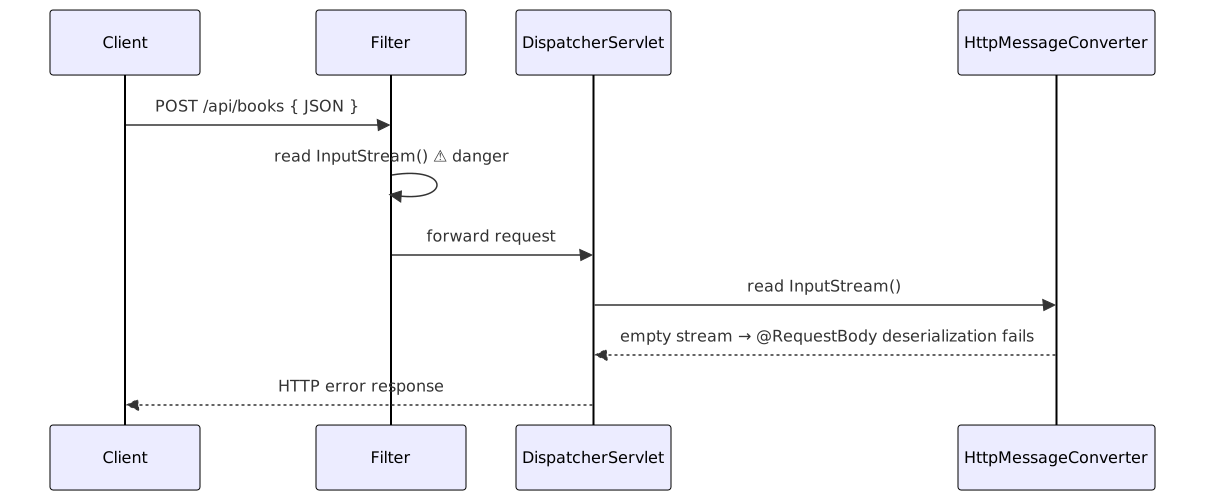
A characteristic of the Request and Response bodies is that both are represented as streams. Thus, once any component consumes the stream, it cannot be read again unless we explicitly save it in some buffer.
This is important because if a filter or interceptor reads the body before it reaches Spring’s HTTP Message conversion layer (HttpMessageConverter), the converter receives an empty stream, and @RequestBody deserialization fails:
Now we have all the elements to understand the underlying details and how Spring handles HTTP requests.
3. Example REST API
Let’s create a simple REST API that creates books using @RequestBody:
public record CreateBookRequest(String title, String author) { }

public record BookCreatedResponse(UUID id, String title, String author) { }

@RestController
@RequestMapping("/api/books")
public class BookController {

    @PostMapping
    public ResponseEntity<BookCreatedResponse> create(@RequestBody CreateBookRequest request) {
        BookCreatedResponse response = new BookCreatedResponse(
            UUID.randomUUID(),
            request.title(),
            request.author()
        );

        return ResponseEntity.status(HttpStatus.CREATED).body(response);
    }
}
Now, the goal here is to log both the incoming CreateBookRequest and BookCreatedResponse records for every call with HTTP method, URI, and status.
4. ContentCaching Wrappers in a Filter
With Spring, we can use ContentCachingRequestWrapper and ContentCachingResponseWrapper to save the request and response content in a cache and expose it via getContentAsByteArray(). So even after we first read the stream, we don’t lose the content in subsequent layers.
To accomplish this, we’ll implement a servlet filter that gets registered to all requests by extending OncePerRequestFilter:
@Component
public class CachingHttpFilter extends OncePerRequestFilter {

    @Override
    protected void doFilterInternal(HttpServletRequest request, HttpServletResponse response,
      FilterChain filterChain) throws ServletException, IOException {

        ContentCachingRequestWrapper cachingRequest = new ContentCachingRequestWrapper(request);

        ContentCachingResponseWrapper cachingResponse = new ContentCachingResponseWrapper(response);

        try {
            filterChain.doFilter(cachingRequest, cachingResponse);
        } finally {
            cachingResponse.copyBodyToResponse();
        }
    }
}
Filters run before the DispatcherServlet, so we save everything before reaching the controller itself. Now let’s see how to use this cached value.
Notably, Spring already ships CommonsRequestLoggingFilter for request-side logging.
4.1. Logging Cached Bodies in HandlerInterceptor
To log the cached values, we implement HandlerInterceptor. Let’s build it step by step.
First, we declare the class and its logger:
@Component
public class HttpLoggingInterceptor implements HandlerInterceptor {

    private static final Logger log =
        LoggerFactory.getLogger(HttpLoggingInterceptor.class);
}
This is a Spring-managed component implementing HandlerInterceptor, so it can be registered later via WebMvcConfigurer.
Next, in preHandle(), we log only lightweight metadata — method and URI — and deliberately avoid touching the body stream, since the HttpMessageConverter hasn’t run yet and the cache isn’t populated:
@Override
public boolean preHandle(HttpServletRequest request, HttpServletResponse response,
  Object handler) {

    log.info("Incoming {} {}", request.getMethod(), request.getRequestURI());
    return true;
}
The right place to log the full request and response is afterCompletion(), because by that point, both the controller and the HttpMessageConverter have run, so the ContentCaching wrappers are fully populated:
@Override
public void afterCompletion(HttpServletRequest request, HttpServletResponse response,
  Object handler, Exception ex) {

    String requestBody = extractRequestBody(request);
    String responseBody = extractResponseBody(response);

    log.info("HTTP {} {} status={} requestBody={} responseBody={}", request.getMethod(),
      request.getRequestURI(), response.getStatus(), requestBody, responseBody);
}
Finally, the helper methods read the cached bytes and convert them to a string. Both extract methods guard with an instanceof check. If we haven’t registered the filter or the wrapper isn’t present, they safely return an empty string. The encoding falls back to UTF-8 when the request or response doesn’t declare a charset:
private String getStringValueFromBuffer(byte[] buffer, String encoding) {
    if (buffer.length > 0) {
        try {
            return new String(buffer, encoding != null ? encoding : StandardCharsets.UTF_8.name());
        } catch (UnsupportedEncodingException ex) {
            return "[unknown-encoding]";
      }
    }
    return "";
}
We use this in the request extraction:
private String extractRequestBody(HttpServletRequest request) {
    if (request instanceof ContentCachingRequestWrapper wrapper) {
        byte[] buf = wrapper.getContentAsByteArray();
        return getStringValueFromBuffer(buf, request.getCharacterEncoding());
    }
    return "";
}
And we use it in the response extraction as well:
private String extractResponseBody(HttpServletResponse response) {
    if (response instanceof ContentCachingResponseWrapper wrapper) {
        byte[] buf = wrapper.getContentAsByteArray();
        return getStringValueFromBuffer(buf, response.getCharacterEncoding());
    }
    return "";
}
Notably, ContentCachingRequestWrapper doesn’t eagerly copy the request body. It only fills its cache when something actually reads the input stream, which happens when Spring’s HttpMessageConverter deserializes the @RequestBody.
4.2. Registering the HandlerInterceptor
Now the final thing left to do is to register this handler for all the incoming API calls:
@Configuration
public class WebConfig implements WebMvcConfigurer {

    private final HttpLoggingInterceptor loggingInterceptor;

    public WebConfig(HttpLoggingInterceptor loggingInterceptor) {
        this.loggingInterceptor = loggingInterceptor;
    }

    @Override
    public void addInterceptors(InterceptorRegistry registry) {
        registry.addInterceptor(loggingInterceptor).addPathPatterns("/api/**");
    }
}
This configuration keeps logging separate from controller code and guarantees that all requests under /api/** pass through our HttpLoggingInterceptor.
4.3. Testing the Implementation
To verify our setup, we can write an integration test using MockMvc together with Spring Boot’s OutputCaptureExtension, which lets us assert against the log output produced during the test:
@SpringBootTest
@AutoConfigureMockMvc
@ExtendWith(OutputCaptureExtension.class)
class BookControllerLoggingUnitTest {

    @Autowired
    private MockMvc mockMvc;

    @Test
    void whenCreateBook_thenRequestAndResponseAreLogged(CapturedOutput output) throws Exception {
        String requestBody = """
          { "title": "Spring in Action", "author": "Craig Walls" }
        """;

        mockMvc.perform(post("/api/books")
          .contentType(MediaType.APPLICATION_JSON)
          .content(requestBody))
          .andExpect(status().isCreated());

        assertThat(output).contains("Incoming POST /api/books");
        assertThat(output).contains("HTTP POST /api/books status=201");
        assertThat(output).contains("\"title\":\"Spring in Action\"");
        assertThat(output).contains("\"author\":\"Craig Walls\"");
    }
}
5. Conclusion
In this article, we’ve seen how to log HTTP request and response bodies in a Spring MVC application without breaking @RequestBody deserialization.
We started by reviewing the request flow through the execution chain and the one-shot nature of HTTP body streams.
We then used ContentCachingRequestWrapper and ContentCachingResponseWrapper within a OncePerRequestFilter to buffer the request and response bodies, and finally read those buffers from a HandlerInterceptor in afterCompletion(), once the message converters had run and the response was complete.














