


Mocking is an essential part of unit testing, and the Mockito library makes it easy to write clean and intuitive unit tests for your Java code.
Get started with mocking and improve your application tests using our Mockito guide:
Handling concurrency in an application can be a tricky process with many potential pitfalls. A solid grasp of the fundamentals will go a long way to help minimize these issues.
Get started with understanding multi-threaded applications with our Java Concurrency guide:
Spring 5 added support for reactive programming with the Spring WebFlux module, which has been improved upon ever since. Get started with the Reactor project basics and reactive programming in Spring Boot:
Since its introduction in Java 8, the Stream API has become a staple of Java development. The basic operations like iterating, filtering, mapping sequences of elements are deceptively simple to use.
But these can also be overused and fall into some common pitfalls.
To get a better understanding on how Streams work and how to combine them with other language features, check out our guide to Java Streams:
Explore Spring Boot 3 and Spring 6 in-depth through building a full REST API with the framework:
Yes, Spring Security can be complex, from the more advanced functionality within the Core to the deep OAuth support in the framework.
I built the security material as two full courses - Core and OAuth, to get practical with these more complex scenarios. We explore when and how to use each feature and code through it on the backing project.
You can explore the course here:
All Access is finally out, with all of my Spring courses. Learn JUnit is out as well, and Learn Maven is coming fast. And, of course, quite a bit more affordable. Finally.
>> GET THE COURSE
Spring Data JPA is a great way to handle the complexity of JPA with the powerful simplicity of Spring Boot.
Get started with Spring Data JPA through the guided reference course:
Refactor Java code safely — and automatically — with OpenRewrite.
Refactoring big codebases by hand is slow, risky, and easy to put off. That’s where OpenRewrite comes in. The open-source framework for large-scale, automated code transformations helps teams modernize safely and consistently.
Each month, the creators and maintainers of OpenRewrite at Moderne run live, hands-on training sessions — one for newcomers and one for experienced users. You’ll see how recipes work, how to apply them across projects, and how to modernize code with confidence.
Join the next session, bring your questions, and learn how to automate the kind of work that usually eats your sprint time.
1. Overview
In this tutorial, we’ll learn how to use FlexyPool with Spring Boot and H2 using HikariCP. It’s a powerful connection pool manager built on top of major connection pools.
2. What Is FlexyPool?
Connection pooling is an important aspect of modern web applications. Because it ensures that database connections are shared among multiple clients. That’s how that technique allows faster and more efficient access to the database.
However, managing connection pools can be a complex and challenging task. It’s particularly visible when the number of clients and the complexity of the application increases. That’s precisely where FlexyPool comes in handy.
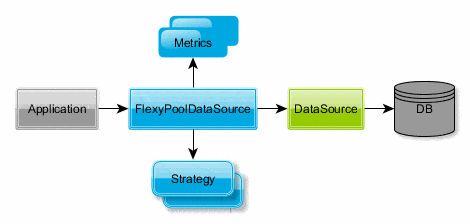
FlexyPool is a powerful connection pool management tool. Indeed, it makes it easy to manage database connections and optimize performance. Simply put, FlexyPool acts as a proxy to major connection pools such as Hikari, C3P0, DBCP2, Tomcat, and Vibur. To achieve its goal, the library provides metrics and failover strategies to help resize a given pool on demand:
2.1. FlexyPool Properties
FlexyPool provides two important properties:
- connectionAcquireTimeThresholdMillis: Specifies a time threshold for the connection acquire request. Passed this time, a ConnectionAcquireTimeThresholdExceededEvent is published.
- connectionLeaseTimeThresholdMillis: It’s the maximum time a connection can be leased out before it’s returned to the pool. Flexypool publishes a ConnectionLeaseTimeThresholdExceededEvent when the pool exceeds this threshold.
2.2. FlexyPool Strategies
FlexyPool offers two strategies to respond to a connection acquisition failure in a connection pool.
The first strategy is IncrementPoolOnTimeoutConnectionAcquiringStrategy. With this strategy, FlexyPool increments the target connection pool maximum size if there’s a timeout during connection acquisition. The strategy takes two options – maxOverflowPoolSize, and timeoutMillis.
maxOverflowPoolSize sets the maximum limit a target connection pool can stretch to.
timeoutMillis sets the duration before a pool increment is attempted. It defaults to the connection pool timeout value.
The strategy RetryConnectionAcquiringStrategy instructs FlexyPool to retry getting a connection from the pool for retryAttempts times before giving up. retryAttempts stands for the number of retries to attempt.
We’ll set all these strategies in the FlexyPoolDataSource configuration.
3. Installation
First, let’s install HikariCP connection pool:
<dependency>
    <groupId>com.zaxxer</groupId>
    <artifactId>HikariCP</artifactId>
    <version>5.1.0</version>
</dependency>
Next, we’ll add FlexyPool dependencies, HikariCP adapter, and Micrometer adapter:
<dependency>
    <groupId>com.vladmihalcea.flexy-pool</groupId>
    <artifactId>flexy-hikaricp</artifactId>
    <version>2.2.3</version>
    <exclusions>
        <exclusion>
            <groupId>com.vladmihalcea.flexy-pool</groupId>
            <artifactId>flexy-dropwizard-metrics</artifactId>
        </exclusion>
    </exclusions>
</dependency>
<dependency>
<groupId>com.vladmihalcea.flexy-pool</groupId>
<artifactId>flexy-micrometer-metrics</artifactId>
<version>2.2.3</version>
</dependency>Since we use Micrometer as the metrics implementation, we’ve excluded Dropwizard-Metrics, which comes by default. Besides, FlexyPool has installation guides for other supported connection pool frameworks. It’s also useful to consult it if the Java version in use is lower than 1.8.
4. Configuration
To get FlexyPool up and running, we’ll first need a FlexyPoolDataSource data source. It requires a data source specific to the connection pool in use, HikariDataSource data source in our case. Let’s set them all up.
4.1. HikariDataSource Configuration
First, we configure the Hikari data source with an in-memory H2 database:
@Bean
public HikariDataSource hikariDataSource() {

    HikariConfig config = new HikariConfig();
    config.setJdbcUrl("jdbc:h2:mem:test;DB_CLOSE_DELAY=-1;INIT=runscript from 'classpath:/db.sql'");
    config.setUsername("");
    config.setPassword("");
    config.addDataSourceProperty("cachePrepStmts", "true");
    config.addDataSourceProperty("prepStmtCacheSize", "250");
    config.addDataSourceProperty("prepStmtCacheSqlLimit", "2048");
    config.addDataSourceProperty("minimumPoolSize", "1");
    config.addDataSourceProperty("maximumPoolSize", "3");
    config.addDataSourceProperty("connectionTimeout", "1000");
    return new HikariDataSource(config);
}
Here, we add maximumPoolSize and connectionTimeout properties. As we’ve seen before, they’re useful to FlexyPool’s IncrementPoolOnTimeoutConnectionAcquiringStrategy.
Next, we wire a configuration bean using HikariDataSource:
@Bean
public Configuration<HikariDataSource> flexypoolConfiguration() {
    HikariDataSource dataSource = hikariDataSource();
    return new Configuration.Builder<>(UUID.randomUUID().toString(), dataSource, HikariCPPoolAdapter.FACTORY)
      .setMetricsFactory(MicrometerMetrics::new)
      .setConnectionProxyFactory(ConnectionDecoratorFactoryResolver.INSTANCE.resolve())
      .setMetricLogReporterMillis(TimeUnit.SECONDS.toMillis(5))
      .setMetricNamingUniqueName(UniqueNamingStrategy.INSTANCE)
      .setJmxEnabled(true)
      .setJmxAutoStart(true)
      .setConnectionAcquireTimeThresholdMillis(50L)
      .setConnectionLeaseTimeThresholdMillis(250L)
      .setEventListenerResolver(() -> Arrays.asList(
        new ConnectionAcquireTimeoutEventListener(),
        new ConnectionAcquireTimeThresholdExceededEventListener(),
        new ConnectionLeaseTimeThresholdExceededEventListener()))
      .build();
}
This configuration:
- Enables JMX reporting
- Sets the metrics implementation to Micrometer. The Micrometer adapter uses the SimpleMetricsRegistry by default. However, it can be customized to use an integrated monitoring report tool, such as Ganglia or Graphite.
- Adds listeners to various connection events: ConnectionAcquireTimeoutEvent, ConnectionAcquireTimeThresholdExceededEvent, and ConnectionLeaseTimeThresholdExceeded. Notably, those listeners are synchronous and shouldn’t perform time-consuming tasks.
- Sets the connection lease time to 250 ms
- Sets the connection acquire time to 50ms
4.2. FlexyPoolDataSource Configuration
Let’s configure a FlexyPoolDataSource bean:
@Bean(initMethod = "start", destroyMethod = "stop")
public FlexyPoolDataSource<HikariDataSource> flexypoolDataSource() {
    Configuration<HikariDataSource> configuration = flexypoolConfiguration();
    return new FlexyPoolDataSource<>(
      configuration,
      new IncrementPoolOnTimeoutConnectionAcquiringStrategy.Factory<>(5),
      new RetryConnectionAcquiringStrategy.Factory<>(2));
}
This FlexyPoolDataSource adds five more connections to the Hikari pool on connection timeout. It also retries connecting at most twice if the pool fails to retrieve a connection.
Finally, we can run our application by calling FlexyPoolDataSource:
@SpringBootApplication
public class FlexypoolDemoApplication {

    private static FlexyPoolDataSource<HikariDataSource> poolDataSource;

    public FlexypoolDemoApplication(FlexyPoolDataSource<HikariDataSource> poolDataSource) {
        FlexypoolDemoApplication.poolDataSource = poolDataSource;
    }

    public static List<Employee> getEmployees() throws SQLException {
        String SQL_QUERY = "select * from emp";
        List<Employee> employees;
        try (Connection con = poolDataSource.getConnection(); PreparedStatement pst = con.prepareStatement(SQL_QUERY); ResultSet rs = pst.executeQuery();) {
            employees = new ArrayList<>();
            Employee employee;
            while (rs.next()) {
                employee = new Employee();
                employee.setEmpNo(rs.getInt("empno"));
                employee.setEname(rs.getString("ename"));
                employee.setJob(rs.getString("job"));
                employee.setMgr(rs.getInt("mgr"));
                employee.setHiredate(rs.getDate("hiredate"));
                employee.setSal(rs.getInt("sal"));
                employee.setComm(rs.getInt("comm"));
                employee.setDeptno(rs.getInt("deptno"));
                employees.add(employee);
            }
        }
        return employees;
    }

    public static void main(String[] args) throws SQLException {
        SpringApplication.run(FlexypoolDemoApplication.class, args);
        List<Employee> employees = getEmployees();
        System.out.println(employees);
    }
}
5. Conclusion
In this article, we learned how to use FlexyPool with Spring Boot and H2 using the HikariCP connection pool.
First, we saw how to set up FlexyPool and configure it. Then we also understood how to monitor its metrics.














