Integrate OpenAPI With Spring Cloud Gateway
Last updated: August 23, 2024


Mocking is an essential part of unit testing, and the Mockito library makes it easy to write clean and intuitive unit tests for your Java code.
Get started with mocking and improve your application tests using our Mockito guide:
Handling concurrency in an application can be a tricky process with many potential pitfalls. A solid grasp of the fundamentals will go a long way to help minimize these issues.
Get started with understanding multi-threaded applications with our Java Concurrency guide:
Spring 5 added support for reactive programming with the Spring WebFlux module, which has been improved upon ever since. Get started with the Reactor project basics and reactive programming in Spring Boot:
Since its introduction in Java 8, the Stream API has become a staple of Java development. The basic operations like iterating, filtering, mapping sequences of elements are deceptively simple to use.
But these can also be overused and fall into some common pitfalls.
To get a better understanding on how Streams work and how to combine them with other language features, check out our guide to Java Streams:
Explore Spring Boot 3 and Spring 6 in-depth through building a full REST API with the framework:
Yes, Spring Security can be complex, from the more advanced functionality within the Core to the deep OAuth support in the framework.
I built the security material as two full courses - Core and OAuth, to get practical with these more complex scenarios. We explore when and how to use each feature and code through it on the backing project.
You can explore the course here:
All Access is finally out, with all of my Spring courses. Learn JUnit is out as well, and Learn Maven is coming fast. And, of course, quite a bit more affordable. Finally.
>> GET THE COURSE
Spring Data JPA is a great way to handle the complexity of JPA with the powerful simplicity of Spring Boot.
Get started with Spring Data JPA through the guided reference course:
Refactor Java code safely — and automatically — with OpenRewrite.
Refactoring big codebases by hand is slow, risky, and easy to put off. That’s where OpenRewrite comes in. The open-source framework for large-scale, automated code transformations helps teams modernize safely and consistently.
Each month, the creators and maintainers of OpenRewrite at Moderne run live, hands-on training sessions — one for newcomers and one for experienced users. You’ll see how recipes work, how to apply them across projects, and how to modernize code with confidence.
Join the next session, bring your questions, and learn how to automate the kind of work that usually eats your sprint time.
1. Overview
Documentation is an essential part of building any robust REST APIs. We can implement API documentation based on the OpenAPI specification and visualize that in Swagger UI in Spring application.
Also, as the API endpoints can be exposed using an API Gateway, we also need to integrate the backend service’s OpenAPI documentation with the gateway service. The gateway service will provide a consolidated view of all the API documentation.
In this article, we’ll learn how to integrate OpenAPI in a Spring application. Also, we’ll expose the backend service’s API documentation using the Spring Cloud Gateway service.
2. Example Application
Let’s imagine we need to build a simple microservice to fetch some data.
2.1. Maven Dependency
First, we’ll include the spring-boot-starter-web dependency:
<dependency>
    <groupId>org.springframework.boot</groupId>
    <artifactId>spring-boot-starter-web</artifactId>
    <version>3.3.2</version>
</dependency>
2.2. Implement a REST API
Our backend application will have an endpoint to return Product data.
First, let’s model the Product class:
public class Product {
    private long id;
    private String name;
    //standard getters and setters
}
Next, we’ll implement the ProductController with the getProduct endpoint:
@GetMapping(path = "/product/{id}")
public Product getProduct(@PathVariable("id") long productId){
    LOGGER.info("Getting Product Details for Product Id {}", productId);
    return productMap.get(productId);
}
3. Integrate the Spring Application With OpenAPI
OpenAPI 3.0 specification can be integrated with Spring Boot 3 using the springdoc-openapi starter project.
3.1. Springdoc Dependency
Spring Boot 3.x requires that we use version 2 of springdoc-openapi-starter-webmvc-ui dependency:
<dependency>
    <groupId>org.springdoc</groupId>
    <artifactId>springdoc-openapi-starter-webmvc-ui</artifactId>
    <version>2.6.0</version>
</dependency>
3.2. Configure the OpenAPI Definition
We can customize the OpenAPI definition details like title, description, and version with a few swagger annotations.
We’ll configure the @OpenAPI bean with a few properties, and set the @OpenAPIDefinition annotation:
@OpenAPIDefinition
@Configuration
public class OpenAPIConfig {

    @Bean
    public OpenAPI customOpenAPI() {
        return new OpenAPI()
          .servers(List.of(new Server().url("http://localhost:8080")))
          .info(new Info().title("Product Service API").version("1.0.0"));
    }
}
3.3. Configure the OpenAPI and Swagger UI Paths
The OpenAPI and Swagger UI default paths can be customized with the springdoc-openapi configurations.
We’ll include the Product-specific path in the springdoc-openapi properties:
springdoc:
  api-docs:
    enabled: true
    path: /product/v3/api-docs
  swagger-ui:
    enabled: true
    path: /product/swagger-ui.html
We can disable the OpenAPI’s api-docs and Swagger UI feature in any environment by using the enabled flag as false:
springdoc:
  api-docs:
    enabled: false
  swagger-ui:
    enabled: false
3.4. Adding the API Summary
We can document the API summary, and payload details and include any security-related information.
Let’s include the API operation summary details in the ProductController class:
@Operation(summary = "Get a product by its id")
    @ApiResponses(value = {
      @ApiResponse(responseCode = "200", description = "Found the product",
        content = { @Content(mediaType = "application/json",
          schema = @Schema(implementation = Product.class)) }),
      @ApiResponse(responseCode = "400", description = "Invalid id supplied",
        content = @Content),
      @ApiResponse(responseCode = "404", description = "Product not found",
        content = @Content) })
@GetMapping(path = "/product/{id}")
public Product getProduct(@Parameter(description = "id of product to be searched")
  @PathVariable("id") long productId){
In the above code, we’re setting the API operation summary as well as API request and response parameter descriptions.
As the backend service is integrated with OpenAPI, now we’ll implement an API gateway service.
4. Implement the API Gateway With Spring Cloud Gateway
Now let’s implement an API gateway service using the Spring Cloud Gateway support. The API gateway service will expose the Product API to our users.
4.1. Spring Cloud Gateway Dependency
First, we’ll include the spring-cloud-starter-gateway dependency:
<dependency>
    <groupId>org.springframework.cloud</groupId>
    <artifactId>spring-cloud-starter-gateway</artifactId>
    <version>4.1.5</version
</dependency>
4.2. Configure the API Routing
We can expose the Product service endpoint using the Spring Cloud Gateway routing option.
We’ll configure the predicates with the /product path, and set the uri property with the backend URI http://<hostname>:<port>:
spring:
  cloud:
    gateway:
      routes:
        -   id: product_service_route
            predicates:
              - Path=/product/**
            uri: http://localhost:8081
We should note in any production-ready application, the Spring Cloud Gateway should route to the load balancer URL of the backend service.
4.3. Test the Spring Gateway API
Let’s run both services, Product and Gateway:
$ java -jar ./spring-backend-service/target/spring-backend-service-1.0.0-SNAPSHOT.jar
$ java -jar ./spring-cloud-gateway-service/target/spring-cloud-gateway-service-1.0.0-SNAPSHOT.jarNow, let’s access the /product endpoint using the gateway service URL:
$ curl -v 'http://localhost:8080/product/100001'< HTTP/1.1 200 OK
< Content-Type: application/json
{"id":100001,"name":"Apple"}As tested above, we’re able to get the backend API response.
5. Integrate the Spring Gateway Service With OpenAPI
Now we can integrate the Spring Gateway application with the OpenAPI documentation as done in the Product service.
5.1. springdoc-openapi Dependency
We’ll include the springdoc-openapi-starter-webflux-ui dependency instead of the springdoc-openapi-starter-webmvc-ui dependency:
<dependency>
    <groupId>org.springdoc</groupId>
    <artifactId>springdoc-openapi-starter-webflux-ui</artifactId>
    <version>2.6.0</version>
</dependency>
We should note that the Spring Cloud Gateway requires the webflux-ui dependency because it’s based on the Spring WebFlux project.
5.2. Configure the OpenAPI Definition
Let’s configure an OpenAPI bean with a few summary-related details:
@OpenAPIDefinition
@Configuration
public class OpenAPIConfig {

    @Bean
    public OpenAPI customOpenAPI() {
        return new OpenAPI().info(new Info()
          .title("API Gateway Service")
          .description("API Gateway Service")
          .version("1.0.0"));
    }
}
5.3. Configure the OpenAPI and Swagger UI Paths
We’ll customize the OpenAPI api-docs.path and swagger-ui.urls property in the Gateway service:
springdoc:
  api-docs:
    enabled: true
    path: /v3/api-docs
  swagger-ui:
    enabled: true
    config-url: /v3/api-docs/swagger-config
    urls:
      -   name: gateway-service
          url: /v3/api-docs
5.4. Include the OpenAPI URL Reference
To access the Product service api-docs endpoint from the Gateway service, we’ll need to add its path in the above configuration.
We’ll include the /product/v3/api-docs path in the above springdoc.swagger-ui.urls property:
springdoc:
  swagger-ui:
    urls:
      -   name: gateway-service
          url: /v3/api-docs
      -   name: product-service
          url: /product/v3/api-docs
6. Test the Swagger UI in API Gateway Application
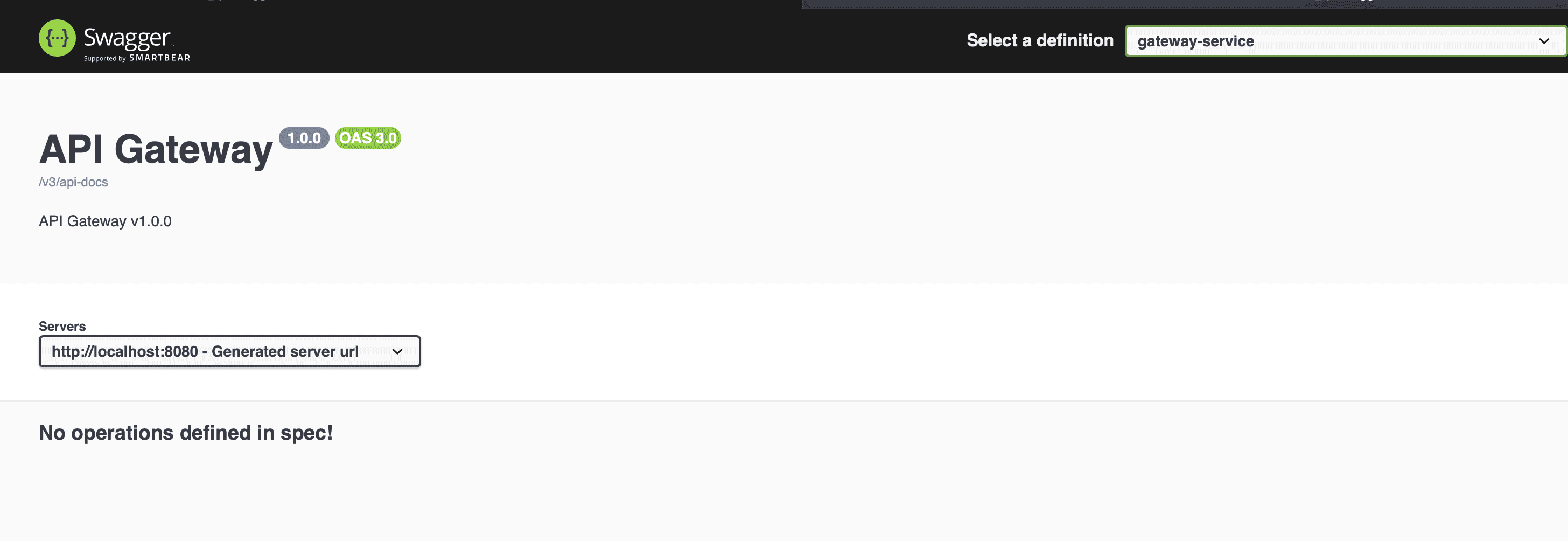
When we run both applications, we can view the API documentation in Swagger UI by navigating to http://localhost:8080/swagger-ui.html:
Now, we’ll access the Product service api-docs from the top right corner dropdown:
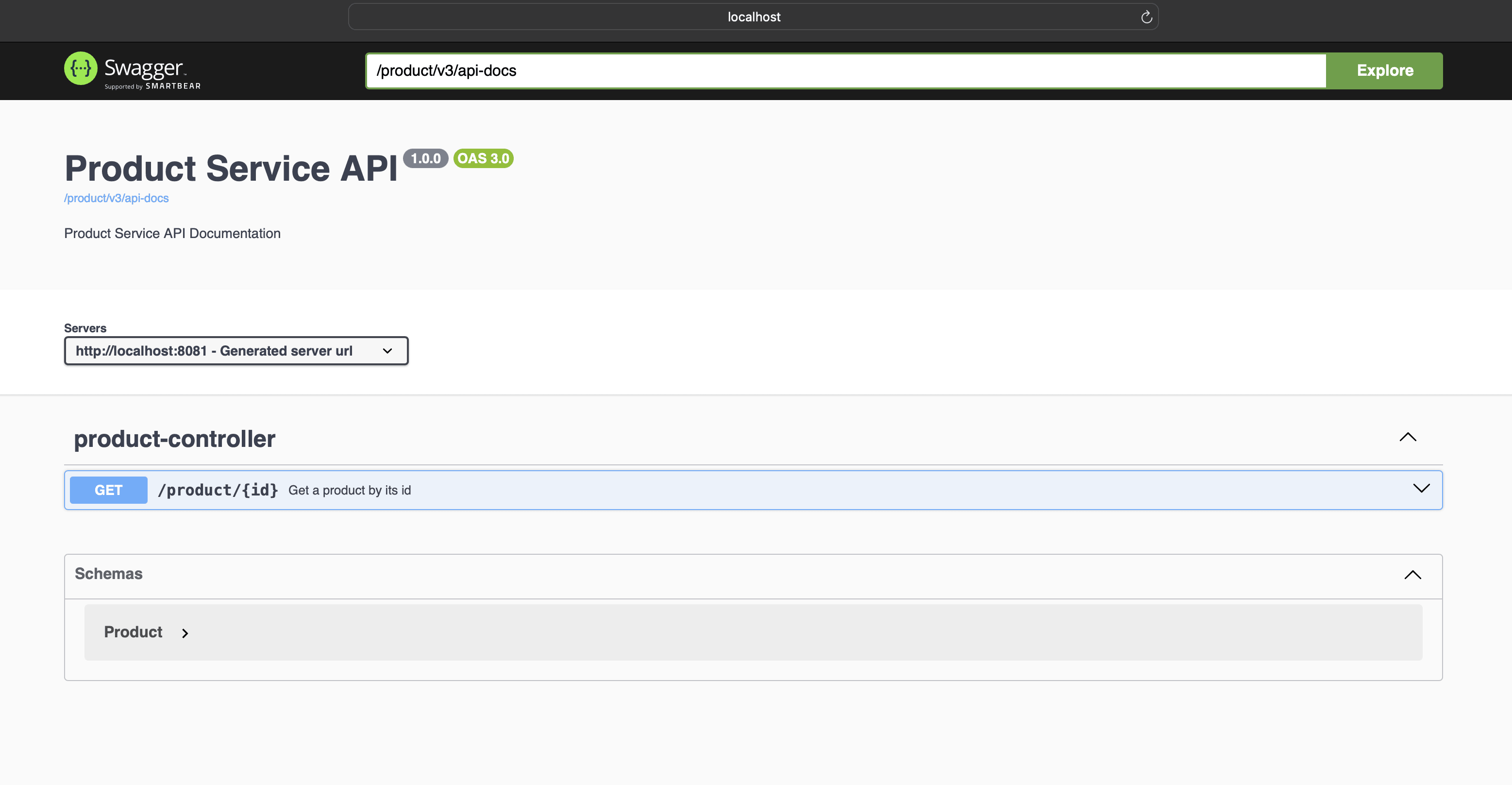
From the above page, we can view and access the Product service API endpoint.
We can access the Product service API documentation in a JSON format by accessing http://localhost:8080/product/v3/api-docs.
7. Conclusion
In this article, we’ve learned how to implement OpenAPI documentation in a Spring application using springdoc-openapi support.
We’ve also seen how to expose the backend API in the Spring Cloud Gateway service.
Finally, we’ve demonstrated how to access the OpenAPI documentation with the Spring Gateway service Swagger UI page.