Containerize a Spring Boot Application With Podman Desktop
Last updated: June 30, 2024


Mocking is an essential part of unit testing, and the Mockito library makes it easy to write clean and intuitive unit tests for your Java code.
Get started with mocking and improve your application tests using our Mockito guide:
Handling concurrency in an application can be a tricky process with many potential pitfalls. A solid grasp of the fundamentals will go a long way to help minimize these issues.
Get started with understanding multi-threaded applications with our Java Concurrency guide:
Spring 5 added support for reactive programming with the Spring WebFlux module, which has been improved upon ever since. Get started with the Reactor project basics and reactive programming in Spring Boot:
Since its introduction in Java 8, the Stream API has become a staple of Java development. The basic operations like iterating, filtering, mapping sequences of elements are deceptively simple to use.
But these can also be overused and fall into some common pitfalls.
To get a better understanding on how Streams work and how to combine them with other language features, check out our guide to Java Streams:
Explore Spring Boot 3 and Spring 6 in-depth through building a full REST API with the framework:
Yes, Spring Security can be complex, from the more advanced functionality within the Core to the deep OAuth support in the framework.
I built the security material as two full courses - Core and OAuth, to get practical with these more complex scenarios. We explore when and how to use each feature and code through it on the backing project.
You can explore the course here:
All Access is finally out, with all of my Spring courses. Learn JUnit is out as well, and Learn Maven is coming fast. And, of course, quite a bit more affordable. Finally.
>> GET THE COURSE
Spring Data JPA is a great way to handle the complexity of JPA with the powerful simplicity of Spring Boot.
Get started with Spring Data JPA through the guided reference course:
Refactor Java code safely — and automatically — with OpenRewrite.
Refactoring big codebases by hand is slow, risky, and easy to put off. That’s where OpenRewrite comes in. The open-source framework for large-scale, automated code transformations helps teams modernize safely and consistently.
Each month, the creators and maintainers of OpenRewrite at Moderne run live, hands-on training sessions — one for newcomers and one for experienced users. You’ll see how recipes work, how to apply them across projects, and how to modernize code with confidence.
Join the next session, bring your questions, and learn how to automate the kind of work that usually eats your sprint time.
1. Overview
In this tutorial, we’ll learn how to containerize a Spring Boot application using Podman Desktop. Podman is a containerization tool that allows us to manage containers without requiring a daemon process.
Podman Desktop is a desktop application with a graphical user interface for managing containers using Podman.
To demonstrate its usage, we’ll create a simple Spring Boot application, build a container image, and run a container using Podman Desktop.
2. Installing Podman Desktop
We need to install Podman Desktop on our local machine to get started. It’s available for Windows, macOS, and Linux operating systems. After downloading the installer, we can follow the installation instructions to set up Podman Desktop on our machine.
Here are a few important steps for setting up Podman Desktop:
- Podman should be installed on the machine. If not installed, Podman Desktop prompts and installs it for us.
- Once Podman is ready, we’ll be prompted to start a Podman machine. We can choose the default settings or customize them as needed. This is required before we can run containers.
- Additionally, for Windows, we need to enable/install WSL2 (Windows Subsystem for Linux) before we can run Podman.
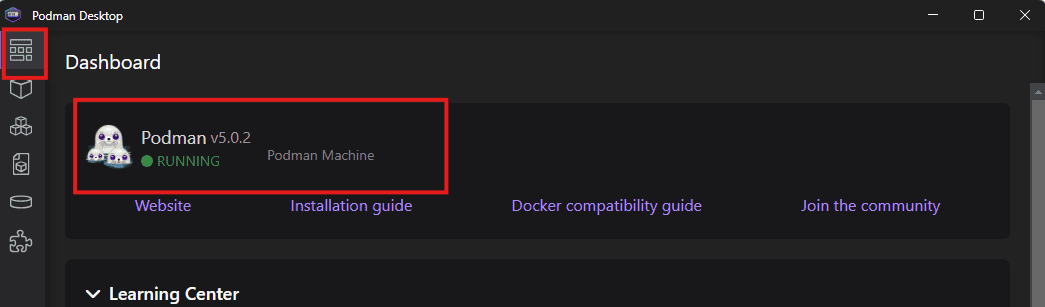
At the end of the installation process, we should have a Podman machine running that can be managed using the Podman Desktop application. We can verify this in the Dashboard section:
3. Creating a Spring Boot Application
Let’s create a small Spring Boot application. The application will have a REST controller that returns a “Hello, World!” message when we access the /hello endpoint.
We’ll use Maven to build the project and create a jar file. Then, we’ll create a Containerfile (also known as Dockerfile in the context of Docker). We’ll use this file to build a container image for our application using Podman Desktop.
3.1. Setting up the Project
To start with, we’ll add the Spring Boot Starter Web dependency to our project:
<dependencies>
    <dependency>
        <groupId>org.springframework.boot</groupId>
        <artifactId>spring-boot-starter-web</artifactId>
        <version>3.3.2</version>
    </dependency>
</dependencies>
This dependency provides the necessary libraries for creating a Spring Boot web application.
3.2. Controller
Next, let’s create our REST controller:
@RestController
public class HelloWorldController {
    @GetMapping("/hello")
    public String helloWorld() {
        return "Hello, World!";
    }
}
Here we use the @RestController annotation to mark the class as a controller and the @GetMapping annotation to map the method to the /hello endpoint. When we access this endpoint, it returns the “Hello, World!” message.
3.3. Building the Project
We can build the project using Maven by running the following command in the terminal:
mvn clean package
This command compiles the project, runs the tests, and creates a jar file in the target directory.
4. Containerfile
Now that we have our Spring Boot application ready, let’s create a Containerfile to build an image for our application. We’ll create this file in the root directory of our project:
FROM openjdk:17-alpine
WORKDIR /app
COPY target/spring-boot-podman-desktop-1.0-SNAPSHOT.jar app.jar
EXPOSE 8080
CMD ["java", "-jar", "app.jar"]
In this file:
- First, we use the openjdk:17-alpine image as the base image.
- Next, we set the working directory to /app.
- Then, we copy the jar file generated by Maven to the /app directory.
- We expose port 8080, the default port for Spring Boot applications.
- Finally, we use the CMD command to specify we want to run the jar file using the java -jar command when the container starts.
5. Building an Image Using Podman Desktop
Once the Containerfile is set up, let’s use the Podman Desktop application to create the image.
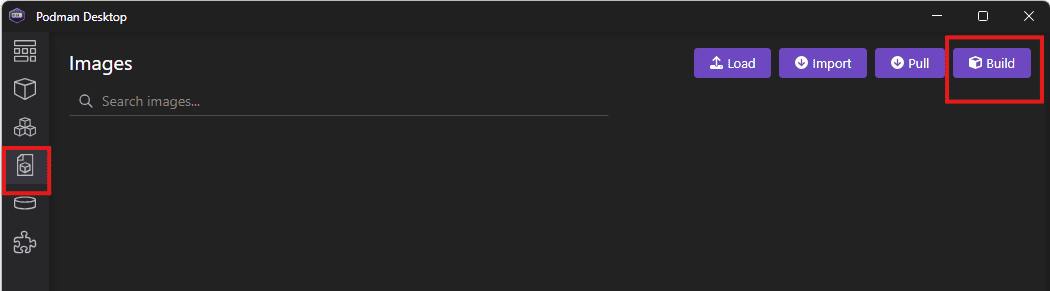
First, we’ll go to the Images section and click on the Build button:
Next, we’ll fill in the details for the image:
- Set the name for the image
- Choose the Containerfile location
- Use the project directory as the context directory
- We can also choose the platform(s) for the image. We’ll use the default value.
Here’s an example of the parameters and values:
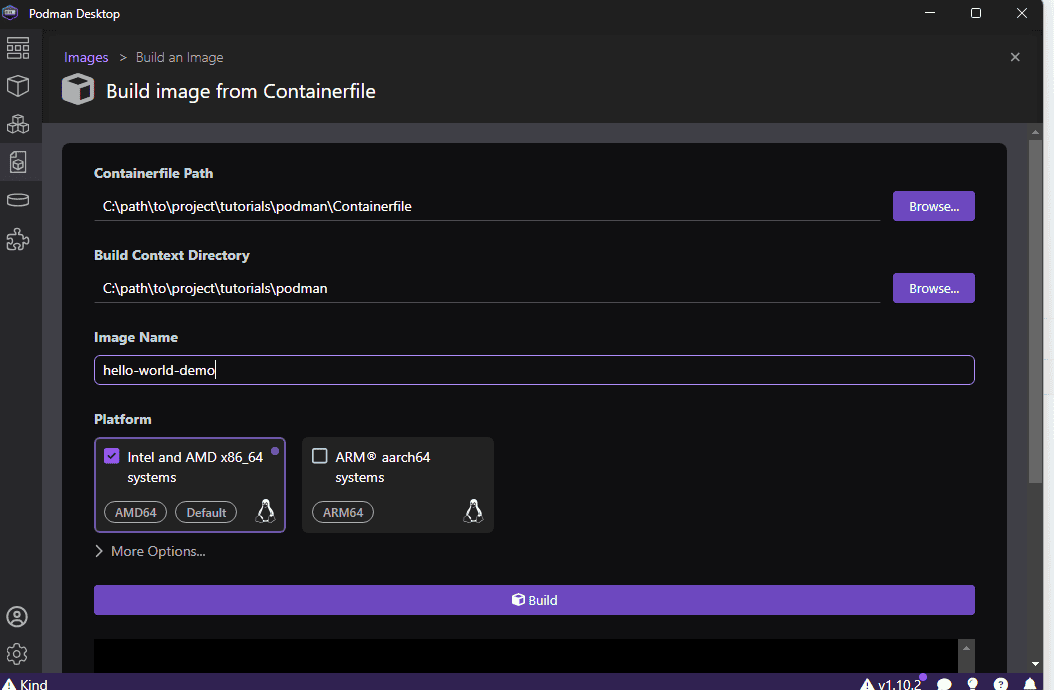
After filling in the details, we can click the Build button to build the image. After the build is completed, we can find the image in the Images section.
6. Running a Container
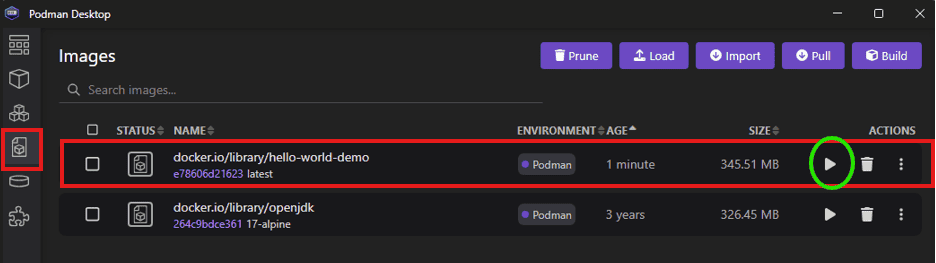
Now that we have the image ready, we can run a container using the image. We can do this by clicking the Run button next to the hello-world-demo image in the Images section:
6.1. Starting a Container
Next, we’ll fill in the details for the container. Properties we set in our Containerfile will be pre-filled, and we can customize them as needed:
In this case, the port mapping and command are already filled. If needed, we can set other properties such as environment variables, volumes, etc. We can also set the name of the container.
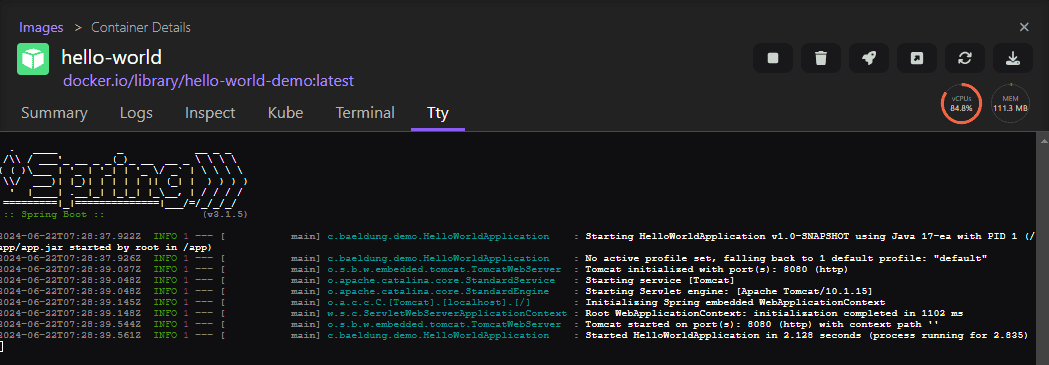
After filling in the details, we can click the Start Container button to start the container. This opens the Container Details section and displays the container logs:
6.2. Testing the Application
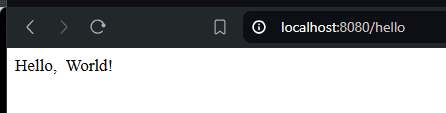
Once the container starts, we can access the application by opening a browser and navigating to http://localhost:8080/hello. We’ll see the “Hello, World!” message on the page:
6.3. Stopping the Container
To stop the container, we click on the Stop button in the Container Details section above.
Alternatively, we can go to the containers list and click on the Stop button for the container:
7. Conclusion
In this article, we learned how to containerize a Spring Boot application using Podman Desktop. We created a simple Spring Boot application with an API endpoint and created a Containerfile for it. Then, we built an image using the Podman Desktop application and ran a container using the image. Finally, we tested that our endpoint was working after the container started.














