


Mocking is an essential part of unit testing, and the Mockito library makes it easy to write clean and intuitive unit tests for your Java code.
Get started with mocking and improve your application tests using our Mockito guide:
Handling concurrency in an application can be a tricky process with many potential pitfalls. A solid grasp of the fundamentals will go a long way to help minimize these issues.
Get started with understanding multi-threaded applications with our Java Concurrency guide:
Spring 5 added support for reactive programming with the Spring WebFlux module, which has been improved upon ever since. Get started with the Reactor project basics and reactive programming in Spring Boot:
Since its introduction in Java 8, the Stream API has become a staple of Java development. The basic operations like iterating, filtering, mapping sequences of elements are deceptively simple to use.
But these can also be overused and fall into some common pitfalls.
To get a better understanding on how Streams work and how to combine them with other language features, check out our guide to Java Streams:
Explore Spring Boot 3 and Spring 6 in-depth through building a full REST API with the framework:
Yes, Spring Security can be complex, from the more advanced functionality within the Core to the deep OAuth support in the framework.
I built the security material as two full courses - Core and OAuth, to get practical with these more complex scenarios. We explore when and how to use each feature and code through it on the backing project.
You can explore the course here:
All Access is finally out, with all of my Spring courses. Learn JUnit is out as well, and Learn Maven is coming fast. And, of course, quite a bit more affordable. Finally.
>> GET THE COURSE
Spring Data JPA is a great way to handle the complexity of JPA with the powerful simplicity of Spring Boot.
Get started with Spring Data JPA through the guided reference course:
Refactor Java code safely — and automatically — with OpenRewrite.
Refactoring big codebases by hand is slow, risky, and easy to put off. That’s where OpenRewrite comes in. The open-source framework for large-scale, automated code transformations helps teams modernize safely and consistently.
Each month, the creators and maintainers of OpenRewrite at Moderne run live, hands-on training sessions — one for newcomers and one for experienced users. You’ll see how recipes work, how to apply them across projects, and how to modernize code with confidence.
Join the next session, bring your questions, and learn how to automate the kind of work that usually eats your sprint time.
1. Overview
In modern web services, we integrate backend services with essential services such as API gateways, load balancers, and reverse proxies. As a resulr, our backend service is no longer aware of the client-specific network details, such as the client’s IP address, hostname, and protocol, due to the network hop.
We can overcome this visibility limitation by including the request details as HTTP forwarded headers.
In this tutorial, we’ll learn various strategies for handling forwarded headers in a Spring Boot application. We’ll also implement and test these approaches with a configured reverse proxy service.
2. What are Forwarded Headers?
Forwarded headers are HTTP headers that specify network-related metadata. The upstream services, while processing the request to the backend APIs, would attach the headers.
Traditionally, many web servers used the de facto standard X-Forwarded-* headers.
Below are the X-Forwarded-* header details:
- X-Forwarded-For – To specify the originating client IP address
- X-Forwarded-By – To include the proxy’s IP address for tracing
- X-Forwarded-Host – To include the destination hostname as mentioned by the client
- X-Forwarded-Port – It specifies the destination port that the client used to connect
- X-Forwarded-Proto – To specify the protocol used, i.e http, https, ws, or wss
- X-Forwarded-Prefix – To specify any path-prefix URL, e.g /myapp, which is not included in the backend URL
We can also use the RFC 7239 standard Forwarded header:
Forwarded: by=<identifier>; for=<identifier>; host=<host>; proto=<http/https>The purpose of using forwarded headers can vary, such as enabling client IP-based rate limiting, auditing, sending HTTP URLs (HATEOAS), or returning an HTTP redirect response.
3. Set up the Example Application
Let’s implement a backend service with an endpoint. We’ll also expose the API through a reverse proxy service.
3.1. Maven Dependencies
We include the spring-boot-starter and spring-boot-starter-web dependencies:
<dependencyManagement>
    <dependencies>
        <dependency>
            <groupId>org.springframework.boot</groupId>
            <artifactId>spring-boot-dependencies</artifactId>
            <version>4.1.1</version>
            <type>pom</type>
            <scope>import</scope>
        </dependency>
    </dependencies>
</dependencyManagement>

<dependencies>
    <dependency>
        <groupId>org.springframework.boot</groupId>
        <artifactId>spring-boot-starter</artifactId>
    </dependency>
    <dependency>
        <groupId>org.springframework.boot</groupId>
        <artifactId>spring-boot-starter-web</artifactId>
    </dependency>
</dependencies>
Next, we implement a REST API service.
3.2. Implement the API
We’ll use the RestController class. First, let’s define a test endpoint:
@GetMapping("/test")
public ResponseEntity<Void> test(HttpServletRequest request) {
    LOGGER.info("""
      scheme : {}
      Remote Host IP : {}
      Remote Port : {}
      Server Name : {}
      Server Port : {}
      Request URL : {}""", request.getScheme(), request.getRemoteHost(), request.getRemotePort(), request.getServerName(), request.getServerPort(),
        request.getRequestURL());

    return new ResponseEntity<>(HttpStatus.OK);
}
Here, we’re logging some of the network metadata present in the HttpServletRequest object.
3.3. Implement the Nginx Service
Now, let’s configure an Nginx service to serve as a reverse proxy for the backend service. We do it in the nginx.conf file:
worker_processes auto;

events {
    worker_connections 1024;
}

http {
    server {
        listen 443 ssl;
        server_name api.example.com;

        ssl_certificate     /etc/nginx/certs/api.example.com.crt;
        ssl_certificate_key /etc/nginx/certs/api.example.com.key;
        ssl_protocols TLSv1.2 TLSv1.3;

        location /myapp/ {
            proxy_pass http://backend-app:8081/;
            proxy_http_version 1.1;
            proxy_set_header Connection "";
        }
    }
}
We set the hostname api.example.com, the location /myapp/, and the TLS certificate. Note the trailing / in the proxy_pass is mandatory so that Nginx can replace the matching /myapp/ path when forwarding the request.
For testing purposes, we generate the self-signed certificate using the openssl command:
$ openssl req -x509 -nodes -days 365 -newkey rsa:2048 \
  -keyout nginx/certs/api.example.com.key \
  -out nginx/certs/api.example.com.crt \
  -subj "/CN=api.example.com"
Additionally, we need to map the hostname api.example.com to the localhost address.
3.4. Implement the Docker Services
Let’s implement the entire setup in the Docker environment.
First, we specify the application image using a Dockerfile:
FROM eclipse-temurin:21-jre-alpine

WORKDIR /app
COPY target/spring-boot-5-0.0.1-SNAPSHOT.jar backend-app.jar

EXPOSE 8081
ENTRYPOINT ["java", "-jar", "backend-app.jar"]
Next, we stitch the above services together in the docker-compose.yml file:
services:
  backend-app:
    build:
      context: ../../../../../
      dockerfile: ./src/test/resources/docker/Dockerfile
    container_name: backend-app
    expose:
      - "8081"

  nginx:
    image: nginx:1.31.3-alpine
    container_name: nginx-proxy
    volumes:
      - ../../nginx/nginx.conf:/etc/nginx/nginx.conf:ro
      - ../../nginx/certs:/etc/nginx/certs:ro
    ports:
      - "443:443"
    depends_on:
      - backend-app
In docker-compose.yml, we configure the backend endpoint to run on the Docker internal port 8081. The Nginx service is accessible over TLS on port 443.
4. Different Strategies in Spring Boot
While the upstream services should include the forwarded headers, we still need to process headers in the application.
Starting with version 2.2.0, Spring Boot supports three different strategies. The options include None, Native, and Framework approaches:
- None means the application ignores the forwarded headers.
- Native lets the web server handles the forwarded headers.
- With Framework, the Spring framework processes these forwarded headers before serving the request.
This is configured using the forward-headers-strategy enum property.
The default strategy is None, except when Spring Boot detects that the application is running on a recognized cloud platform, which then enables the native strategy.
Before version 2.2.0, we could either ignore the forwarded headers or enable native support using the server.use-forward-headers boolean configuration.
5. Implement the Strategies
Let’s see these forwarded-headers strategies in action with Spring Boot support.
5.1. Forwarded Headers in Nginx
We need to include the forwarded headers in the Nginx service before implementing any strategy.
First, we define the forwarded_for and forwarded_by variables within the nginx http block:
map $remote_addr $forwarded_for {
    ~: "\"[$remote_addr]:$remote_port\"";
    default "\"$remote_addr:$remote_port\"";
}
map $server_addr $forwarded_by {
    ~:  "\"[$server_addr]:$server_port\"";
    default "\"$server_addr:$server_port\"";
}
The IP address and port are appended with a colon, thus supporting both IPv4 and IPv6 formats.
Now, we set the X-Forwarded-*, Forwarded, and Host headers using the proxy_set_header directive in the nginx.conf file:
location /myapp/ {
    proxy_pass http://backend-app:8081/;

    proxy_set_header Host $host;
    proxy_set_header X-Forwarded-Proto $scheme;
    proxy_set_header X-Forwarded-For $remote_addr;
    proxy_set_header X-Forwarded-Host $host;
    proxy_set_header X-Forwarded-Port $server_port;
    proxy_set_header X-Forwarded-Prefix /myapp;

    proxy_set_header Forwarded "for=$forwarded_for;by=$forwarded_by;host=$host;proto=$scheme";

    proxy_http_version 1.1;
    proxy_set_header Connection "";
}
With the config above, the Nginx service will automatically include the forwarded headers.
Instead of overwriting the X-Forwarded-For value, we can append the proxy’s IP to preserve the trusted upstream service’s X-Forwarded-For header. We can append the header using the built-in proxy_add_x_forwarded_for variable:
proxy_set_header X-Forwarded-For $proxy_add_x_forwarded_for;We should append it only if the XFF header comes from a trusted internal service. This will ensure the client cannot spoof the forwarded headers.
5.2. None
Let’s say we want to ignore and can’t trust forwarded headers. For example, the application may be directly exposed to the client, or the proxy does not handle the forwarded headers. In such use cases, we use the None strategy.
First, we configure the forward-headers-strategy as NONE in the application.yml file:
server:
  port: 8081
  forward-headers-strategy: NONE
For testing purposes, we run the above with the Nginx reverse proxy enabled. Then, we run the above Docker services with the docker compose command:
$ docker compose up --buildFinally, we execute the /myapp/test endpoint in the terminal:
$ curl -k https://api.example.com/myapp/testWe can confirm the request details in the Nginx log:
192.168.65.1 - - [26/Aug/2026:08:13:08 +0000] "GET /myapp/test HTTP/1.1" 200 0 "-" "curl/8.7.1"
Also, we need to verify the HttpServletRequest attributes in the application log:
2026-08-26T08:13:08.124Z  INFO 1 --- [backend-app] [nio-8081-exec-1] c.b.forwardheaders.TestController:
scheme : http
Remote Host IP : 172.21.0.3
Remote Port : 50754
Server Name : api.example.com
Server Port : 80
Request URL : http://api.example.com/test
The logs confirm that the scheme, remote IP, server port, and request URL are different from what the Nginx server received.
Additionally, let’s confirm the Nginx service’s IP address:
$ docker exec -it nginx-proxy /bin/sh
/ # ifconfig
eth0      Link encap:Ethernet  HWaddr 2A:4C:7C:42:E0:87
          inet addr:172.21.0.3  Bcast:172.21.255.255  Mask:255.255.0.0
The client IP address is 172.21.0.3, which is the Nginx service’s IP address. However, in the Nginx log, we see that the client IP address is 192.168.65.1, which is actually the Docker’s Desktop default gateway address. As expected, the forwarded headers were not processed by the backend service.
5.3. Native
With the Native strategy, Spring Boot delegates the processing of the forwarded headers to the underlying web server. The use case can be to audit, enable IP-based rate limiting, or provide an accessible redirect URL.
First, let’s configure the forward-headers-strategy as NATIVE and include the Tomcat-related remoteip configs:
server:
  port: 8081
  forward-headers-strategy: NATIVE
  tomcat:
    remoteip:
      remote-ip-header: X-Forwarded-For
      protocol-header: X-Forwarded-Proto
      host-header: X-Forwarded-Host
      port-header: X-Forwarded-Port
      trusted-proxies: 172\.(1[6-9]|2\d|3[0-1])\.\d{1,3}\.\d{1,3}
In the config above, we’re setting both the X-Forwarded-* names and the trusted-proxies IP range pattern. The remoteip configuration is optional, as the Tomcat server implements a sensible default.
Then, let’s enable the access logs on the server:
server:
  tomcat:
    accesslog:
      enabled: true
      request-attributes-enabled: true
      directory: /app/logs
      prefix: access_log
      suffix: .log
      pattern: '%h %l %u %t "%r" %s %b "%{X-Forwarded-Host}i" "%{X-Forwarded-For}i" "%{X-Forwarded-Proto}i"'
      rotate: false
Internally, the Tomcat server implements a valve called RemoteIpValve to handle the configured forwarded headers.
Finally, we execute the same test endpoint to verify the application logs:
2026-08-26T08:15:31.672Z  INFO 1 --- [backend-app] [nio-8081-exec-1] c.b.forwardheaders.TestController:
scheme : https
Remote Host IP : 192.168.65.1
Remote Port : 56444
Server Name : api.example.com
Server Port : 443
Request URL : https://api.example.com/test
The logs confirm the expected scheme, remote IP, server name, and server port.
However, the request URL did not include the /myapp prefix. The reason is that the RemoteIpValve implementation ignores the X-Forwarded-Prefix header.
Additionally, we verify the forwarded headers in the server access log inside the Docker environment:
$ docker exec -it backend-app /bin/sh
/app # tail -f ./logs/access_log.log
192.168.65.1 - - [26/Aug/2026:08:15:31 +0000] "GET /test HTTP/1.1" 200 - "api.example.com" "192.168.65.1" "https"
The Native approach works as expected, except the request URL is missing the prefix.
Here’s how the overall flow for the client’s request looks:
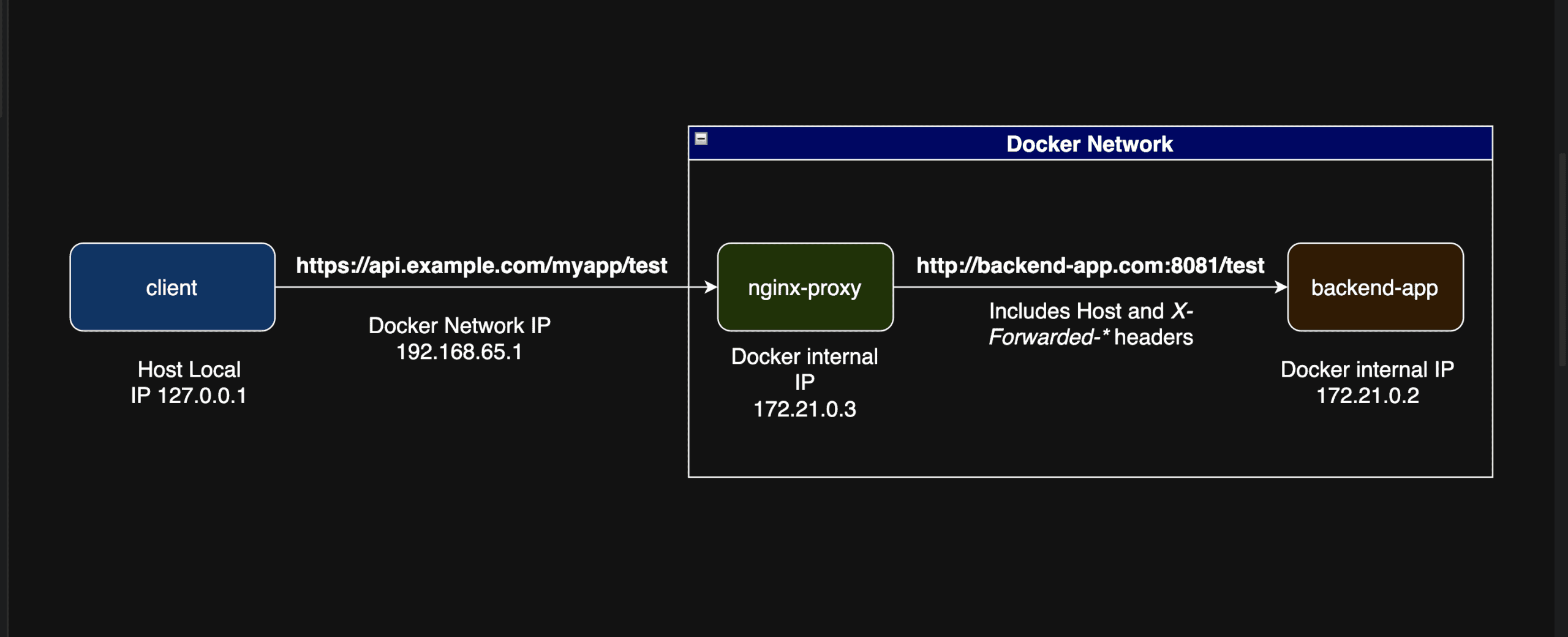
Although we processed the forwarded headers correctly, we still need to include the prefix in the request URL.
5.4. Framework
In this approach, Spring Boot internally handles all forwarded headers, including the X-Forwarded-Prefix header. This will allow us to include the prefix in the URL.
We enable the forward-headers-strategy as FRAMEWORK in the application.yml file:
server:
  port: 8081
  forward-headers-strategy: FRAMEWORK
Internally, Spring Boot implements this strategy using the ForwardedHeaderFilter class.
Let’s execute the /myapp/test endpoint and verify the application logs:
2026-08-26T08:18:07.197Z  INFO 1 --- [backend-app] [nio-8081-exec-1] c.b.forwardheaders.TestController:
scheme : https
Remote Host IP : 192.168.65.1
Remote Port : 52414
Server Name : api.example.com
Server Port : 443
Request URL : https://api.example.com/myapp/test
We confirm the scheme, remote IP/port, server name/port, and request URL as expected. Also, the ForwardedHeaderFilter correctly extracts the remote IP and port based on the configured Forwarded header. By default, the remote IP and port are updated using the Forwarded: for header, if present. Otherwise, only the remote IP gets updated using the X-Forwarded-For header.
The above behavior was implemented in Spring Boot 2.4.0. Before Spring Boot 2.4.0/Spring Framework 5.3.0, the remote IP and port were left untouched.
We shouldn’t enable both the Framework and Native strategies, as it will cause duplicate processing.
6. Conclusion
In this article, we learned about the forwarded headers and why we need them.
We also demonstrated and tested three strategies provided by Spring Boot: None, Native, and Framework strategies with the forward-header-strategy configuration.
As always, the article code can be found over the GitHub.














