Modify Request Body Before Reaching Controller in Spring Boot
Last updated: December 12, 2024


Mocking is an essential part of unit testing, and the Mockito library makes it easy to write clean and intuitive unit tests for your Java code.
Get started with mocking and improve your application tests using our Mockito guide:
Handling concurrency in an application can be a tricky process with many potential pitfalls. A solid grasp of the fundamentals will go a long way to help minimize these issues.
Get started with understanding multi-threaded applications with our Java Concurrency guide:
Spring 5 added support for reactive programming with the Spring WebFlux module, which has been improved upon ever since. Get started with the Reactor project basics and reactive programming in Spring Boot:
Since its introduction in Java 8, the Stream API has become a staple of Java development. The basic operations like iterating, filtering, mapping sequences of elements are deceptively simple to use.
But these can also be overused and fall into some common pitfalls.
To get a better understanding on how Streams work and how to combine them with other language features, check out our guide to Java Streams:
Explore Spring Boot 3 and Spring 6 in-depth through building a full REST API with the framework:
Yes, Spring Security can be complex, from the more advanced functionality within the Core to the deep OAuth support in the framework.
I built the security material as two full courses - Core and OAuth, to get practical with these more complex scenarios. We explore when and how to use each feature and code through it on the backing project.
You can explore the course here:
All Access is finally out, with all of my Spring courses. Learn JUnit is out as well, and Learn Maven is coming fast. And, of course, quite a bit more affordable. Finally.
>> GET THE COURSE
Spring Data JPA is a great way to handle the complexity of JPA with the powerful simplicity of Spring Boot.
Get started with Spring Data JPA through the guided reference course:
Refactor Java code safely — and automatically — with OpenRewrite.
Refactoring big codebases by hand is slow, risky, and easy to put off. That’s where OpenRewrite comes in. The open-source framework for large-scale, automated code transformations helps teams modernize safely and consistently.
Each month, the creators and maintainers of OpenRewrite at Moderne run live, hands-on training sessions — one for newcomers and one for experienced users. You’ll see how recipes work, how to apply them across projects, and how to modernize code with confidence.
Join the next session, bring your questions, and learn how to automate the kind of work that usually eats your sprint time.
1. Overview
In this tutorial, we’ll learn how to modify an HTTP request before it reaches the controller in a Spring Boot application. Web applications and RESTful web services often employ this technique to address common concerns like transforming or enriching the incoming HTTP requests before they hit the actual controllers. This promotes loose coupling and considerably reduces development effort.
2. Modify Request With Filters
Often, applications have to perform generic operations such as authentication, logging, escaping HTML characters, etc. Filters are an excellent choice to take care of these generic concerns of an application running in any servlet container. Let’s take a look at how a filter works:
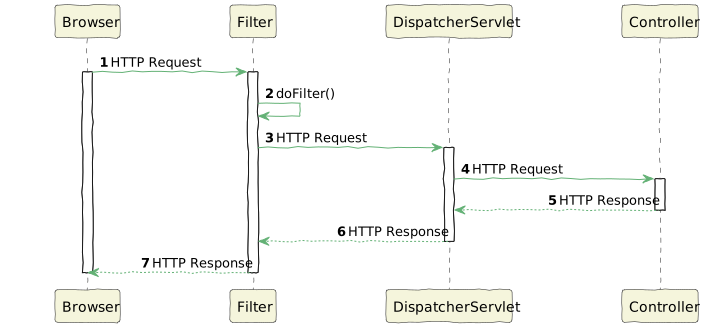
In Spring Boot applications, filters can be registered to be invoked in a particular order to:
- modify the request
- log the request
- check the request for authentication or some malicious scripts
- decide to reject or forward the request to the next filter or controller
Let’s assume we want to escape all the HTML characters from the HTTP request body to prevent an XSS attack. Let’s first define the filter:
@Component
@Order(1)
public class EscapeHtmlFilter implements Filter {
    @Override
    public void doFilter(ServletRequest servletRequest, ServletResponse servletResponse, FilterChain filterChain)
      throws IOException, ServletException {
        filterChain.doFilter(new HtmlEscapeRequestWrapper((HttpServletRequest) servletRequest), servletResponse);
    }
}
The value 1 in the @Order annotation signifies that all HTTP requests first pass through the filter EscapeHtmlFilter. We can also register filters with the help of FilterRegistrationBean defined in the Spring Boot configuration class. With this, we can define the URL pattern for the filter as well.
The doFilter() method wraps the original ServletRequest in a custom wrapper EscapeHtmlRequestWrapper:
public class EscapeHtmlRequestWrapper extends HttpServletRequestWrapper {
    private String body = null;
    public HtmlEscapeRequestWrapper(HttpServletRequest request) throws IOException {
        super(request);
        this.body = this.escapeHtml(request);
    }

    @Override
    public ServletInputStream getInputStream() throws IOException {
        final ByteArrayInputStream byteArrayInputStream = new ByteArrayInputStream(body.getBytes());
        ServletInputStream servletInputStream = new ServletInputStream() {
            @Override
            public int read() throws IOException {
                return byteArrayInputStream.read();
            }
        //Other implemented methods...
        };
        return servletInputStream;
    }

    @Override
    public BufferedReader getReader() {
        return new BufferedReader(new InputStreamReader(this.getInputStream()));
    }
}
The wrapper is necessary because we cannot modify the original HTTP request. Without this, the servlet container would reject the request.
In the custom wrapper, we’ve overridden the method getInputStream() to return a new ServletInputStream. Basically, we assigned it the modified request body after escaping the HTML characters with the method escapeHtml().
Let’s define a UserController class:
@RestController
@RequestMapping("/")
public class UserController {
    @PostMapping(value = "save")
    public ResponseEntity<String> saveUser(@RequestBody String user) {
        logger.info("save user info into database");
        ResponseEntity<String> responseEntity = new ResponseEntity<>(user, HttpStatus.CREATED);
        return responseEntity;
    }
}
For this demo, the controller returns the request body user that it receives on the endpoint /save.
Let’s see if the filter works:
@Test
void givenFilter_whenEscapeHtmlFilter_thenEscapeHtml() throws Exception {
Map<String, String> requestBody = Map.of(
"name", "James Cameron",
"email", "<script>alert()</script>[email protected]"
);
Map<String, String> expectedResponseBody = Map.of(
"name", "James Cameron",
"email", "<script>alert()</script>[email protected]"
);
ObjectMapper objectMapper = new ObjectMapper();
mockMvc.perform(MockMvcRequestBuilders.post(URI.create("/save"))
.contentType(MediaType.APPLICATION_JSON)
.content(objectMapper.writeValueAsString(requestBody)))
.andExpect(MockMvcResultMatchers.status().isCreated())
.andExpect(MockMvcResultMatchers.content().json(objectMapper.writeValueAsString(expectedResponseBody)));
}Well, the filter successfully escapes the HTML characters before it hits the URL /save defined in the UserController class.
3. Using Spring AOP
The RequestBodyAdvice interface along with the annotation @RestControllerAdvice by the Spring framework helps apply global advice to all REST controllers in a Spring application. Let’s use them to escape the HTML characters from the HTTP request before it reaches the controllers:
@RestControllerAdvice
public class EscapeHtmlAspect implements RequestBodyAdvice {
    @Override
    public HttpInputMessage beforeBodyRead(HttpInputMessage inputMessage,
      MethodParameter parameter, Type targetType, Class<? extends HttpMessageConverter<?>> converterType) throws IOException {
        InputStream inputStream = inputMessage.getBody();
        return new HttpInputMessage() {
            @Override
            public InputStream getBody() throws IOException {
                return new ByteArrayInputStream(escapeHtml(inputStream).getBytes(StandardCharsets.UTF_8));
            }

            @Override
            public HttpHeaders getHeaders() {
                return inputMessage.getHeaders();
            }
        };
    }

    @Override
    public boolean supports(MethodParameter methodParameter,
      Type targetType, Class<? extends HttpMessageConverter<?>> converterType) {
        return true;
    }

    @Override
    public Object afterBodyRead(Object body, HttpInputMessage inputMessage,
      MethodParameter parameter, Type targetType, Class<? extends HttpMessageConverter<?>> converterType) {
        return body;
    }

    @Override
    public Object handleEmptyBody(Object body, HttpInputMessage inputMessage,
      MethodParameter parameter, Type targetType, Class<? extends HttpMessageConverter<?>> converterType) {
        return body;
    }
}
The method beforeBodyRead() gets called before the HTTP request hits the controller. Hence we’re escaping the HTML characters in it. The support() method returns true which means it applies the advice to all the REST controllers.
Let’s see if it works:
@Test
void givenAspect_whenEscapeHtmlAspect_thenEscapeHtml() throws Exception {
Map<String, String> requestBody = Map.of(
"name", "James Cameron",
"email", "<script>alert()</script>[email protected]"
);
Map<String, String> expectedResponseBody = Map.of(
"name", "James Cameron",
"email", "<script>alert()</script>[email protected]"
);
ObjectMapper objectMapper = new ObjectMapper();
mockMvc.perform(MockMvcRequestBuilders.post(URI.create("/save"))
.contentType(MediaType.APPLICATION_JSON)
.content(objectMapper.writeValueAsString(requestBody)))
.andExpect(MockMvcResultMatchers.status().isCreated())
.andExpect(MockMvcResultMatchers.content().json(objectMapper.writeValueAsString(expectedResponseBody)));
}As expected, all the HTML characters were escaped.
We can also create custom AOP annotations which can used on controller methods to apply the advice in a more granular way.
4. Modify Request With Interceptors
A Spring interceptor is a class that can intercept incoming HTTP requests and process them before the controller handles them. Interceptors are used for various purposes, such as authentication, authorization, logging, and caching. Moreover, interceptors are specific to the Spring MVC framework where they have access to the Spring ApplicationContext.
Let’s see how interceptors work:
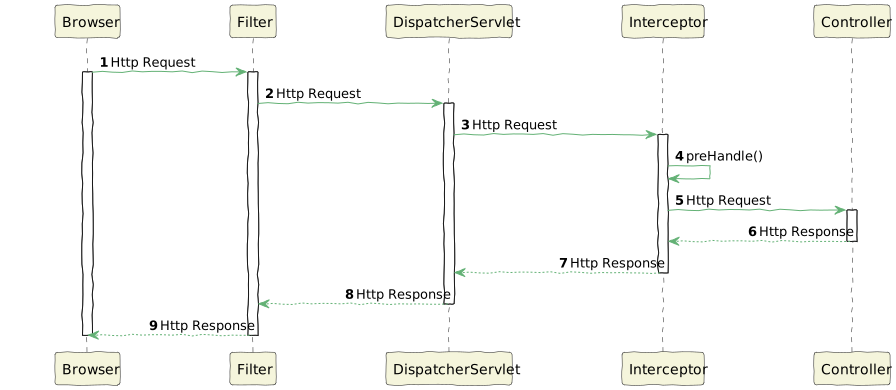
The DispatcherServlet forwards the HTTP request to the interceptor. Further, after processing, the interceptor can forward the request to the controller or reject it. Due to this, there’s a widespread misconception that interceptors can alter HTTP requests. However, we’ll demonstrate that this notion is incorrect.
Let’s consider the example of escaping the HTML characters from the HTTP requests, discussed in the earlier section. Let’s see if we can implement this with a Spring MVC interceptor:
public class EscapeHtmlRequestInterceptor implements HandlerInterceptor {
    @Override
    public boolean preHandle(HttpServletRequest request, HttpServletResponse response, Object handler) throws Exception {
        HtmlEscapeRequestWrapper htmlEscapeRequestWrapper = new HtmlEscapeRequestWrapper(request);
        return HandlerInterceptor.super.preHandle(htmlEscapeRequestWrapper, response, handler);
    }
}
All interceptors must implement the HandleInterceptor interface. In the interceptor, the preHandle() method gets called before the request is forwarded to the target controllers. Hence, we’ve wrapped the HttpServletRequest object in the EscapeHtmlRequestWrapper and that takes care of escaping the HTML characters.
Furthermore, we must also register the interceptor to an appropriate URL pattern:
@Configuration
@EnableWebMvc
public class WebMvcConfiguration implements WebMvcConfigurer {
    private static final Logger logger = LoggerFactory.getLogger(WebMvcConfiguration.class);
    @Override
    public void addInterceptors(InterceptorRegistry registry) {
        logger.info("addInterceptors() called");
        registry.addInterceptor(new HtmlEscapeRequestInterceptor()).addPathPatterns("/**");

        WebMvcConfigurer.super.addInterceptors(registry);
    }
}
As we can see, WebMvcConfiguration class implements WebMvcConfigurer. In the class, we’ve overridden the method addInterceptors(). In the method, we registered the interceptor EscapeHtmlRequestInterceptor for all the incoming HTTP requests with the method addPathPatterns().
Surprisingly, HtmlEscapeRequestInterceptor fails to forward the modified request body and call the handler /save:
@Test
void givenInterceptor_whenEscapeHtmlInterceptor_thenEscapeHtml() throws Exception {
    Map<String, String> requestBody = Map.of(
      "name", "James Cameron",
      "email", "<script>alert()</script>[email protected]"
    );

    ObjectMapper objectMapper = new ObjectMapper();
    mockMvc.perform(MockMvcRequestBuilders.post(URI.create("/save"))
      .contentType(MediaType.APPLICATION_JSON)
      .content(objectMapper.writeValueAsString(requestBody)))
      .andExpect(MockMvcResultMatchers.status().is4xxClientError());
}
We pushed a few JavaScript characters in the HTTP request body. Unexpectedly the request fails with an HTTP error code 400. Hence, though interceptors can act like filters, they aren’t suitable for modifying the HTTP request. Rather, they’re useful when we need to modify an object in the Spring application context.
5. Conclusion
In this article, we discussed the various ways to modify the HTTP request body in a Spring Boot application before it reaches the controller. According to popular belief, interceptors can help in doing it, but we saw that it fails. However, we saw how filters and AOP successfully modify an HTTP request body before it reaches the controller.














