Mocking is an essential part of unit testing, and the Mockito library makes it easy to write clean and intuitive unit tests for your Java code.
Get started with mocking and improve your application tests using our Mockito guide:
Handling concurrency in an application can be a tricky process with many potential pitfalls. A solid grasp of the fundamentals will go a long way to help minimize these issues.
Get started with understanding multi-threaded applications with our Java Concurrency guide:
Spring 5 added support for reactive programming with the Spring WebFlux module, which has been improved upon ever since. Get started with the Reactor project basics and reactive programming in Spring Boot:
Since its introduction in Java 8, the Stream API has become a staple of Java development. The basic operations like iterating, filtering, mapping sequences of elements are deceptively simple to use.
But these can also be overused and fall into some common pitfalls.
To get a better understanding on how Streams work and how to combine them with other language features, check out our guide to Java Streams:
Explore Spring Boot 3 and Spring 6 in-depth through building a full REST API with the framework:
Yes, Spring Security can be complex, from the more advanced functionality within the Core to the deep OAuth support in the framework.
I built the security material as two full courses - Core and OAuth, to get practical with these more complex scenarios. We explore when and how to use each feature and code through it on the backing project.
You can explore the course here:
All Access is finally out, with all of my Spring courses. Learn JUnit is out as well, and Learn Maven is coming fast. And, of course, quite a bit more affordable. Finally.
>> GET THE COURSE
Spring Data JPA is a great way to handle the complexity of JPA with the powerful simplicity of Spring Boot.
Get started with Spring Data JPA through the guided reference course:
Refactor Java code safely — and automatically — with OpenRewrite.
Refactoring big codebases by hand is slow, risky, and easy to put off. That’s where OpenRewrite comes in. The open-source framework for large-scale, automated code transformations helps teams modernize safely and consistently.
Each month, the creators and maintainers of OpenRewrite at Moderne run live, hands-on training sessions — one for newcomers and one for experienced users. You’ll see how recipes work, how to apply them across projects, and how to modernize code with confidence.
Join the next session, bring your questions, and learn how to automate the kind of work that usually eats your sprint time.
1. Overview
In our previous introduction to Spring Batch, we introduced the framework as a batch-processing tool. We also explored the configuration details and the implementation for a single-threaded, single process job execution.
To implement a job with some parallel processing, a range of options is provided. At a higher level, there are two modes of parallel processing:
- Single-Process, multi-threaded
- Multi-Process
In this quick article, we’ll discuss the partitioning of Step, which can be implemented for both single process and multi-process jobs.
2. Partitioning a Step
Spring Batch with partitioning provides us the facility to divide the execution of a Step:
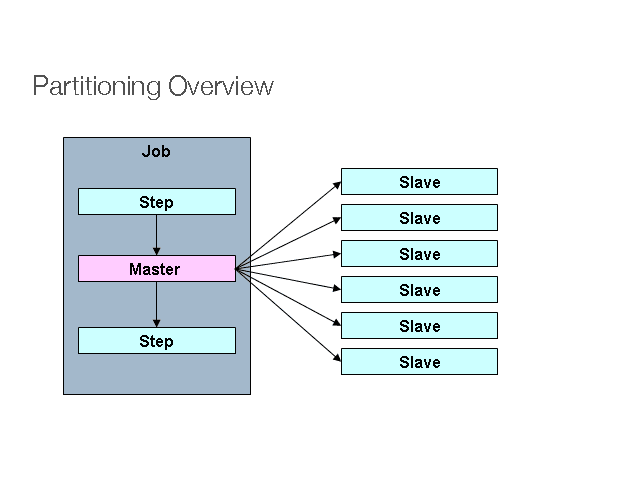
The above picture shows an implementation of a Job with a partitioned Step.
There’s a Step called “Master”, whose execution is divided into some “Slave” steps. These slaves can take the place of a master, and the outcome will still be unchanged. Both master and slave are instances of Step. Slaves can be remote services or just locally executing threads.
If required, we can pass data from the master to the slave. The meta data (i.e. the JobRepository), makes sure that every slave is executed only once in a single execution of the Job.
Here is the sequence diagram showing how it all works:
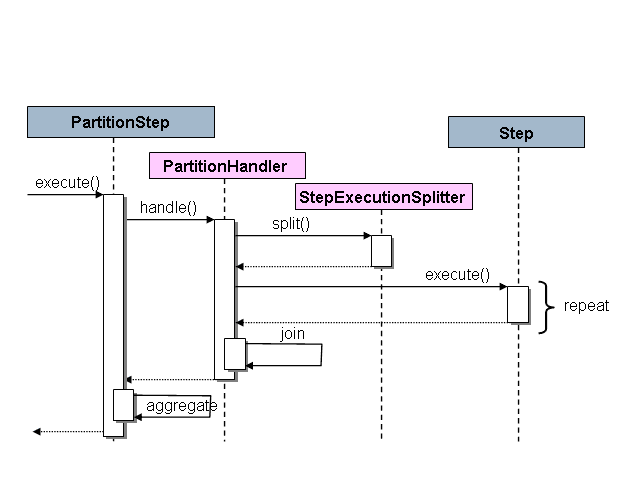
As shown, the PartitionStep is driving the execution. The PartitionHandler is responsible for splitting the work of “Master” into the “Slaves”. The rightmost Step is the slave.
3. The Maven POM
The Maven dependencies are the same as mentioned in our previous article. That is, Spring Core, Spring Batch and the dependency for the database (in our case, H2).
4. Configuration
In our introductory article, we saw an example of converting some financial data from CSV to XML file. Let’s extend the same example.
Here, we’ll convert the financial information from 5 CSV files to corresponding XML files, using a multi-threaded implementation.
We can achieve this using a single Job and Step partitioning. We’ll have five threads, one for each of the CSV files.
First of all, let’s create a Job:
@Bean(name = "partitionerJob")
public Job partitionerJob(JobRepository jobRepository)
  throws UnexpectedInputException, MalformedURLException, ParseException {
    return jobs.get("partitioningJob", jobRepository)
      .start(partitionStep())
      .build();
}
As we can see, this Job starts with the PartitioningStep. This is our master step which will be divided into various slave steps:
@Bean
public Step partitionStep(JobRepository jobRepository, PlatformTransactionManager transactionManager)
  throws UnexpectedInputException, ParseException {
    return new StepBuilder("partitionStep", jobRepository)
      .partitioner("slaveStep", partitioner())
      .step(slaveStep(jobRepository, transactionManager))
      .taskExecutor(taskExecutor())
      .build();
}
Here, we’ll create the PartitioningStep using StepBuilder constructor with the name of the step. For that, we need to give the information about the SlaveSteps and the Partitioner.
The Partitioner is an interface which provides the facility to define a set of input values for each of the slaves. In other words, logic to divide tasks into respective threads goes here.
Let’s create an implementation of it, called CustomMultiResourcePartitioner, where we’ll put the input and output file names in the ExecutionContext to pass on to every slave step:
public class CustomMultiResourcePartitioner implements Partitioner {

    @Override
    public Map<String, ExecutionContext> partition(int gridSize) {
        Map<String, ExecutionContext> map = new HashMap<>(gridSize);
        int i = 0, k = 1;
        for (Resource resource : resources) {
            ExecutionContext context = new ExecutionContext();
            Assert.state(resource.exists(), "Resource does not exist: "
              + resource);
            context.putString(keyName, resource.getFilename());
            context.putString("opFileName", "output"+k+++".xml");
            map.put(PARTITION_KEY + i, context);
            i++;
        }
        return map;
    }
}
We’ll also create the bean for this class, where we’ll give the source directory for input files:
@Bean
public CustomMultiResourcePartitioner partitioner() {
    CustomMultiResourcePartitioner partitioner
      = new CustomMultiResourcePartitioner();
    Resource[] resources;
    try {
        resources = resoursePatternResolver
          .getResources("file:src/main/resources/input/*.csv");
    } catch (IOException e) {
        throw new RuntimeException("I/O problems when resolving"
          + " the input file pattern.", e);
    }
    partitioner.setResources(resources);
    return partitioner;
}
We will define the slave step, just like any other step with the reader and the writer. The reader and writer will be same as we saw in our introductory example, except they will receive filename parameter from the StepExecutionContext.
Note that these beans need to be step scoped so that they will be able to receive the stepExecutionContext params, at every step. If they would not be step scoped, their beans will be created initially, and won’t accept the filenames at step level:
@StepScope
@Bean
public FlatFileItemReader<Transaction> itemReader(
  @Value("#{stepExecutionContext[fileName]}") String filename)
  throws UnexpectedInputException, ParseException {

    FlatFileItemReader<Transaction> reader
      = new FlatFileItemReader<>();
    DelimitedLineTokenizer tokenizer = new DelimitedLineTokenizer();
    String[] tokens
      = {"username", "userid", "transactiondate", "amount"};
    tokenizer.setNames(tokens);
    reader.setResource(new ClassPathResource("input/" + filename));
    DefaultLineMapper<Transaction> lineMapper
      = new DefaultLineMapper<>();
    lineMapper.setLineTokenizer(tokenizer);
    lineMapper.setFieldSetMapper(new RecordFieldSetMapper());
    reader.setLinesToSkip(1);
    reader.setLineMapper(lineMapper);
    return reader;
}
@Bean
@StepScope
public ItemWriter<Transaction> itemWriter(Marshaller marshaller,
  @Value("#{stepExecutionContext[opFileName]}") String filename)
  throws MalformedURLException {
    StaxEventItemWriter<Transaction> itemWriter
      = new StaxEventItemWriter<Transaction>();
    itemWriter.setMarshaller(marshaller);
    itemWriter.setRootTagName("transactionRecord");
    itemWriter.setResource(new FileSystemResource("src/main/resources/output/" + filename));
    return itemWriter;
}
While mentioning the reader and writer in the slave step, we can pass the arguments as null, because these filenames will not be used, as they will receive the filenames from stepExecutionContext:
@Bean
public Step slaveStep(JobRepository jobRepository, PlatformTransactionManager transactionManager)
  throws UnexpectedInputException, ParseException {
    return new StepBuilder("slaveStep").<Transaction, Transaction> chunk(1, transactionManager)
      .reader(itemReader(null))
      .writer(itemWriter(marshaller(), null))
      .build();
}
5. Conclusion
In this tutorial, we discussed how to implement a job with parallel processing using Spring Batch.