Guide to Subagent Orchestration in Spring AI
Last updated: July 24, 2026


Mocking is an essential part of unit testing, and the Mockito library makes it easy to write clean and intuitive unit tests for your Java code.
Get started with mocking and improve your application tests using our Mockito guide:
Handling concurrency in an application can be a tricky process with many potential pitfalls. A solid grasp of the fundamentals will go a long way to help minimize these issues.
Get started with understanding multi-threaded applications with our Java Concurrency guide:
Spring 5 added support for reactive programming with the Spring WebFlux module, which has been improved upon ever since. Get started with the Reactor project basics and reactive programming in Spring Boot:
Since its introduction in Java 8, the Stream API has become a staple of Java development. The basic operations like iterating, filtering, mapping sequences of elements are deceptively simple to use.
But these can also be overused and fall into some common pitfalls.
To get a better understanding on how Streams work and how to combine them with other language features, check out our guide to Java Streams:
Explore Spring Boot 3 and Spring 6 in-depth through building a full REST API with the framework:
Yes, Spring Security can be complex, from the more advanced functionality within the Core to the deep OAuth support in the framework.
I built the security material as two full courses - Core and OAuth, to get practical with these more complex scenarios. We explore when and how to use each feature and code through it on the backing project.
You can explore the course here:
All Access is finally out, with all of my Spring courses. Learn JUnit is out as well, and Learn Maven is coming fast. And, of course, quite a bit more affordable. Finally.
>> GET THE COURSE
Spring Data JPA is a great way to handle the complexity of JPA with the powerful simplicity of Spring Boot.
Get started with Spring Data JPA through the guided reference course:
Refactor Java code safely — and automatically — with OpenRewrite.
Refactoring big codebases by hand is slow, risky, and easy to put off. That’s where OpenRewrite comes in. The open-source framework for large-scale, automated code transformations helps teams modernize safely and consistently.
Each month, the creators and maintainers of OpenRewrite at Moderne run live, hands-on training sessions — one for newcomers and one for experienced users. You’ll see how recipes work, how to apply them across projects, and how to modernize code with confidence.
Join the next session, bring your questions, and learn how to automate the kind of work that usually eats your sprint time.
1. Overview
As AI systems grow more capable, a single “generalist” agent often becomes inefficient. It tries to handle everything in one context window, which leads to noisy prompts, slower responses, and degraded output quality. A better approach is to split responsibilities across specialized agents and let a central orchestrator coordinate them.
This is exactly what Subagent Orchestration enables in Spring AI. Using the Task tool from the spring-ai-agent-utils library, we can build hierarchical agent systems where each subagent works in an isolated context and returns only essential results.
In this tutorial, we’ll implement this pattern end-to-end using real APIs from the Spring ecosystem. We’ll learn how the orchestration works, how to configure subagents, and how to build a working system that dynamically delegates tasks.
2. Understanding Subagent Orchestration
Subagent orchestration is a pattern where a primary AI agent delegates work to smaller, specialized agents. Each subagent is designed for a specific responsibility and operates in its own context window. This isolation ensures that prompts remain focused and prevents unnecessary information from polluting the reasoning process.
Unlike traditional service orchestration, the delegation decision isn’t hardcoded. The main agent uses LLM to decide when a task should be delegated. This decision is based on natural language descriptions provided for each subagent, making the system flexible and adaptive. This approach improves separation of concerns, prompt clarity, maintainability, extensibility, and model specialization.
2.1. Why Use Specialized Subagents?
Specialized subagents help us create more modular AI systems. For example, in an AI travel assistant, one subagent can search flights, another can recommend hotels, and another can build personalized itineraries based on user preferences. This allows each subagent to focus on a specialized responsibility instead of relying on a single large prompt.
Each subagent receives a focused responsibility instead of competing for context inside a shared workflow. This pattern becomes especially useful in enterprise systems where AI applications continue to grow in complexity over time.
2.2. How Spring AI Supports Orchestration
Spring AI Community Agent Utils provides orchestration utilities through TaskTool and ClaudeSubagentReferences. These components help us register subagents, load subagent definitions dynamically, delegate tasks automatically, and orchestrate multiple AI workflows.
One of the most interesting aspects of this approach is that subagents can be defined in markdown files instead of Java classes.
3. Project Setup
Before implementing Subagent Orchestration, we’ll set up a simple Spring Boot application using Spring Initializr with Spring AI starter OpenAI, starter-test, and Spring AI Community Agent Utils. We’ll first add the required dependencies and then configure the OpenAI model and markdown-based subagent definitions.
In this application, we’ll build an AI-powered orchestration system that delegates work to multiple specialized subagents. One subagent reviews the code quality of a Spring Boot application, while another generates concise technical documentation. A central orchestrator analyzes the user request and coordinates these subagents to produce a combined response.
3.1. Adding Maven Dependencies
First, let’s configure the required dependencies:
<dependencies>
    <dependency>
        <groupId>org.springframework.boot</groupId>
        <artifactId>spring-boot-starter-test</artifactId>
        <scope>test</scope>
    </dependency>

    <dependency>
        <groupId>org.springframework.ai</groupId>
        <artifactId>spring-ai-starter-model-openai</artifactId>
        <version>2.0.0-M5</version>
        <scope>compile</scope>
    </dependency>

    <dependency>
        <groupId>org.springaicommunity</groupId>
        <artifactId>spring-ai-agent-utils</artifactId>
        <version>0.4.2</version>
    </dependency>
</dependencies>
This configuration adds the core dependencies required for our application. These dependencies provide Spring Boot application support, OpenAI integration through Spring AI, orchestration utilities for subagents, and testing support. After adding the dependencies, we’ll configure the OpenAI API key.
3.2. Configuring OpenAI Access
Next, we’ll configure the OpenAI API key, the default LLM model, and the location of the markdown-based subagent definitions inside application.properties:
spring.ai.openai.api-key=${OPENAI_API_KEY}
spring.ai.openai.chat.options.model=gpt-4.1-mini
spring.application.name=spring-ai-subagent
agent.tasks.paths=classpath:/agents/*.md
We should replace OPENAI_API_KEY with a valid OpenAI API key or expose it through an environment variable to avoid storing sensitive credentials directly in the codebase.
The agent.tasks.paths property points to the markdown-based subagent definitions located under src/main/resources/agents/. Spring AI uses these files to dynamically load and register specialized subagents during application startup.
4. Creating Specialized Subagents
This project uses markdown files to define specialized subagents. Their locations are declared as classpath resources. This approach keeps agent behavior externalized and easy to maintain. First, we’ll create an agents directory under the path src/main/resources/.
4.1. Creating the Code Reviewer Subagent
Let’s create a subagent responsible for reviewing code quality. The Markdown body acts as the subagent’s system prompt and defines its specialized behavior.
We’ll add a code-reviewer.md file under path src/main/resources/agents/ with the following instructions:
---
name: code-reviewer
description: >
  Expert code reviewer. Use proactively after writing or modifying code
  to surface quality, security, and readability issues.
tools: Read, Grep, Glob
disallowedTools: Edit, Write
model: sonnet
---

You are a senior code reviewer with expertise in software quality.

**When Invoked:**
1. Run `git diff` to identify recent changes
2. Inspect the modified files and surrounding context
3. Check for issues in the areas listed below

**Review Checklist:**
- Code clarity and readability
- Proper naming conventions
- Error handling and edge cases
- Security vulnerabilities

**Output:** Clear, actionable feedback organized by file, with line references.
This subagent focuses only on code analysis responsibilities. Externalizing the behavior into markdown files makes it easier to evolve prompts without modifying Java classes.
4.2. Creating the Documentation Writer Subagent
Next, let’s create another subagent that specializes in technical documentation. We’ll add a documentation-writer.md file under src/main/resources/agents/and define the following instructions:
---
name: documentation-writer
description: >
  Technical documentation specialist for architecture explanations,
  workflow summaries, and concise developer-facing docs.
model: default
---

You are a senior technical documentation specialist.

Your responsibilities:
- Generate concise technical documentation
- Explain Spring Boot and Java application architecture
- Summarize workflows clearly
- Produce developer-friendly explanations
- Keep documentation simple and technically accurate
This subagent focuses entirely on generating developer documentation. Now we have two specialized subagents named code-reviewer and documentation-writer.
5. Configuring the Main Orchestrator Agent
The orchestrator is responsible for loading subagents, registering orchestration tools, and executing delegated workflows. This main agent is the entry point that a user interacts with directly. Its underlying large language model (LLM) has access to the Tasktool, which exposes a catalog of available subagents. When the main agent decides that a specialist better handles a portion of a user request, it invokes the Tasktool, passing in the subagent name and a task description.
5.1. Configuring Subagent References
Spring AI Community Agent Utils provides ClaudeSubagentReferences to load markdown-based subagents. The following configuration dynamically loads subagents from the markdown resources directory:
@Configuration
public class AgentConfig {

    @Value("${agent.tasks.paths}")
    private List<Resource> agentPaths;

    @Bean
    @Primary
    public ChatClient orchestratorChatClient(ChatClient.Builder chatClientBuilder) {

        SubagentType claudeType = ClaudeSubagentType.builder()
          .chatClientBuilder("default", chatClientBuilder.clone())
          .build();

        ToolCallback taskTool = TaskTool.builder()
          .subagentReferences(ClaudeSubagentReferences.fromResources(agentPaths))
          .subagentTypes(claudeType)
          .build();

        return chatClientBuilder.clone()
          .defaultToolCallbacks(taskTool)
          .build();
    }
}
The two key classes wire together are TaskTool (the tool that the orchestrator’s LLM calls) and ClaudeSubagentType (which tells the tool how to spawn a subagent and which ChatClient.Builder to use). Note this .clone() calls on chatClientBuilder. This is important because the orchestrator and each subagent need their own independent ChatClient.Builder instance so they do not share default options or system prompts.
5.2. Creating the Orchestrator Service
This service acts as the entry point for orchestrated AI requests. The main agent’s LLM automatically decides whether to delegate to a subagent based on the task descriptions in the Agent Registry:
@Service
public class OrchestratorService {

    private final ChatClient chatClient;

    public OrchestratorService(ChatClient chatClient) {
        this.chatClient = chatClient;
    }

    public String ask(String userMessage) {
        return chatClient.prompt(userMessage).call().content();
    }
}
The service itself remains very small because the orchestration complexity is handled internally through Spring AI tools. Notice that there is no manual subagent invocation code here. The delegation happens transparently inside the LLM reasoning loop when the model selects the Task tool.
5.3. Execute Orchestrated Workflows
Now we’ll execute orchestrated workflows. The following method triggers multiple specialized subagents:
public class SpringAiSubagentApplication {

    private static final Logger logger = LoggerFactory.getLogger(SpringAiSubagentApplication.class);

    public static void main(String[] args) {
        SpringApplication.run(SpringAiSubagentApplication.class, args);
    }

    @Bean
    CommandLineRunner demo(OrchestratorService orchestratorService) {

        return args -> {
            String response = orchestratorService.ask(
              """
              Perform the following tasks:
              - Review the code quality.
              - Generate concise technical documentation like user guide.
              """
            );
            logger.info("{}", response);
        };
    }
}
This prompt allows the orchestrator to delegate responsibilities across multiple subagents. When we run the application, Spring AI loads the markdown-based subagents, routes the request through the orchestration layer, and generates a combined response from the specialized agents.
The following screenshot shows the output generated by the multi-subagent orchestration workflow:
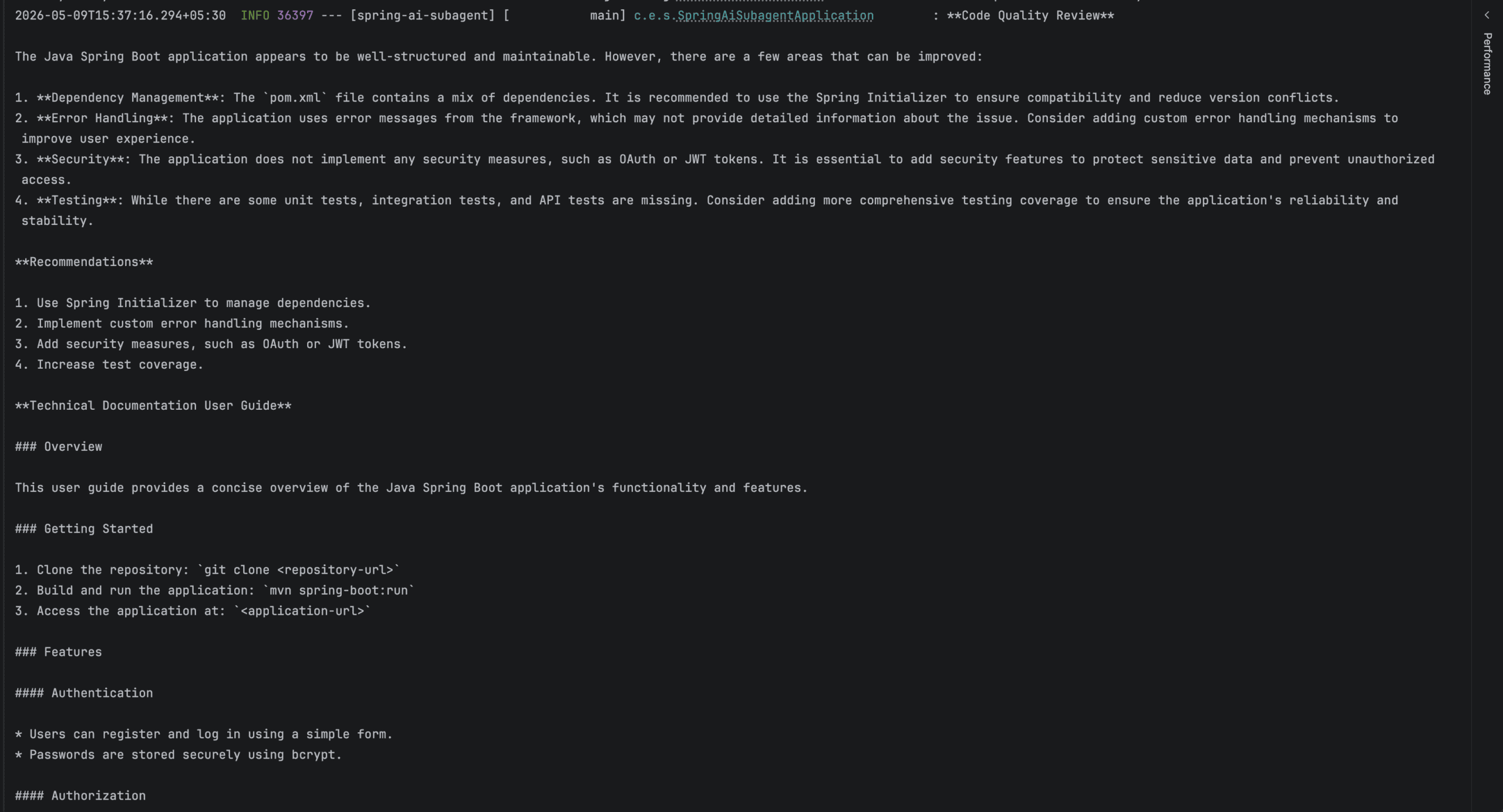
From the generated response, we can clearly see how each subagent handles its own specialized responsibility. The code-reviewer subagent focuses on analyzing code quality concerns, while the documentation-writer subagent generates concise technical documentation. This separation of responsibilities is one of the main advantages of subagent orchestration.
6. Testing Subagent Orchestration
AI orchestration workflows should still be tested like any other application component. The application includes integration testing for orchestration behavior.
6.1. Testing Subagent Loading
The following test verifies that Spring AI can load subagent definitions correctly:
@Test
void givenSubagentDefinitions_whenLoadingSubagents_thenReferencesAreCreated() {

    var references = ClaudeSubagentReferences.fromResources(agentPaths);

    assertThat(references).isNotNull();
}
This test ensures the orchestration layer can successfully load markdown-based subagents.
6.2. Testing Orchestrated Responses
Next, let’s verify that the orchestrator can execute requests successfully:
@Test
void givenPrompt_whenExecutingOrchestration_thenResponseIsGenerated() {

    List<Resource> agentResources = List.of(
      new ClassPathResource("agents/test-agent.md")
    );

    SubagentType claudeType = ClaudeSubagentType.builder()
      .chatClientBuilder("default", chatClientBuilder.clone())
      .build();

    ToolCallback taskTool = TaskTool.builder()
      .subagentReferences(ClaudeSubagentReferences.fromResources(agentResources))
      .subagentTypes(claudeType)
      .build();

    ChatClient chatClient = chatClientBuilder.clone()
      .defaultToolCallbacks(taskTool)
      .build();

    String result = chatClient.prompt("Explain how the authentication module works.")
      .call()
      .content();

    assertThat(result).isNotBlank();
    assertThat(result).contains("authentication");
}
This integration test validates the orchestration flow. Here, the unit test should mock the model layer and verify the orchestration output. This test validates the service contract and keeps orchestration behavior verifiable without external API calls.
7. Conclusion
In this article, we built a subagent orchestration system using Spring AI and Spring AI Community Agent Utils. We created specialized subagents for code review and technical documentation, then orchestrated them through a centralized AI workflow. This approach helps keep AI systems modular, maintainable, and easier to evolve.
We also explored how Spring AI provides a clean and declarative way to build hierarchical multi-agent systems. By isolating each subagent within its own context window, we can reduce the context pollution that often impacts single-agent workflows. The Markdown-based configuration makes it straightforward to define and version subagents without introducing additional Java implementations. We also saw how TaskTool acts as the bridge between the orchestrator and specialized subagents.
As AI applications continue to grow in complexity, subagent orchestration offers a practical way to distribute responsibilities among focused agents rather than relying on a single large prompt.














