


Mocking is an essential part of unit testing, and the Mockito library makes it easy to write clean and intuitive unit tests for your Java code.
Get started with mocking and improve your application tests using our Mockito guide:
Handling concurrency in an application can be a tricky process with many potential pitfalls. A solid grasp of the fundamentals will go a long way to help minimize these issues.
Get started with understanding multi-threaded applications with our Java Concurrency guide:
Spring 5 added support for reactive programming with the Spring WebFlux module, which has been improved upon ever since. Get started with the Reactor project basics and reactive programming in Spring Boot:
Since its introduction in Java 8, the Stream API has become a staple of Java development. The basic operations like iterating, filtering, mapping sequences of elements are deceptively simple to use.
But these can also be overused and fall into some common pitfalls.
To get a better understanding on how Streams work and how to combine them with other language features, check out our guide to Java Streams:
Explore Spring Boot 3 and Spring 6 in-depth through building a full REST API with the framework:
Yes, Spring Security can be complex, from the more advanced functionality within the Core to the deep OAuth support in the framework.
I built the security material as two full courses - Core and OAuth, to get practical with these more complex scenarios. We explore when and how to use each feature and code through it on the backing project.
You can explore the course here:
All Access is finally out, with all of my Spring courses. Learn JUnit is out as well, and Learn Maven is coming fast. And, of course, quite a bit more affordable. Finally.
>> GET THE COURSE
Spring Data JPA is a great way to handle the complexity of JPA with the powerful simplicity of Spring Boot.
Get started with Spring Data JPA through the guided reference course:
Refactor Java code safely — and automatically — with OpenRewrite.
Refactoring big codebases by hand is slow, risky, and easy to put off. That’s where OpenRewrite comes in. The open-source framework for large-scale, automated code transformations helps teams modernize safely and consistently.
Each month, the creators and maintainers of OpenRewrite at Moderne run live, hands-on training sessions — one for newcomers and one for experienced users. You’ll see how recipes work, how to apply them across projects, and how to modernize code with confidence.
Join the next session, bring your questions, and learn how to automate the kind of work that usually eats your sprint time.
1. Overview
As AI agents become more capable, long-term memory has become just as important as reasoning. While mechanisms such as ChatMemory and Retrieval Augmented Generation (RAG) handle conversations and external knowledge, they don’t answer a different question: What should an agent permanently remember about a user or project?
Spring AI AutoMemoryTools addresses this by enabling agents to persist and recall long-term memories, such as user preferences and project-specific knowledge.
In this article, we’ll explore AutoMemoryTools, its architecture and components, and build a simple Spring Boot chatbot that demonstrates how it works.
2. Dependencies
Let’s start by defining the minimum dependencies possible for demonstrating the Spring AI AutoMemoryTools. We’ll need the spring-ai-starter-model-openai and spring-ai-agent-utils. The first is the starter for integrating any OpenAI-compatible API with Spring AI, and the latter contains the tools we’re exploring in this article. We can use the (current) latest versions:
<dependency>
    <groupId>org.springframework.ai</groupId>
    <artifactId>spring-ai-starter-model-openai</artifactId>
    <version>2.0.0</version>
</dependency>
<dependency>
    <groupId>org.springaicommunity</groupId>
    <artifactId>spring-ai-agent-utils</artifactId>
    <version>0.10.0</version>
</dependency>
3. Spring AI AutoMemoryTools
Spring AI AutoMemoryTools is a Spring AI Community library that implements long-term memory for AI agents. It uses tool calling and file-based persistence. It’s part of the Spring AI Agent Utils, similar to Agent Skills. It’s worth mentioning that it’s inspired heavily by Claude Code and saves developers from implementing common agent capabilities themselves.
Similar to MessageChatMemoryAdvisor (for conversation memory), Spring AI AutoMemoryTools also implements BaseChatMemoryAdvisor. This means it’s related to conversational memory, but it does not focus on the conversation part. Rather, aims to store information about concepts like user preferences, projects, feedback, and more.
3.1. Types of Memory
Let’s look at the types of memory the Spring AI AutoMemoryTools targets:
- User: Remembers who the user is and how to assist them best
- Feedback: Remembers how the user prefers the AI to behave
- Project: Remembers important project context and decisions
- Reference: Remembers where to find information in external systems.
As we’ll see later, these are best described in the AUTO_MEMORY_TOOLS_SYSTEM_PROMPT.md, which is part of the dependency resources. Another thing we’ll see is how we can override this PromptSystemSpec with a custom one. This would mean that these types of memory might no longer exist, unless we define them.
3.2. The Tools
Now, let’s go through the six distinct tools of AutoMemoryTools:
- MemoryView: Reads the contents of a memory file or lists the available memory files in a directory
- MemoryCreate: Creates a new memory file to persist long-term information
- MemoryStrReplace: Updates an existing memory by replacing an exact piece of text
- MemoryInsert: Inserts new content at a specific location within an existing memory file
- MemoryDelete: Removes a memory file or directory from persistent storage
- MemoryRename: Renames or relocates a memory file while preserving its contents.
3.3. Memory System Prompt
As we saw before, the AUTO_MEMORY_TOOLS_SYSTEM_PROMPT.md is part of the library. The library offers two different levels of abstraction. The first is sandboxed, a restricted environment that limits the agent’s access, using the Spring AI AutoMemoryTools. The other is the unrestricted use of FileSystemTools or ShellTools.
In practise, AutoMemoryTools is a specialized abstraction built on top of generic filesystem operations. The Agent can access and manage memory files within the designated memory directories like memory/user, memory/feedback, etc. But it should not have the privileges to do anything outside the memory directory. On the contrary, FileSystemTools and ShellTools are unrestricted unless the developer properly handles this matter.
3.4. How It Works – Bringing All Together
Now that we’ve covered the components, let’s see how a request flows through Spring AI AutoMemoryTools.
When a user sends a request, the LLM combines the Memory System Prompt with the user’s message to determine whether it should read from or write to memory. If needed, it invokes the AutoMemoryTools to manage Markdown files in the configured memory directory, as described by the default AUTO_MEMORY_TOOLS_SYSTEM_PROMPT.md.
After generating the response, the LLM may perform additional memory operations, such as invoking more tools or consolidating existing memory entries. Finally, it returns the response to the user.
4. Spring AI AutoMemoryTools Application
Bringing all together, let’s see this in action. We’ll see three scenarios of configuring a ChatClient to use the Spring AI AutoMemoryTools:
- All-defaults AutoMemoryToolsAdvisor (sandbox operation)
- Manual setup of AutoMemoryToolsAdvisor (sandbox operation)
- FileSystemTools and ShellTools (not sandboxed by default)
4.1. Default AutoMemoryToolsAdvisor Configuration
For the first scenario, we create an AutoMemoryToolsAdvisor with the default, minimum configuration needed:
@Configuration
class ChatClientConfiguration {

    @Value("${agent.memory.dir}")
    String memoryDirectory;

    ChatClient chatClient(ChatModel chatModel) {
        return ChatClient
          .builder(chatModel)
          .defaultAdvisors(
            AutoMemoryToolsAdvisor.builder()
              .memoriesRootDirectory(memoryDirectory)
              .build(),
            MessageChatMemoryAdvisor.builder(
              MessageWindowChatMemory.builder()
                .maxMessages(100)
                .build())
            .build(),
            ToolCallingAdvisor.builder()
              .disableInternalConversationHistory()
              .build())
          .build();
    }
}
This setup uses the default AUTO_MEMORY_TOOLS_SYSTEM_PROMPT.md and defines the memory types we explained earlier. We use the Advisor to intercept all message exchanges. The memoriesRootDirectory() method sets the memory directory, which is also the boundary of access for the Agent. Last, the MessageChatMemoryAdvisor is the known Advisor that handles the memory for the conversation aspect. We set a random value of 100 messages history.
4.2. Custom AutoMemoryTools Configuration
If we still want the sandboxed AutoMemoryTools but we have more system prompts to include, we can use a more custom approach:
@Configuration
class ChatClientConfiguration {
    // ...
    @Value("classpath:/prompts/AUTO_MEMORY_TOOLS_SYSTEM_PROMPT.md")
    Resource memorySystemPromptAutoMemoryTools;

    // ....

    @Bean
    ChatClient chatClientWithMoreSystemPrompt(ChatModel chatModel) {
        return ChatClient
          .builder(chatModel)
          .defaultSystem(p -> p
            .text(memorySystemPromptAutoMemoryTools)
            .param("MEMORIES_ROOT_DIERCTORY", memoryDirectory))
          .defaultTools(
            AutoMemoryTools.builder()
              .memoriesDir(memoryDirectory)
              .build(),
            TodoWriteTool.builder()
              .build())
          .defaultAdvisors(ToolCallingAdvisor.builder()
              .build())
          .build();
    }
}
Here, we do a similar setup as before, but we use the Tools instead. This way we can define the custom PromptSystemSpec, with the prompt in the .md file we provide. However, this prompt is the essence of AutoMemoryTools, where we should define memory types, how to store, and more. So, if we need to override it, better copy the default prompt and append the extra system prompts.
We should note that ChatMemory is not set here, but the TodoWriteTool is used. This has nothing to do with Spring AI AutoMemoryTools. It’s to show that we can have or not have more tools and advisors, depending on the Agent’s needs.
4.3. FileSystemTools and ShellTools
Last, we can have an unrestricted scenario, using FileSystemTools and ShellTools. For example, if the agent already has FileSystemTools or ShellTools for other tasks, there’s no need for AutoMemoryTools:
@Configuration
class ChatClientConfiguration {
    // ...
    @Value("classpath:/prompts/AUTO_MEMORY_FILESYSTEM_TOOLS_SYSTEM_PROMPT.md")
    Resource memorySystemPromptFilesystemTools;

    // ....

    @Bean
    ChatClient chatClientWithoutAutoMemoryTools(ChatModel chatModel) {
      return ChatClient
        .builder(chatModel)
        .defaultSystem(p -> p
          .text(memorySystemPromptFilesystemTools)
          .param("MEMORIES_ROOT_DIERCTORY", memoryDirectory))   // tells the agent where to write
          .defaultTools(
            ShellTools.builder()
              .build(),         // Bash — mkdir, ls, etc.
            FileSystemTools.builder()
              .build())    // Read, Write, Edit — memory file operations
          .defaultAdvisors(ToolCallingAdvisor.builder()
              .build())
        .build();
    }
}
The file AUTO_MEMORY_FILESYSTEM_TOOLS_SYSTEM_PROMPT.md can also be found in the library. For the demonstration, we can copy it over. Using this one, the same memory conventions apply: .md files, two-step save, etc. But the agent conventionally has full filesystem access and stays in the configured directory only.
The two tools are the ones the Agent needs to do all the file creation, removal, editing, etc, to keep the memory in the file system.
4.4. Other Project Files
For the demonstration, we’ll use spring-web-mvc, with a RestController:
@PostMapping("/chat-with-memory")
ResponseEntity<String> chat(@RequestBody String question, @RequestHeader("X-Conversation-ID") String conversationId) {
    String answer = chatClient
      .prompt()
      .advisors(a -> a.param(ChatMemory.CONVERSATION_ID, conversationId))
      .user(question)
      .call()
      .content();

    return ResponseEntity.ok(answer);
}
As mentioned earlier, the conversationId is needed, since Spring AI AutoMemoryTools implements BaseChatMemoryAdvisor.
Let’s run the application using a local Ollama Qwen model:
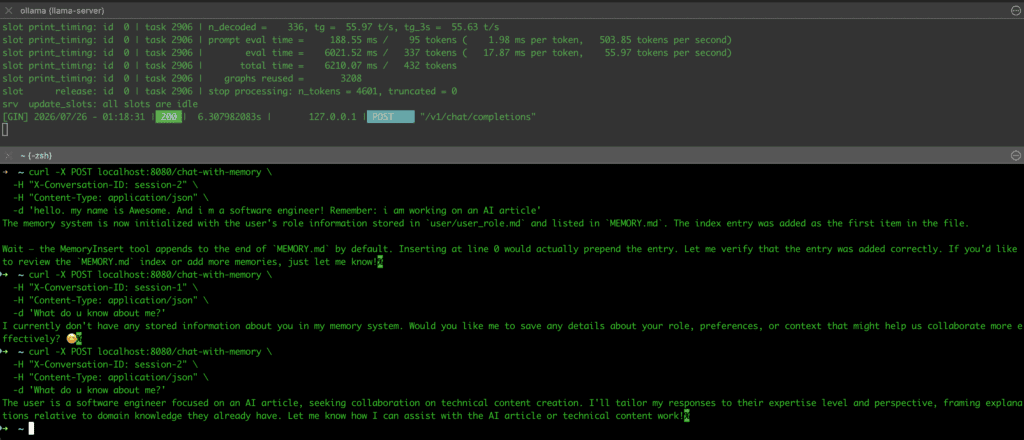
First, we ask the Agent to save some info. Then we request this info, but notice the different conversationId! The Agent doesn’t know anything about session-1. Asking as session-2 again, the Agent remembers it.
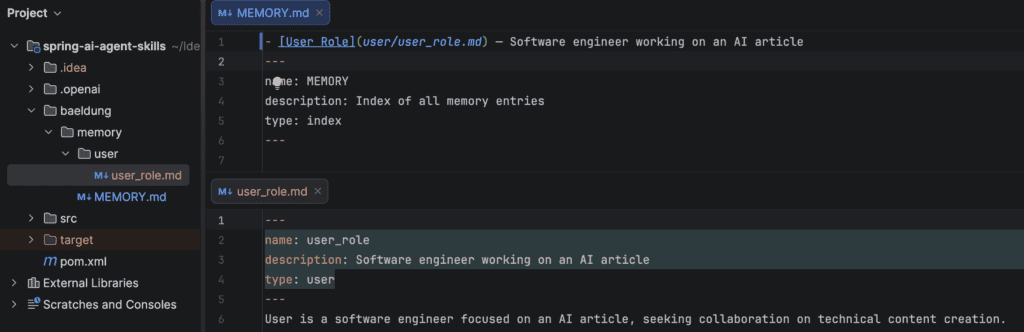
Depending on our machine, the Agent interaction with the file system might be quite slow. We can also see the directories that the Agent created, along with the file content:
5. Conclusion
In this article, we went through Spring AI AutoMemoryTools. We covered the use cases and the basic definitions. Then we walked through the six operations and the three options to use them. Finally, we used Spring AI to demonstrate it in practise.














