


Mocking is an essential part of unit testing, and the Mockito library makes it easy to write clean and intuitive unit tests for your Java code.
Get started with mocking and improve your application tests using our Mockito guide:
Handling concurrency in an application can be a tricky process with many potential pitfalls. A solid grasp of the fundamentals will go a long way to help minimize these issues.
Get started with understanding multi-threaded applications with our Java Concurrency guide:
Spring 5 added support for reactive programming with the Spring WebFlux module, which has been improved upon ever since. Get started with the Reactor project basics and reactive programming in Spring Boot:
Since its introduction in Java 8, the Stream API has become a staple of Java development. The basic operations like iterating, filtering, mapping sequences of elements are deceptively simple to use.
But these can also be overused and fall into some common pitfalls.
To get a better understanding on how Streams work and how to combine them with other language features, check out our guide to Java Streams:
Explore Spring Boot 3 and Spring 6 in-depth through building a full REST API with the framework:
Yes, Spring Security can be complex, from the more advanced functionality within the Core to the deep OAuth support in the framework.
I built the security material as two full courses - Core and OAuth, to get practical with these more complex scenarios. We explore when and how to use each feature and code through it on the backing project.
You can explore the course here:
All Access is finally out, with all of my Spring courses. Learn JUnit is out as well, and Learn Maven is coming fast. And, of course, quite a bit more affordable. Finally.
>> GET THE COURSE
Spring Data JPA is a great way to handle the complexity of JPA with the powerful simplicity of Spring Boot.
Get started with Spring Data JPA through the guided reference course:
Refactor Java code safely — and automatically — with OpenRewrite.
Refactoring big codebases by hand is slow, risky, and easy to put off. That’s where OpenRewrite comes in. The open-source framework for large-scale, automated code transformations helps teams modernize safely and consistently.
Each month, the creators and maintainers of OpenRewrite at Moderne run live, hands-on training sessions — one for newcomers and one for experienced users. You’ll see how recipes work, how to apply them across projects, and how to modernize code with confidence.
Join the next session, bring your questions, and learn how to automate the kind of work that usually eats your sprint time.
1. Introduction
In this tutorial, we’re going to handle exceptions in a Jakarta EE Servlet application – in order to provide a graceful and expected outcome whenever an error happens.
2. Jakarta EE Servlet Exceptions
First, we’ll define a Servlet using the API annotations (have a look at the Servlets Intro for more details) with a default GET processor that will throw an exception:
@WebServlet(urlPatterns = "/randomError")
public class RandomErrorServlet extends HttpServlet {

    @Override
    protected void doGet(
      HttpServletRequest req,
      HttpServletResponse resp) {
        throw new IllegalStateException("Random error");
    }
}
3. Default Error Handling
Let’s now simply deploy the application into our servlet container (we’re going to assume that the application runs under http://localhost:8080/jakarta-servlets).
When we access the address http://localhost:8080/jakarta-servlets/randomError, we’ll see the default servlet error handling in place:
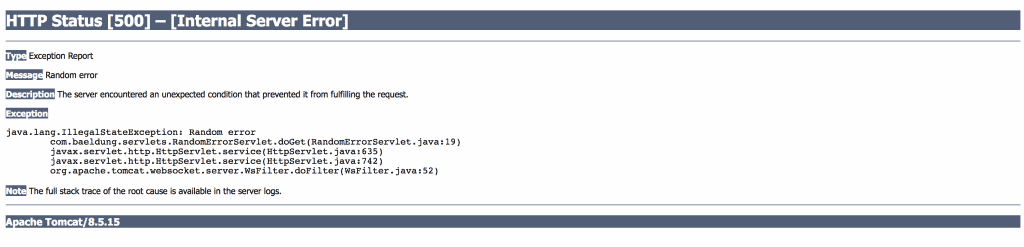
Default error handling is provided by the servlet container and can be customized at a container or application level.
4. Custom Error Handling
We can define custom error handling using a web.xml file descriptor in which we can define the following types of policies:
- Status code error handling – it allows us to map HTTP error codes (client and server) to a static HTML error page or an error handling servlet
- Exception type error handling – it allows us to map exception types to static HTML error pages or an error handling servlet
4.1. Status Code Error Handling with an HTML Page
We can set up our custom error handling policy for HTTP 404 errors in the web.xml:
<web-app xmlns:xsi="http://www.w3.org/2001/XMLSchema-instance"
  xmlns="http://java.sun.com/xml/ns/javaee"
  xsi:schemaLocation="http://java.sun.com/xml/ns/javaee
    http://java.sun.com/xml/ns/javaee/web-app_3_1.xsd"
  version="3.1">

    <error-page>
        <error-code>404</error-code>
        <location>/error-404.html</location> <!-- /src/main/webapp/error-404.html-->
    </error-page>

</web-app>
Now, access http://localhost:8080/jakarta-servlets/invalid.html from the browser – to get the static HTML error page.
4.2. Exception Type Error Handling with a Servlet
We can set up our custom error handling policy for java.lang.Exception in web.xml:
<web-app xmlns:xsi="http://www.w3.org/2001/XMLSchema-instance"
  xmlns="http://java.sun.com/xml/ns/javaee"
  xsi:schemaLocation="http://java.sun.com/xml/ns/javaee
    http://java.sun.com/xml/ns/javaee/web-app_3_1.xsd"
  version="3.1">
    <error-page>
        <exception-type>java.lang.Exception</exception-type>
        <location>/errorHandler</location>
    </error-page>
</web-app>
In ErrorHandlerServlet, we can access the error details using the error attributes provided in the request:
@WebServlet(urlPatterns = "/errorHandler")
public class ErrorHandlerServlet extends HttpServlet {

    @Override
    protected void doGet(
      HttpServletRequest req,
      HttpServletResponse resp) throws IOException {

        resp.setContentType("text/html; charset=utf-8");
        try (PrintWriter writer = resp.getWriter()) {
            writer.write("<html><head><title>Error description</title></head><body>");
            writer.write("<h2>Error description</h2>");
            writer.write("<ul>");
            Arrays.asList(
              ERROR_STATUS_CODE,
              ERROR_EXCEPTION_TYPE,
              ERROR_MESSAGE)
              .forEach(e ->
                writer.write("<li>" + e + ":" + req.getAttribute(e) + " </li>")
            );
            writer.write("</ul>");
            writer.write("</html></body>");
        }
    }
}
Now, we can access http://localhost:8080/jakarta-servlets/randomError to see the custom error servlet working.
Note: Our exception type defined in the web.xml is too broad and we should specify all the exceptions we want to handle in more detail.
We can also use the container-provided servlet logger in our ErrorHandlerServlet component to log additional details:
Exception exception = (Exception) req.getAttribute(ERROR_EXCEPTION);
if (IllegalArgumentException.class.isInstance(exception)) {
    getServletContext()
      .log("Error on an application argument", exception);
}
It’s worth knowing what’s beyond the servlet-provided logging mechanisms, check the guide on slf4j for more details.
5. Conclusion
In this brief article, we have seen default error handling and specified custom error handling in a servlet application without adding external components nor libraries.














