


Mocking is an essential part of unit testing, and the Mockito library makes it easy to write clean and intuitive unit tests for your Java code.
Get started with mocking and improve your application tests using our Mockito guide:
Handling concurrency in an application can be a tricky process with many potential pitfalls. A solid grasp of the fundamentals will go a long way to help minimize these issues.
Get started with understanding multi-threaded applications with our Java Concurrency guide:
Spring 5 added support for reactive programming with the Spring WebFlux module, which has been improved upon ever since. Get started with the Reactor project basics and reactive programming in Spring Boot:
Since its introduction in Java 8, the Stream API has become a staple of Java development. The basic operations like iterating, filtering, mapping sequences of elements are deceptively simple to use.
But these can also be overused and fall into some common pitfalls.
To get a better understanding on how Streams work and how to combine them with other language features, check out our guide to Java Streams:
Explore Spring Boot 3 and Spring 6 in-depth through building a full REST API with the framework:
Yes, Spring Security can be complex, from the more advanced functionality within the Core to the deep OAuth support in the framework.
I built the security material as two full courses - Core and OAuth, to get practical with these more complex scenarios. We explore when and how to use each feature and code through it on the backing project.
You can explore the course here:
All Access is finally out, with all of my Spring courses. Learn JUnit is out as well, and Learn Maven is coming fast. And, of course, quite a bit more affordable. Finally.
>> GET THE COURSE
Spring Data JPA is a great way to handle the complexity of JPA with the powerful simplicity of Spring Boot.
Get started with Spring Data JPA through the guided reference course:
Refactor Java code safely — and automatically — with OpenRewrite.
Refactoring big codebases by hand is slow, risky, and easy to put off. That’s where OpenRewrite comes in. The open-source framework for large-scale, automated code transformations helps teams modernize safely and consistently.
Each month, the creators and maintainers of OpenRewrite at Moderne run live, hands-on training sessions — one for newcomers and one for experienced users. You’ll see how recipes work, how to apply them across projects, and how to modernize code with confidence.
Join the next session, bring your questions, and learn how to automate the kind of work that usually eats your sprint time.
1. Overview
Routing is a common concept that appears in most web development frameworks including Spring MVC.
A route is a URL pattern that is mapped to a handler. The handler can be a physical file, such as a downloadable asset in the web application or a class that processes the request, such as a controller in an MVC application.
In this tutorial, we’ll explore the aspect of routing in developing web applications with the Play Framework.
2. Setup
First, we’ll need to create a Java Play application. The details on how to set up the Play Framework on a machine are available in our introductory article.
By the end of the setup, we should have a working Play application that we can access from a browser.
3. HTTP Routing
So how does Play knows which controller to consult whenever we send an HTTP request? The answer to this question lies in the app/conf/routes configuration file.
Play’s router translates HTTP requests into action calls. HTTP requests are considered to be events in MVC architecture and the router reacts to them by consulting the routes file for which controller and which action in that controller to execute.
Each of these events supplies a router with two parameters: a request path with its query string and the request’s HTTP method.
4. Basic Routing With Play
For the router to do its work, the conf/routes file must define mappings of HTTP methods and URI patterns to appropriate controller actions:
GET     /     controllers.HomeController.index
GET     /     assets/*file controllers.Assets.versioned(path="/public", file: Asset)
All routes files must also map the static resources in the play-routing/public folder available to the client on the /assets endpoint.
Notice the syntax of defining HTTP routes, and the HTTP method space URI pattern space controller action.
5. URI Patterns
In this section, we will expound a little on URI patterns.
5.1. Static URI Patterns
The first three URI patterns above are static. This means that mapping of the URLs to resources occurs without any further processing in the controller actions.
As long as a controller method is called, it returns a static resource whose content is determined before the request.
5.2. Dynamic URI Patterns
The last URI pattern above is dynamic. This means that the controller action servicing a request on these URIs needs some information from the request to determine the response. In the above case, it expects a file name.
The normal sequence of events is that the router receives an event, picks the path from the URL, decodes its segments, and passes them to the controller.
Path and query parameters are then injected into the controller action as parameters. We’ll demonstrate this with an example in the next sections.
6. Advanced Routing With Play
In this section, we’ll discuss advanced options in routing using Dynamic URI Patterns in detail.
6.1. Simple Path Parameters
Simple path parameters are unnamed parameters in a request URL that appear after the host and port and are parsed in order of appearance.
Inside play-routing/app/HomeController.java, let’s create a new action:
public Result greet(String name) {
    return ok("Hello " + name);
}
We want to be able to pick a path parameter from the request URL and map it to the variable name.
The router will get those values from a route configuration.
So, let’s open play-routing/conf/routes and create a mapping for this new action:
GET /greet/:name controllers.HomeController.greet(name: String)Notice how we inform a router that name is a dynamic path segment with the colon syntax and then go ahead to pass it as a parameter to the greet action call.
Now, let’s load http://locahost:9000/greet/john in the browser, and we’ll be greeted by name:
Hello johnIt so happens that if our action parameter is of string type, we may pass it during the action call without specifying the parameter type, though this is not the same for other types.
Let’s spice up our /greet endpoint with age information.
Back to HomeController‘s greet action, we’ll change it to:
public Result greet(String name, int age) {
    return ok("Hello " + name + ", you are " + age + " years old");
}
And the route to:
GET /greet/:name/:age controllers.HomeController.greet(name: String, age: Integer)Notice also the Scala syntax for declaring a variable, age: Integer. In Java, we would use the Integer age syntax. The Play Framework is built in Scala. Consequently, there is a lot of scala syntax.
Let’s load http://localhost:9000/greet/john/26:
Hello john, you are 26 years old6.2. Wildcards in Path Parameters
In our routes configuration file, the last mapping is:
GET /assets/*file controllers.Assets.versioned(path="/public", file: Asset)We use a wildcard in the dynamic part of the path. What we are telling Play is that whatever value replaces *file in the actual request should be parsed as a whole and not decoded like in other cases of path parameters.
In this example, the controller is a built-in one, Assets, which allows the client to download files from the play-routing/public folder. When we load http://localhost:9000/assets/images/favicon.png, we should see the image of the Play favicon in the browser since it’s present in the /public/images folder.
Let’s create our own example action in HomeController.java:
public Result introduceMe(String data) {
    String[] clientData = data.split(",");
    return ok("Your name is " + clientData[0] + ", you are " + clientData[1] + " years old");
}
Notice that in this action, we receive one String parameter and apply our logic to decode it. In this case, the logic is to split a comma-delimited String into an array. Previously, we depended on a router to decode this data for us.
With wildcards, we are on our own. We’re hoping that the client gets our syntax correct while passing this data in. Ideally, we should validate the incoming String before using it.
Let’s create a route to this action:
GET /*data controllers.HomeController.introduceMe(data)Now load the URL http://localhost:9000/john,26. This will print:
Your name is john, you are 26 years old6.3. Regex in Path Parameters
Just like wildcards, we can use regular expressions for the dynamic part. Let’s add an action that receives a number and returns its square:
public Result squareMe(Long num) {
    return ok(num + " Squared is " + (num * num));
}
Now we’ll add its route:
GET /square/$num<[0-9]+> controllers.HomeController.squareMe(num:Long)Let’s place this route below the introduceMe route to introduce a new concept. We can only handle routes where the regex part is a positive integer with this routing configuration.
Now if we have placed the route as instructed in the previous paragraph, and we load http://localhost:9000/square/2, we should be greeted with an ArrayIndexOutOfBoundsException:
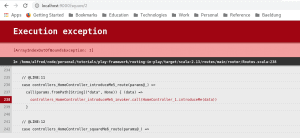
If we check the error logs in the server console, we will realize that the action call was actually performed on introduceMe action rather than squareMe action. As said earlier about wildcards, we are on our own and we did not validate incoming data.
Instead of a comma-delimited string, the introduceMe method was called with the string “square/2“. Consequently, after splitting it, we got an array of size one. Trying to reach index 1 then threw the exception.
Naturally, we would expect the call to be routed to the squareMe method. Why was it routed to introduceMe? The reason is a Play feature we’ll cover next called Routing Priority.
7. Routing Priority
If there is a conflict between routes as there is between squareMe and introduceMe, then Play picks the first route in declaration order.
Why is there a conflict? Because of the wildcard context path /*data matches any request URL apart from the base path /. So every route whose URI pattern uses wildcards should appear last in order.
Now let’s change the declaration order of the routes such that the introduceMe route comes after squareMe and reload:
2 Squared is 4To test the power of regular expressions in a route, try loading http://locahost:9000/square/-1, a router will fail to match the squareMe route. Instead, it will match introduceMe, and we’ll get the ArrayIndexOutOfBoundsException again.
This is because -1 does not match by the provided regular expression, neither does any alphabetic character.
8. Parameters
Up until this point, we’ve covered the syntax for declaring parameter types in the routes file.
In this section, we’ll look at more options available to us when dealing with parameters in routes.
8.1. Parameters With Fixed Values
Sometimes we’ll want to use a fixed value for a parameter. This is our way of telling Play to use the path parameter provided or if the request context is the path /, then use a certain fixed value.
Another way of looking at it is having two endpoints or context paths leading to the same controller action — with one endpoint requiring a parameter from the request URL and defaulting to the other in case the said parameter is absent.
To demonstrate this, let’s add a writer() action to the HomeController:
public Result writer() {
    return ok("Routing in Play by Baeldung");
}
Assuming we don’t always want our API to return a String:
Routing in Play by BaeldungWe want to control it by sending the name of an author of the article along with the request, defaulting to the fixed value Baeldung only if the request does not have the author parameter.
So let’s further change the writer action by adding a parameter:
public Result writer(String author) {
    return ok("REST API with Play by " + author);
}
Let’s also see how to add a fixed value parameter to the route:
GET     /writer           controllers.HomeController.writer(author = "Baeldung")
GET     /writer/:author   controllers.HomeController.writer(author: String)
Notice how we now have two separate routes all leading to the HomeController.index action instead of one.
When we now load http://localhost:9000/writer from the browser we get:
Routing in Play by BaeldungAnd when we load http://localhost:9000/writer/john, we get:
Routing in Play by john8.2. Parameters With Default Values
Apart from having fixed values, parameters can also have default values. Both provide fallback values to the controller action parameters in case the request does not provide the required values.
The difference between the two is that fixed values are used as a fallback for path parameters while default values are used as a fallback for query parameters.
Path parameters are of the form http://localhost:9000/param1/param2 and query parameters are of the form http://localhost:9000/?param1=value1¶m2=value2.
The second difference is in the syntax of declaring the two in a route. Fixed value parameters use the assignment operator as in:
author = "Baeldung"While default values use a different type of assignment:
author ?= "Baeldung"We use the ?= operator which conditionally assigns Baeldung to author in case author is found to contain no value.
To have a complete demonstration, let’s create the HomeController.writer action. Let’s say, apart from the author’s name which is a path parameter, we also want to pass author id as a query parameter which should default to 1 if not passed in the request.
We’ll change writer action to:
public Result writer(String author, int id) {
    return ok("Routing in Play by: " + author + " ID: " + id);
}
and the writer routes to:
GET     /writer           controllers.HomeController.writer(author="Baeldung", id: Int ?= 1)
GET     /writer/:author   controllers.HomeController.writer(author: String, id: Int ?= 1)
Now loading http://localhost:9000/writer we see:
Routing in Play by: Baeldung ID: 1Hitting http://localhost:9000/writer?id=10 gives us:
Routing in Play by: Baeldung ID: 10What about http://localhost:9000/writer/john?
Routing in Play by: john ID: 1And finally, http://localhost:9000/writer/john?id=5 returns:
Routing in Play by: john ID: 59. Conclusion
In this article, we explored the notion of Routing in Play applications. We also have an article on building a RESTful API with Play Framework where the routing concepts in this tutorial are applied in a practical example.














