


Mocking is an essential part of unit testing, and the Mockito library makes it easy to write clean and intuitive unit tests for your Java code.
Get started with mocking and improve your application tests using our Mockito guide:
Handling concurrency in an application can be a tricky process with many potential pitfalls. A solid grasp of the fundamentals will go a long way to help minimize these issues.
Get started with understanding multi-threaded applications with our Java Concurrency guide:
Spring 5 added support for reactive programming with the Spring WebFlux module, which has been improved upon ever since. Get started with the Reactor project basics and reactive programming in Spring Boot:
Since its introduction in Java 8, the Stream API has become a staple of Java development. The basic operations like iterating, filtering, mapping sequences of elements are deceptively simple to use.
But these can also be overused and fall into some common pitfalls.
To get a better understanding on how Streams work and how to combine them with other language features, check out our guide to Java Streams:
Explore Spring Boot 3 and Spring 6 in-depth through building a full REST API with the framework:
Yes, Spring Security can be complex, from the more advanced functionality within the Core to the deep OAuth support in the framework.
I built the security material as two full courses - Core and OAuth, to get practical with these more complex scenarios. We explore when and how to use each feature and code through it on the backing project.
You can explore the course here:
All Access is finally out, with all of my Spring courses. Learn JUnit is out as well, and Learn Maven is coming fast. And, of course, quite a bit more affordable. Finally.
>> GET THE COURSE
Spring Data JPA is a great way to handle the complexity of JPA with the powerful simplicity of Spring Boot.
Get started with Spring Data JPA through the guided reference course:
Refactor Java code safely — and automatically — with OpenRewrite.
Refactoring big codebases by hand is slow, risky, and easy to put off. That’s where OpenRewrite comes in. The open-source framework for large-scale, automated code transformations helps teams modernize safely and consistently.
Each month, the creators and maintainers of OpenRewrite at Moderne run live, hands-on training sessions — one for newcomers and one for experienced users. You’ll see how recipes work, how to apply them across projects, and how to modernize code with confidence.
Join the next session, bring your questions, and learn how to automate the kind of work that usually eats your sprint time.
1. Overview
In this tutorial, we’ll learn about Netflix Hollow, a low-latency framework for disseminating data from a source to multiple targets. The library is effective in scenarios with frequent, low-to-medium-volume, structured incoming data, where processing time is critical.
Java applications are highly prone to heap space issues while distributing data. Netflix Hollow’s design handles this by efficiently managing memory by offloading large datasets into external storage systems, such as file systems, object stores, or networked solutions.
2. Key Components and Their Features
Netflix-Hollow follows the separation of concerns design pattern:
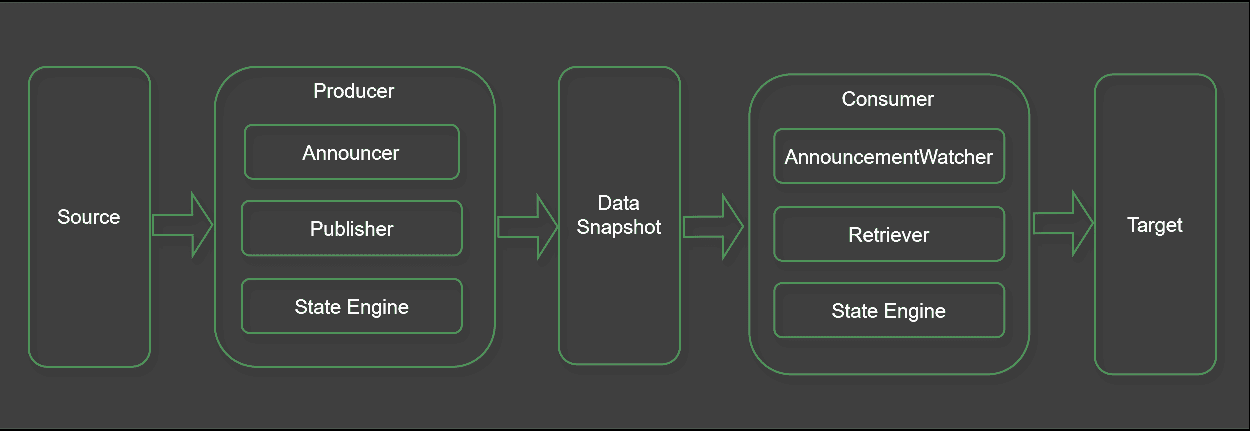
Typically, the library uses a producer-consumer model to handle messages. The producer fetches the data from source systems by invoking their APIs. At the same time, the consumers are responsible for reading that data and disseminating it to downstream systems.
The producer can create and modify external data snapshots, like file systems and object storage. The Netflix-Hollow library provides built-in publisher implementations for writing data into local file systems. In contrast, the consumers are limited to reading the published data from these snapshots.
In the producer, we outline the steps to retrieve data from external systems. Typically, we use a publisher and an announcer component to publish the data and notify the consumers. Furthermore, the state engine helps write the data and maintain the snapshot versions.
Moving on, in the consumer, we fetch data using an announcement watcher and a retriever component. Like the producer, the consumer relies on the state engine to read the correct data version from the snapshot.
Furthermore, to read and process data from a snapshot, consumers must first deserialize the snapshot. Thus, the Netflix Hollow library provides a HollowAPIGenerator class that helps generate APIs for accessing snapshot data. Consumers interact with these generated APIs to retrieve data published by the producer. The API generator class depends on the entity class that mirrors the data structure. Therefore, we must define the entity class before using the generator to create the API.
3. Prerequisites
Now that we know the fundamentals of the Netflix Hollow architecture, let’s set up to implement a sample producer and a consumer application. Let’s assume a critical application that must regularly poll an infrastructure monitoring tool to fetch the latest events. Finally, it must persist those events into a database for further processing.
We’ll begin with importing the most essential Netflix Hollow Maven dependencies in the pom.xml:
<dependency>
    <groupId>com.netflix.hollow</groupId>
    <artifactId>hollow</artifactId>
    <version>7.14.23</version>
</dependency>
4. Implementation of a Producer
Moving on, let’s define the entity class for the monitoring event:
@HollowPrimaryKey(fields = "eventId")
public class MonitoringEvent {
    private int eventId;
    private String eventName;
    private String creationDate;
    private String eventType;
    private String status;
    private String deviceId;

    //..Standard getters and setters
}
The annotation @HollowPrimaryKey helps declare the primary key of the snapshot data model.
Next, let’s define the producer that fetches the latest events from the monitoring tool:
public static void main(String[] args) {
    initialize(getSnapshotFilePath());
    pollEvents();
}
Essentially, we’re using a main() method to implement the program’s entry point. It first invokes the initialize() and then the pollEvents() method. Furthermore, the getSnapshotFilePath() method fetches the snapshot data location where the producer writes the data fetched from the monitoring tool.
First, the initialize() method instantiates the implementation classes of the HollowProducer.Publisher and HollowProducer.Announcer interfaces:
private static void initialize(final Path snapshotPath) {
    publisher = new HollowFilesystemPublisher(snapshotPath);
    announcer = new HollowFilesystemAnnouncer(snapshotPath);
    producer = HollowProducer.withPublisher(publisher)
      .withAnnouncer(announcer)
      .build();
    dataService = new MonitoringDataService();
    mapper = new HollowObjectMapper(producer.getWriteEngine());
}
HollowFilesystemPublisher and HollowFilesystemAnnouncer are out-of-the-box Hollow library classes providing implementation of HollowProducer.Publisher and HollowProducer.Announcer interfaces.
The chaining with method calls returns an instance of a HollowProducer.Builder class. The fluent-style API registers the publisher and announcer instances with the HollowProducer instance. Then, we instantiate an application-specific MonitoringDataService class that helps retrieve the monitoring events.
Next, in the pollEvents() method, we use the MonitoringDataService to retrieve the latest events at a regular interval:
private static void pollEvents() {
    while(true) {
        List<MonitoringEvent> events = dataService.retrieveEvents();
        events.forEach(mapper::add);
        producer.runCycle(task -> {
          events.forEach(task::add);
        });
        producer.getWriteEngine().prepareForNextCycle();
        sleep(POLL_INTERVAL_MILLISECONDS);
    }
}
Typically, a polling function would periodically retrieve data at a regular interval by calling the data service class in a while loop. Between the calls, it uses the Thread#sleep() method to pause for a specific duration. However, we can also use a scheduling library like Quartz that can help define a much more advanced schedule with the help of cron expressions.
5. Generate Consumer APIs
Consumers must read the snapshot data published by the producer. Therefore, Netflix Hollow helps auto-generate the consumer APIs in line with the published data model and the snapshot storage target. The consumer APIs are the adapters between the consumer program and the persistence layer, where the producer persists the snapshot data.
Let’s see a consumer generator program in the custom ConsumerApiGenerator class:
public static void main(String[] args) {
     String sourceDir = args[0];
     Path outputPath = getGeneratedSourceDirectory(sourceDir);

    HollowWriteStateEngine writeEngine = new HollowWriteStateEngine();
    HollowObjectMapper mapper = new HollowObjectMapper(writeEngine);

    mapper.initializeTypeState(MonitoringEvent.class);

    HollowAPIGenerator generator = new HollowAPIGenerator.Builder()
      .withDestination(outputPath)
      .withAPIClassname("MonitoringEventAPI")
      .withPackageName("com.baeldung.hollow.consumer.api")
      .withDataModel(writeEngine)
      .build();
    try {
        generator.generateSourceFiles();
    } catch (IOException e) {
        throw new RuntimeException(e);
    }
}
First, we retrieve or create the output source directory for the consumer API classes. Next, we instantiate the HollowWriteStateEngine and HollowObjectMapper classes. The mapper helps convert the MonitoringEvent data entity object into the Netflix Hollow object format and vice versa during the serialization and deserialization processes.
Additionally, the Gradle build tool is supported with a Hollow consumer API generator plugin. Unfortunately, the Maven plugin for Netflix Hollow is not functioning properly with the latest release of Netflix Hollow. In our example, we utilized the Maven exec plugin to run the generator class and create the consumer API source files.
6. Implementation of a Consumer
Based on our scalability and high availability requirements, we can deploy the producer and consumer programs in the same or separate JVMs. For our example, we’ve chosen to have the consumer as a separate application. This helps keep it modular and loosely coupled.
Let’s see how the MonitoringEventConsumer class handles the data published by the producer:
public static void main(String[] args) {
    initialize(getSnapshotFilePath());
    while (true) {
        Collection<MonitoringEvent> events = monitoringEventAPI.getAllMonitoringEvent();
        processEvents(events);
        sleep(POLL_INTERVAL_MILLISECONDS);
    }
}
First, the program calls the initialize() method to set up the announcement watcher and the snapshot retriever components. Additionally, it also instantiates the MonitoringEventAPI class.
The initialize() method prepares the class-level HollowFilesystemAnnouncementWatcher and HollowFilesystemBlobRetriever objects:
private static void initialize(final Path snapshotPath) {
    announcementWatcher = new HollowFilesystemAnnouncementWatcher(snapshotPath);
    blobRetriever = new HollowFilesystemBlobRetriever(snapshotPath);

    consumer = new HollowConsumer.Builder<>()
      .withAnnouncementWatcher(announcementWatcher)
      .withBlobRetriever(blobRetriever)
      .withGeneratedAPIClass(MonitoringEventAPI.class)
      .build();
    consumer.triggerRefresh();
    monitoringEventAPI = consumer.getAPI(MonitoringEventAPI.class);
}
In the method, the HollowConsumer.Builder class builds the HollowConsumer object by using the announcement watcher and the retriever objects. Next, the HollowConsumer#triggerRefresh() method updates the consumer to the latest version announced by the announcement watcher. Finally, it invokes HollowConsumer#getAPI() to retrieve the MonitoringEventAPI, which will be used later for fetching the monitoring events.
After initialization, the consumer program periodically polls the snapshot data in the local file system in an infinite while loop similar to the producer. In the loop, the program calls the MonitoringEventAPI#getAllMonitoringEvent() and fetches a collection of MonitoringEvent objects from the file system. Finally, the processEvents() method further processes the fetched events.
7. Conclusion
In this article, we created a monitoring event producer and a consumer application using the Netflix Hollow library. The Hollow API is a straightforward framework that is easy to understand and implement.
The library handles all the complex tasks on the producer’s side, including updating the snapshot and announcing those updates. Similarly, it manages consumer-specific tasks, such as monitoring and reading updates.
Moreover, the developers establish the entity structure and focus on writing the program that manages the data.














