A Guide to Maven Versioning
Last updated: June 9, 2023


Mocking is an essential part of unit testing, and the Mockito library makes it easy to write clean and intuitive unit tests for your Java code.
Get started with mocking and improve your application tests using our Mockito guide:
Handling concurrency in an application can be a tricky process with many potential pitfalls. A solid grasp of the fundamentals will go a long way to help minimize these issues.
Get started with understanding multi-threaded applications with our Java Concurrency guide:
Spring 5 added support for reactive programming with the Spring WebFlux module, which has been improved upon ever since. Get started with the Reactor project basics and reactive programming in Spring Boot:
Since its introduction in Java 8, the Stream API has become a staple of Java development. The basic operations like iterating, filtering, mapping sequences of elements are deceptively simple to use.
But these can also be overused and fall into some common pitfalls.
To get a better understanding on how Streams work and how to combine them with other language features, check out our guide to Java Streams:
Explore Spring Boot 3 and Spring 6 in-depth through building a full REST API with the framework:
Yes, Spring Security can be complex, from the more advanced functionality within the Core to the deep OAuth support in the framework.
I built the security material as two full courses - Core and OAuth, to get practical with these more complex scenarios. We explore when and how to use each feature and code through it on the backing project.
You can explore the course here:
All Access is finally out, with all of my Spring courses. Learn JUnit is out as well, and Learn Maven is coming fast. And, of course, quite a bit more affordable. Finally.
>> GET THE COURSE
Spring Data JPA is a great way to handle the complexity of JPA with the powerful simplicity of Spring Boot.
Get started with Spring Data JPA through the guided reference course:
Refactor Java code safely — and automatically — with OpenRewrite.
Refactoring big codebases by hand is slow, risky, and easy to put off. That’s where OpenRewrite comes in. The open-source framework for large-scale, automated code transformations helps teams modernize safely and consistently.
Each month, the creators and maintainers of OpenRewrite at Moderne run live, hands-on training sessions — one for newcomers and one for experienced users. You’ll see how recipes work, how to apply them across projects, and how to modernize code with confidence.
Join the next session, bring your questions, and learn how to automate the kind of work that usually eats your sprint time.
Get up to speed with the core of Maven quickly, and then go beyond the foundations into the more powerful functionality of the build tool, such as profiles, scopes, multi-module projects and quite a bit more:
1. Overview
In this tutorial, we’ll explain how Maven versioning works. This will help us to understand how a build tool picks up the correct version.
We’ll focus on the Maven 3 specification and suggest how to use semantic versioning correctly.
2. Maven Dependency Versioning
During the development of software, a library or a package, we may face an issue – what version should be assigned to it? We should do this in such a way that users can unambiguously determine what the version that the current one succeeds is.
Often, after a release, we keep working on our software. We may add new features, optimize the existent ones or fix bugs that have remained hidden during the development stage.
It might happen that we’ll work simultaneously on multiple versions of the application.
For example, in one branch we add new features, and in another, we fix the bugs that the users have reported. In this case, the chronological order of the releases might be not the most convenient:
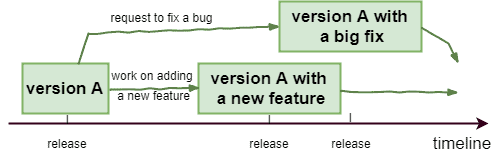
In another example, we might want to put in production a version with a new feature, while the next day we might have to urgently patch a version that was released a couple of days ago.
3. Maven Specifications
In this section, we describe the Maven 3 version order specifications. Maven 2 has slightly different ones, but since it has reached its end of life, we omit discussing the differences.
In Maven, we have a version that is composed of alpha-numeric characters along with two special symbols “.” (dot) and “-” (dash) that we call prefixes.
To compare two versions, Maven transforms a version number into a sequence of prefixed tokens using the operations of splitting and trimming.
3.1. Splitting
First, a version number is treated as a String and gets split into the prefixed tokens using prefixes as delimiters:
1.2.3 -> 1, .2, .3
1.2-a -> 1, .2, -a
1a -> 1, -a
1.2.3b -> 1, .2, .3, -b
a-b-0 -> a, -b, -0
Note that a transition between a digit and a non-digit is considered to be equivalent to a dash.
3.2. Trimming
Then, Maven removes empty tokens. A token is considered to be empty if it starts with one of the prefixes, optionally followed by 0 (zero), final or ga.
For example, each of these tokens is empty: -, -0, .0, -ga, .final.
3.3. Version Ordering
Maven compares two versions based on the sequences of prefixed tokens that correspond to those versions. If tokens:
- Have different sizes, then the shorter one is padded by .0’s (if the other version’s token starts with the dot) or by – (if the other version’s token starts with the dash). Once the sequences are made to have the same length, they are compared in alphabetical (lexicographical) order
- Start with the same prefixes, then they’re compared either in the natural order (for numeric ones) or the alphabetical order otherwise
There also exist tokens with special meanings which we assume to be ordered as follows:
alpha < beta < milestone < rc = cr < snapshot < "" (empty string) = final = ga < spIf tokens start with different prefixes, then we assume that they’re ordered as follows:
.qualifier < -qualifier < -number < .number
Maven’s comparison algorithm at first might seem to be quite intricate. In case of doubt, we may use a special Maven tool called Maven Artifact for such a comparison. For example, if we execute:
java -jar maven-artifact-3.6.0.jar 2.3-SNAPSHOT 2.3
then we’ll see the following output:
Display parameters as parsed by Maven (in canonical form) and comparison result:
1. 2.3-SNAPSHOT == 2.3-snapshot
   2.3-SNAPSHOT < 2.3
2. 2.3 == 2.3
which shows the canonical names of the versions and demonstrates that version 2.3-SNAPSHOT comes before 2.3.
Please refer to the Maven Dependency Specification for more details.
4. Semantic Versioning
Maven specifications say little about how we can assign versions to our software. We may use the so-called semantic versioning for this purpose.
It consists in assigning a tag of the following structure:
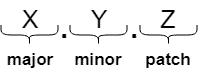
to every release of the software:
- X is called a major version. When we deliver a version that introduces features due to which the compatibility with the previous ones might not be guaranteed, then we should advance the tag by changing the major version and resetting the minor and patch ones to 0.
- Y is called a minor version. When we deliver a version that optimizes an existent feature or introduces a new one that is fully compatible with previous releases, then we should advance the tag by changing the minor version and resetting the patch one to 0.
- Z is called a patch or a build or an incremental version. When we deliver a version that only fixes a bug and remains fully compatible with a previous one, then we should advance the tag by changing the patch version.
5. Common Release Qualifiers
There exist various release types that have already become quite common. There might be no precise distinction between them, and the proper choice of the qualifier is up to us. Usually, a tag contains no more than one qualifier.
The list of the common qualifiers includes the following ones:
- alpha, beta: they mean that the development on this version is in its very early stage
- snapshot: it is added for a version that we currently work on. This is a cut-edge version of the app that can change at any moment
- eap: this is an early access preview version that is released to a restricted number of users in order to collect reviews
- rc, cr: they mean that this version is a release candidate and most probably (but not guaranteed) it’ll become a released version
- release: it means that this version of the software is final and can not be changed anymore. Any eventual enhancements to this version will be released with another version number
- m, milestone: it means that this version contains a significant amount of new functionality
6. Conclusion
In this article, we briefly explained Maven 3 version order specifications and suggested to use semantic versioning when choosing a tag for the releases of our applications.
For more details, we may always consult the official Maven versioning specifications.














