Use the Latest Version of a Dependency in Maven
Last updated: January 7, 2026


Mocking is an essential part of unit testing, and the Mockito library makes it easy to write clean and intuitive unit tests for your Java code.
Get started with mocking and improve your application tests using our Mockito guide:
Handling concurrency in an application can be a tricky process with many potential pitfalls. A solid grasp of the fundamentals will go a long way to help minimize these issues.
Get started with understanding multi-threaded applications with our Java Concurrency guide:
Spring 5 added support for reactive programming with the Spring WebFlux module, which has been improved upon ever since. Get started with the Reactor project basics and reactive programming in Spring Boot:
Since its introduction in Java 8, the Stream API has become a staple of Java development. The basic operations like iterating, filtering, mapping sequences of elements are deceptively simple to use.
But these can also be overused and fall into some common pitfalls.
To get a better understanding on how Streams work and how to combine them with other language features, check out our guide to Java Streams:
Explore Spring Boot 3 and Spring 6 in-depth through building a full REST API with the framework:
Yes, Spring Security can be complex, from the more advanced functionality within the Core to the deep OAuth support in the framework.
I built the security material as two full courses - Core and OAuth, to get practical with these more complex scenarios. We explore when and how to use each feature and code through it on the backing project.
You can explore the course here:
All Access is finally out, with all of my Spring courses. Learn JUnit is out as well, and Learn Maven is coming fast. And, of course, quite a bit more affordable. Finally.
>> GET THE COURSE
Spring Data JPA is a great way to handle the complexity of JPA with the powerful simplicity of Spring Boot.
Get started with Spring Data JPA through the guided reference course:
Refactor Java code safely — and automatically — with OpenRewrite.
Refactoring big codebases by hand is slow, risky, and easy to put off. That’s where OpenRewrite comes in. The open-source framework for large-scale, automated code transformations helps teams modernize safely and consistently.
Each month, the creators and maintainers of OpenRewrite at Moderne run live, hands-on training sessions — one for newcomers and one for experienced users. You’ll see how recipes work, how to apply them across projects, and how to modernize code with confidence.
Join the next session, bring your questions, and learn how to automate the kind of work that usually eats your sprint time.
Get up to speed with the core of Maven quickly, and then go beyond the foundations into the more powerful functionality of the build tool, such as profiles, scopes, multi-module projects and quite a bit more:
1. Overview
Upgrading Maven dependencies manually has always been a tedious work, especially in projects with a lot of libraries releasing frequently.
In this tutorial, we’ll learn how to exploit the Versions Maven Plugin to keep our dependencies up-to-date.
Above all, this can be extremely useful when implementing Continuous Integration pipelines that automatically upgrade the dependencies, test that everything still works properly, and commit or rollback the result, whichever is appropriate.
2. Maven Version Range Syntax
Back in the Maven2 days, developers could specify version ranges within which the artifacts would’ve been upgraded without the need of a manual intervention.
This syntax is still valid, used in several projects out there and is hence worth knowing:
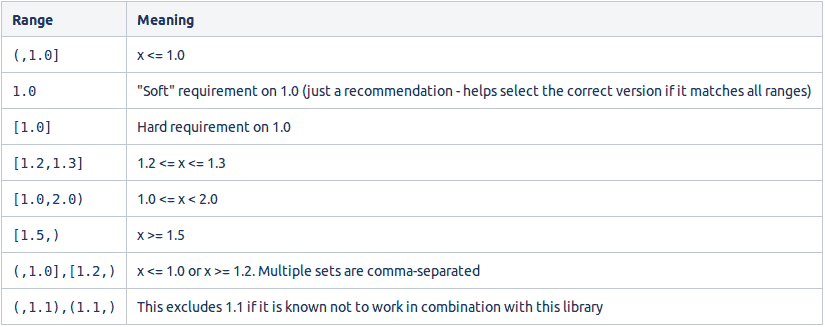
Nonetheless, we should avoid it in favor of the Versions Maven Plugin when possible, because advancing concrete versions from the outside gives us definitely more control than letting Maven handle the whole operation on its own.
2.1. Deprecated Syntax
Maven2 also provided two special metaversion values to achieve the result: LATEST and RELEASE.
LATEST looks for the newest possible version, while RELEASE aims at the latest non-SNAPSHOT version.
They’re, indeed, still absolutely valid for regular dependencies resolution.
However, this legacy upgrade method was causing unpredictability where CI needed reproducibility. Hence, they’ve been deprecated for plugin dependencies resolution.
3. Versions Maven Plugin
The Versions Maven Plugin is the de facto standard way to handle versions management nowadays.
From high-level comparisons between remote repositories up to low-level timestamp-locking for SNAPSHOT versions, its massive list of goals allows us to take care of every aspect of our projects involving dependencies.
While many of them are out of the scope of this tutorial, let’s take a closer look at the ones that will help us in the upgrade process.
3.1. The Test Case
Before starting, let’s define our test case:
- three RELEASEs with a hard-coded version
- one RELEASE with a property version, and
- one SNAPSHOT
<dependencies>
    <dependency>
        <groupId>commons-io</groupId>
        <artifactId>commons-io</artifactId>
        <version>2.15.1</version>
    </dependency>
    <dependency>
        <groupId>org.apache.commons</groupId>
        <artifactId>commons-collections4</artifactId>
        <version>4.0</version>
    </dependency>
    <dependency>
        <groupId>org.apache.commons</groupId>
        <artifactId>commons-lang3</artifactId>
        <version>3.13.0</version>
    </dependency>
    <dependency>
        <groupId>org.apache.commons</groupId>
        <artifactId>commons-compress</artifactId>
        <version>${commons-compress-version}</version>
    </dependency>
    <dependency>
        <groupId>commons-beanutils</groupId>
        <artifactId>commons-beanutils</artifactId>
        <version>1.9.1-SNAPSHOT</version>
    </dependency>
</dependencies>

<properties>
    <commons-compress-version>1.15</commons-compress-version>
</properties>
Finally, let’s also exclude an artifact from the process when defining the plugin:
<build>
    <plugins>
        <plugin>
            <groupId>org.codehaus.mojo</groupId>
            <artifactId>versions-maven-plugin</artifactId>
            <version>2.7</version>
            <configuration>
                <excludes>
                    <exclude>org.apache.commons:commons-collections4</exclude>
                </excludes>
            </configuration>
        </plugin>
    </plugins>
</build>
4. Displaying Available Updates
First of all, to simply know if and how we can update our project, the right tool for the job is versions:display-dependency-updates:
mvn versions:display-dependency-updates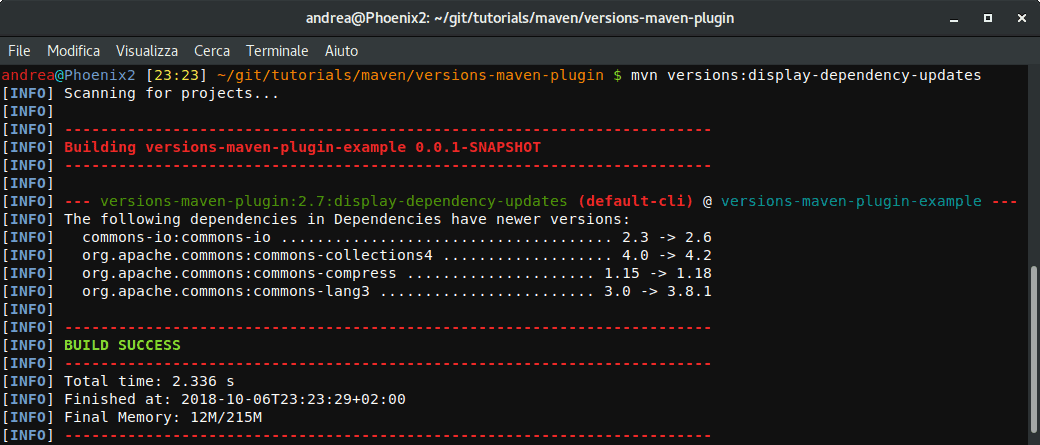
As we can see, the process included every RELEASE version. It even included commons-collections4 since the exclusion in the configuration refers to the update process, and not to the discovery one.
In contrast, it ignored the SNAPSHOT, for the reason that it’s a development version which is often not safe to update automatically.
5. Updating the Dependencies
When running an update for the first time, the plugin creates a backup of the pom.xml named pom.xml.versionsBackup.
While every iteration will alter the pom.xml, the backup file will preserve the original state of the project up to the moment the user will commit (through mvn versions:commit) or revert (through mvn versions:revert) the whole process.
5.1. Converting SNAPSHOTs into RELEASEs
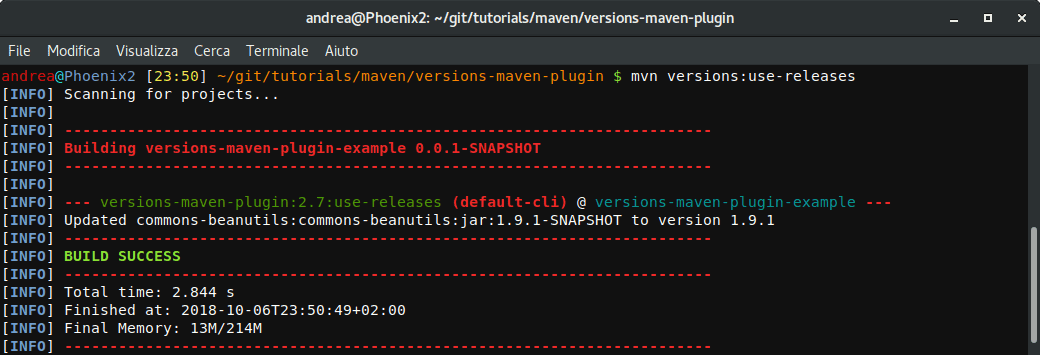
It happens sometimes that a project includes a SNAPSHOT (a version which is still under heavy development).
We can use versions:use-releases to check if the correspondent RELEASE has been published, and even more to convert our SNAPSHOT into that RELEASE at the same time:
mvn versions:use-releases
5.2. Updating to the Next RELEASE
We can port every non-SNAPSHOT dependency to its nearest version with versions:use-next-releases:
mvn versions:use-next-releases
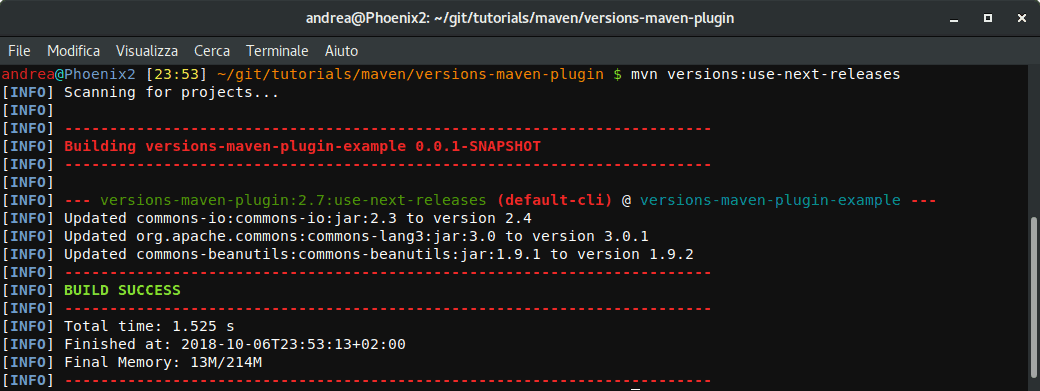
We can clearly see that the plugin updated commons-io, commons-lang3, and even commons-beanutils, which is not a SNAPSHOT anymore, to their next version.
Most importantly, it ignored commons-collections4, which is excluded in the plugin configuration, and commons-compress, which has a version number specified dynamically through a property.
5.3. Updating to the Latest RELEASE
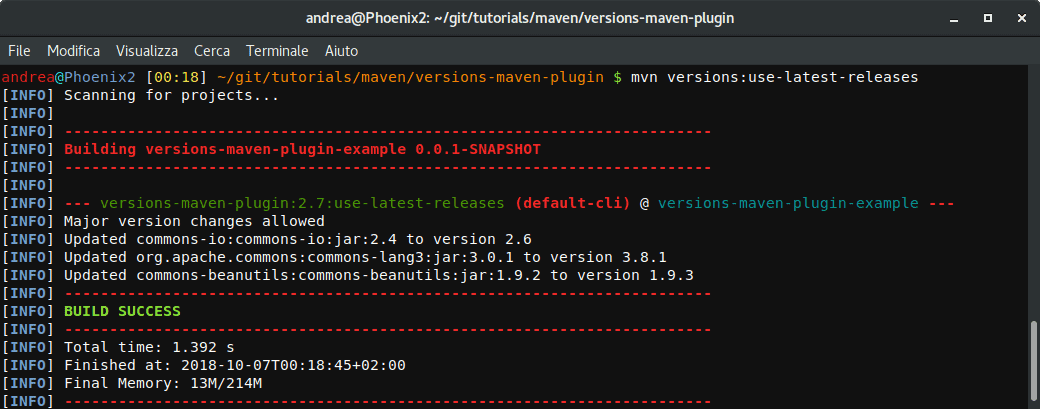
Updating every non-SNAPSHOT dependency to its latest release works in the same way, simply changing the goal to versions:use-latest-releases:
mvn versions:use-latest-releases
6. Filtering out Unwanted Versions
In case we want to ignore certain versions, the plugin configuration can be tuned to dynamically load rules from an external file:
<plugin>
    <groupId>org.codehaus.mojo</groupId>
    <artifactId>versions-maven-plugin</artifactId>
    <version>2.7</version>
    <configuration>
        <rulesUri>http://www.mycompany.com/maven-version-rules.xml</rulesUri>
    </configuration>
</plugin>
Most noteworthy, <rulesUri> can also refer to a local file:
<rulesUri>file:///home/andrea/maven-version-rules.xml</rulesUri>
6.1. Ignoring Versions Globally
We can configure our rules file so that it’ll ignore versions matching a specific Regular Expression:
<ruleset comparisonMethod="maven"
  xmlns="http://mojo.codehaus.org/versions-maven-plugin/rule/2.0.0"
  xmlns:xsi="http://www.w3.org/2001/XMLSchema-instance"
  xsi:schemaLocation="http://mojo.codehaus.org/versions-maven-plugin/rule/2.0.0
  http://mojo.codehaus.org/versions-maven-plugin/xsd/rule-2.0.0.xsd">
    <ignoreVersions>
        <ignoreVersion type="regex">.*-beta</ignoreVersion>
    </ignoreVersions>
</ruleset>
6.2. Ignoring Versions on a Per-Rule Basis
Finally, in case our needs are more specific, we can build a set of rules instead:
<ruleset comparisonMethod="maven"
  xmlns="http://mojo.codehaus.org/versions-maven-plugin/rule/2.0.0"
  xmlns:xsi="http://www.w3.org/2001/XMLSchema-instance"
  xsi:schemaLocation="http://mojo.codehaus.org/versions-maven-plugin/rule/2.0.0
    http://mojo.codehaus.org/versions-maven-plugin/xsd/rule-2.0.0.xsd">
    <rules>
        <rule groupId="com.mycompany.maven" comparisonMethod="maven">
            <ignoreVersions>
                <ignoreVersion type="regex">.*-RELEASE</ignoreVersion>
                <ignoreVersion>2.1.0</ignoreVersion>
            </ignoreVersions>
        </rule>
    </rules>
</ruleset>
7. Conclusion
We’ve seen how to check and update the dependencies of a project in a safe, automatic, and Maven3-compliant way.
To see it in action, simply download the project and run in a terminal (or in Git Bash if using Windows):
./run-the-demo.sh













