


Mocking is an essential part of unit testing, and the Mockito library makes it easy to write clean and intuitive unit tests for your Java code.
Get started with mocking and improve your application tests using our Mockito guide:
Handling concurrency in an application can be a tricky process with many potential pitfalls. A solid grasp of the fundamentals will go a long way to help minimize these issues.
Get started with understanding multi-threaded applications with our Java Concurrency guide:
Spring 5 added support for reactive programming with the Spring WebFlux module, which has been improved upon ever since. Get started with the Reactor project basics and reactive programming in Spring Boot:
Since its introduction in Java 8, the Stream API has become a staple of Java development. The basic operations like iterating, filtering, mapping sequences of elements are deceptively simple to use.
But these can also be overused and fall into some common pitfalls.
To get a better understanding on how Streams work and how to combine them with other language features, check out our guide to Java Streams:
Explore Spring Boot 3 and Spring 6 in-depth through building a full REST API with the framework:
Yes, Spring Security can be complex, from the more advanced functionality within the Core to the deep OAuth support in the framework.
I built the security material as two full courses - Core and OAuth, to get practical with these more complex scenarios. We explore when and how to use each feature and code through it on the backing project.
You can explore the course here:
All Access is finally out, with all of my Spring courses. Learn JUnit is out as well, and Learn Maven is coming fast. And, of course, quite a bit more affordable. Finally.
>> GET THE COURSE
Spring Data JPA is a great way to handle the complexity of JPA with the powerful simplicity of Spring Boot.
Get started with Spring Data JPA through the guided reference course:
Refactor Java code safely — and automatically — with OpenRewrite.
Refactoring big codebases by hand is slow, risky, and easy to put off. That’s where OpenRewrite comes in. The open-source framework for large-scale, automated code transformations helps teams modernize safely and consistently.
Each month, the creators and maintainers of OpenRewrite at Moderne run live, hands-on training sessions — one for newcomers and one for experienced users. You’ll see how recipes work, how to apply them across projects, and how to modernize code with confidence.
Join the next session, bring your questions, and learn how to automate the kind of work that usually eats your sprint time.
Get up to speed with the core of Maven quickly, and then go beyond the foundations into the more powerful functionality of the build tool, such as profiles, scopes, multi-module projects and quite a bit more:
1. Overview
Working on large Maven projects can be intimidating, as can keeping track of all the dependencies between modules and libraries and resolving conflicts between them.
In this tutorial, we’ll learn about the Maven dependency graph or tree. First, we’ll learn how to create a dependency tree, filter dependencies, and create different output formats. Later, we’ll discuss visualizing different approaches to viewing the dependency tree graphically.
2. Project Setup
In real-life projects, the dependency tree grows very fast and becomes complex. However, for our example, we’ll create a small project with two modules, module1 and module2, each with two to three dependencies. Additionally, module1 depends on module2.
We’ll create our first module module2, and add the commons-collections, slf4j-api, spring-bean, and junit dependencies:
<dependencies>
    <dependency>
        <groupId>commons-collections</groupId>
        <artifactId>commons-collections</artifactId>
        <version>3.2.2</version>
    </dependency>
    <dependency>
        <groupId>org.slf4j</groupId>
        <artifactId>slf4j-api</artifactId>
        <version>1.7.25</version>
    </dependency>
    <dependency>
        <groupId>org.springframework</groupId>
        <artifactId>spring-bean</artifactId>
        <version>6.1.1</version>
    </dependency>
    <dependency>
        <groupId>junit</groupId>
        <artifactId>junit</artifactId>
        <version>4.13.2</version>
        <scope>test</scope>
    </dependency>
</dependencies>
Now, we create a new module module1, and add commons-collections , spring-core, slf4j-api, and our module2 as dependencies:
<dependencies>
    <dependency>
        <groupId>commons-collections</groupId>
        <artifactId>commons-collections</artifactId>
        <version>3.2.2</version>
    </dependency>
    <dependency>
        <groupId>org.springframework</groupId>
        <artifactId>spring-core</artifactId>
        <version>6.1.1</version>
    </dependency>
    <dependency>
        <groupId>org.slf4j</groupId>
        <artifactId>slf4j-api</artifactId>
        <version>1.7.25</version>
    </dependency>
    <dependency>
        <groupId>com.baeldung.module2</groupId>
        <artifactId>module2</artifactId>
        <version>1.0</version>
    </dependency>
</dependencies>
We’re not concerned with the library functionalities here, but rather with how they’re derived for our project, to detect version conflicts, identify unnecessary dependencies, resolve build or run-time issues, and visualize the dependency tree.
3. Methods for Analyzing Dependency Graph or Tree
There are multiple ways to analyze the dependency tree or graph.
3.1. Using the Maven Dependency Plugin
maven-dependency-plugin displays the dependency tree for a given project in text format by default.
Let’s run the Maven command under the module2 directory to get the dependency tree for our module2:
$ mvn dependency:tree
// output snippet
[INFO] com.baeldung.module2:module2:jar:1.0
[INFO] +- commons-collections:commons-collections:jar:3.2.2:compile
[INFO] +- org.slf4j:slf4j-api:jar:1.7.25:compile
[INFO] +- org.springframework:spring-beans:jar:6.1.1:compile
[INFO] |  \- org.springframework:spring-core:jar:6.1.1:compile
[INFO] |     \- org.springframework:spring-jcl:jar:6.1.1:compile
[INFO] \- junit:junit:jar:4.13.2:test
[INFO]    \- org.hamcrest:hamcrest-core:jar:1.3:test
Now, let’s run the Maven command under the module1 directory to get its dependency tree:
$ mvn dependency:tree
// output snippet
[INFO] com.baeldung.module1:module1:jar:1.0
[INFO] +- commons-collections:commons-collections:jar:3.2.2:compile
[INFO] +- org.springframework:spring-core:jar:6.1.1:compile
[INFO] |  \- org.springframework:spring-jcl:jar:6.1.1:compile
[INFO] +- org.slf4j:slf4j-api:jar:1.7.25:compile
[INFO] \- com.baeldung.module2:module2:jar:1.0:compile
[INFO]    \- org.springframework:spring-beans:jar:6.1.1:compile
By default, the output is in text format, and we can see how dependencies are getting included in our project.
We can filter the dependency tree output by excluding or including artifacts using this plugin.
For example, if we need to include only slf4j in the dependency tree, we can use the -Dinclude option to include all the dependencies:
$ mvn dependency:tree -Dincludes=org.slf4j
//output
[INFO] com.baeldung.module1:module1:jar:1.0
[INFO] \- org.slf4j:slf4j-api:jar:1.7.25:compile
If we need to exclude only slf4j in the tree, we can use the -Dexcludes option to exclude all the dependencies:
$ mvn dependency:tree -Dexcludes=org.slf4j
//output
[INFO] com.baeldung.module1:module1:jar:1.0
[INFO] +- commons-collections:commons-collections:jar:3.2.2:compile
[INFO] +- org.springframework:spring-core:jar:6.1.1:compile
[INFO] |  \- org.springframework:spring-jcl:jar:6.1.1:compile
[INFO] \- com.baeldung.module2:module2:jar:1.0:compile
[INFO]    \- org.springframework:spring-beans:jar:6.1.1:compile
Now, if we need to analyze all the dependencies in detail, we can use the –Dverbose option:
$ mvn dependency:tree -Dverbose
//output
[INFO] com.baeldung.module1:module1:jar:1.0
[INFO] +- commons-collections:commons-collections:jar:3.2.2:compile
[INFO] +- org.springframework:spring-core:jar:6.1.1:compile
[INFO] |  \- org.springframework:spring-jcl:jar:6.1.1:compile
[INFO] +- org.slf4j:slf4j-api:jar:1.7.25:compile
[INFO] \- com.baeldung.module2:module2:jar:1.0:compile
[INFO]    +- (commons-collections:commons-collections:jar:3.2.2:compile - omitted for duplicate)
[INFO]    +- (org.slf4j:slf4j-api:jar:1.7.25:compile - omitted for duplicate)
[INFO]    \- org.springframework:spring-beans:jar:6.1.1:compile
[INFO]       \- (org.springframework:spring-core:jar:6.1.1:compile - omitted for duplicate)
Here, we can see that the spring-core from module1 is picked, and the one from module2 is removed.
Furthermore, for a complex project, reading this format is tedious. This plugin allows us to create another output format, like dot, graphml, or tgf, from the same dependency tree. It’s possible to visualize these output formats later using different editors.
Now, let’s get the same dependency tree in graphml format, and store the output in dependency.graphml:
$ mvn dependency:tree -DoutputType=graphml -DoutputFile=dependency.graphmlHere, we can use any online available graphml reader tool to visualize the dependency tree.
For our example, we’ll use the yED editor. We can import the dependency.graphml file in the yED editor. Although yED doesn’t format the graph by default, it offers multiple formats that we can use.
To customize, we’ll go to Layout > Hierarchic > Orientation > Left to Right > Apply. We can do a lot of other customizations on the tool as well, as per our needs:

3.2. Using Eclipse/IntelliJ Like IDE
Most developers work with IDEs like Eclipse and IntelliJ, and these have the Maven dependency tree plugin.
First, we’ll start with the Eclipse m2e plugin, which provides a helpful dependency view.
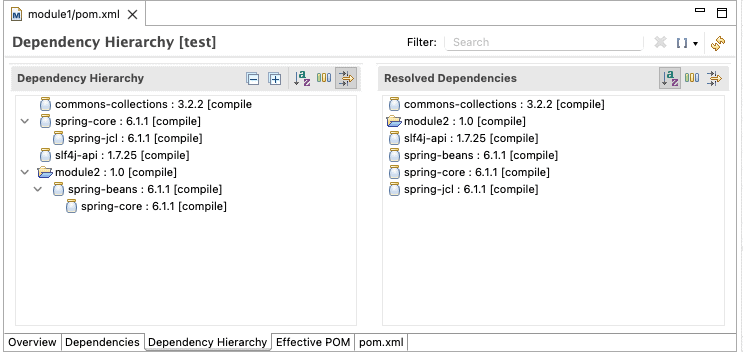
After installing the plugin (if not already done), we’ll open module1‘s pom.xml and select Dependency Hierarchy from the tabs. The left side shows the hierarchy of jars in our project (same as the -Dverbose output). The resolved list is shown on the right. These are the jars used in our project:
IntelliJ also has a dependency analyzer tool. The default IntelliJ IDEA Community Edition provides a similar view as the Eclipse m2e plugin. We need to select the project, right-click on it, and select Dependency Analyser:

However, IntelliJ IDEA Ultimate provides more options and a more advanced graph. For this, we select the module1 project and right-click on it, select Maven, and click on Show Diagram:

3.3. Using Third-Party Lib
We’ve got a few third-party tools to help analyze the big dependency tree. They can import the graphml file created using the mvn dependency:tree and further use it for analyzing the graph visually.
Here are a few tools we can use to visualize complex dependency trees:
4. Conclusion
In this article, we discussed how to get the dependency tree of Maven projects and learned about filtering the dependency tree. Later, we looked at a few tools and plugins to visualize the dependency tree.














