


Learn through the super-clean Baeldung Pro experience:
>> Membership and Baeldung Pro.
No ads, dark-mode and 6 months free of IntelliJ Idea Ultimate to start with.
Last updated: May 24, 2024
Learn through the super-clean Baeldung Pro experience:
>> Membership and Baeldung Pro.
No ads, dark-mode and 6 months free of IntelliJ Idea Ultimate to start with.
The filesystem assumes a central role in organizing files on our machine. It is the filesystem that orchestrates the management and retrieval of requested information as we navigate through the files on our device.
In this tutorial, we explore the basic building blocks of a Linux filesystem: superblock, inode, dentry, and file. We’ll also check how we can extract information from the disk, interpret it, and finally reach the content of a file.
The disk’s memory locations are divided into logical blocks, each storing different information. This information is kept in a hierarchical way to reach the contents of a file.
If we look at it from a high level, we’ve got a superblock at the top that stores the structure of the logical blocks in the disk. Then, we’ve got the block group descriptors that hold the usage of these blocks and the location of the inode table. The inode table further contains the metadata and extents about files. These extents hold the location of the block number where the directory entries or dentry are stored. Finally, the dentry stores the file name and the block information, which is where we can find the actual file content.
High-level disk layout:
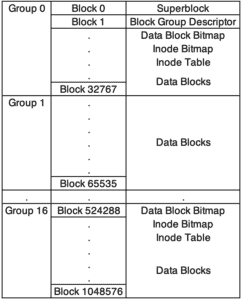
The superblock stores the overall filesystem layout in the disk. It starts at an offset of 1024 bytes from the disk’s beginning and spans 1024 bytes. It holds block size, block count, group size, and inode count among other disk layout parameters as described in the superblock data structure.
We can extract the superblock information from the disk:
$ df -hT /
Filesystem     Type  Size  Used Avail Use% Mounted on
/dev/sda1      ext4   49G   41G  5.5G  89% /
$ sudo dd if=/dev/sda1 of=superblock.dat bs=1024 count=1 skip=1 status=none
Here, the df command prints utilization and type details for the root partition. The device name is /dev/sda1 and the filesystem type is ext4.
The dd command extracts the superblock data from the disk. It skips 1 block of 1024 bytes to the starting location of the superblock. Then it reads 1 block of size 1024 bytes, which is the superblock information. Finally, the data is saved to superblock.dat.
From the superblock data structure, we can see the block size information is present at offset 0x18.
Let’s use the hexdump command to read it:
$ hexdump -e '"s_log_block_size: " /4 "%d\n"' -s 0x18 -n 4 superblock.img
s_log_block_size: 2
The options used in the command are:
As we can see, the above command prints the block size as 2. It is a log2 value. To convert it to decimal, we can use the formula 2^(10+s_log_block_size). For the value 2, we get 4096 (2^12) as the block size.
Likewise, we can extract the rest of the parameters in the superblock based on the data structure.
Some of the key fields are:
| Fields | Offset | Size | Value |
|---|---|---|---|
| Block count | 0x4 | 32 | 13106688 |
| Block size | 0x18 | 32 | 0x2 |
| Blocks per group | 0x20 | 32 | 0x8000 (32768) |
| Inodes per group | 0x28 | 32 | 0x2000 (8192) |
| Inode size | 0x58 | 16 | 0x100 (256) |
From this, we can infer that the memory locations on the disk are logically clubbed together as a block of size 4096. These blocks are further combined into block groups having 32768 blocks. And there are 400 (13106688/32768) block groups.
Once we get these values, we can peek into the block group descriptors to find the inode information as the next step.
A block group descriptor serves as a table of contents for groups. It stores the block numbers where we can find the data block bitmap, the inode bitmaps, the inode table, and various other parameters. Placed in the second block, it stores these data for all the groups available on the disk.
The data in a block group descriptor can be interpreted following the data structure here. The size of a block group descriptor table is 64 bytes. The first 64 bytes are for the first group, the second 64 for the second group, and so on. The location of the descriptor table for any group can be calculated using the formula 64 * (group – 1).
We’re mainly looking for the inode table location and that at offset 0x8:
$ sudo dd if=/dev/sda1 of=bgd.dat bs=4096 count=1 skip=1 status=none
$ hexdump -v -e '"Inode table: " /4 "%d\n"' -s 0x8 -n 4 bgd.dat
Inode table: 1064
The dd command extracts one block of data, skipping the first one. The hexdump command printed the block address of the inode table as 1064.
Inodes or index nodes serve as essential data structures housing metadata pertinent to files and directories. It encompasses details such as timestamps, permissions, size, and pointers to file content data blocks.
Every file stored on the disk is associated with an inode number. This number facilitates locating its respective inode table and the block storing the file content. The inode numbers from 1 to 10 are reserved for special purposes. Of that, the inode number 2 denotes the root folder (/). And there is no inode zero.
Given an inode number, we can find where the block group resides by:
group = (inode_number - 1) / inodes_per_groupWe can also find the index in the inode table by:
index = (inode_number - 1) % inodes_per_groupHence, for the root folder with inode number 2:
group = (2 - 1) / 8192 = 0
index = (2 -1) % 8192 = 1
Thus the inode table resides in the first group (group 0) and the second entry (index 1) in the inode table corresponds to the root folder.
We’ve learned that for block group 0, the inode table starts at block 1064 and that the size of the inode table is 256 bytes. The first inode is for bad blocks, so we can skip the first 256 bytes. The next entry corresponds to the root folder.
Let’s extract the inode table content for the root folder:
$ sudo dd if=/dev/sda1 of=root_inode_table.img bs=4096 skip=1064 count=1 status=none
$ hexdump -s 256 -n 256 root_inode_table.img
0000100 41ed 0000 1000 0000 ac16 663b 9277 6037
0000110 9277 6037 0000 0000 0000 001a 0008 0000
0000120 0000 0008 0027 0000 f30a 0001 0004 0000
0000130 0000 0000 0000 0000 0001 0000 2428 0000
Here we’ve used the dd command to save the 1064th block in the root_inode_table.img file. Then, using the hexdump command, we extracted the second entry in the inode table.
In ext4, bytes are stored in little-endian format.
Let’s look at some important fields:
| Field Name | Offset | Length | Value | Description |
|---|---|---|---|---|
| Mode | 0x0 | 16 | 0x41ed (40755 octal) | 0x4000 represents directory |
| Size | 0x4 | 32 | 0x1000 (4096) | Size of the file/folder |
| Last access time | 0x8 | 32 | 0x663bac16 (1715186710) | $ date -d @1715186710 Wed May 8 22:15:10 IST 2024 |
| Last data modification time | 0x10 | 32 | 0x60379277 (1614254711) | Thu Feb 25 17:35:11 IST 2021 |
| Last inode change time | 0xc | 32 | 0x60379277 (1614254711) | Thu Feb 25 17:35:11 IST 2021 |
Running the stat command on the root folder also gives a similar output:
$ stat /
  File: /
  Size: 4096      	Blocks: 8          IO Block: 4096   directory
Device: 801h/2049d	Inode: 2           Links: 26
Access: (0755/drwxr-xr-x)  Uid: (    0/    root)   Gid: (    0/    root)
Access: 2024-05-08 22:15:10.186009447 +0530
Modify: 2021-02-25 17:35:11.121430326 +0530
Change: 2021-02-25 17:35:11.121430326 +0530
 Birth: -
One of the important portions in the inode table is the extent tree section. It has a length of 60 bytes from offset 0x28. At first, a 12-byte-long extent tree header appears. Then, the rest of the 48 bytes can contain either the extent tree index or the extent itself, both of size 12 bytes. Consequently, we can store 4 indexes or 4 extents. If file information cannot be represented in those 4 extents, the extent tree index is stored in all of the four.
The attributes in the extent header and their values from the above dump are:
| Offset | Length | Field | Value |
|---|---|---|---|
| 0x28 | 16 | Magic number | 0xF30A |
| 0x2a | 16 | Number of entries | 0x01 |
| 0x2c | 16 | Max entries | 0x4 |
| 0x2e | 16 | Tree depth | 0x0 |
| 0x30 | 32 | Generation id | 0x0 |
In our case, the tree depth is zero. Hence, the next bytes point to an extent, not an index.
Let’s look at the values in it:
| Offset | Length | Field | Value |
|---|---|---|---|
| 0x34 | 32 | Logical block | 0x0 |
| 0x38 | 16 | Number of blocks | 01 |
| 0x3a | 16 | High 16-bits of starting block | 0x0 |
| 0x3c | 32 | Low 32-bits of starting block | 0x2428 (9256) |
In the extent details, we find the block number 0x2428 (9256). This block holds the directory information for the root folder.
The directory entry or dentry maps the inode number to a file name. It includes the filename and its associated metadata, such as the inode number, file type, permissions, timestamps, and pointers to the actual data blocks or inodes for files and directories. We can follow the bytes by looking at the data structure here.
Let’s dump the content:
$ hexdump -s 37912576 -n 512 -C disk_image.img
02428000  02 00 00 00 0c 00 01 02  2e 00 00 00 02 00 00 00  |................|
02428010  0c 00 02 02 2e 2e 00 00  0b 00 00 00 14 00 0a 02  |................|
02428020  6c 6f 73 74 2b 66 6f 75  6e 64 00 00 0c 00 00 00  |lost+found......|
02428030  10 00 08 01 73 77 61 70  66 69 6c 65 01 00 26 00  |....swapfile..&.|
02428040  0c 00 03 02 65 74 63 00  01 00 28 00 10 00 05 02  |....etc...(.....|
...
Here, we can see the directories in the root folder.
Let’s interpret the bytes:
| Offset | Length | Field | Value |
|---|---|---|---|
| 0x0 | 32 | Inode number | 2 |
| 0x4 | 16 | Record length | 0xc |
| 0x6 | 8 | Name length | 1 |
| 0x7 | 8 | File type | 2 |
| 0x8 | char | Name | . (the dot directory) |
| 0xc | 32 | Inode number | 2 |
| 0x10 | 16 | Record length | 0xc |
| 0x12 | 8 | Name length | 2 |
| 0x13 | 8 | File type | 2 |
| 0x14 | char | Name | .. |
This is repeated. Thus we see these directories:
The file points to the actual content on the disk.
Now we know how to list the root folder. Next, let’s check how we can arrive at a file. We’ll try listing the directories in the /etc folder. And read the content of one of the files in that folder.
We found that the inode number for the /etc folder is 2490369. Next, we need to figure out which block group it belongs to.
Since we’ve 8192 inodes in a group, the inode number 2490369 should fall in the block group (2490369 – 1) / 8192 = 304.
To get more details about the /etc folder, we need to look at the inode table for group 304. The location of the inode table is stored in the block descriptor group. As we’ve seen earlier the block group descriptor for group 304 will be at offset 304 * 64 = 19456. The block group descriptor is in the second block. Adding the first block size, the final offset becomes 19456 + 4096 = 23552 (0x5c00).
This location comes in the 5th block (23552/4096 = 4.75). Let’s read 5 blocks from the disk and dump the bytes.
Looking at the value of this location:
$ sudo dd if=/dev/sda1 bs=4096 count=5 status=none | hexdump -s 23552 -n 64
0005c00 0000 0098 0010 0098 0020 0098 5dac 135e
0005c10 01b8 0004 0000 0000 9176 7216 1352 8aee
0005c20 0000 0000 0000 0000 0000 0000 0000 0000
0005c30 0000 0000 0000 0000 364b 63b9 0000 0000
The block number of the inode table is at offset 0x8. In the above dump, it is at 0x5c08. And the value is 0x00980020 (9961504).
Let’s extract the bytes at that block:
$ sudo dd if=/dev/sda1 bs=4096 skip=9961504 count=1 status=none | hexdump -n 256
0000000 41ed 0000 3000 0000 4d90 6637 c75e 6620
0000010 c75e 6620 0000 0000 0000 0089 0018 0000
0000020 1000 0008 04f7 0000 f30a 0002 0004 0000
0000030 0000 0000 0000 0000 0001 0000 2020 0098
As we did earlier, we can see the block information in the inode table:
Since the depth is zero, the next data will be the extent information:
Now, let’s extract the directory info at block 9969696:
$ sudo dd if=/dev/sda1 bs=4096 skip=9969696 count=2 status=none | hexdump -C
00000000  01 00 26 00 0c 00 01 02  2e 00 00 00 02 00 00 00  |..&.............|
00000010  f4 0f 02 02 2e 2e 00 00  00 00 00 00 01 08 00 00  |................|
00000020  fb 01 02 00 01 00 00 00  e0 32 e2 74 02 00 00 00  |.........2.t....|
00000030  49 6d 61 67 65 4d 61 67  69 63 6b 2d 36 00 00 00  |ImageMagick-6...|
00000040  04 00 26 00 18 00 0e 02  4e 65 74 77 6f 72 6b 4d  |..&.....NetworkM|
00000050  61 6e 61 67 65 72 00 00  05 00 26 00 14 00 0a 02  |anager....&.....|
...
00000890 6e 74 00 00 80 00 26 00 0c 00 03 02 78 64 67 00 |nt....&.....xdg.|
000008a0 81 00 26 00 14 00 09 01 2e 70 77 64 2e 6c 6f 63 |..&......pwd.loc|
000008b0 6b 00 00 00 82 00 26 00 14 00 0c 01 61 64 64 75 |k.....&.....addu|
000008c0 73 65 72 2e 63 6f 6e 66 83 00 26 00 14 00 0a 01 |ser.conf..&.....|
...
Above, we can see the list of files inside the /etc folder. There it lists the folders first. Further down, it starts listing the files. Let’s look at the adduser.conf file. Immediately after the .pwd.loc filename starts the data for adduser.conf file. The first byte indicates the inode number for that file is 0x00260082 (2490498).
If we run the calculations, we get the following details:
Let’s extract the inode data from the disk:
$ sudo dd if=/dev/sda1 bs=4096 skip=9961512 count=1 status=none | hexdump -s 256 -n 256
0000100 81a4 0000 0bd4 0000 50e2 6637 f45a 5fbd
0000110 17f3 5ae2 0000 0000 0000 0001 0008 0000
0000120 0000 0008 0001 0000 f30a 0001 0004 0000
0000130 0000 0000 0000 0000 0001 0000 8001 0098
...
At offset 0x13c, we get the starting physical block as 0x00988001 = 9994241. And at offset 0x104 we get the size of the file 0xbd4 (3028).
Let’s dump the block at 9994241:
$ sudo dd if=/dev/sda1 bs=4096 skip=9994241 count=1 status=none | hexdump -n 3028 -C
00000000  23 20 2f 65 74 63 2f 61  64 64 75 73 65 72 2e 63  |# /etc/adduser.c|
00000010  6f 6e 66 3a 20 60 61 64  64 75 73 65 72 27 20 63  |onf: `adduser' c|
00000020  6f 6e 66 69 67 75 72 61  74 69 6f 6e 2e 0a 23 20  |onfiguration..# |
00000030  53 65 65 20 61 64 64 75  73 65 72 28 38 29 20 61  |See adduser(8) a|
...
Finally, we arrive at the content of the file.
In this article, we’ve seen the different data structures in the ext4 filesystem and how they work together to store the disk structure and file contents. We’ve also explored listing the directories and file content navigating through these data structures.