


Learn through the super-clean Baeldung Pro experience:
>> Membership and Baeldung Pro.
No ads, dark-mode and 6 months free of IntelliJ Idea Ultimate to start with.
Learn through the super-clean Baeldung Pro experience:
>> Membership and Baeldung Pro.
No ads, dark-mode and 6 months free of IntelliJ Idea Ultimate to start with.
In computing, booting is one of the essential processes that enable the computer to launch an operating system. If we’re familiar with bootloader and the Linux boot process, it can help immensely in recovering from critical or disastrous situations.
In this article, we’ll discuss the role of bootloader to effectively grasp the Linux boot process.
In computing, the boot process refers to initializing the hardware components and the essential software to load and start an operating system. The boot process is comprised of several necessary steps. However, to understand how the Linux boot process and bootloader work, we should be familiar with a few concepts beforehand.
When we power on a computer, the firmware launches to initialize all the necessary hardware for the bootloader to load an operating system. Specifically, there are two widely known firmware: BIOS and UEFI. BIOS stands for Basic Input and Output System. It is stored in flash memory in the motherboard and is an old system that has several limitations.
On the other hand, there’s UEFI, which stands for Unified Extensible Firmware Interface. UEFI provides a standard environment for booting an operating system and pre-boot applications. It’s the intended replacement for BIOS.
After we switch on the computer, the BIOS searches for a bootable device such as HDD, USB, and CD-ROM. Once it finds a device to boot from, it tries to load the bootloader.

In contrast, the UEFI boots from a specified boot device and searches for the ESP (EFI System Partition). The ESP partition is usually a FAT file system that contains pre-boot applications and possibly a bootloader.
In addition, it also provides additional capabilities that aren’t available in BIOS like secure boot.
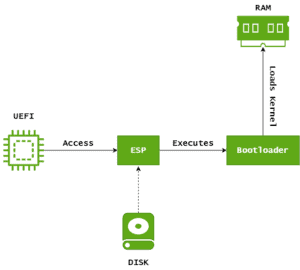
A bootloader is a lightweight software that enables us to load an operating system into the RAM and run it. Thus, it’s an interface between the firmware and the operating system. The bootloader is located in the MBR (Master Boot Record) for BIOS or the EFI System Partition (ESP) for UEFI.
Technically, a UEFI system doesn’t need bootloaders because it can directly load the kernel. However, we can use bootloaders if we want to launch the kernel with custom kernel parameters.
Bootloaders are equipped with necessary drivers for essential tasks like reading OS files on a storage device. Modern bootloaders also support additional features that we’re going to cover next.
In multi-boot environments, the bootloader is capable of booting into multiple operating systems. For instance, if we have Windows and Linux on the same disk, we can choose the one we want to boot into from the menu it presents at system startup.
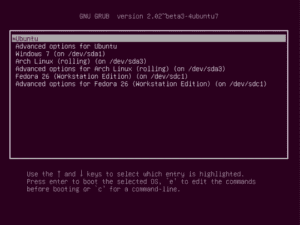
Not only that, but we can also boot different versions of a kernel for the same operating system. Typically, this is handy in scenarios like testing beta kernels. Besides, if we upgrade to the latest kernel that contains bugs, we can easily revert to the working version of the kernel.
Kernel parameters are configuration options that enable us to modify the kernel behavior. We can use kernel parameters to enable/disable hardware components and change how they operate.
For instance, we can specify a custom graphics resolution, disable unnecessary hardware, limit the amount of memory to the kernel, and so on. Not only that, but we can also change the kernel behavior in other ways (like increasing the kernel timer frequency), tweak the kernel scheduler, and enable AppArmor modules.
Nonetheless, we can also configure the kernel parameters persistently. For instance, for GRUB, we typically edit /etc/default/grub file to modify the kernel parameters to have them persist across reboots. In the file, we add or remove parameters to the GRUB_CMDLINE_LINE field:
GRUB_CMDLINE_LINUX="quiet splash mem=8G"Here’s what each parameter does:
Then, we apply the changes:
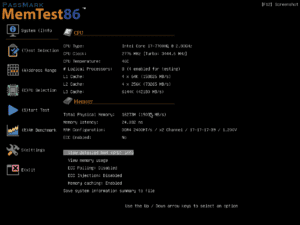
$ sudo update-grubSome bootloaders provide features like system memory testing. This helps us troubleshoot problems that arise during the boot process. Furthermore, there are kernel parameters that we use to enable detailed debug logs to trace and fix kernel and hardware issues.
If there are issues in the primary operating system, we can use the bootloader to boot into a recovery environment. The recovery environment might come with the distribution, or we may need to install it explicitly on a recovery partition. Either way, it provides us with a safety net to repair the system or carry out data recovery.
The most popular bootloader for Linux is GRUB. It supports BIOS, UEFI, MBR, GPT, and multi-boot. In addition, it ships with essential drivers that are ready to use out of the box.
Other bootloaders like Syslinux, LILO, and GRUB Legacy support only BIOS. However, they are rarely used.
In addition, there are other UEFI-only capable bootloaders like systemd-boot, rEFInd, and EFISTUB.
In this article, we learned about what a bootloader is and how it works to load and initialize an operating system. We got familiar with the Linux boot process in general and how the bootloader is essential to loading and customizing the behavior of the kernel.
Finally, we covered the most popular bootloaders that are commonly used in the Linux ecosystem.