How to Fix Unknown Magic Byte Errors in Apache Kafka
Last updated: September 16, 2025


Mocking is an essential part of unit testing, and the Mockito library makes it easy to write clean and intuitive unit tests for your Java code.
Get started with mocking and improve your application tests using our Mockito guide:
Handling concurrency in an application can be a tricky process with many potential pitfalls. A solid grasp of the fundamentals will go a long way to help minimize these issues.
Get started with understanding multi-threaded applications with our Java Concurrency guide:
Spring 5 added support for reactive programming with the Spring WebFlux module, which has been improved upon ever since. Get started with the Reactor project basics and reactive programming in Spring Boot:
Since its introduction in Java 8, the Stream API has become a staple of Java development. The basic operations like iterating, filtering, mapping sequences of elements are deceptively simple to use.
But these can also be overused and fall into some common pitfalls.
To get a better understanding on how Streams work and how to combine them with other language features, check out our guide to Java Streams:
Explore Spring Boot 3 and Spring 6 in-depth through building a full REST API with the framework:
Yes, Spring Security can be complex, from the more advanced functionality within the Core to the deep OAuth support in the framework.
I built the security material as two full courses - Core and OAuth, to get practical with these more complex scenarios. We explore when and how to use each feature and code through it on the backing project.
You can explore the course here:
All Access is finally out, with all of my Spring courses. Learn JUnit is out as well, and Learn Maven is coming fast. And, of course, quite a bit more affordable. Finally.
>> GET THE COURSE
Spring Data JPA is a great way to handle the complexity of JPA with the powerful simplicity of Spring Boot.
Get started with Spring Data JPA through the guided reference course:
Refactor Java code safely — and automatically — with OpenRewrite.
Refactoring big codebases by hand is slow, risky, and easy to put off. That’s where OpenRewrite comes in. The open-source framework for large-scale, automated code transformations helps teams modernize safely and consistently.
Each month, the creators and maintainers of OpenRewrite at Moderne run live, hands-on training sessions — one for newcomers and one for experienced users. You’ll see how recipes work, how to apply them across projects, and how to modernize code with confidence.
Join the next session, bring your questions, and learn how to automate the kind of work that usually eats your sprint time.
1. Overview
In this article, we’ll learn how to handle the “Unknown magic byte” error and other deserialization issues that arise when consuming Avro messages using Spring Kafka. We’ll explore the ErrorHandlingDeserializer and see how it helps manage poison pill messages.
Finally, we’ll configure the DefaultErrorHandler along with a DeadLetterPublishingRecoverer to route problematic records to a DLQ topic, ensuring the consumer continues processing without getting stuck.
2. Poison Pills and Magic Bytes
Sometimes, we receive messages that can’t be processed due to format issues or unexpected content – these are called poison pill messages. Instead of trying to process them endlessly, we should handle these messages gracefully.
In Kafka, poison pill messages can occur when a consumer expects Avro-encoded data but receives something different. For instance, a producer using a StringSerializer might send a plain message to a topic expecting Avro-encoded data, causing the AvroDeserializer on the consumer side to fail:
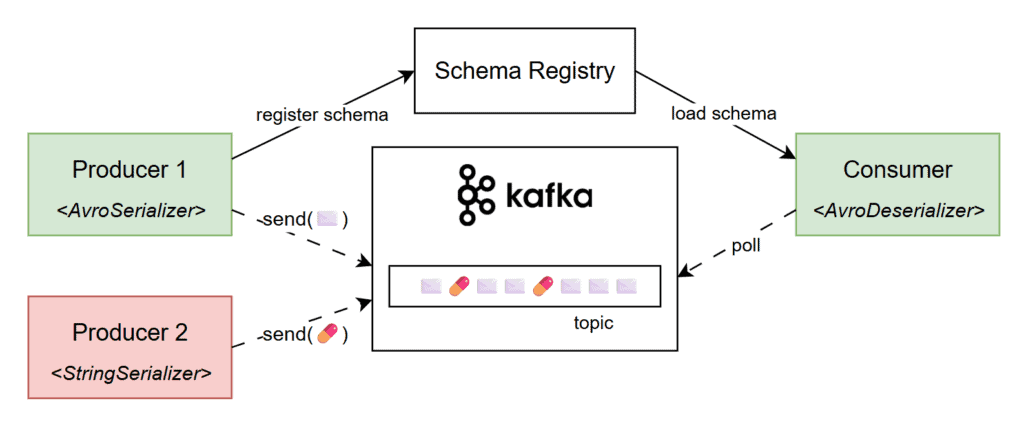
Consequently, we get deserialization errors with the “Unknown magic byte” message. The “magic byte” is a marker at the start of an Avro-encoded message that helps the deserializer identify and process it correctly. If the message wasn’t serialized with an Avro serializer and it doesn’t begin with this byte, the deserializer throws an error signaling a format mismatch.
3. Reproducing the Issue
To reproduce the issue, we’ll use a simple Spring Boot application that consumes messages in Avro format from a Kafka topic. Our app will use the spring-kafka, avro, and kafka-avro-deserialzier dependencies:
<dependency>
    <groupId>org.springframework.kafka</groupId>
    <artifactId>spring-kafka</artifactId>
</dependency>
<dependency>
    <groupId>org.apache.avro</groupId>
    <artifactId>avro</artifactId>
    <version>1.12.0</version>
</dependency>
<dependency>
    <groupId>io.confluent</groupId>
    <artifactId>kafka-avro-serializer</artifactId>
    <version>7.9.1</version>
</dependency>
Additionally, our service uses a @KafkaListener to listen to all messages from the “baeldung.article.published” topic. For demonstration purposes, we’ll store the article name of all incoming messages in memory, in a List:
@Component
class AvroMagicByteApp {

    // logger
    List<String> blog = new ArrayList<>();

    @KafkaListener(topics = "baeldung.article.published")
    public void listen(Article article) {
        LOG.info("a new article was published: {}", article);
        blog.add(article.getTitle());
    }
}
Next, we’ll add our Kafka-specific application properties. Since we’re using Spring Boot’s built-in Testcontainers support, we can omit the bootstrap-servers property as it’ll be injected automatically. We’ll also set schema.registry.url to “mock://test“, since we won’t be using a real schema registry during testing:
spring:
  kafka:
#    bootstrap-servers <-- it'll be injected in test by Spring and Testcontainers
    consumer:
      group-id: test-group
      auto-offset-reset: earliest
      key-deserializer: org.apache.kafka.common.serialization.StringDeserializer
      value-deserializer: io.confluent.kafka.serializers.KafkaAvroDeserializer
      properties:
        schema.registry.url: mock://test
        specific.avro.reader: true
That’s it, we can now use Testcontainers to start a Docker container with a Kafka broker and test the happy path of our simple app.
However, if we publish a poison-pill message to our test topic, we’ll encounter the “Unknown magic byte!” exception. To produce the non-compliant message, we’ll leverage a KafkaTemplate instance that uses a StringSerializer and publish a dummy String to our topic:
@SpringBootTest
class AvroMagicByteLiveTest {

    @Container
    @ServiceConnection
    static KafkaContainer kafka = new KafkaContainer(DockerImageName.parse("apache/kafka:4.0.0"));

    @Test
    void whenSendingMalformedMessage_thenSendToDLQ() throws Exception {
        stringKafkaTemplate()
          .send("baeldung.article.published", "not a valid avro message!")
          .get();

        Thread.sleep(10_000L);
        // manually verify that the poison-pill message is handled correctly
    }

    private static KafkaTemplate<Object, Object> stringKafkaTemplate() { /* ... */ }
}
Additionally, we’ve also temporarily added a Thread.sleep() that will help us observe the application logs. As expected, our service fails to deserialize the message, and we encounter the “Unknown magic byte!” error:
ERROR o.s.k.l.KafkaMessageListenerContainer - Consumer exception
  java.lang.IllegalStateException: This error handler cannot process 'SerializationException's directly; __please consider configuring an 'ErrorHandlingDeserializer'__ in the value and/or key deserializer
  at org.springframework.kafka...DefaultErrorHandler.handleOtherException(DefaultErrorHandler.java:192)
   [...]
Caused by: org.apache.kafka...RecordDeserializationException:
Error deserializing VALUE for partition baeldung.article.published-0 at offset 1.
  __If needed, please seek past the record to continue consumption.__
  at org.apache.kafka.clients...CompletedFetch.newRecordDeserializationException(CompletedFetch.java:346)
   [...]
Caused by: org.apache.kafka...errors.SerializationException: __Unknown magic byte!__
  at io.confluent.kafka.serializers.AbstractKafkaSchemaSerDe.getByteBuffer(AbstractKafkaSchemaSerDe.java:649)
   [...]
Moreover, we’ll also see this error repeatedly because we didn’t handle it properly and never acknowledged the message. Simply put, the consumer gets stuck at that offset, continuously trying to process the malformed message.
4. Error-Handling Deserializer
Fortunately, the error log is detailed and even suggests a possible fix:
This error handler cannot process 'SerializationException's directly;
please consider configuring an 'ErrorHandlingDeserializer' in the value and/or key deserializer.
An ErrorHandlingDeserializer in Spring Kafka is a wrapper that catches deserialization errors and allows our application to handle them gracefully, preventing the consumer from crashing. It works by delegating the actual deserialization to another deserializer, such as JsonDeserializer or KafkaAvroDeserializer, and capturing any exceptions thrown during that process.
To configure it, we’ll update the value-deserializer property to ErrorHandlingDeserializer. Additionally, we’ll specify the original deserializer under spring.kafka.consumer.spring.deserializer.value.delegate.class:
spring.kafka:
  consumer:
    value-deserializer: org.springframework.kafka.support.serializer.ErrorHandlingDeserializer
    properties:
      spring.deserializer.value.delegate.class: io.confluent.kafka.serializers.KafkaAvroDeserializer
With this configuration, the “Unknown magic byte!” exception appears only once in the logs. This time, the application handles the poisoned pill message gracefully and moves on without attempting to deserialize it again.
5. Publishing to DLQ
So far, we’ve configured an ErrorHandlingDeserializer for the message payload and correctly handled poison pill scenarios. However, if we simply catch exceptions and move on, it becomes difficult to inspect or recover those faulty messages. To address this, we should consider sending them to a DLQ topic.
A Dead Letter Queue (DLQ) is a special topic used to store messages that can’t be processed successfully after one or more attempts. Let’s enable this behavior in our application:
@Configuration
class DlqConfig {

    @Bean
    DefaultErrorHandler errorHandler(DeadLetterPublishingRecoverer dlqPublishingRecoverer) {
        return new DefaultErrorHandler(dlqPublishingRecoverer);
    }

    @Bean
    DeadLetterPublishingRecoverer dlqPublishingRecoverer(KafkaTemplate<byte[], byte[]> bytesKafkaTemplate) {
        return new DeadLetterPublishingRecoverer(bytesKafkaTemplate);
    }

    @Bean("bytesKafkaTemplate")
    KafkaTemplate<?, ?> bytesTemplate(ProducerFactory<?, ?> kafkaProducerFactory) {
        return new KafkaTemplate<>(kafkaProducerFactory,
          Map.of(ProducerConfig.VALUE_SERIALIZER_CLASS_CONFIG, ByteArraySerializer.class.getName()));
    }
}
As we can observe, we define a DefaultErrorHandler bean, which determines which retryable exceptions. In our case, deserialization exceptions are considered non-retryable, so they will be sent directly to the DLQ. When creating the error handler, we’ll inject a DeadLetterPublishingRecoverer instance via the constructor.
On the other hand, the dlqPublishingRecoverer forwards the failed messages to a DLQ topic using a KafkaTemplate with a ByteArraySerializer since the exact format is unknown for poison pill messages. Additionally, it’s responsible for resolving the DLQ topic name; by default, it will append “-dlt” to the original topic name:
@Test
void whenSendingMalformedMessage_thenSendToDLQ() throws Exception {
    stringKafkaTemplate()
      .send("baeldung.article.published", "not a valid avro message!")
      .get();

    var dlqRecord = listenForOneMessage("baeldung.article.published-dlt", ofSeconds(5L));

    assertThat(dlqRecord.value())
      .isEqualTo("not a valid avro message!");
}

private static ConsumerRecord<?, ?> listenForOneMessage(String topic, Duration timeout) {
    return KafkaTestUtils.getOneRecord(
      kafka.getBootstrapServers(), "test-group-id", topic, 0, false, true, timeout);
}
As we can see, configuring the ErrorHandlingDeserializer allowed us to gracefully handle malformed messages. After that, the customized DefaultErrorHandler and DeadLetterPublishingRecoverer beans enabled us to push these faulty messages to a DLQ topic.
6. Conclusion
In this tutorial, we covered how to resolve the “Unknown magic byte” error and other deserialization issues that can arise when handling Avro messages with Spring Kafka. We explored how the ErrorHandlingDeserializer helps prevent consumers from being blocked by problematic messages.
Finally, we reviewed the concept of Dead Letter Queues and configured Spring Kafka beans to route poison pill messages to a dedicated DLQ topic, ensuring smooth and uninterrupted processing.














