1. Overview
It’s very common to execute all our JUnit tests automatically as a part of the CI build using Maven. This, however, is often time-consuming.
Therefore, we often want to filter our tests and execute either unit tests or integration tests or both at various stages of the build process.
In this tutorial, we’ll look at a few filtering techniques for test cases with JUnit 5. In the following sections, we’ll also look at various filtering mechanisms before JUnit 5.
2.1. Annotating JUnit Tests with Tag
With JUnit 5 we can filter tests by tagging a subset of them under a unique tag name. For example, suppose we have both unit tests and integration tests implemented using JUnit 5. We can add tags on both sets of test cases:
@Test
@Tag("IntegrationTest")
public void testAddEmployeeUsingSimpelJdbcInsert() {
}

@Test
@Tag("UnitTest")
public void givenNumberOfEmployeeWhenCountEmployeeThenCountMatch() {
}
Henceforth we can execute all tests under a particular tag name separately. We can also tag the class instead of methods. Thereby including all tests in a class under a tag.
In the next few sections, we’ll see various ways of filtering and executing the tagged JUnit tests.
2.2. Filtering Tags with Test Suite
JUnit 5 allows us to implement test suites through which we can execute tagged test cases:
@SelectPackages("com.baeldung.tags")
@IncludeTags("UnitTest")
public class EmployeeDAOUnitTestSuite {
}
Now, if we run this suite, all JUnit tests under the tag UnitTest would be executed. Similarly, we can exclude tests with ExcludeTags annotation.
For filtering JUnit tests within the various phases of the Maven build, we can use the Maven Surefire plugin. The Surefire plugin allows us to include or exclude the tags in the plugin configuration:
<plugin>
    <artifactId>maven-surefire-plugin</artifactId>
    <version>3.2.5</version>
    <configuration>
        <groups>UnitTest</groups>
    </configuration>
</plugin>
If we now execute this plugin, it will execute all tests which are tagged as UnitTest. Similarly, we can exclude test cases under a tag name:
<excludedGroups>IntegrationTest</excludedGroups>
IDEs now allow filtering the JUnit tests by tags. This way we can execute a specific set of tagged tests directly from our IDE.
IntelliJ allows such filtering through a custom Run/Debug Configuration:
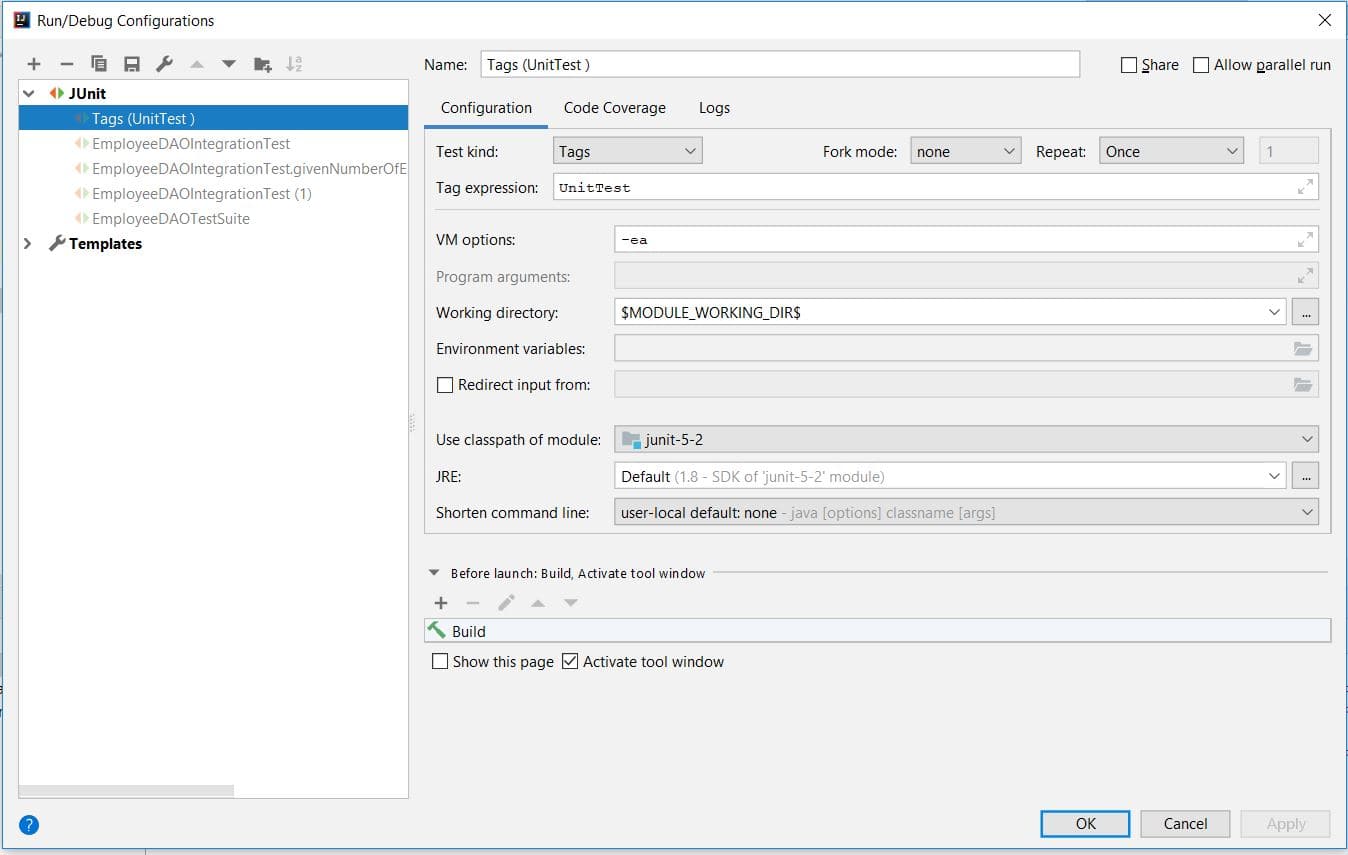
As shown in this image, we selected the Test Kind as tags and the tag to be executed in the Tag Expression.
JUnit 5 allows various Tag Expressions which can be used to filter the tags. For example, to run everything but the integration tests, we could use !IntegrationTest as the Tag Expression. Or for executing both UnitTest and IntegrationTest, we can use UnitTest | IntegrationTest.
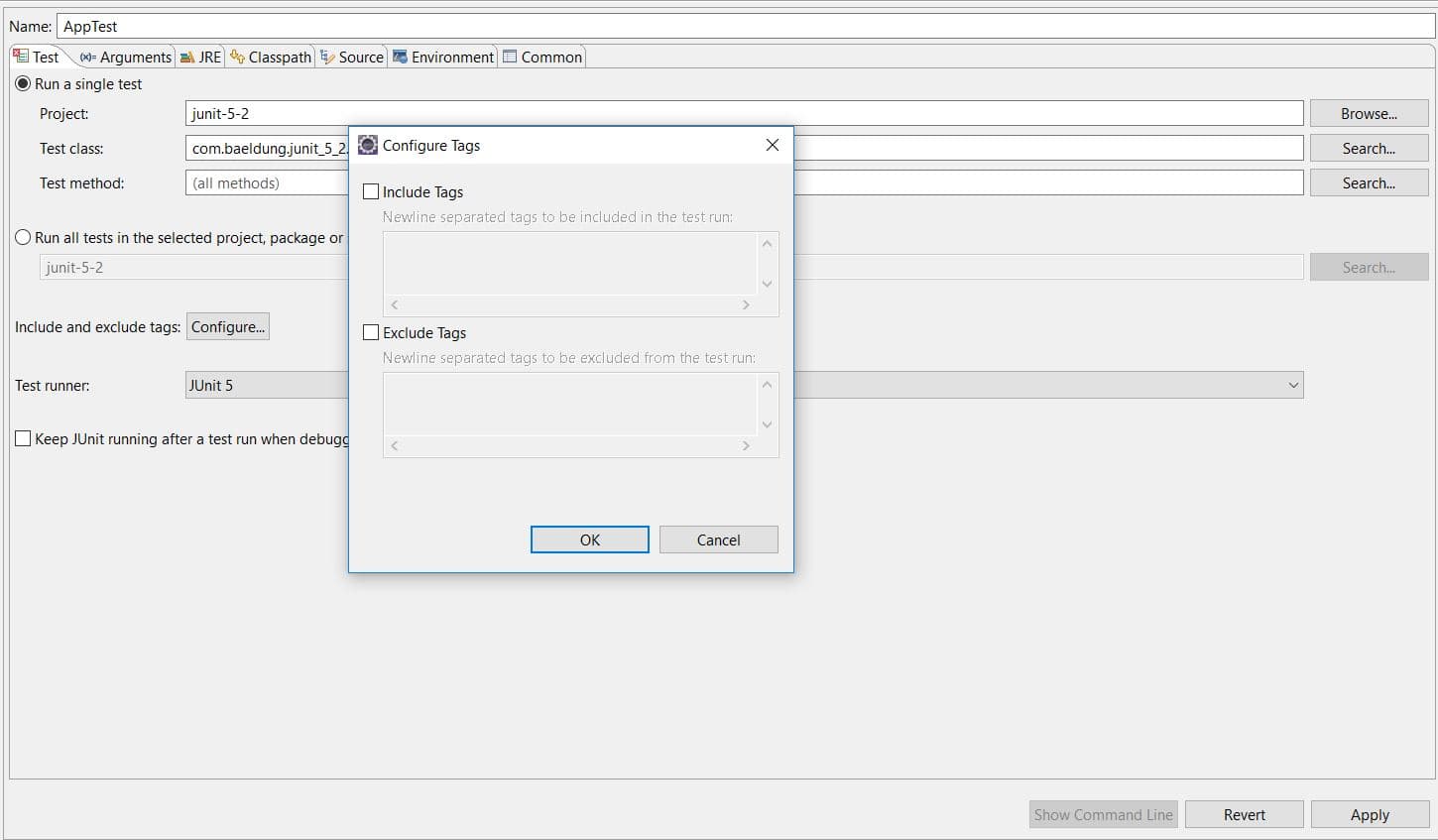
Similarly, Eclipse also allows including or excluding tags in the JUnit Run/Debug configurations:
3. JUnit 4 Categories
3.1. Categorizing JUnit Tests
JUnit 4 allows us to execute a subset of JUnit tests by adding them into different categories. As a result, we can execute the test cases in a particular category while excluding other categories.
We can create as many categories by implementing marker interfaces where the name of the marker interface represents the name of the category. For our example, we’ll implement two categories, UnitTest:
public interface UnitTest {
}
and IntegrationTest:
public interface IntegrationTest {
}
Now, we can categorize our JUnit by annotating it with Category annotation:
@Test
@Category(IntegrationTest.class)
public void testAddEmployeeUsingSimpelJdbcInsert() {
}

@Test
@Category(UnitTest.class)
public void givenNumberOfEmployeeWhenCountEmployeeThenCountMatch() {
}
In our example, we put the Category annotation on the test methods. Similarly, we can also add this annotation on the test class, thus adding all tests into one category.
3.2. Categories Runner
In order to execute JUnit tests in a category, we need to implement a test suite class:
@RunWith(Categories.class)
@IncludeCategory(UnitTest.class)
@SuiteClasses(EmployeeDAOCategoryIntegrationTest.class)
public class EmployeeDAOUnitTestSuite {
}
This test suite can be executed from an IDE and would execute all JUnit tests under the UnitTest category. Similarly, we can also exclude a category of tests in the suite:
@RunWith(Categories.class)
@ExcludeCategory(IntegrationTest.class)
@SuiteClasses(EmployeeDAOCategoryIntegrationTest.class)
public class EmployeeDAOUnitTestSuite {
}
3.3. Excluding or Including Categories in Maven
Finally, we can also include or exclude the categories of JUnit tests from the Maven build. Thus, we can execute different categories of JUnit tests in different Maven profiles.
We’ll use the Maven Surefire plugin for this:
<plugin>
    <artifactId>maven-surefire-plugin</artifactId>
    <version>3.2.5</version>
    <configuration>
        <groups>com.baeldung.categories.UnitTest</groups>
    </configuration>
</plugin>
And similarly we can exclude a category from the Maven build:
<plugin>
    <artifactId>maven-surefire-plugin</artifactId>
    <version>3.2.5</version>
    <configuration>
        <excludedGroups>com.baeldung.categories.IntegrationTest</excludedGroups>
    </configuration>
</plugin>
This is similar to the example we discussed in the previous section. The only difference is that we replaced the tag name with the fully qualified name of the Category implementation.
4. Filtering JUnit Tests with Maven Surefire Plugin
Both of the approaches we’ve discussed have been implemented with the JUnit library. An implementation agnostic way of filtering test cases is by following a naming convention. For our example, we’ll use UnitTest suffix for unit tests and IntegrationTest for integration tests.
Now we’ll use the Maven Surefire Plugin for executing either the unit tests or the integrations tests:
<plugin>
    <artifactId>maven-surefire-plugin</artifactId>
    <version>3.2.5</version>
    <configuration>
        <excludes>
            **/*IntegrationTest.java
        </excludes>
    </configuration>
</plugin>
The excludes tag here filters all integration tests and executes only the unit tests. Such a configuration would save a considerable amount of build time.
Furthermore, we can execute the Surefire plugin within various Maven profiles with different exclusions or inclusions.
Although Surefire works well for filtering, it is recommended to use the Failsafe Plugin for executing integration tests in Maven.
5. Conclusion
In this article, we saw a way to tag and filter test cases with JUnit 5. We used the Tag annotation and also saw various ways for filtering the JUnit tests with a specific tag through the IDE or in the build process using Maven.
We also discussed some of the filtering mechanisms before JUnit 5.
The code backing this article is available on GitHub. Once you're
logged in as a Baeldung Pro Member, start learning and coding on the project.


