


Mocking is an essential part of unit testing, and the Mockito library makes it easy to write clean and intuitive unit tests for your Java code.
Get started with mocking and improve your application tests using our Mockito guide:
Handling concurrency in an application can be a tricky process with many potential pitfalls. A solid grasp of the fundamentals will go a long way to help minimize these issues.
Get started with understanding multi-threaded applications with our Java Concurrency guide:
Spring 5 added support for reactive programming with the Spring WebFlux module, which has been improved upon ever since. Get started with the Reactor project basics and reactive programming in Spring Boot:
Since its introduction in Java 8, the Stream API has become a staple of Java development. The basic operations like iterating, filtering, mapping sequences of elements are deceptively simple to use.
But these can also be overused and fall into some common pitfalls.
To get a better understanding on how Streams work and how to combine them with other language features, check out our guide to Java Streams:
Explore Spring Boot 3 and Spring 6 in-depth through building a full REST API with the framework:
Yes, Spring Security can be complex, from the more advanced functionality within the Core to the deep OAuth support in the framework.
I built the security material as two full courses - Core and OAuth, to get practical with these more complex scenarios. We explore when and how to use each feature and code through it on the backing project.
You can explore the course here:
All Access is finally out, with all of my Spring courses. Learn JUnit is out as well, and Learn Maven is coming fast. And, of course, quite a bit more affordable. Finally.
>> GET THE COURSE
Spring Data JPA is a great way to handle the complexity of JPA with the powerful simplicity of Spring Boot.
Get started with Spring Data JPA through the guided reference course:
Refactor Java code safely — and automatically — with OpenRewrite.
Refactoring big codebases by hand is slow, risky, and easy to put off. That’s where OpenRewrite comes in. The open-source framework for large-scale, automated code transformations helps teams modernize safely and consistently.
Each month, the creators and maintainers of OpenRewrite at Moderne run live, hands-on training sessions — one for newcomers and one for experienced users. You’ll see how recipes work, how to apply them across projects, and how to modernize code with confidence.
Join the next session, bring your questions, and learn how to automate the kind of work that usually eats your sprint time.
1. Overview
XLSX is a popular spreadsheet format created by Microsoft Excel, known for its ability to store complex data structures such as formulas and graphs. In contrast, CSV, or Comma-Separated Values, is a simpler format often used for data exchange between applications.
Converting XLSX files to CSV format simplifies data processing, integration, and analysis by making the data more accessible.
In this tutorial, we’ll learn how to convert an XLSX file to CSV in Java. We’ll use Apache POI to read the XLSX files and Apache Commons CSV and OpenCSV to write the data to CSV files.
2. Reading an XLSX File
To handle XLSX files, we’ll use Apache POI, a robust Java library designed for handling Microsoft Office documents. Apache POI offers extensive support for reading and writing Excel files, making it an excellent choice for our conversion task.
2.1. POI Dependency
First, we need to add the Apache POI dependency to our pom.xml:
<dependency>
    <groupId>org.apache.poi</groupId>
    <artifactId>poi-ooxml</artifactId>
    <version>5.2.5</version>
</dependency>
This dependency includes the necessary libraries to work with XLSX files and handle various data structures.
2.2. Opening an XLSX File with POI
To open and read an XLSX file, we’ll create a method that uses Apache POI’s XSSFWorkbook class. We can use this class to read XLSX files and access their contents:
public static Workbook openWorkbook(String filePath) throws IOException {
    try (FileInputStream fis = new FileInputStream(filePath)) {
        return WorkbookFactory.create(fis);
    }
}
The above method uses a FileInputStream to open the specified XLSX file. It returns a Workbook object that contains the entire Excel workbook and allows us to access its sheets and data.
We also use the WorkbookFactory.create() method to create the Workbook object from the input stream, handling the file format and initialization internally.
2.3. Iterating Over Rows and Columns to Output Them
After opening the XLSX file, we need to iterate over its rows and columns to extract and prepare the data for further processing:
public static List<String[]> iterateAndPrepareData(String filePath) throws IOException {
    Workbook workbook = openWorkbook(filePath);
    Sheet sheet = workbook.getSheetAt(0);
    List<String[]> data = new ArrayList<>();
    DataFormatter formatter = new DataFormatter();
    for (Row row : sheet) {
        String[] rowData = new String[row.getLastCellNum()];
        for (int cn = 0; cn < row.getLastCellNum(); cn++) {
            Cell cell = row.getCell(cn);
            rowData[cn] = cell == null ? "" : formatter.formatCellValue(cell);
        }
        data.add(rowData);
    }
    workbook.close();
    return data;
}
In this method, we initially retrieve the first sheet from the workbook using getSheetAt(0), and then we iterate over each row and column of the XLSX file.
For each cell in the worksheet, we use a DataFormatter to convert its value into a formatted string. These formatted values are stored in a String array, representing a row of data from the XLSX file.
Finally, we add each rowData array to a List<String[]> named data containing all rows of extracted data from the XLSX file.
3. Writing a CSV File With Apache Commons CSV
To write CSV files in Java, we’ll use Apache Commons CSV, which provides a simple and efficient API for reading and writing CSV files.
3.1. Dependencies
To use Apache Commons CSV, we need to add the dependency to our pom.xml:
<dependency>
    <groupId>org.apache.commons</groupId>
    <artifactId>commons-csv</artifactId>
    <version>1.11.0</version>
</dependency>
This will include the necessary libraries to handle CSV file operations.
3.2. Creating a CSV File
Next, let’s create a method to write a CSV file using Apache Commons CSV:
public class CommonsCSVWriter {
    public static void writeCSV(List<String[]> data, String filePath) throws IOException {
        try (FileWriter fw = new FileWriter(filePath);
             CSVPrinter csvPrinter = new CSVPrinter(fw, CSVFormat.DEFAULT)) {
            for (String[] row : data) {
                csvPrinter.printRecord((Object[]) row);
            }
            csvPrinter.flush();
        }
    }
}
In the CommonsCSVWriter.writeCSV() method, we use Apache Commons CSV to write data to a CSV file.
We create a FileWriter for the target file path and initialize a CSVPrinter to handle the writing process.
The method iterates over each row in the data list and uses csvPrinter.printRecord() to write each row to the CSV file. It ensures that all resources are properly managed by flushing and closing the CSVPrinter after writing is complete.
3.3. Iterating Over the Workbook and Writing to the CSV File
Let’s now combine reading from the XLSX file and writing to the CSV file:
public class ConvertToCSV {
    public static void convertWithCommonsCSV(String xlsxFilePath, String csvFilePath) throws IOException {
        List<String[]> data = XLSXReader.iterateAndPrepareData(xlsxFilePath);
        CommonsCSVWriter.writeCSV(data, csvFilePath);
    }
}
In the convert(String xlsxFilePath, String csvFilePath) method, we first extract data from the specified XLSX file using the XLSXReader.iterateAndPrepareData() method from earlier.
We then pass this extracted data to the CommonsCSVWriter.writeCSV() method to write it to a CSV file at the specified location using Apache Commons CSV.
4. Writing a CSV File with OpenCSV
OpenCSV is another popular library for working with CSV files in Java. It offers a simple API for reading and writing CSV files. Let’s try it as an alternative to Apache Commons CSV.
4.1. Dependencies
To use OpenCSV, we need to add the dependency to our pom.xml:
<dependency>
    <groupId>com.opencsv</groupId>
    <artifactId>opencsv</artifactId>
    <version>5.8</version>
</dependency>
4.2. Creating a CSV File
Next, let’s create a method to write a CSV file using OpenCSV:
public static void writeCSV(List<String[]> data, String filePath) throws IOException {
    try (FileWriter fw = new FileWriter(filePath);
         CSVWriter csvWriter = new CSVWriter(fw,
                 CSVWriter.DEFAULT_SEPARATOR,
                 CSVWriter.NO_QUOTE_CHARACTER,
                 CSVWriter.DEFAULT_ESCAPE_CHARACTER,
                 CSVWriter.DEFAULT_LINE_END)) {
        for (String[] row : data) {
            csvWriter.writeNext(row);
        }
    }
}
In the OpenCSVWriter.writeCSV() method, we use OpenCSV to write data to a CSV file.
We create a FileWriter for the specified path and initialize a CSVWriter with configurations that disable field quoting and use default separators and line endings.
The method iterates through the provided data list, writing each row to the file using csvWriter.writeNext(). The try-with-resources statement ensures proper closure of the FileWriter and CSVWriter, managing resources efficiently and preventing leaks.
4.3. Iterating Over the Workbook and Writing to the CSV File
Now, we’ll adapt our previous XLSX-to-CSV conversion logic to use OpenCSV:
public class ConvertToCSV {
    public static void convertWithOpenCSV(String xlsxFilePath, String csvFilePath) throws IOException {
        List<String[]> data = XLSXReader.iterateAndPrepareData(xlsxFilePath);
        OpenCSVWriter.writeCSV(data, csvFilePath);
    }
}
5. Testing the CSV Conversion
Finally, let’s create a unit test to check our CSV conversion. The test will use a sample XLSX file and verify the resulting CSV content:
class ConvertToCSVUnitTest {

    private static final String XLSX_FILE_INPUT = "src/test/resources/xlsxToCsv_input.xlsx";
    private static final String CSV_FILE_OUTPUT = "src/test/resources/xlsxToCsv_output.csv";

    @Test
    void givenXlsxFile_whenUsingCommonsCSV_thenGetValuesAsList() throws IOException {
        ConvertToCSV.convertWithCommonsCSV(XLSX_FILE_INPUT, CSV_FILE_OUTPUT);
        List<String> lines = Files.readAllLines(Paths.get(CSV_FILE_OUTPUT));
        assertEquals("1,Dulce,Abril,Female,United States,32,15/10/2017,1562", lines.get(1));
        assertEquals("2,Mara,Hashimoto,Female,Great Britain,25,16/08/2016,1582", lines.get(2));
    }

    @Test
    void givenXlsxFile_whenUsingOpenCSV_thenGetValuesAsList() throws IOException {
        ConvertToCSV.convertWithOpenCSV(XLSX_FILE_INPUT, CSV_FILE_OUTPUT);
        List<String> lines = Files.readAllLines(Paths.get(CSV_FILE_OUTPUT));
        assertEquals("1,Dulce,Abril,Female,United States,32,15/10/2017,1562", lines.get(1));
        assertEquals("2,Mara,Hashimoto,Female,Great Britain,25,16/08/2016,1582", lines.get(2));
    }
}
In this unit test, we verify that the CSV files generated by both Apache Commons CSV and OpenCSV contain the expected values. We use a sample XLSX file and check specific rows in the resulting CSV file to ensure the conversion is accurate.
Here is an example of the input XLSX file (xlsxToCsv_input.xlsx):
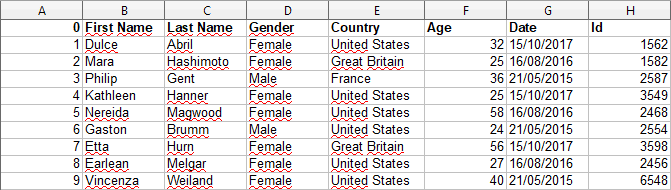
Here is the corresponding output CSV file (xlsxToCsv_output.csv):

6. Conclusion
Converting XLSX files to CSV format in Java can be efficiently achieved using Apache POI for reading and either Apache Commons CSV or OpenCSV for writing.
Both CSV libraries offer powerful tools for handling and writing different data types to CSV.














