Implement Feature Flags in Java With Unleash
Last updated: July 18, 2025


Mocking is an essential part of unit testing, and the Mockito library makes it easy to write clean and intuitive unit tests for your Java code.
Get started with mocking and improve your application tests using our Mockito guide:
Handling concurrency in an application can be a tricky process with many potential pitfalls. A solid grasp of the fundamentals will go a long way to help minimize these issues.
Get started with understanding multi-threaded applications with our Java Concurrency guide:
Spring 5 added support for reactive programming with the Spring WebFlux module, which has been improved upon ever since. Get started with the Reactor project basics and reactive programming in Spring Boot:
Since its introduction in Java 8, the Stream API has become a staple of Java development. The basic operations like iterating, filtering, mapping sequences of elements are deceptively simple to use.
But these can also be overused and fall into some common pitfalls.
To get a better understanding on how Streams work and how to combine them with other language features, check out our guide to Java Streams:
Explore Spring Boot 3 and Spring 6 in-depth through building a full REST API with the framework:
Yes, Spring Security can be complex, from the more advanced functionality within the Core to the deep OAuth support in the framework.
I built the security material as two full courses - Core and OAuth, to get practical with these more complex scenarios. We explore when and how to use each feature and code through it on the backing project.
You can explore the course here:
All Access is finally out, with all of my Spring courses. Learn JUnit is out as well, and Learn Maven is coming fast. And, of course, quite a bit more affordable. Finally.
>> GET THE COURSE
Spring Data JPA is a great way to handle the complexity of JPA with the powerful simplicity of Spring Boot.
Get started with Spring Data JPA through the guided reference course:
Refactor Java code safely — and automatically — with OpenRewrite.
Refactoring big codebases by hand is slow, risky, and easy to put off. That’s where OpenRewrite comes in. The open-source framework for large-scale, automated code transformations helps teams modernize safely and consistently.
Each month, the creators and maintainers of OpenRewrite at Moderne run live, hands-on training sessions — one for newcomers and one for experienced users. You’ll see how recipes work, how to apply them across projects, and how to modernize code with confidence.
Join the next session, bring your questions, and learn how to automate the kind of work that usually eats your sprint time.
1. Overview
In today’s fast-paced software development environment, dynamic feature management is essential.
Feature flags, often known as feature toggles, allow us to enable and disable features without releasing additional code. This article will show us how to add feature flags in Java using Unleash, an open-source feature management tool.
We’ll review the fundamentals of feature flags, including how to configure them with Unleash, integrate them into a Java application, and ensure our feature toggles operate properly.
2. Understanding Feature Flags and Why Use Them
Feature flags allow application developers to change a program’s functionality during runtime without redeploying the code. Using feature flags, we can enable/disable certain functions in the code by setting the value of feature toggles that reside outside of the application code, for example in a configuration file, a database, or a feature management system like Unleash.
The two key benefits are:
- Faster Development Cycles: Feature flags act like switches, allowing us to toggle features on and off without redeploying code. This accelerates the testing and delivery of new features.
- Limited Rolling Out Testing: Feature flags provide control over testing new features through A/B testing and canary deployments.
3. Introduction to Unleash
Unleash is an open-source feature management application that allows users to toggle between features. It offers an effective framework for managing feature flags across multiple environments. Unleash provides a variety of methodologies for managing feature releases, making it suited for both small teams and large companies. The following are the key features of Unleash:
- Flexibility: Supports custom techniques for feature toggling based on specific needs.
- Scalability: Manages feature flags across multiple environments and applications.
- Open Source: Community-driven with active development and support.
Unleash runs on a client-server architecture. The Unleash server acts as a centralized repository for feature flag configurations. Applications communicate with the server to get flag states and decide which features to enable depending on predefined strategies.
4. Setting up Unleash
To set up Unleash, we’ll first look at the installation steps, then we’ll learn how to configure a simple feature toggle.
4.1. Installation
Let’s walk through the installation of Unleash, configuring a local instance, logging in, and adding a feature flag.
To start with Unleash, first, we need to set up an Unleash server and ensure we have installed Docker and Git on our machine. We can run Unleash locally using Docker or deploy it in the cloud. Here’s a quick guide to setting it up locally using Docker.
First, let’s use Git to clone the Unleash repository and Docker to build and run it. We’ll open a terminal window and run the following commands:
git clone https://github.com/Unleash/unleash.git
cd unleash
docker compose up -d
We’ll now have Unleash installed on our machine and running in the background. We can access this instance in our web browser at http://localhost:4242 and log in using:
Username: admin
Password: unleash4all
4.2. Setup
Once we log in, we can see the below dashboard. Here, we select ‘Projects‘ from the left sidebar to either create or select the project and the feature flag under that project:
For this article, we’ll use the default project, so we click on the ‘Default‘ project:
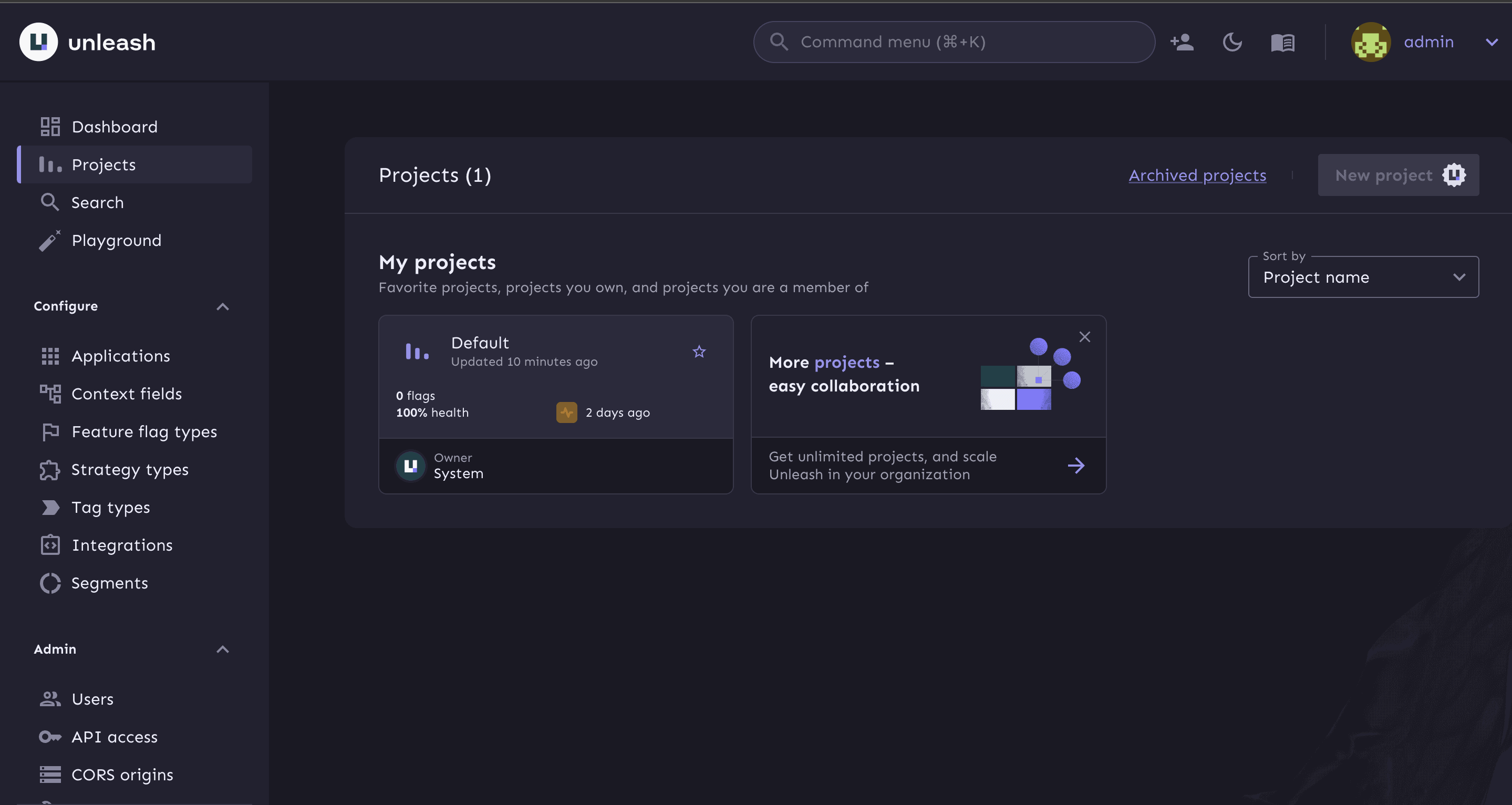
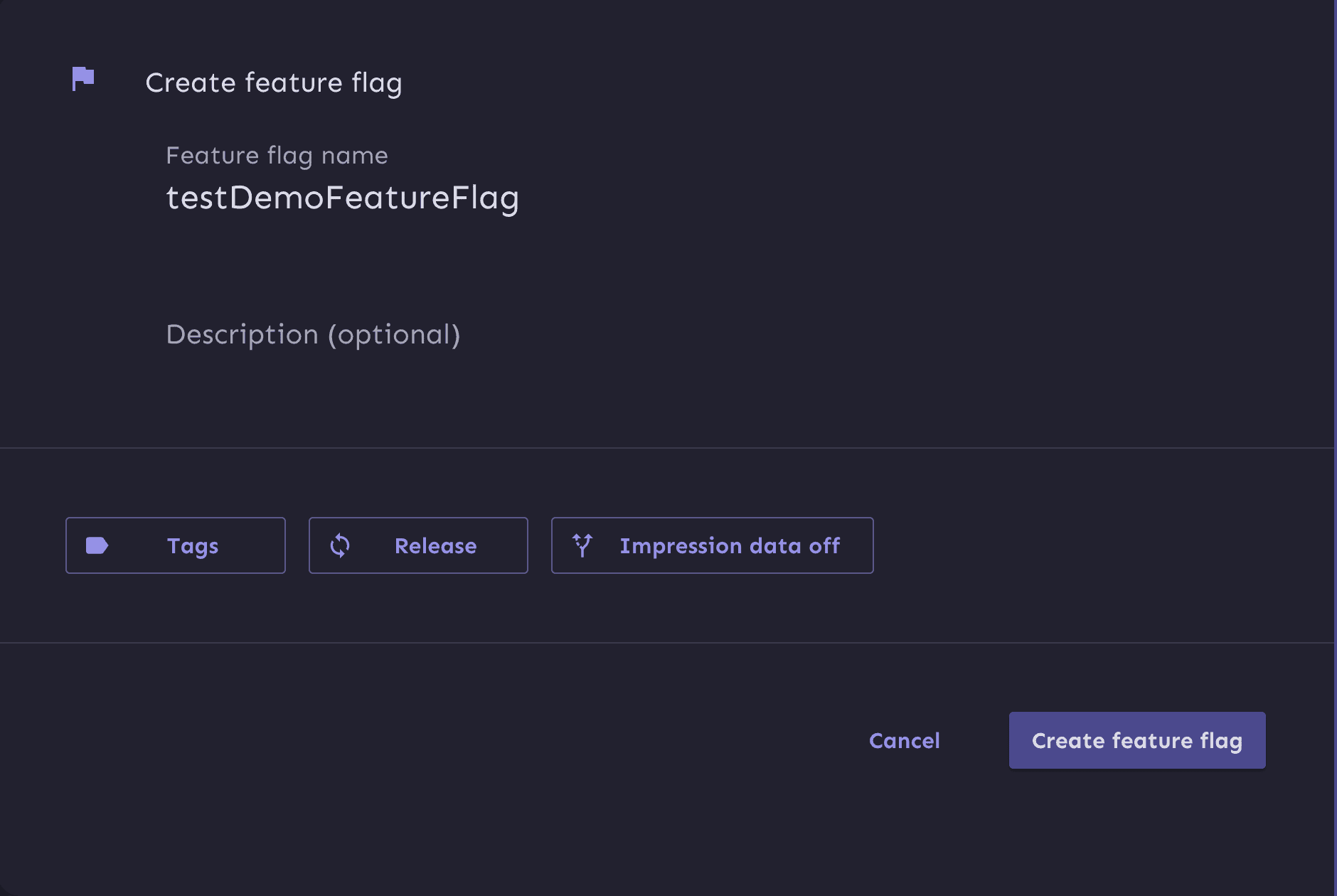
Next, we’ll create a feature flag by clicking on ‘New feature flag‘ and name it ‘testDemoFeatureFlag‘. We’ll use the default values in the rest of the feature flag form:

We’ve created the new feature flag and it’s now ready for use. We need to enable this flag for use in our development environment. This makes it accessible in our application in the local environment:

Next, we need to generate an API token to authenticate calls made to the Unleash server from our project. Our application will eventually pull in this API token to toggle features. We require this API token as part of our flag configuration to ensure only applications with correct authentication can access our feature flag in Unleash.
From the left sidebar, we expand the ‘Admin‘ section, select ‘API access‘ and click on the ‘New API token‘ button:

We name the API token and select the ‘Server-side SDK(CLIENT)‘ type, since we’ll be doing flag evaluation on the server side using Java SDK. This token should have access to the ‘development‘ environment:

5. Using Unleash in Java
Here, we’re using a Spring Boot application with the Maven build tool to download and install the dependencies. In the pom.xml file, we add the Unleash client dependency:
<dependency>
  <groupId>io.getunleash</groupId>
  <artifactId>unleash-client-java</artifactId>
  <version>9.2.6</version>
</dependency>
Next, we configure the Unleash Client using the Unleash builder:
UnleashConfig config = UnleashConfig.builder()
  .appName("appName")
  .instanceId("instanceId")
  .unleashAPI("http://localhost:4242/api/")
  .apiKey("apiToken")
  .build();

Unleash unleash = new DefaultUnleash(config);
To make sure that we connect to the Unleash server at application startup, we can add the above code in the application’s main function or any other place that’s called during the initialization of our application.
Let’s go through the key components used in creating an UnleashConfig object:
- appName is the name of our application. It helps identify which app is using the feature flags especially useful when managing applications on the same Unleash server.
- instanceId is an identifier for the instance of our application. It helps in tracking and logging feature flag usage per instance.
- unleashAPI is the URL of Unleash server’s API. It tells the client where to fetch the feature flag configurations from. In our local setup, this would be http://localhost:4242/api/.
The Unleash client object is initialized using this configuration, allowing our application to connect and efficiently manage feature flags. We can get additional information about configuration options and API tokens in their official documentation.
6. Verify Feature Toggle Experience
After setting up feature flags on the local Unleash server and our Java application, we can verify whether our flag is enabled and our Java program is reading the flag’s status or not.
Here’s the implementation of the Java code:
public static void main(String[] args) throws InterruptedException {
    String appName = "unleash-onboarding-java";
    String appInstanceID ="unleash-onboarding-instance";
    String appServerUrl = "http://localhost:4242/api/";
    String appToken = "<AddYourApiTokenHere>";

    SpringApplication.run(DemoApplication.class, args);
    UnleashConfig config = UnleashConfig.builder()
      .appName(appName)
      .instanceId(appInstanceID)
      .unleashAPI(appServerUrl)
      .apiKey(appToken)
      .build();

    Unleash unleash = new DefaultUnleash(config);
    while(true) {
        if(unleash.isEnabled("testDemoFeatureFlag")) {
            log.info("New feature is enabled!");
        } else {
            log.info("New feature is disabled!");
        }
        Thread.sleep(1000);
    }
}
With the flag toggle on, we should see the corresponding status as shown in the below image:

We can use Unleash to turn off the flag and view an updated status in the console output. In the Unleash dashboard, we disable the testFeatureFlag in the development environment:
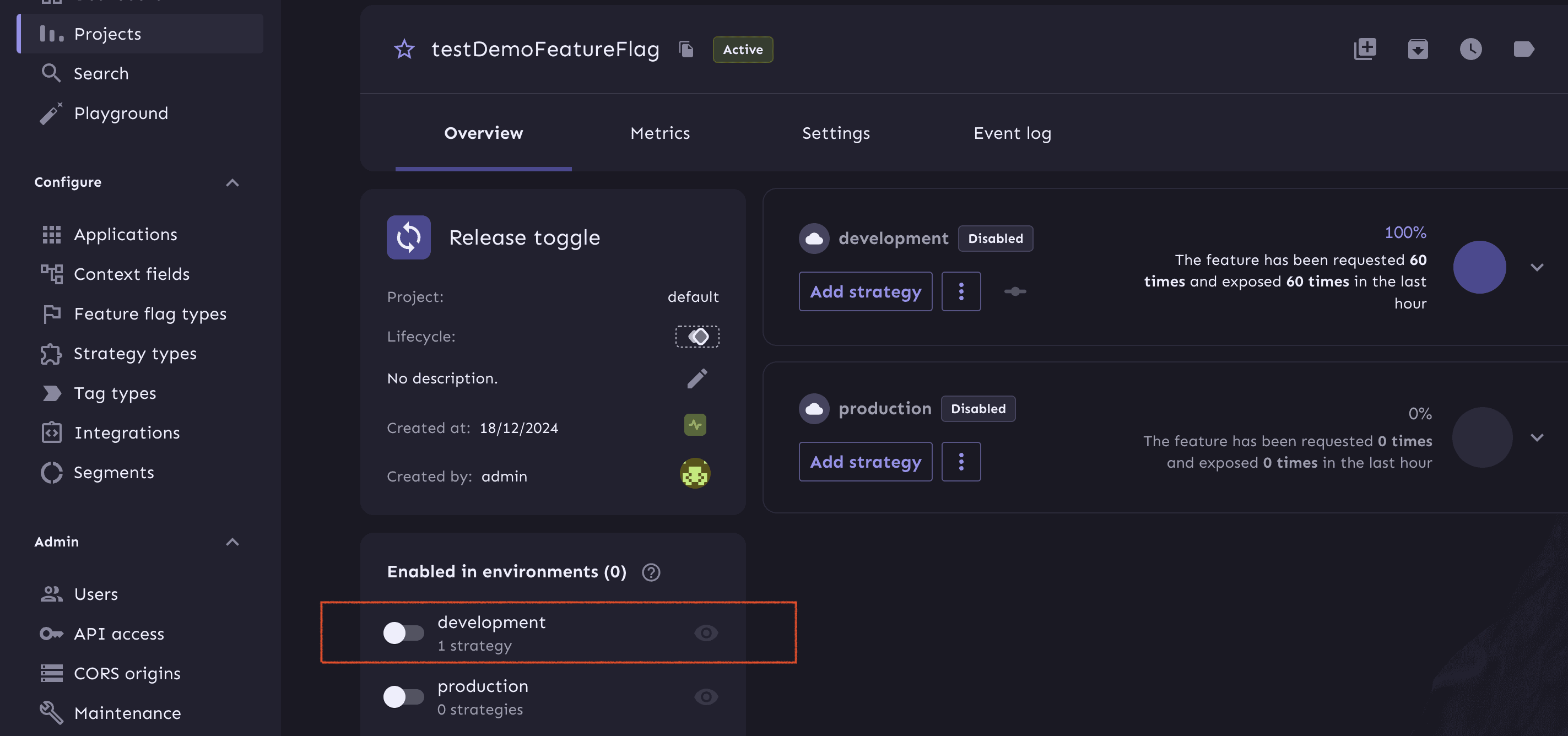
After a few seconds, our app updates to reflect the latest flag status, which looks like this output change in the console:

7. Conclusion
This article provided an in-depth guide to understanding, implementing, and testing feature flags using Unleash. We can efficiently manage feature flags and roll out changes dynamically with minimum risk.














