Loading Test Data from Files in JUnit Tests with Java Test Gadgets Test Data Factory
Last updated: June 24, 2025


Mocking is an essential part of unit testing, and the Mockito library makes it easy to write clean and intuitive unit tests for your Java code.
Get started with mocking and improve your application tests using our Mockito guide:
Handling concurrency in an application can be a tricky process with many potential pitfalls. A solid grasp of the fundamentals will go a long way to help minimize these issues.
Get started with understanding multi-threaded applications with our Java Concurrency guide:
Spring 5 added support for reactive programming with the Spring WebFlux module, which has been improved upon ever since. Get started with the Reactor project basics and reactive programming in Spring Boot:
Since its introduction in Java 8, the Stream API has become a staple of Java development. The basic operations like iterating, filtering, mapping sequences of elements are deceptively simple to use.
But these can also be overused and fall into some common pitfalls.
To get a better understanding on how Streams work and how to combine them with other language features, check out our guide to Java Streams:
Explore Spring Boot 3 and Spring 6 in-depth through building a full REST API with the framework:
Yes, Spring Security can be complex, from the more advanced functionality within the Core to the deep OAuth support in the framework.
I built the security material as two full courses - Core and OAuth, to get practical with these more complex scenarios. We explore when and how to use each feature and code through it on the backing project.
You can explore the course here:
All Access is finally out, with all of my Spring courses. Learn JUnit is out as well, and Learn Maven is coming fast. And, of course, quite a bit more affordable. Finally.
>> GET THE COURSE
Spring Data JPA is a great way to handle the complexity of JPA with the powerful simplicity of Spring Boot.
Get started with Spring Data JPA through the guided reference course:
Refactor Java code safely — and automatically — with OpenRewrite.
Refactoring big codebases by hand is slow, risky, and easy to put off. That’s where OpenRewrite comes in. The open-source framework for large-scale, automated code transformations helps teams modernize safely and consistently.
Each month, the creators and maintainers of OpenRewrite at Moderne run live, hands-on training sessions — one for newcomers and one for experienced users. You’ll see how recipes work, how to apply them across projects, and how to modernize code with confidence.
Join the next session, bring your questions, and learn how to automate the kind of work that usually eats your sprint time.
1. Overview
When writing JUnit tests, we may need to make test data to use as inputs or expected outputs of our code. We can do this by instantiating Java objects within our tests, or in test data factory classes, but in some cases it’s easier to create files containing our test data, and load them during the test.
In this tutorial, we’ll look at how to load test data from the file system and learn how Java Test Gadgets solves this problem with its Test Data Factory plugin for JUnit 4 and JUnit 5.
2. Example
Let’s look at an example where having test data in files might be useful.
2.1. Text Converter
Let’s imagine we’re creating a module to load text for processing. It has a model which stores Paragraphs in a Document, with Sentences in the Paragraph, and Tokens in the Sentence:
public class Document {
    private List<Paragraph> paragraphs;
}

public class Paragraph {
    public enum Style { NORMAL, HEADING };

    private List<Sentence> sentences;
    private Style style = Style.NORMAL;
}

public class Sentence {
    private List<String> tokens;
}
We want to write a converter between this format and files in .txt and .md format, and we want to use test-driven development to complete our stub implementation:
public class Converter {
    public static Document fromText(String text) {
        // TO DO
    }

    public static Document fromMarkdown(String markdown) {
        // TO DO
    }

    public static String fromDocument(Document doc) {
        // TO DO
    }

    public static String toMarkdown(Document doc) {
        // TO DO
    }
}
We could store a text file, plain.txt, in our src/test/resources/testdata directory for use with this test:
Paragraph one starts here.
Then paragraph two follows. It has two sentences.
And we might expect that to be parsed into a Document which could be stored in a .json file:
{
  "paragraphs": [
    {
      "style": "NORMAL",
      "sentences": [
        {
          "tokens": ["Paragraph", "one", "starts", "here."]
        }
      ]
    },
    {
      "style": "NORMAL",
      "sentences": [
        {
          "tokens": ["Then", "paragraph", "two", "follows."]
        },
        {
          "tokens": ["It", "has", "two", "sentences."]
        }
      ]
    }
  ]
}
2.2. Comparing With Local Objects
Instead of data files, we could use plain Java in a TestDataFactory class to build our test data:
public class TestDataFactory {
    public static String twoParagraphs() {
        return "Paragraph one starts here.\n" +
          "Then paragraph two follows. It has two sentences.";
    }
}
It’s lightweight for Strings, but longer documents might lead to big .java files.
However, building our Document object involves more code:
public static Document twoParagraphsAsDocument() {
    Paragraph paragraph1 = new Paragraph();
    paragraph1.setStyle(Paragraph.Style.NORMAL);

    Sentence sentence1 = new Sentence();
    sentence1.setTokens(asList("Paragraph", "one", "starts", "here."));
    paragraph1.setSentences(asList(sentence1));

    Paragraph paragraph2 = new Paragraph();
    paragraph2.setStyle(Paragraph.Style.NORMAL);
    Sentence sentence2 = new Sentence();
    sentence2.setTokens(asList("Then", "paragraph", "two", "follows."));
    Sentence sentence3 = new Sentence();
    sentence3.setTokens(asList("It", "has", "two", "sentences."));
    paragraph2.setSentences(asList(sentence2, sentence3));

    Document document = new Document();
    document.setParagraphs(asList(paragraph1, paragraph2));
    return document;
}
We might make this code easier to write by adding builders or special constructors, but data files would be easier.
2.3. Features We Need for Using Test Data Files in Tests
When using test data from files, we need:
- Deserialization from the file to the right type
- Checked exception handling – especially for IOException – without making our test code messy
- Reloading where we’ve changed data during the test
- Avoid performance cost through reloading files when it’s not needed
- Handle file paths across multiple operating systems
3. Test Data Files in Plain Java
We can create a test data factory that loads files from the file system.
3.1. Working out the Path
We need to be able to express the path to the file in our src/test/resources without using a system-specific file separator:
Path path = Paths.get("src", "test", "resources",
  "testdata", "twoParagraphs.txt");
3.2. Loading Plaintext
And then we can use Files.lines() to load a plain text file from this path:
public class TestDataFilesFactory {
    public static String twoParagraphs() throws IOException {
        Path path = Paths.get("src", "test", "resources",
          "testdata", "twoParagraphs.txt");
        try (Stream<String> file = Files.lines(path)) {
            return file.collect(Collectors.joining("\n"));
        }
    }
}
We should note that this function throws a checked IOException unless we explicitly add a catch block to re-throw using a RuntimeException.
3.3. Loading JSON
For Document, we can use Jackson‘s ObjectMapper to load the JSON:
public static Document twoParagraphsAsDocument() throws IOException {
    ObjectMapper objectMapper = new ObjectMapper();
    return objectMapper.readValue(
      Paths.get("src", "test", "resources",
        "testdata", "twoParagraphs.json").toFile(), Document.class);
}
3.4. Using Loaded Files in a Test
We can then use these loaded values in a unit test:
@Test
void givenDocumentAndPlaintextInFiles_whenConvertToText_thenMatches() throws IOException {
    Document source = TestDataFilesFactory.twoParagraphsAsDocument();

    String asPlaintext = TestDataFilesFactory.twoParagraphs();

    assertThat(Converter.fromDocument(source)).isEqualTo(asPlaintext);
}
3.5. Limitations of This Approach
The code for this isn’t especially complex, but there’s a lot of boilerplate. The immutable String of the plaintext file would need to be loaded for every test. While we could use a static field, we’d have to handle the IOException to initialize it.
The boilerplate for navigating the path structure also requires either repetition or careful coding.
It would be easier if we could just declare which data we want and have it injected into our tests for us.
4. Test Data Factory JUnit 4
4.1. Dependencies
To use this, we need the test-gadgets dependency:
<dependency>
    <groupId>uk.org.webcompere</groupId>
    <artifactId>test-gadgets-junit4</artifactId>
    <version>1.0.2</version>
    <scope>test</scope>
</dependency>
4.2. Adding to JUnit 4 Test
The TestDataFieldsRule enables fields in our test to be injected from files:
@Rule
public TestDataFieldsRule rule = new TestDataFieldsRule(new TestDataLoader().addPath("testdata"));
The rule will create its own TestDataLoader if we don’t provide one, but here we’ve added a loader object which expects our files to be stored within our testdata subdirectory.
Then, to inject a .json file into a POJO, we can declare a field annotated with @TestData:
@TestData
private Document twoParagraphs;
This uses the default file extension (.json) and assumes the file name and field name match. Thus, it loads twoParagraphs.json into the Document. Where we have a file with a different extension, we can give the filename inside the @TestData annotation:
@TestData("twoParagraphs.txt")
private String twoParagraphsText;
If there were subdirectories, we could express those as an array of strings inside the annotation.
This means our unit test can now assert using the fields:
assertThat(Converter.fromDocument(twoParagraphs)).isEqualTo(twoParagraphsText);This approach requires minimal boilerplate.
5. Test Data Factory JUnit 5
5.1. Dependencies
We start by adding the dependency to our pom.xml:
<dependency>
    <groupId>uk.org.webcompere</groupId>
    <artifactId>test-gadgets-jupiter</artifactId>
    <version>1.0.2</version>
    <scope>test</scope>
</dependency>
5.2. Adding to JUnit 5 Test
First, we annotate our test with @TestDataFactory, providing the subdirectory for our test files:
@TestDataFactory(path = "testdata")
class ConverterTestFactoryFieldsJUnit5UnitTest {}
Then we can add the fields, annotated with @TestData as before, and the same unit test to use them:
@TestData
private Document twoParagraphs;

@TestData("twoParagraphs.txt")
private String twoParagraphsText;

@Test
void givenDocumentAndPlaintextInFiles_whenConvertToText_thenMatches() {
    assertThat(Converter.fromDocument(twoParagraphs)).isEqualTo(twoParagraphsText);
}
5.3. Parameter Injection
If we had a lot of tests using different files, we might prefer to have the specific data injected on a test-by-test basis:
@Test
void givenInjectedFiles_whenConvertToText_thenMatches(
  @TestData("twoParagraphs.json") Document twoParagraphs,
  @TestData("twoParagraphs.txt") String twoParagraphsText) {
    // assertion
}
The input parameters to this test are assigned from the contents of the files described by the annotations.
6. Lazy Loading
If we had a lot of files, then creating a few dozen fields and loading all of them before each test might be time-consuming. So, rather than use @TestData to inject the value of the file, we can use it to inject a Supplier:
@TestData("twoParagraphs.txt")
private Supplier<String> twoParagraphsText;
Then use the Supplier objects within our tests with get():
assertThat(Converter.fromDocument(twoParagraphs.get()))
  .isEqualTo(twoParagraphsText.get());
We could use it to put all possible test files into Supplier fields in a common test base class and use the ones we need in each test. But there’s a better solution for that.
7. Test Data Collection
7.1. Using a Collection
If we’re using the same set of test data in multiple places, or have groups of files with the same names in multiple directories for different purposes, then we can declare a test data collection to represent them and inject that. We start by defining an interface, annotated with @TestDataCollection, which has getter methods for each file:
@TestDataCollection
public interface TwoParagraphsCollection {
    @TestData("twoParagraphs.json")
    Document twoParagraphs();

    @TestData("twoParagraphs.txt")
    String twoParagraphsText();
}
Then we inject this interface into a test object with the @TestData annotation:
@TestData
private TwoParagraphsCollection collection;
And then use it within a test case:
assertThat(Converter.fromDocument(collection.twoParagraphs()))
  .isEqualTo(collection.twoParagraphsText());
In JUnit 5, this also works as an injected parameter:
@Test
void givenInjectedCollection_whenConvertToText_thenMatches(
  @TestData TwoParagraphsCollection collection) {
    assertThat(Converter.fromDocument(collection.twoParagraphs()))
      .isEqualTo(collection.twoParagraphsText());
}
7.2. Defining the Collection’s Directory
We may wish to have multiple sets of files with the same names in scenario-based directories:
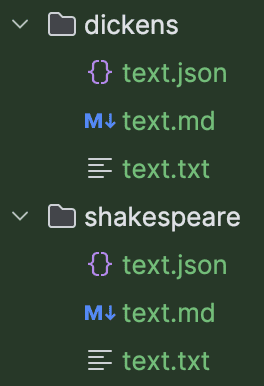
We can define a test data collection interface that represents these:
@TestDataCollection
public interface AllVersions {
    @TestData("text.json")
    Document document();

    @TestData("text.md")
    String markdown();

    @TestData("text.txt")
    String text();
}
Then we put the correct subdirectory into the @TestData annotation:
@TestData("dickens")
private AllVersions dickens;

@TestData("shakespeare")
private AllVersions shakespeare;
8. Supporting File Formats
By default, Test Data Factory only supports .txt and .json files. However, we can extend it.
8.1. Customising With Existing Loaders – JUnit 4
For our markdown example, we want to support loading .md files as text. When constructing our TestDataLoader, we can add a mapping for .md.
@Rule
public TestDataFieldsRule rule = new TestDataFieldsRule(
  new TestDataLoader()
    .addLoader(".md", new TextLoader())
    .addPath("testdata"));
8.2. Customising With Existing Loaders – JUnit 5
We can provide a custom loading setup for JUnit 5 via the @TestDataFactory annotation:
@TestDataFactory(
    loaders = { @FileTypeLoader(extension = ".md", loadedBy = TextLoader.class) },
    path = "testdata")
Here, the loaders property lets us map between file extensions and loading classes. The loading class must have a default constructor and implement the ObjectLoader interface.
Alternatively, we can customize a loader within a static field within our test class. It’s annotated with @Loader so the extension will use it:
@TestDataFactory
class StaticLoaderUnitTest {
    @Loader
    private static TestDataLoader customLoader = new TestDataLoader()
      .addLoader(".md", new TextLoader())
      .addPath("testdata");
}
We can also access the loader that the extension creates for us – perhaps to do some ad-hoc file loading. The extension will inject it into our test object if we provide an uninitialized field:
@Loader
private TestDataLoader loader;
8.3. Custom Loaders
We can also create completely new loaders by implementing the ObjectLoader interface. Or we could modify the ObjectMapper used by the JsonLoader by constructing it with a different mapper:
TestDataLoader customLoader = new TestDataLoader()
   .addLoader(".json", new JsonLoader(myObjectMapper));
Here we’re using addLoader() to provide a replacement loader for an existing file extension.
9. Reusing Loaded Data
If many of our tests are using the same data, and are not changing it during the test, it would be better not to have to reload that data from disk all the time. By sharing a loader between tests, we can achieve this. Similarly, we can use the Test Data Factory to provide values to static fields.
9.1. With JUnit 4 Class Rule
To populate static fields with the JUnit plugin, we need to use the TestDataClassRule:
@ClassRule
public static TestDataClassRule classRule = new TestDataClassRule(
  new TestDataLoader()
    .addLoader(".md", new TextLoader())
    .addPath("testdata"));
This is, according to JUnit 4’s standards, annotated with @ClassRule, and targets the static fields of the test class:
@TestData("twoParagraphs.txt")
private static String twoParagraphsTextStatic;
9.2. With JUnit 5
The @TestDataFactory defines the TestDataLoader at the class level and populates any static and non-static fields from it.
9.3. Immutable Data
We should treat the static fields of the class as shared across the tests. We should only use them for data we don’t intend to change.
However, we may have some values that we know we will not change and which we want to provide identically for fields, test data collections, or Supplier objects that we use in our tests.
As String is immutable, the TestDataLoader will automatically provide the same exact value, no matter how many times it’s injected:
@TestData("twoParagraphs.txt")
private static String twoParagraphsTextStatic;

@TestData("twoParagraphs.txt")
private String twoParagraphsTextField;

// ...
assertThat(twoParagraphsTextStatic).isSameAs(twoParagraphsTextField);
For other types of data, we need to explicitly mark it as safe from change.
9.4. Test Data May Change
One of the advantages of reading a file to build a test object is that we can customise it from a template. For example, in our AllVersions test data, we have an .md, a .txt, and a .json of the same text, and we can use them to test conversions between them. However, while the .json matches the formatting of titles in the .md version, the .txt version has no formatting.
So we may modify our temporary copy of the Document within the test to make things match:
Document document = shakespeare.document();
document.getParagraphs().get(0).setStyle(Paragraph.Style.NORMAL);
document.getParagraphs().get(1).setStyle(Paragraph.Style.NORMAL);
assertThat(Converter.fromText(shakespeare.text())).isEqualTo(document);
In this case, we benefit from each Document being a unique instance.
9.5. Asking for Data to Be Cached
However, when we know that test data will not change, we can add an immutability mode to the loader, or the item we’re injecting:
@TestData(value = "twoParagraphs.json", immutable = Immutable.IMMUTABLE)
private static Document twoParagraphsStaticImmutable;

@TestData(value = "twoParagraphs.json", immutable = Immutable.IMMUTABLE)
private Document twoParagraphsImmutable;

// ...
assertThat(twoParagraphsStaticImmutable).isSameAs(twoParagraphsImmutable);
Here, we proved that twoParagraphs.json is only loaded once before being provided to each field where the @TestData describes it as immutable.
10. Conclusion
In this article, we’ve looked at the benefits of using data files to store our test data, rather than building it programmatically.
We saw how we could load test data without any help from a framework. Then we looked at the Test Data Factory JUnit 4 plugin and JUnit 4 extension, which allows us to load test data declaratively.
We saw how to use Test Data Collections to modularise similar sets of test data, and how to provide a shared loader across tests so that data could be cached.














