


Mocking is an essential part of unit testing, and the Mockito library makes it easy to write clean and intuitive unit tests for your Java code.
Get started with mocking and improve your application tests using our Mockito guide:
Handling concurrency in an application can be a tricky process with many potential pitfalls. A solid grasp of the fundamentals will go a long way to help minimize these issues.
Get started with understanding multi-threaded applications with our Java Concurrency guide:
Spring 5 added support for reactive programming with the Spring WebFlux module, which has been improved upon ever since. Get started with the Reactor project basics and reactive programming in Spring Boot:
Since its introduction in Java 8, the Stream API has become a staple of Java development. The basic operations like iterating, filtering, mapping sequences of elements are deceptively simple to use.
But these can also be overused and fall into some common pitfalls.
To get a better understanding on how Streams work and how to combine them with other language features, check out our guide to Java Streams:
Explore Spring Boot 3 and Spring 6 in-depth through building a full REST API with the framework:
Yes, Spring Security can be complex, from the more advanced functionality within the Core to the deep OAuth support in the framework.
I built the security material as two full courses - Core and OAuth, to get practical with these more complex scenarios. We explore when and how to use each feature and code through it on the backing project.
You can explore the course here:
All Access is finally out, with all of my Spring courses. Learn JUnit is out as well, and Learn Maven is coming fast. And, of course, quite a bit more affordable. Finally.
>> GET THE COURSE
Spring Data JPA is a great way to handle the complexity of JPA with the powerful simplicity of Spring Boot.
Get started with Spring Data JPA through the guided reference course:
Refactor Java code safely — and automatically — with OpenRewrite.
Refactoring big codebases by hand is slow, risky, and easy to put off. That’s where OpenRewrite comes in. The open-source framework for large-scale, automated code transformations helps teams modernize safely and consistently.
Each month, the creators and maintainers of OpenRewrite at Moderne run live, hands-on training sessions — one for newcomers and one for experienced users. You’ll see how recipes work, how to apply them across projects, and how to modernize code with confidence.
Join the next session, bring your questions, and learn how to automate the kind of work that usually eats your sprint time.
1. Overview
Solon is an enterprise Java framework built independently of Spring.
In this tutorial, we’ll introduce Solon theoretically and in practice. First, we’ll start with a greeting endpoint and extend it into a REST API that stores tasks in an H2 database.
In particular, we’ll use Solon 4.1.0, Java 21, and Maven 3.9.16, with MyBatis-Flex 1.11.8 for persistence. Along the way, we’ll compare configuration, dependency injection, and HTTP handling with familiar Spring Boot concepts, then test the API through real HTTP requests.
2. What Is Solon
Solon separates its core application services from optional integrations. This gives us control over which features the application loads.
2.1. Core Principles and Architecture
The project emphasizes restrained design, efficiency, openness, and an extensible ecosystem. Its core provides dependency injection, aspect-oriented programming, and request routing. Plugins add capabilities such as database access and JSON serialization.
Solon doesn’t require a Servlet container or a Java EE application server. HTTP adapters connect its request abstractions to a server. The example here uses Smart-HTTP through the solon-web bundle, although Servlet adapters are also available.
2.2. The Solon Ecosystem
The main solon project is complemented by solon-cloud for distributed services and solon-ai for AI applications. There are also other related projects:
- solon-flow for workflows
- solon-expression for expression evaluation
- and solon-admin for application administration
The solon-java17 and solon-java25 projects host implementations targeting newer Java baselines. The wider plugin ecosystem includes MyBatis-Flex, JPA, Redis, Sa-Token, Nacos, and gateway integrations.
2.3. When Solon Is a Good Fit
Solon’s modular design makes it worth evaluating for microservices, serverless functions, and applications with constrained resources, including embedded or IoT workloads. Its AI modules also offer a starting point for applications that call language models.
These are candidates for evaluation, rather than performance guarantees. For a service with demanding concurrency requirements, we need to benchmark the actual workload with the required plugins.
Spring Boot may remain the more practical choice when a team already relies on its integrations and operating procedures. Adopting Solon means learning a different set of annotations, configuration conventions, and extension points.
3. First Application
Let’s create a Maven project with the standard src/main/java directory. Further, we place App in com.baeldung.solon and the controllers in its web subpackage.
3.1. Prerequisites
The test environment uses OpenJDK 21 and Maven 3.9.16. The POM excerpt we show assumes the Baeldung repository layout and its shared parent-modules POM.
So, let’s import solon-parent 4.1.0 as a BOM and add solon-web to pom.xml:
<parent>
    <groupId>com.baeldung</groupId>
    <artifactId>parent-modules</artifactId>
    <version>1.0.0-SNAPSHOT</version>
</parent>

<dependencyManagement>
    <dependencies>
        <dependency>
            <groupId>org.noear</groupId>
            <artifactId>solon-parent</artifactId>
            <version>4.1.0</version>
            <type>pom</type>
            <scope>import</scope>
        </dependency>
    </dependencies>
</dependencyManagement>

<dependencies>
    <dependency>
        <groupId>org.noear</groupId>
        <artifactId>solon-web</artifactId>
    </dependency>
</dependencies>

<properties>
    <java.version>21</java.version>
    <maven.compiler.parameters>true</maven.compiler.parameters>
</properties>
The BOM manages matching Solon dependency versions. The compiler retains method parameter names so Solon can bind request parameters by name. The web bundle brings in solon-lib, solon-server-smarthttp, and solon-serialization-snack4, among other plugins.
Solon declares support for Java 8 through Java 26, which can also make it relevant to legacy applications. However, individual integrations can require newer Java versions. This project specifically targets Java 21.
3.2. Hello World
Let’s add an entry point that starts the application and discovers components in its package and subpackages:
public class App {
    public static void main(String[] args) {
        Solon.start(App.class, args);
    }
}
Spring Boot commonly combines SpringApplication.run() with @SpringBootApplication. Here, Solon.start() initializes the container and available plugins without that annotation.
Next, let’s expose a greeting that accepts an optional query parameter:
@Controller
public class DemoController {
    @Get
    @Mapping("/hello")
    public String hello(@Param(defaultValue = "World") String name) {
        return "Hello, " + name + "!";
    }
}
@Mapping defines the path, while @Get restricts the HTTP method. @Param supplies a default when name is absent. In particular, these annotations come from org.noear.solon.annotation.
For this endpoint, Solon writes the returned string to the response body as plain text. A comparable Spring REST endpoint typically uses @RestController with @GetMapping.
3.3. Running the Application
To run the entry point from Maven, let’s configure exec-maven-plugin 3.6.4 under build/plugins:
<plugin>
    <groupId>org.codehaus.mojo</groupId>
    <artifactId>exec-maven-plugin</artifactId>
    <version>3.6.4</version>
    <configuration>
        <mainClass>com.baeldung.solon.App</mainClass>
    </configuration>
</plugin>
With the plugin in place, we can compile and start the application:
mvn compile exec:javaFrom another terminal, let’s call the endpoint:
curl 'http://localhost:8080/hello?name=Baeldung'Thus, the response confirms that the query parameter reaches the controller:
Hello, Baeldung!Calling /hello without the parameter returns Hello, World!.
4. RESTful API Example
The API we’re constructing can create, list, update, and delete tasks. Specifically, each task has a generated ID, a title, and a completion flag.
4.1. Dependencies
Let’s add the MyBatis-Flex Solon plugin 1.11.8, HikariCP 7.1.0, and H2 2.5.250 to the dependencies:
<dependency>
    <groupId>com.mybatis-flex</groupId>
    <artifactId>mybatis-flex-solon-plugin</artifactId>
    <version>1.11.8</version>
</dependency>
<dependency>
    <groupId>com.zaxxer</groupId>
    <artifactId>HikariCP</artifactId>
    <version>7.1.0</version>
</dependency>
<dependency>
    <groupId>com.h2database</groupId>
    <artifactId>h2</artifactId>
    <version>2.5.250</version>
    <scope>runtime</scope>
</dependency>
Next, we continue with the configuration.
4.2. Configuration Properties
Solon reads application settings from src/main/resources/app.yml. So, let’s name the application, choose its port, and configure a HikariCP connection pool and mapper discovery:
solon.app:
  name: task-api
  group: examples
server.port: 8080
solon.dataSources:
  tasks!:
    class: com.zaxxer.hikari.HikariDataSource
    jdbcUrl: jdbc:h2:mem:tasks
    username: sa
    password: ""
    maximumPoolSize: 4
mybatisFlex:
  mapperLocations:
    - com.baeldung.solon.persistence
The ! suffix registers the datasource by type as well as by the name tasks. Here, we use that name when injecting it. The mapperLocations list identifies the package containing the mapper interface.
Settings from later configuration layers override earlier values for the same key. The six-layer configuration model places application files at the lowest priority:
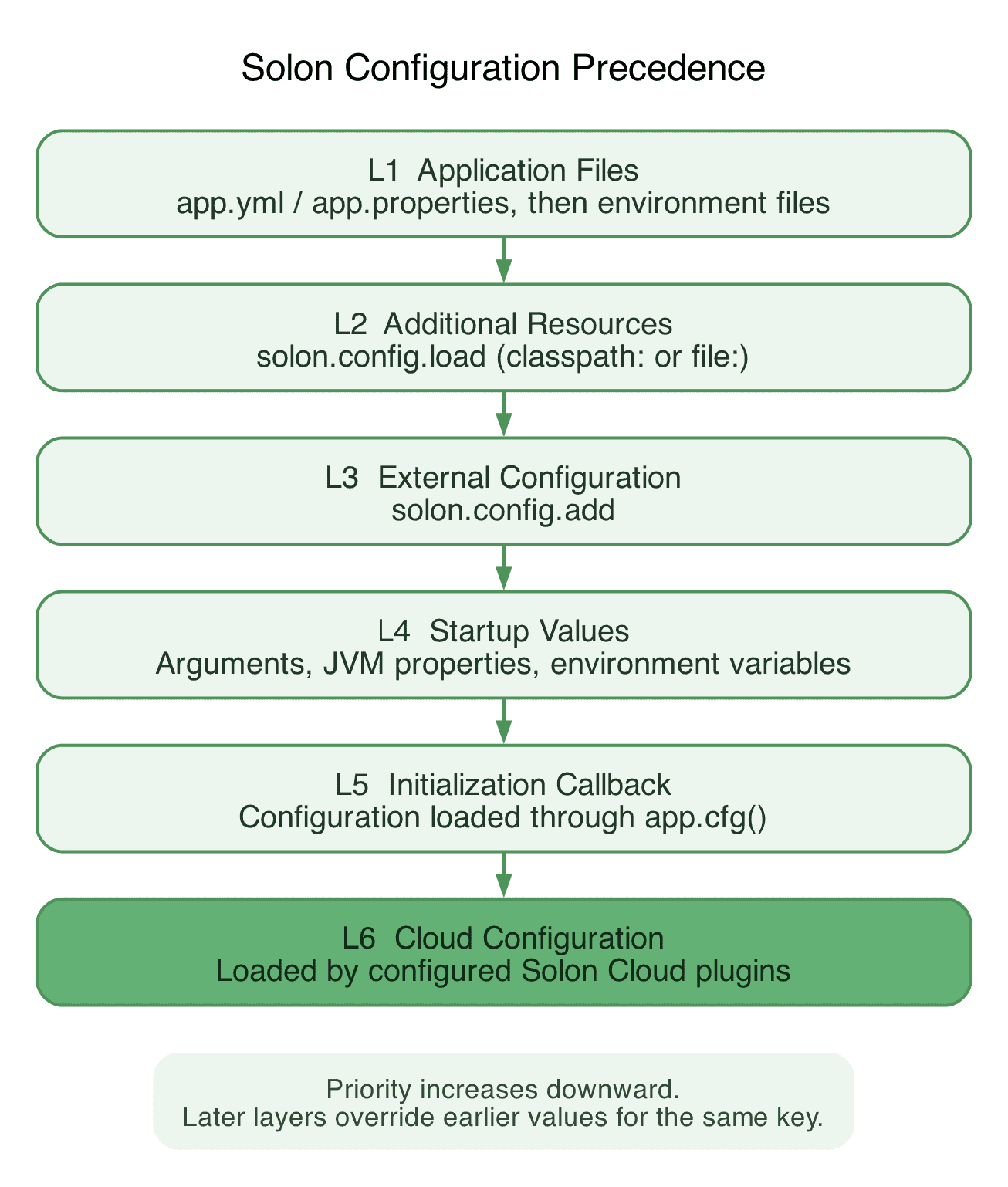
For example, a startup argument overrides the port in app.yml:
mvn compile exec:java -Dexec.args="--server.port=8081"The cloud layer only applies when the relevant plugins are configured. While Spring Boot users are familiar with externalized configuration, Solon uses app.properties or app.yml instead of the Spring Boot application.properties or application.yml.
Critically, the H2 database lives in memory only. Its contents disappear when the application stops.
4.3. Architectural Layers
Let’s organize the code around three responsibilities:
- TaskController handles HTTP requests and responses
- TaskService validates titles and coordinates database operations
- TaskMapper performs persistence operations through MyBatis-Flex
The Solon @Component annotation registers the service as a managed bean. Spring provides additional role-specific annotations, such as @Service and @Repository. However, neither framework requires this layered organization.
In addition, we can connect the objects with @Inject, which fills a role similar to that of Spring @Autowired.
4.4. Presentation Layer
A record defines the fields accepted in a request body:
public record TaskRequest(String title, Boolean completed) {
}
Using Boolean enables the completion flag to be null. Conversely, creating a task always sets it to false. On the other hand, updating a task treats an absent or null flag as false.
Let’s register a controller under /tasks and inject the service. Its creation endpoint binds JSON with @Body:
@Controller
@Mapping("/tasks")
public class TaskController {
    @Inject
    private TaskService taskService;

    @Post
    @Mapping
    public Task create(@Body TaskRequest request, Context context) {
        Task task = taskService.create(request.title());
        context.status(201);
        context.headerSet("Location", "/tasks/" + task.getId());
        return task;
    }
}
Returning a Task lets the Snack4 plugin serialize the response as JSON. Furthermore, the endpoint sets status 201 and a Location header pointing to the new resource.
Inside the same controller, the update method combines a path parameter with a JSON body:
@Put
@Mapping("/{id}")
public Task update(long id, @Body TaskRequest request) {
    return taskService.update(id, request.title(),
      Boolean.TRUE.equals(request.completed()));
}
Solon binds {id} to the parameter named id. The complete controller also provides several mappings:
- GET /tasks returns all tasks, ordered by ID
- GET /tasks/{id} returns one task
- DELETE /tasks/{id} deletes a task and returns 204 with an empty body
These are fairly standard endpoints, so the structure and framework remain the focus instead of the implementation.
4.5. Business Logic Layer
Let’s annotate TaskService with @Component. It receives a mapper and creates tasks within a transaction:
@Inject
TaskMapper taskMapper;

@Transaction
public Task create(String title) {
    Task task = new Task();
    task.setTitle(normalizeTitle(title));
    task.setCompleted(false);
    taskMapper.insert(task);
    return task;
}
Here, @Transaction comes from org.noear.solon.data.annotation. The persistence plugin integrates mapper operations with the Solon transaction management.
The normalizeTitle() helper strips surrounding whitespace and rejects blank titles or titles longer than 200 characters. Invalid input raises IllegalArgumentException.
Updates first load the existing task, preserving its ID. Missing tasks raise NoSuchElementException. Deletion checks the number of affected rows so deleting an unknown ID produces the same error.
The application ApiErrorFilter translates those exceptions into JSON responses with status 400 or 404. This keeps HTTP status handling out of the service.
4.6. Persistence Layer
The Task entity is a mutable POJO with standard getters and setters. In addition, its MyBatis-Flex mapping uses an automatically generated key:
@Table("tasks")
public class Task {
    @Id(keyType = KeyType.Auto)
    private Long id;
    private String title;
    private boolean completed;

    // getters and setters
}
MyBatis-Flex writes the generated ID back into the entity after insertion. Thus, the controller has the ID needed for the response and its Location header.
The mapper inherits the standard database operations:
public interface TaskMapper extends BaseMapper<Task> {
}
The plugin discovers this interface through the mybatisFlex.mapperLocations configuration and makes it available for injection. We don’t need to implement its insert, update, or delete methods.
4.7. Initializing the Database
Let’s save the table definition in src/main/resources/schema.sql:
CREATE TABLE IF NOT EXISTS tasks (
    id BIGINT GENERATED BY DEFAULT AS IDENTITY PRIMARY KEY,
    title VARCHAR(200) NOT NULL,
    completed BOOLEAN NOT NULL DEFAULT FALSE
);
The DatabaseInitializer is another @Component. In this case, it receives the named datasource and executes a script in its @Init method:
@Inject("tasks")
private DataSource dataSource;

@Init
public void initialize() throws SQLException, IOException {
    String schema = ResourceUtil.getResourceAsString("schema.sql");
    try (Connection connection = dataSource.getConnection();
      Statement statement = connection.createStatement()) {
        statement.execute(schema);
    }
}
Solon invokes the initialization method after dependency injection. The schema is created explicitly by this component, and try-with-resources closes the JDBC resources afterward.
4.8. Trying the API
After restarting the completed application on port 8080, let’s create a task:
curl -i -X POST http://localhost:8080/tasks \
  -H 'Content-Type: application/json' \
  -d '{"title":"Learn Solon"}'
On a fresh database, the response has status 201 Created, a Location: /tasks/1 header, and this JSON body:
{"id":1,"title":"Learn Solon","completed":false}Using the returned ID, let’s read, update, and delete the task:
curl http://localhost:8080/tasks/1
curl -X PUT http://localhost:8080/tasks/1 \
  -H 'Content-Type: application/json' \
  -d '{"title":"Learn Solon REST APIs","completed":true}'
curl -i -X DELETE http://localhost:8080/tasks/1
The update returns the changed task. Deletion returns 204 No Content, and a subsequent read returns 404. A blank title produces 400 with a JSON error message.
4.9. API Testing
For automated tests, we add solon-test, which includes JUnit 5 in this Solon version:
<dependency>
    <groupId>org.noear</groupId>
    <artifactId>solon-test</artifactId>
    <scope>test</scope>
</dependency>
The example module uses JUnit 5.14.4 with Surefire 3.5.5 and inherits the test selection rules from the Baeldung shared parent POM.
Next, let’s enable the HTTP server and select the test environment:
@SolonTest(value = App.class, env = "test", enableHttp = true,
  delay = 0, debug = false)
public class TaskApiIntegrationTest {
    @Inject("${server.port}")
    private int port;

    @Inject
    private TaskService taskService;
}
Solon requires a public test class here. In the repository, app-test.yml selects a separate H2 database. The Maven integration profile reserves an available port and passes it as server.port.
The request() helper uses the JDK HttpClient to contact that port. This test therefore checks the actual HTTP response and the database state:
@Test
void givenBlankTitle_whenCreatingTask_thenReturnBadRequestWithoutPersisting() throws Exception {
    HttpResponse<String> response = request("POST", "/tasks", "{\"title\":\" \"}");

    assertEquals(400, response.statusCode());
    assertEquals("Title must not be blank",
      ONode.ofJson(response.body()).get("message").getString());
    assertTrue(taskService.findAll().isEmpty());
}
The integration suite also checks greetings, missing IDs, and a complete create-read-update-delete sequence. Let’s run unit tests and integration tests separately from the module directory:
mvn clean install -Pdefault
mvn clean install -Pintegration
Let’s see the integration report:
Tests run: 5, Failures: 0, Errors: 0, Skipped: 0Thus, all tests pass without issues.
4.10. Transaction Rollback
Finally, let’s demonstrate @Rollback with a separate service-level test:
@Test
@Rollback
public void whenCreatingTaskWithinTransaction_thenReadUncommittedTask() {
    Task task = taskService.create("Temporary task");

    assertEquals("Temporary task", taskService.findById(task.getId()).getTitle());
}
The annotated method is public so the Solon proxy can intercept it. The @AfterEach hook checks that the database is empty before cleanup, verifying the rollback.
Notably, we don’t apply @Rollback to the test that exercises CRUD across multiple HTTP requests. When @Rollback is active, Solon installs an interceptor that rolls back the transaction of each HTTP request separately. A task created by one request is therefore unavailable to the next.
The HTTP workflow test therefore runs without @Rollback and uses explicit row cleanup before and after each test. Changes persist across requests within a test, while cleanup keeps tests isolated from one another.
5. Conclusion
In this article, we built and tested a Solon REST API with MyBatis-Flex and H2. Further, we saw how its annotations, configuration layers, and plugins supported request handling and persistence, including the difference between testing an HTTP workflow and verifying transaction rollback.
As always, the full source code is available over on GitHub.














