Set a Parameter in an HttpServletRequest in Java
Last updated: January 8, 2024


Mocking is an essential part of unit testing, and the Mockito library makes it easy to write clean and intuitive unit tests for your Java code.
Get started with mocking and improve your application tests using our Mockito guide:
Handling concurrency in an application can be a tricky process with many potential pitfalls. A solid grasp of the fundamentals will go a long way to help minimize these issues.
Get started with understanding multi-threaded applications with our Java Concurrency guide:
Spring 5 added support for reactive programming with the Spring WebFlux module, which has been improved upon ever since. Get started with the Reactor project basics and reactive programming in Spring Boot:
Since its introduction in Java 8, the Stream API has become a staple of Java development. The basic operations like iterating, filtering, mapping sequences of elements are deceptively simple to use.
But these can also be overused and fall into some common pitfalls.
To get a better understanding on how Streams work and how to combine them with other language features, check out our guide to Java Streams:
Explore Spring Boot 3 and Spring 6 in-depth through building a full REST API with the framework:
Yes, Spring Security can be complex, from the more advanced functionality within the Core to the deep OAuth support in the framework.
I built the security material as two full courses - Core and OAuth, to get practical with these more complex scenarios. We explore when and how to use each feature and code through it on the backing project.
You can explore the course here:
Spring Data JPA is a great way to handle the complexity of JPA with the powerful simplicity of Spring Boot.
Get started with Spring Data JPA through the guided reference course:
Refactor Java code safely — and automatically — with OpenRewrite.
Refactoring big codebases by hand is slow, risky, and easy to put off. That’s where OpenRewrite comes in. The open-source framework for large-scale, automated code transformations helps teams modernize safely and consistently.
Each month, the creators and maintainers of OpenRewrite at Moderne run live, hands-on training sessions — one for newcomers and one for experienced users. You’ll see how recipes work, how to apply them across projects, and how to modernize code with confidence.
Join the next session, bring your questions, and learn how to automate the kind of work that usually eats your sprint time.
1. Overview
When developing web applications in Java using the Servlet API, the HttpServletRequest object plays a key role in processing incoming HTTP requests. It provides access to various aspects of the request such as parameters, headers, and attributes.
Request parameters are always supplied by the HTTP client. However, there are scenarios where we might need to set parameters programmatically within the HttpServletRequest object before it’s processed by our application.
It’s important to note that HttpServletRequest lacks setter methods for adding new parameters or altering parameter values. In this article, we’ll explore how to achieve this by extending the functionalities of the original HttpServletRequest.
2. Maven Dependencies
In addition to the standard Java Servlet API:
<dependency>
    <groupId>jakarta.servlet</groupId>
    <artifactId>jakarta.servlet-api</artifactId>
    <version>6.1.0</version>
    <scope>provided</scope>
</dependency>
We’ll also use the commons-text library in one of our use cases to sanitize request parameters by escaping HTML entities:
<dependency>
    <groupId>org.apache.commons</groupId>
    <artifactId>commons-text</artifactId>
    <version>1.10.0</version>
</dependency>
3. Essential Servlet Components
Before we dive into the real-world usage examples, let’s take a quick look at some foundational Servlet components that we’ll make use of.
3.1. HttpServletRequest
The HttpServletRequest class is the primary means of communication between clients and Servlets. It encapsulates incoming HTTP requests, providing access to parameters, headers, and other request-related information.
3.2. HttpServletRequestWrapper
The HttpServletRequestWrapper extends the capabilities of HttpServletRequest by acting as a decorator of an existing HttpServletRequest object. This allows us to attach additional responsibilities according to our specific needs.
3.3. Filter
A Filter captures and processes requests and responses as they traverse the servlet container. These Filters are designed to invoke before Servlet execution, empowering them to alter both incoming requests and outgoing responses.
4. Parameter Sanitization
One of the applications of setting parameters programmatically within HttpServletRequest is to sanitize request parameters, effectively mitigating Cross-Site Scripting (XSS) vulnerabilities. This procedure involves the elimination or encoding of potentially harmful characters from user input, thus enhancing the security of the web application.
4.1. Example
Now, let’s explore the process in detail. First of all, we have to set up a Servlet Filter to intercept the requests. The filter provides a way to modify the request and response before it reaches the target Servlet or JSP.
Here’s a concrete example of a Servlet Filter that intercepts all requests to a specific URL pattern, ensuring the filter chain returns the SanitizeParametersRequestWrapper over the original HttpSevletRequest object:
@WebFilter(urlPatterns = {"/sanitize/with-sanitize.jsp"})
public class SanitizeParametersFilter implements Filter {

    @Override
    public void doFilter(ServletRequest request, ServletResponse response, FilterChain chain)
            throws IOException, ServletException {

        HttpSerlvetRequest httpReq = (HttpSerlvetRequest) request;
        chain.doFilter(new SanitizeParametersRequestWrapper(httpReq), response);
    }
}
The class SanitizeParameterRequestWrapper extends HttpServletRequestWrapper. This plays a crucial role in the parameter sanitization process. This class is designed to sanitize the request parameters from the original HttpServletRequest and expose only the sanitized parameters to the calling JSP:
public class SanitizeParametersRequestWrapper extends HttpServletRequestWrapper {

    private final Map<String, String[]> sanitizedMap;

    public SanitizeParametersRequestWrapper(HttpServletRequest request) {
        super(request);
        sanitizedMap = Collections.unmodifiableMap(
            request.getParameterMap().entrySet().stream()
                .collect(Collectors.toMap(
                  Map.Entry::getKey,
                  entry -> Arrays.stream(entry.getValue())
                    .map(StringEscapeUtils::escapeHtml4)
                    .toArray(String[]::new)
                )));
    }

    @Override
    public Map<String, String[]> getParameterMap() {
        return sanitizedMap;
    }

    @Override
    public String[] getParameterValues(String name) {
        return Optional.ofNullable(getParameterMap().get(name))
            .map(values -> Arrays.copyOf(values, values.length))
            .orElse(null);
    }

    @Override
    public String getParameter(String name) {
        return Optional.ofNullable(getParameterValues(name))
            .map(values -> values[0])
            .orElse(null);
    }

}
In the constructor, we iterate over each request parameter and use StringEscapeUtils.escapeHtml4 to sanitize the value. The processed parameters are collected in a new sanitized map.
We override the getParameter method to return the corresponding parameter from the sanitized map instead of the original request parameters. Even though the getParameter method is the primary focus of use, it’s vital to override getParameterMap and getParameterValues, too. We ensure consistent behavior among all parameter retrieval methods and maintain security standards throughout them.
As per the specification, the getParameterMap method guarantees an unmodifiable map that prevents changing the internal values. Hence, it’s important to adhere to this contract and to ensure that the override also returns an unmodifiable map. Similarly, the overridden getParameterValues method returns a cloned array instead of its internal value.
Now, let’s create a JSP to illustrate our work. It simply renders the value of the input request parameter on the screen:
The text below comes from request parameter "input":<br/>
<%=request.getParameter("input")%>
4.2. Results
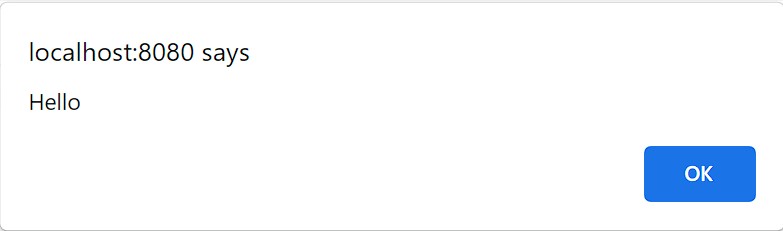
Now, let’s run the JSP without the sanitization filter activated. We’ll inject a script tag to the request parameter as a reflected XSS:
http://localhost:8080/sanitize/without-sanitize.jsp?input=<script>alert('Hello');</script>We’ll see that the JavaScript embedded in the parameter is being executed by the browser:
Next, we’ll run the sanitized version:
http://localhost:8080/sanitize/with-sanitize.jsp?input=<script>alert('Hello');</script>In this case, the filter will capture the request and pass the SanitizeParameterRequestWrapper to the calling JSP. As a result, the popup will no longer appear. Instead, we’ll observe that HTML entities are escaped and visibly rendered on the screen:
The text below comes from request parameter "input":
<script>alert('Hello');</script>
5. Third-Party Resource Access
Let’s consider another scenario where a third-party module accepts a request parameter locale to change the language displayed by the module. Note that we are unable to modify the source code of the third-party module directly.
In our example, we’ll set the locale parameter to the default system locale. However, it could also be taken from another source, such as the HTTP session.
5.1. Example
The third-party module is a JSP page:
<%
    String localeStr = request.getParameter("locale");
    Locale currentLocale = (localeStr != null ? new Locale(localeStr) : null);
%>
The language you have selected: <%=currentLocale != null ? currentLocale.getDisplayLanguage(currentLocale) : " None"%>
If the locale parameter is provided, the module displays the language name.
We’ll provide the default system language Locale.getDefault().getLanguage() to the target request parameter. To do this, let’s set the locale parameter in our SetParameterRequestWrapper, which decorates the original HttpServletRequest:
@WebServlet(name = "LanguageServlet", urlPatterns = "/setparam/lang")
public class LanguageServlet extends HttpServlet {

    @Override
    protected void doGet(HttpServletRequest request, HttpServletResponse response) throws IOException, ServletException {

        SetParameterRequestWrapper requestWrapper = new SetParameterRequestWrapper(request);
        requestWrapper.setParameter("locale", Locale.getDefault().getLanguage());
        request.getRequestDispatcher("/setparam/3rd_party_module.jsp").forward(requestWrapper, response);
    }
}
We’ll take a similar approach to the previous section when creating the SetParameterRequestWrapper. In addition, we’ll implement the setParameter method to add a new parameter to the existing parameter map:
public class SetParameterRequestWrapper extends HttpServletRequestWrapper {

    private final Map<String, String[]> paramMap;

    public SetParameterRequestWrapper(HttpServletRequest request) {
        super(request);
        paramMap = new HashMap<>(request.getParameterMap());
    }

    @Override
    public Map<String, String[]> getParameterMap() {
        return Collections.unmodifiableMap(paramMap);
    }

    public void setParameter(String name, String value) {
        paramMap.put(name, new String[] {value});
    }

    // getParameter() and getParameterValues() are the same as SanitizeParametersRequestWrapper
}
The getParameter method retrieves parameters stored within the paramMap instead of the original request.
5.2. Results
LangaugeServlet passes the locale parameter to the third-party module via SetParameterRequestWrapper. We’ll see the following when we access the third-party module on an English language server:
The language you have selected: English6. Conclusion
In this article, we looked at some important Servlet components that we can use in Java web application development to handle client requests. These include HttpServletRequest, HttpServletRequestWrapper, and Filter.
Through concrete examples, we’ve demonstrated how to extend the capabilities of HttpServletRequest to programmatically set and modify request parameters.
Whether it’s for enhancing security by sanitizing user input or integrating with third-party resources, these techniques empower developers to cope with diverse scenarios.














