


Mocking is an essential part of unit testing, and the Mockito library makes it easy to write clean and intuitive unit tests for your Java code.
Get started with mocking and improve your application tests using our Mockito guide:
Handling concurrency in an application can be a tricky process with many potential pitfalls. A solid grasp of the fundamentals will go a long way to help minimize these issues.
Get started with understanding multi-threaded applications with our Java Concurrency guide:
Spring 5 added support for reactive programming with the Spring WebFlux module, which has been improved upon ever since. Get started with the Reactor project basics and reactive programming in Spring Boot:
Since its introduction in Java 8, the Stream API has become a staple of Java development. The basic operations like iterating, filtering, mapping sequences of elements are deceptively simple to use.
But these can also be overused and fall into some common pitfalls.
To get a better understanding on how Streams work and how to combine them with other language features, check out our guide to Java Streams:
Explore Spring Boot 3 and Spring 6 in-depth through building a full REST API with the framework:
Yes, Spring Security can be complex, from the more advanced functionality within the Core to the deep OAuth support in the framework.
I built the security material as two full courses - Core and OAuth, to get practical with these more complex scenarios. We explore when and how to use each feature and code through it on the backing project.
You can explore the course here:
All Access is finally out, with all of my Spring courses. Learn JUnit is out as well, and Learn Maven is coming fast. And, of course, quite a bit more affordable. Finally.
>> GET THE COURSE
Spring Data JPA is a great way to handle the complexity of JPA with the powerful simplicity of Spring Boot.
Get started with Spring Data JPA through the guided reference course:
Refactor Java code safely — and automatically — with OpenRewrite.
Refactoring big codebases by hand is slow, risky, and easy to put off. That’s where OpenRewrite comes in. The open-source framework for large-scale, automated code transformations helps teams modernize safely and consistently.
Each month, the creators and maintainers of OpenRewrite at Moderne run live, hands-on training sessions — one for newcomers and one for experienced users. You’ll see how recipes work, how to apply them across projects, and how to modernize code with confidence.
Join the next session, bring your questions, and learn how to automate the kind of work that usually eats your sprint time.
1. Introduction
In this tutorial, we’ll explore how to read text inside the body of an email using Java. We’ll use the JavaMail API to connect to an email server, retrieve emails, and read the text inside the email body.
2. Setting Up
Before we begin, we need to add the jakarta.mail dependency into our pom.xml file:
<dependency>
    <groupId>com.sun.mail</groupId>
    <artifactId>jakarta.mail-api</artifactId>
    <version>2.0.1</version>
</dependency>
The JavaMail API is a set of classes and interfaces that provide a framework for reading and sending email in Java. This library allows us to handle email-related tasks, such as connecting to email servers and reading email content.
3. Connecting to the Email Server
To connect to the email server, we need to create a Session object, which acts as the mail session for our application. This session uses a Store object to establish a connection with the email server.
Here’s how we set up the JavaMail API and connect to the email server:
// Set up the JavaMail API
Properties props = new Properties();
props.put("mail.smtp.host", "smtp.gmail.com");
props.put("mail.smtp.port", "587");
props.put("mail.smtp.auth", "true");
props.put("mail.smtp.starttls.enable", "true");

Session session = Session.getInstance(props, new Authenticator() {
    @Override
    protected PasswordAuthentication getPasswordAuthentication() {
        return new PasswordAuthentication("your_email", "your_password");
    }
});

// Connect to the email server
try (Store store = session.getStore("imaps")){
    store.connect("imap.gmail.com", "your_email", "your_password");

    // ...
} catch (MessagingException e) {
    // handle exception
}
First, we configure properties for the mail session with details about the SMTP server, including host, port, authentication, and TLS settings. We then create a Session object using these properties and an Authenticator object that provides the email address and password for authentication.
The Authenticator object is used to authenticate with the email server, and it returns a PasswordAuthentication object with the email address and password. Once we have the Session object, we can use it to connect to the email server using the getStore()method, which returns a Store object. We use try-with-resources to manage the Store object. This ensures that the store is closed automatically after we’re done using it.
4. Retrieving Emails
After successfully connecting to the email server, the next step is to retrieve emails from the inbox. This involves using the Folder class to access the inbox folder and then fetching the emails contained within it.
Here’s how we retrieve emails from the inbox folder:
//... (same code as above to connect to email server)

// Open the inbox folder
try (Folder inbox = store.getFolder("inbox")){
    inbox.open(Folder.READ_ONLY);

    // Retrieve emails from the inbox
    Message[] messages = inbox.getMessages();

} catch (MessagingException e) {
    // handle exception
}
We use the Store object to get a Folder instance representing the inbox. The getFolder(“inbox”) method accesses the inbox folder. We then open this folder in read-only mode using Folder.READ_ONLY, which allows us to read emails without making any changes.
The getMessages() method fetches all the messages in the inbox folder. These messages are stored in an array of Message objects.
5. Reading Email Content
Once we have the array of message objects, we can iterate through them to access each individual email. To read the content of each email, we need to use the Message class and its related classes, such as Multipart and BodyPart.
Here’s an example of how to read the content of an email:
void retrieveEmails() throws MessagingException {
    // ... connection and open inbox folder

    for (Message message : messages) {
        try {
            Object content = message.getContent();

            if (content instanceof Multipart) {
                Multipart multipart = (Multipart) content;

                for (int i = 0; i < multipart.getCount(); i++) {
                    BodyPart bodyPart = multipart.getBodyPart(i);
                    if (bodyPart.getContentType().toLowerCase().startsWith("text/plain")) {
                        plainContent = (String) bodyPart.getContent();
                    } else if (bodyPart.getContentType().toLowerCase().startsWith("text/html")) {
                        // handle HTML content
                    } else {
                       // handle attachement
                    }
                }
            } else {
                plainContent = (String) content;
            }
        } catch (IOException | MessagingException e) {
            // handle exception
        }
    }
}
In this example, we iterate through each Message object in the array and get its content using the getContent() method. This method returns an Object, which can be a String for plain text or a Multipart for emails with multiple parts.
If the content is an instance of String, it indicates that the email is in plain text format. We can simply cast the content to String. Otherwise, if the content is a Multipart object, we need to handle each part separately. We use the getCount() method to iterate through the parts and process them accordingly.
For each BodyPart in the Multipart, we check its content type using the getContentType() method. If the body part is a text part, we get its content using the getContent() method and check if it’s plain text or HTML content. We can then process the text content accordingly. Otherwise, we handle it as an attachment file.
6. Handling HTML Content
In addition to plain text and attachments, email bodies can also contain HTML content. To handle HTML content, we can use a library such as Jsoup to parse the HTML and extract the text content.
Here’s an example of how to handle HTML content using Jsoup:
try (InputStream inputStream = bodyPart.getInputStream()) {
    String htmlContent = new String(inputStream.readAllBytes(), "UTF-8");
    Document doc = Jsoup.parse(htmlContent);
    htmlContent = doc.text();
} catch (IOException e) {
    // Handle exception
}
In this example, we use Jsoup to parse the HTML content and extract the text content. We then process the text content as needed.
7. Nested MultiPart
In JavaMail, it’s possible for a Multipart object to contain another Multipart object, which is known as a nested multipart message. To handle this scenario, we need to use recursion. This approach allows us to traverse the entire nested structure and extract text content from each part.
First, we create a method to obtain the content of the Message object:
String extractTextContent(Message message) throws MessagingException, IOException {
    Object content = message.getContent();
    return getTextFromMessage(content);
}
Next, we create a method to process the content object. If the content is a Multipart, we iterate through each BodyPart and recursively extract the content from each part. Otherwise, if the content is in plain text we directly append the text to the StringBuilder:
String getTextFromMessage(Object content) throws MessagingException, IOException {
    if (content instanceof Multipart) {
        Multipart multipart = (Multipart) content;
        StringBuilder text = new StringBuilder();
        for (int i = 0; i < multipart.getCount(); i++) {
            BodyPart bodyPart = multipart.getBodyPart(i);
            text.append(getTextFromMessage(bodyPart.getContent()));
        }
        return text.toString();
    } else if (content instanceof String) {
        return (String) content;
    }
    return "";
}
8. Testing
In this section, we test the retrieveEmails() method by sending an email with three parts: plain text content and HTML content:
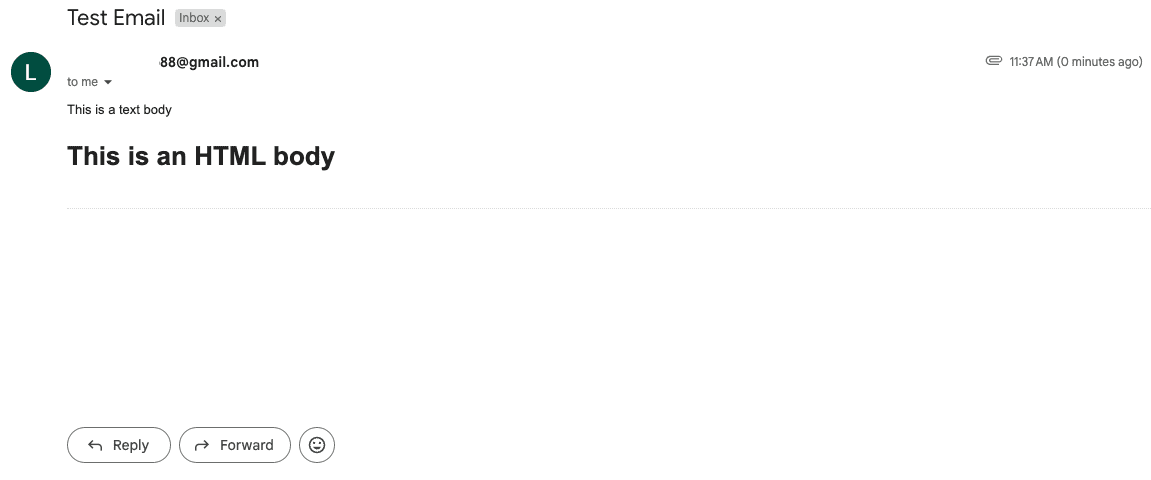
In the test method, we retrieve the emails and validate that the plain text content and HTML content are correctly read and extracted from the email:
EmailService es = new EmailService(session);
es.retrieveEmails();
assertEquals("This is a text body", es.getPlainContent());
assertEquals("This is an HTML body", es.getHTMLContent());
9. Conclusion
In this tutorial, we’ve learned how to read text from email bodies using Java. We discussed setting up the JavaMail API, connecting to an email server, and extracting email content.














