How to Fix java.lang.UnsupportedClassVersionError
Last updated: February 19, 2026


Mocking is an essential part of unit testing, and the Mockito library makes it easy to write clean and intuitive unit tests for your Java code.
Get started with mocking and improve your application tests using our Mockito guide:
Handling concurrency in an application can be a tricky process with many potential pitfalls. A solid grasp of the fundamentals will go a long way to help minimize these issues.
Get started with understanding multi-threaded applications with our Java Concurrency guide:
Spring 5 added support for reactive programming with the Spring WebFlux module, which has been improved upon ever since. Get started with the Reactor project basics and reactive programming in Spring Boot:
Since its introduction in Java 8, the Stream API has become a staple of Java development. The basic operations like iterating, filtering, mapping sequences of elements are deceptively simple to use.
But these can also be overused and fall into some common pitfalls.
To get a better understanding on how Streams work and how to combine them with other language features, check out our guide to Java Streams:
Explore Spring Boot 3 and Spring 6 in-depth through building a full REST API with the framework:
Yes, Spring Security can be complex, from the more advanced functionality within the Core to the deep OAuth support in the framework.
I built the security material as two full courses - Core and OAuth, to get practical with these more complex scenarios. We explore when and how to use each feature and code through it on the backing project.
You can explore the course here:
All Access is finally out, with all of my Spring courses. Learn JUnit is out as well, and Learn Maven is coming fast. And, of course, quite a bit more affordable. Finally.
>> GET THE COURSE
Spring Data JPA is a great way to handle the complexity of JPA with the powerful simplicity of Spring Boot.
Get started with Spring Data JPA through the guided reference course:
Refactor Java code safely — and automatically — with OpenRewrite.
Refactoring big codebases by hand is slow, risky, and easy to put off. That’s where OpenRewrite comes in. The open-source framework for large-scale, automated code transformations helps teams modernize safely and consistently.
Each month, the creators and maintainers of OpenRewrite at Moderne run live, hands-on training sessions — one for newcomers and one for experienced users. You’ll see how recipes work, how to apply them across projects, and how to modernize code with confidence.
Join the next session, bring your questions, and learn how to automate the kind of work that usually eats your sprint time.
1. Introduction
In this short tutorial, we’re going to learn what causes the Java runtime error java.lang.UnsupportedClassVersionError: Unsupported major.minor version and how to fix it.
Further reading:
Java - "Could Not Find or Load Main Class" Error
Java Compiler Error: "class, interface, or enum expected"
Causes and Avoidance of java.lang.VerifyError
2. A Look at the Error
Let’s start by looking at an example error:
Exception in thread "main" java.lang.UnsupportedClassVersionError: com/baeldung/MajorMinorApp
  has been compiled by a more recent version of the Java Runtime (class file version 55.0),
  this version of the Java Runtime only recognizes class file versions up to 52.0
This error is telling us that our class was compiled at a higher version of Java than the version with which we tried to run it. More specifically, in this case we compiled our class with Java 11 and tried to run it with Java 8.
2.1. Java Version Numbers
For reference, let’s take a quick look at the Java version numbers. This will come in handy in case we need to download the appropriate Java version.
The major and minor version numbers are stored in the class bytecode at bytes six and seven.
Let’s see how the major version numbers map to Java versions:
- 45 = Java 1.1
- 46 = Java 1.2
- 47 = Java 1.3
- 48 = Java 1.4
- 49 = Java 5
- 50 = Java 6
- 51 = Java 7
- 52 = Java 8
- 53 = Java 9
- 54 = Java 10
- 55 = Java 11
- 56 = Java 12
- 57 = Java 13
- 58 = Java 14
- 59 = Java 15
- 60 = Java 16
- 61 = Java 17
- 62 = Java 18
- 63 = Java 19
- 64 = Java 20
- 65 = Java 21
- 66 = Java 22
3. Fix via the Command Line
Now let’s discuss how we can resolve this error when running Java from the command line.
Depending on our situation, we have two ways we can resolve this error: compile our code for an earlier version of Java, or run our code on a newer Java version.
The final decision depends on our situation. If we need to use a third-party library that’s already been compiled at a higher level, our best option is probably to run our application using a newer Java version. If we’re packaging an application for distribution, it might be best to compile down to an older version.
3.1. JAVA_HOME Environment Variable
Let’s start by checking how our JAVA_HOME variable is set. This will tell us which JDK is being used when we run javac from our command line:
echo %JAVA_HOME%
C:\Apps\Java\jdk8-x64
If we’re ready to move entirely to a newer JDK, we can download the newer version and make sure our PATH and JAVA_HOME environment variables are set appropriately.
3.2. Running a New JRE
Returning to our example, let’s look at how we can resolve the error by running it at a higher version of Java. Assuming we have Java 11 JRE in C:\Apps\jdk-11.0.2, we can run our code with the java command packaged with it:
C:\Apps\jdk-11.0.2\bin\java com.baeldung.MajorMinorApp
Hello World!
3.3. Compiling With an Older JDK
If we’re writing an application that we want to be runnable down to a certain version of Java, we need to compile the code for that version.
We can do that in one of three ways: using an older JDK to compile our code; using the -bootclasspath, -source, and -target options of the javac command (JDK 8 and older); or using the –release option (JDK 9 and newer).
Let’s start by using an older JDK, similar to how we used a newer JRE for running our code:
C:\Apps\Java\jdk1.8.0_31\bin\javac com/baeldung/MajorMinorApp.javaIt’s possible to just use -source and -target, but it might still create class files that aren’t compatible with an older Java.
To ensure compatibility, we can point -bootclasspath at the rt.jar of the targeted JRE:
javac -bootclasspath "C:\Apps\Java\jdk1.8.0_31\jre\lib\rt.jar" \
  -source 1.8 -target 1.8 com/baeldung/MajorMinorApp.java
The above applies mainly to JDK 8 and lower. In JDK 9, the –release parameter was added to replace -source and -target. The –release option supports targets 6, 7, 8, 9, 10, and 11.
Let’s use –release to target Java 8:
javac --release 8 com/baeldung/MajorMinorApp.javaNow we can run our code on a Java 8 or higher JRE.
4. Eclipse IDE
Now that we understand the error and the general approach to correcting it, let’s take what we’ve learned and see how we can apply it when working in the Eclipse IDE.
4.1. Changing the JRE
Assuming we already have Eclipse configured with different versions of Java, let’s change our project’s JRE.
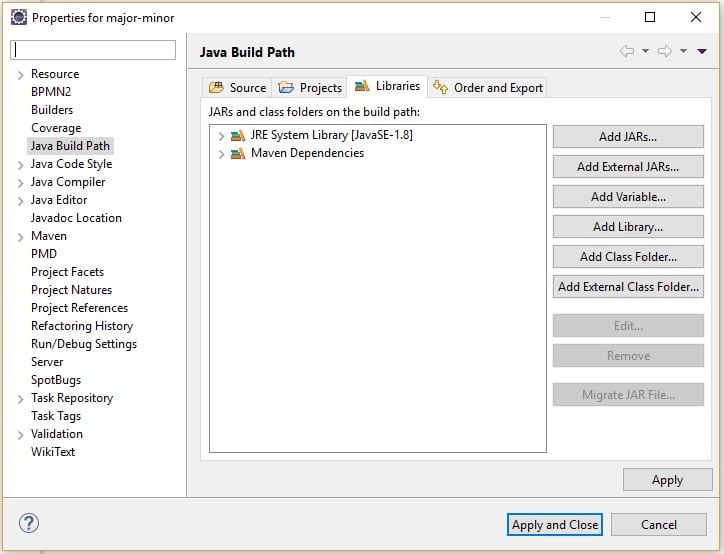
Let’s go to our Project properties, then Java Build Path, and then the Libraries tab. Once there, we’ll select the JRE and click Edit:
Now let’s choose Alternate JRE and point to our Java 11 installation:
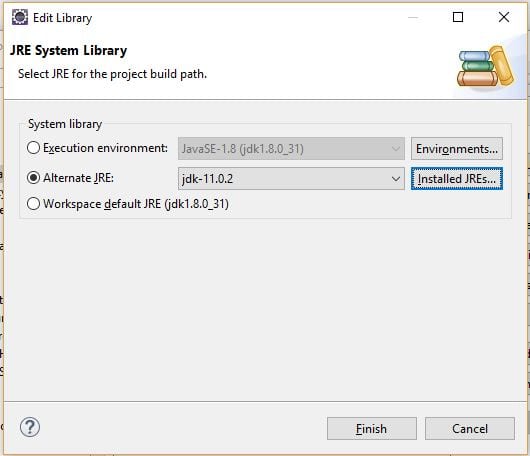
At this point, our application will run against Java 11.
4.2. Changing the Compiler Level
Now let’s look at how we can change our target to a lower level of Java.
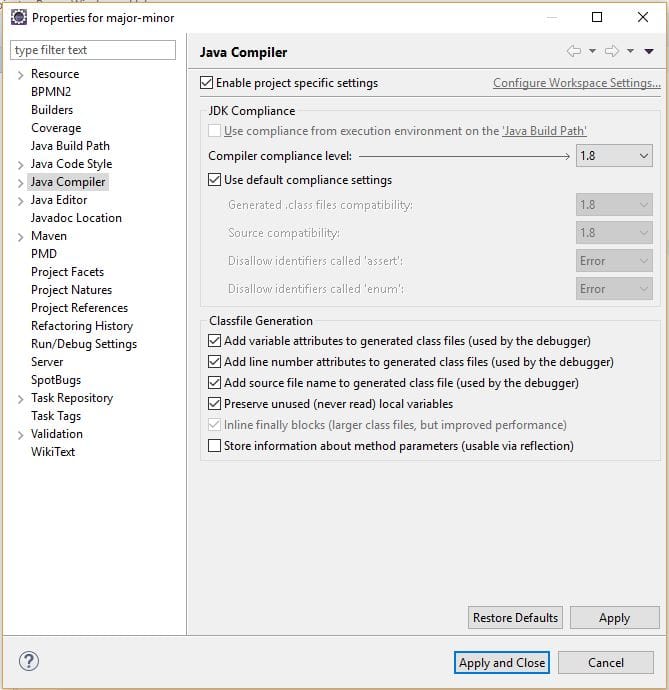
First, let’s go back to our Project properties, then Java Compiler, and then check Enable project specific settings:
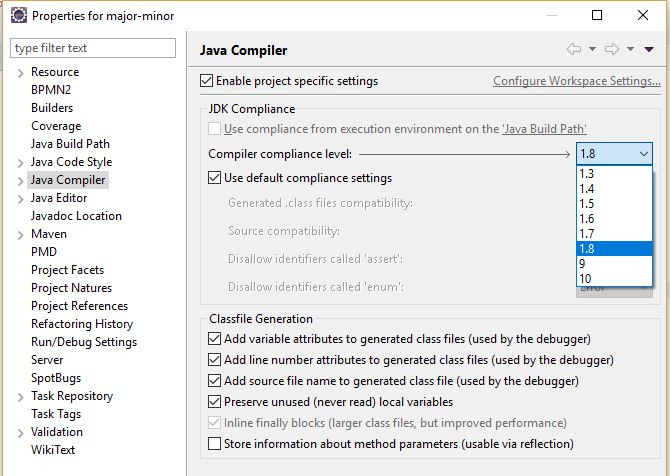
Here we can set our project to compile for earlier versions of Java and customize other compliance settings:
5. IntelliJ IDEA
We can also control the version of Java we’re using for compiling and running in IntelliJ IDEA.
5.1. Adding a JDK
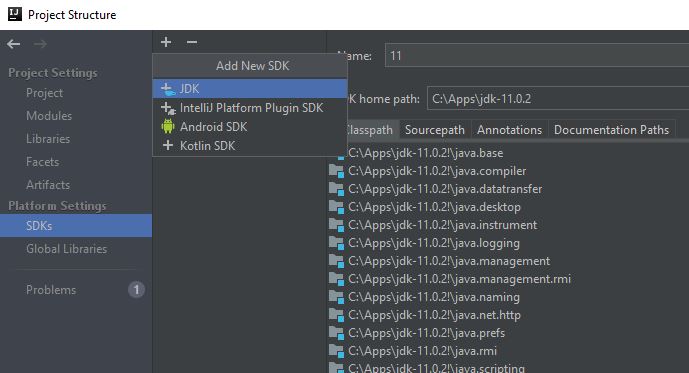
Before we do that, we’ll see how to add additional JDKs. Let’s go to File -> Project Structure -> Platform Settings -> SDKs:

Let’s click the plus icon in the middle column, select the JDK from the drop-down, and select our JDK location:
5.2. Changing the JRE
First, we’ll look at how to use IDEA to run our project on the newer JRE.
Let’s go to Run -> Edit Configurations… and change our JRE to 11:
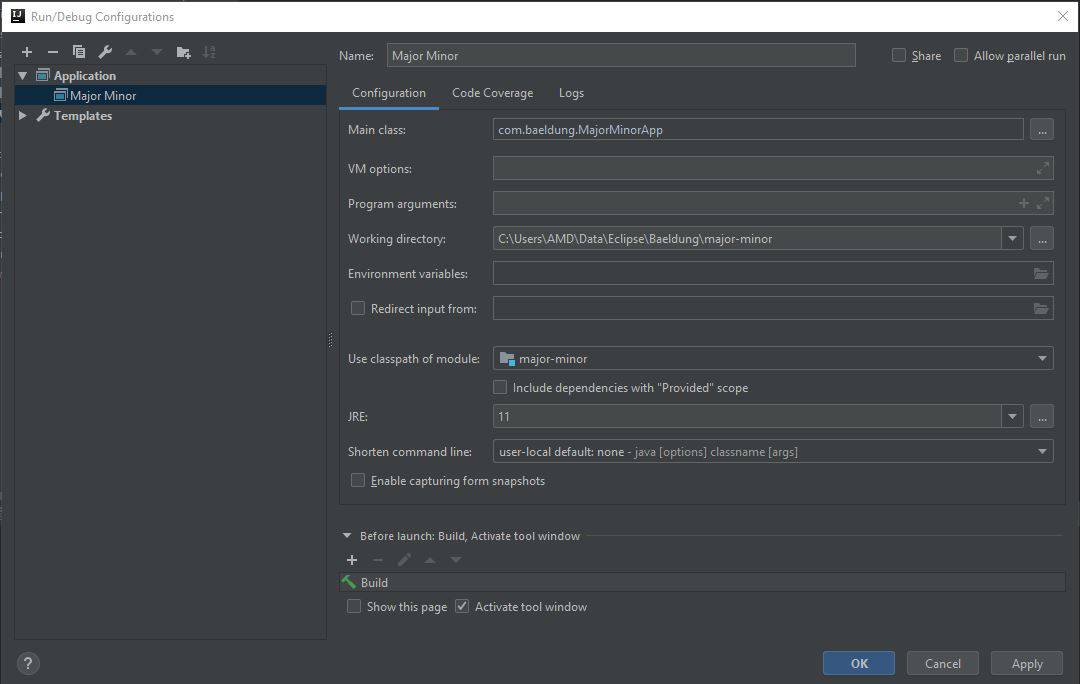
Now when we run our project, it will run with the Java 11 JRE.
5.3. Changing the Compiler Level
If we’re distributing our application to run on a lower JRE, we need to adjust our compiler level to target the older version of Java.
Let’s go to File -> Project Structure… -> Project Settings -> Project and change our Project SDK and Project language level:
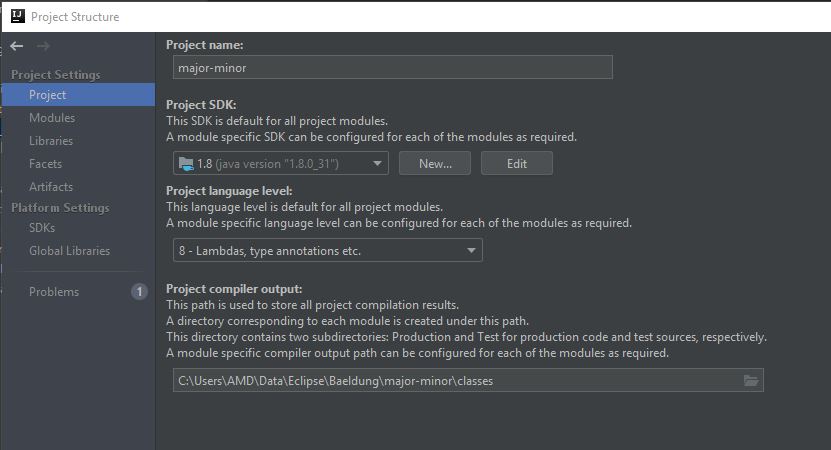
We can now build our project, and the class files generated will run on Java 8 and higher.
6. Maven
When we build and package a file in Maven, we can control the version of Java we target.
When using Java 8 or older, we set the source and target for the compiler plugin.
Let’s set the source and target using compiler plugin properties:
<properties>
    <maven.compiler.target>1.8</maven.compiler.target>
    <maven.compiler.source>1.8</maven.compiler.source>
</properties>
Alternatively, we can set the source and target in the compiler plugin:
<plugins>
    <plugin>
        <artifactId>maven-compiler-plugin</artifactId>
        <configuration>
            <source>1.8</source>
            <target>1.8</target>
        </configuration>
    </plugin>
</plugins>
With the –release option added in Java 9, we can configure that with Maven as well.
Let’s use a compiler plugin property to set the release:
<properties>
    <maven.compiler.release>8</maven.compiler.release>
</properties>
Or we can configure the compiler plugin directly:
<plugins>
    <plugin>
        <artifactId>maven-compiler-plugin</artifactId>
        <configuration>
            <release>8</release>
        </configuration>
    </plugin>
</plugins>
7. Conclusion
In this article, we learned what causes the java.lang.UnsupportedClassVersionError: Unsupported major.minor version error message, and how to fix it.














