


Mocking is an essential part of unit testing, and the Mockito library makes it easy to write clean and intuitive unit tests for your Java code.
Get started with mocking and improve your application tests using our Mockito guide:
Handling concurrency in an application can be a tricky process with many potential pitfalls. A solid grasp of the fundamentals will go a long way to help minimize these issues.
Get started with understanding multi-threaded applications with our Java Concurrency guide:
Spring 5 added support for reactive programming with the Spring WebFlux module, which has been improved upon ever since. Get started with the Reactor project basics and reactive programming in Spring Boot:
Since its introduction in Java 8, the Stream API has become a staple of Java development. The basic operations like iterating, filtering, mapping sequences of elements are deceptively simple to use.
But these can also be overused and fall into some common pitfalls.
To get a better understanding on how Streams work and how to combine them with other language features, check out our guide to Java Streams:
Explore Spring Boot 3 and Spring 6 in-depth through building a full REST API with the framework:
Yes, Spring Security can be complex, from the more advanced functionality within the Core to the deep OAuth support in the framework.
I built the security material as two full courses - Core and OAuth, to get practical with these more complex scenarios. We explore when and how to use each feature and code through it on the backing project.
You can explore the course here:
All Access is finally out, with all of my Spring courses. Learn JUnit is out as well, and Learn Maven is coming fast. And, of course, quite a bit more affordable. Finally.
>> GET THE COURSE
Spring Data JPA is a great way to handle the complexity of JPA with the powerful simplicity of Spring Boot.
Get started with Spring Data JPA through the guided reference course:
Refactor Java code safely — and automatically — with OpenRewrite.
Refactoring big codebases by hand is slow, risky, and easy to put off. That’s where OpenRewrite comes in. The open-source framework for large-scale, automated code transformations helps teams modernize safely and consistently.
Each month, the creators and maintainers of OpenRewrite at Moderne run live, hands-on training sessions — one for newcomers and one for experienced users. You’ll see how recipes work, how to apply them across projects, and how to modernize code with confidence.
Join the next session, bring your questions, and learn how to automate the kind of work that usually eats your sprint time.
1. Overview
Whenever we implement Kafka producers or consumers (e.g., with Spring), one of the things we need to configure is a “bootstrap.servers” property.
In this tutorial, we’ll learn what this setting means and what it’s used for.
2. Kafka Topology
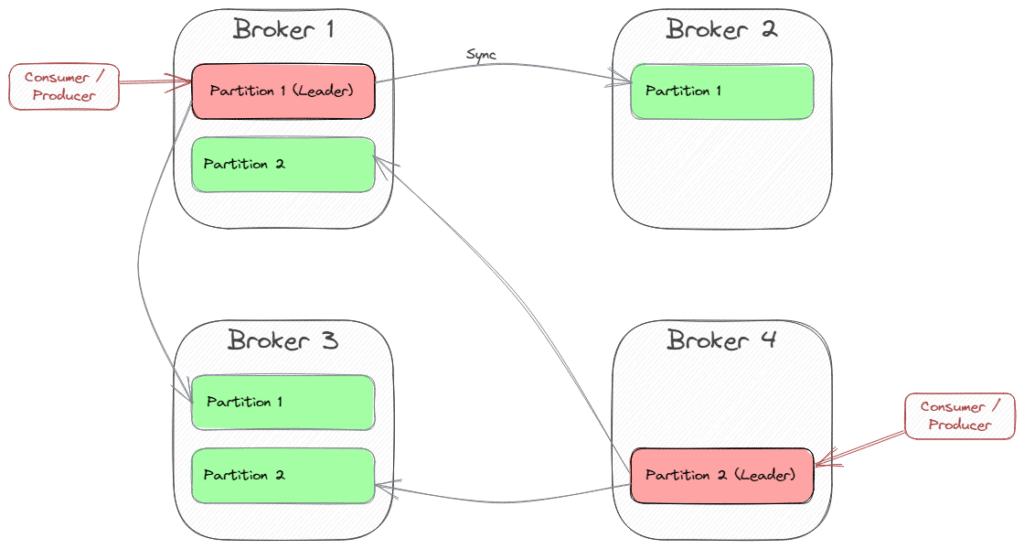
Kafka’s topology is designed for scalability and high availability. That’s why there is a cluster of servers (brokers) dealing with topic partitions replicated between the brokers. Each partition has one broker as the leader and the other brokers as followers.
Producers send messages to the partition leader, which then propagates the record to each replica. Consumers typically also connect to the partition leader, because consuming a message is state-changing (consumer offset).
The count of replicas is the replication factor. A value of 3 is recommended, as it provides the right balance between performance and fault tolerance, and usually cloud providers provide three data centers (availability zones) to deploy to as part of a region.
As an example, the following picture shows a cluster of four brokers providing a topic with two partitions and a replication factor of 3:
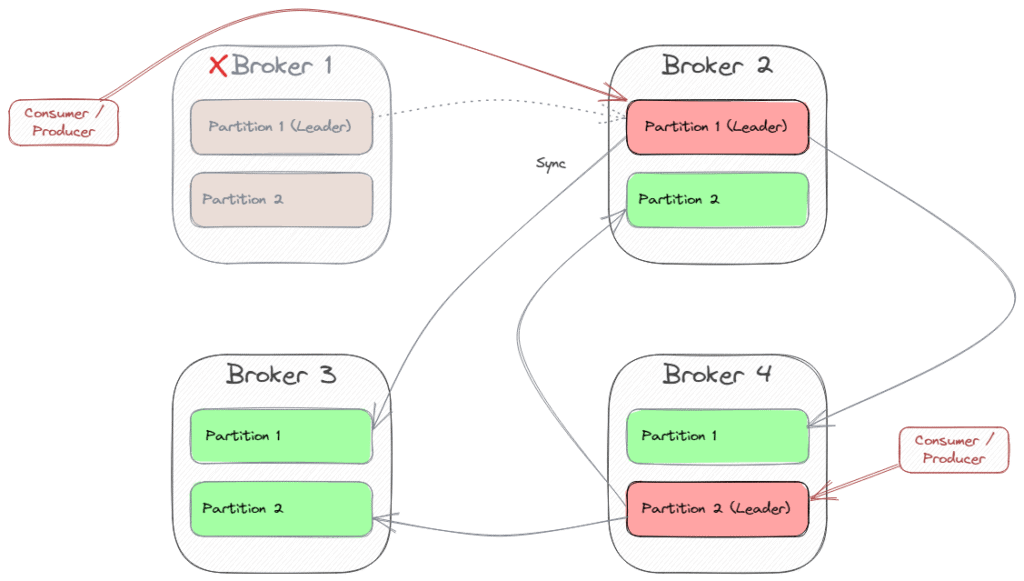
When one partition leader crashes, Kafka chooses another broker as the new partition leader. Then, the consumers and producers (“clients”) also have to switch to the new leader. So in case of a crash of Broker 1, the scenario might change to this:
3. Bootstrapping
As we’ve seen, the whole cluster is dynamic, and clients need to know about the current state of topology to connect to the correct partition leader for sending and receiving messages. This is where bootstrapping comes into play.
The “bootstrap-servers” configuration is a list of “hostname:port” pairs that address one or more (even all) of the brokers. The client uses this list by doing these steps:
- pick the first broker from the list
- send a request to the broker to fetch the cluster metadata containing information about topics, partitions, and the leader brokers for each partition (each broker can provide this metadata)
- connect to the leader broker for the chosen partition of the topic
Of course, it makes sense to specify multiple brokers within the list because if the first broker is unavailable, the client can choose the second one for bootstrapping.
Kafka uses Kraft (from the earlier Zookeeper) to manage all this kind of orchestration.
4. Sample
Let’s assume we use a simple Docker image with Kafka and Kraft (like bashj79/kafka-kraft) in our development environment. We can install this Docker image with this command:
docker run -p 9092:9092 -d bashj79/kafka-kraftThis runs a single Kafka instance available at port 9092 within the container and on the host.
4.1. Using Kafka CLI
One possibility to connect to Kafka is using the Kafka CLI, which is available within the Kafka installation. First, let’s create a topic named samples. Within the container’s Bash, we can run this command:
$ cd /opt/kafka/bin
$ sh kafka-topics.sh --bootstrap-server localhost:9092 --create --topic samples --partitions 1 --replication-factor 1
If we want to start consuming the topic, we need to specify the bootstrap servers again:
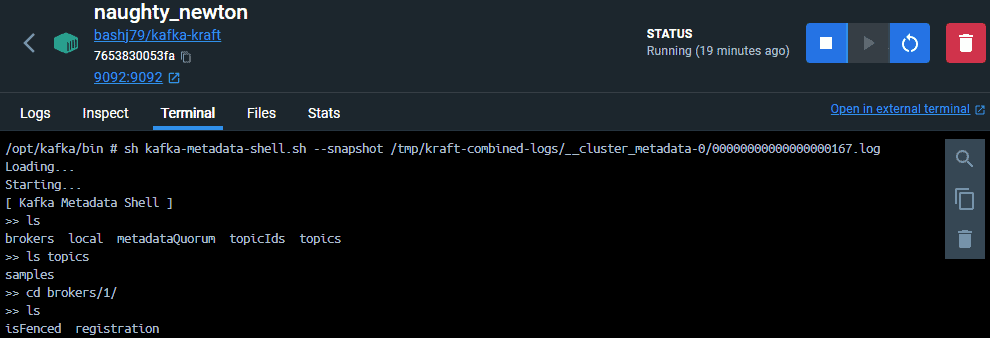
$ sh kafka-console-consumer.sh --bootstrap-server localhost:9092,another-host.com:29092 --topic samplesWe can also explore the cluster metadata as a kind of virtual file system. We connect to the metadata with the kafka-metadata-shell script:
$ sh kafka-metadata-shell.sh --snapshot /tmp/kraft-combined-logs/__cluster_metadata-0/00000000000000000167.log
4.2. Using Java
Within a Java application, we can use the Kafka client:
static Consumer<Long, String> createConsumer() {
    final Properties props = new Properties();
    props.put(ConsumerConfig.BOOTSTRAP_SERVERS_CONFIG,
        "localhost:9092,another-host.com:29092");
    props.put(ConsumerConfig.GROUP_ID_CONFIG,
        "MySampleConsumer");
    props.put(ConsumerConfig.KEY_DESERIALIZER_CLASS_CONFIG,
        LongDeserializer.class.getName());
    props.put(ConsumerConfig.VALUE_DESERIALIZER_CLASS_CONFIG,
        StringDeserializer.class.getName());
      // Create the consumer using props.
      final Consumer<Long, String> consumer = new KafkaConsumer<>(props);
      // Subscribe to the topic.
      consumer.subscribe(Arrays.asList("samples"));
      return consumer;
  }
With Spring Boot and Spring’s Kafka integration, we can simply configure the application.properties:
spring.kafka.bootstrap-servers=localhost:9092,another-host.com:290925. Conclusion
In this article, we learned that Kafka is a distributed system consisting of multiple brokers that replicate topic partitions to ensure high availability, scalability, and fault tolerance.
Clients need to retrieve metadata from one broker to find the current partition leader to connect to. This broker is then a bootstrap server, and we usually provide a list of bootstrap servers to give the client alternatives in case the primary broker is unreachable.














